
schedviz


crontab.guru for all your jobs at once. A terminal timeline that pulls in
your crontabs, /etc/cron.d, systemd .timer units, and CI cron schedules,
lays every job out on one 24h/7d strip — and flashes red where two of them
collide.
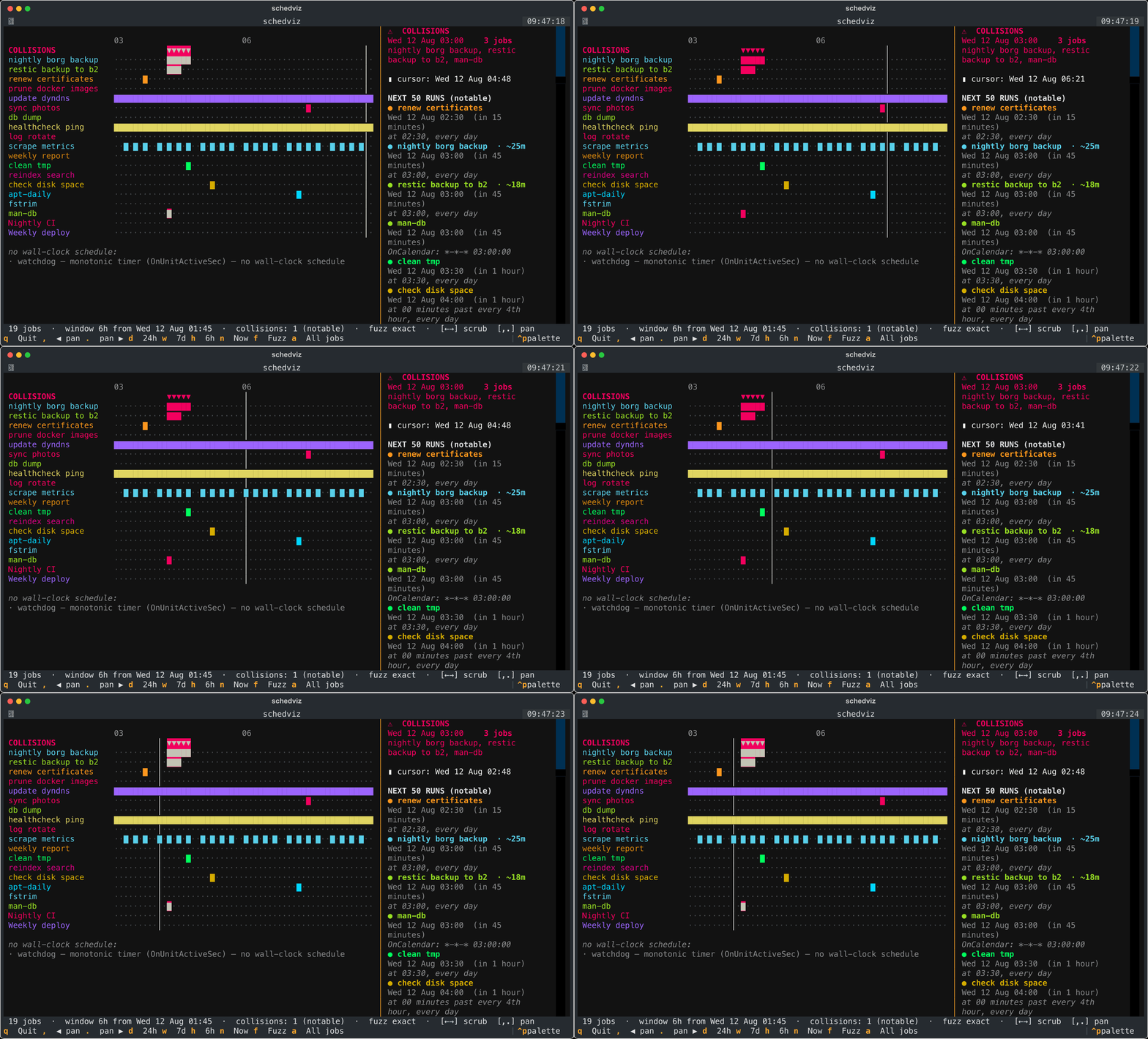
You know the feeling: a borg backup and a restic backup both fire at 03:00,
hammer the same disk, and everything crawls. Individually each cron line looks
fine. The problem only shows up when you see them together. That's schedviz.
What it does
- One timeline, every source. Parses
crontab -l,/etc/crontab,/etc/cron.d/*, systemd*.timerunits (OnCalendar=), and CI cron (GitHub Actionson.schedule). Each job is a colored bar across a 24-hour or 7-day strip. - Collision detection. Runs that overlap (or fall within a fuzz window you choose) are flagged and ranked by severity — two nightly backups colliding matters; two health-check pings overlapping doesn't, so the noise is filtered out by default. See What counts as a collision for how duration is handled.
- Plain-English "next 50 runs". A side panel explains every upcoming run: "nightly borg backup — Wed 12 Aug 03:00 (in 30 minutes) — at 03:00, every day."
- Scrub the timeline. Arrow keys move a cursor across time;
,/.pan;d/w/hswitch between 24h / 7d / 6h. - Handles the awkward cases honestly. systemd AND-semantics vs cron's
day-of-month/day-of-week OR rule,
@dailymacros, symbolic names,*/Nsteps, leap years,Feb 30(never fires), monotonic timers (OnUnitActiveSec=, no wall-clock schedule — listed separately, never guessed), and UTC CI schedules shifted to your local time.
What counts as a collision
By default, schedviz models start times, not duration. Every job is treated
as an instant: a collision is two or more jobs whose start times land in the
same minute (or within the --fuzz window). This is the honest default —
neither cron nor systemd declares how long a job runs, so schedviz does not
invent it.
That means the default view will not catch this case on its own:
A borg backup starts at
03:00and runs for 20 minutes; a restic backup starts at03:05. Their start times differ, but they overlap on disk for 15 minutes.
There are two ways to make schedviz model that overlap:
1. Annotate a job's duration in a comment. schedviz reads a
duration= (also runtime=, runs for, takes) annotation:
# nightly borg backup   duration=25m
0 3 * * * /usr/bin/borg create ::daily

# restic backup to b2   duration=18m
5 3 * * * /usr/local/bin/restic backup /data
# in a .timer file, or any comment inside it:
# schedviz: duration=25m
[Timer]
OnCalendar=*-*-* 03:00:00
# GitHub Actions — annotate the cron line's trailing comment:
on:
  schedule:
    - cron: '0 3 * * *'   # duration=15m
With durations set, a job occupies the interval [start, start + duration) and
collision detection switches to interval overlap — so the borg/restic case
above is caught, and its collision is reported as 03:00–03:25.
2. Assume a blanket duration for a quick "what if everything takes N minutes" pass, without annotating anything:
schedviz --assume-duration 15m --collisions
Jobs with an explicit annotation keep it; everything else is treated as running for 15 minutes.
A looser alternative to duration is the --fuzz window (f in the TUI),
which treats starts within N minutes of each other as a collision regardless of
runtime — handy when you don't know durations but want to flag anything that
starts "close together."
Non-goals
schedviz is a read-only viewer. It is not a scheduler, it does not run, edit, enable, or disable jobs, and it runs no daemon. It reads your schedules and draws them. That's it.
It also does not measure or guess how long your jobs actually take — it has
no visibility into runtime. Duration is only ever what you tell it (an
annotation or --assume-duration); by default jobs are modelled as
instantaneous. See What counts as a collision.
Install
pipx install schedviz     # recommended
# or
pip install schedviz
From source:
git clone https://github.com/david-g-3654/schedviz
cd schedviz
pip install -e .
Requires Python 3.9+.
Usage
schedviz                      # auto-discover the local system, open the TUI
schedviz --demo               # try it with a built-in homelab scenario
schedviz ~/mycron /etc/cron.d ./.github/workflows   # specific files/dirs
Non-interactive modes (great for scripts and CI):
schedviz --demo --collisions          # print ranked collisions, exit non-zero if any
schedviz --demo --list -n 20          # merged "next 20 runs" in plain English
schedviz --explain "0 3 * * *"        # describe a single cron expression
schedviz --explain "Mon..Fri *-*-* 08:00:00"   # ...or a systemd OnCalendar
schedviz --assume-duration 15m --collisions     # model 15-min overlaps, not just same-minute starts
Gate a CI pipeline on "no new collisions":
schedviz /etc/cron.d /etc/systemd/system --collisions --window 7d
# exits 1 if any collisions are found in the next 7 days
Keys (TUI)
| key | action |
|---|---|
← / → |
scrub the cursor across the timeline |
, / . |
pan the window earlier / later |
d / w / h |
24-hour / 7-day / 6-hour view |
n |
jump back to now |
f |
cycle the collision fuzz window (exact / ±1m / ±5m / ±15m) |
a |
include high-frequency jobs (pings, scrapes) instead of hiding them |
↑ / ↓ |
select a job (dims the rest) |
q |
quit |
Limitations & correctness notes
schedviz predicts nominal schedules from configuration. It is deliberate about where that prediction stops matching reality:
-
Monotonic systemd timers aren't on the timeline.
OnBootSec=,OnUnitActiveSec=,OnStartupSec=,OnActiveSec=fire relative to boot or unit-activation time, which schedviz cannot know. Such timers are listed separately as "no wall-clock schedule" and never guessed at or included in collisions. -
Timezones & DST are naive local wall-clock. cron and systemd schedule in the machine's local time, and schedviz computes in local wall-clock to match. It does not model DST transitions: around a spring-forward gap a job at
02:30may be skipped or shifted by the real scheduler (and cronie, vixie-cron and systemd disagree on exactly how), and a fall-back hour repeats. Near a transition schedviz can be off by up to an hour. Per-job timezone overrides (CRON_TZ=, systemdTimezone=, a trailing TZ on anOnCalendarline) are ignored — everything is treated as the local zone. -
CI cron is UTC and drifts. GitHub Actions cron runs in UTC; schedviz converts to local using the current fixed offset, so it can be an hour off around DST. More importantly, hosted CI schedulers are not punctual: scheduled workflows are queued and are commonly delayed several minutes to 15+ minutes under load, and sometimes dropped entirely. schedviz shows the nominal fire time, not the actual (drifting) execution time.
-
Duration is an estimate you provide, not a measurement. By default jobs are instantaneous (start-time only). With annotations or
--assume-duration, a job is modelled as a fixed interval[start, start + duration). Real runtimes vary — a 20-minute backup can take 90 minutes once the dataset grows. schedviz does not observe or predict actual runtime, and does not modelRandomizedDelaySec=jitter,Persistent=catch-up runs after downtime, retries,flock/lock serialization, or a job whose run overruns its own interval. Read a duration overlap as "these could contend," not "these will." -
A collision is temporal overlap, not proven resource contention. schedviz flags jobs whose scheduled runs overlap in time. It doesn't know whether they touch the same disk, CPU, or lock — two 03:00 jobs on separate disks are flagged but don't actually conflict, and contention between jobs that don't overlap in time won't be flagged. To cut noise, jobs firing more than ~6 times/day are excluded from collision detection by default; use
--all-collisions(orain the TUI) to include them. -
Cron syntax: classic only. 5-field expressions,
@macros, symbolic names, ranges/lists/steps, and the Vixie day-of-month/day-of-week OR rule are supported. A leading seconds field is accepted but dropped (schedviz is minute-resolution).@reboothas no wall-clock time and is skipped. Quartz/ Jenkins-style extensions (L,W,#,?) are not supported — they're reported as unparsed rather than silently mis-scheduled. -
systemd
OnCalendar: common forms. Keywords,DOW Y-M-D H:M:S, wildcards, lists, ranges,/step, seconds, and AND-semantics are supported. Not supported:~(last-day-of-month) and sub-second precision.RandomizedDelaySec=/AccuracySec=are ignored — the nominal time is shown, not the randomized one. -
Auto-discovery reads files, not the live scheduler. It parses
crontab -l,/etc/crontab,/etc/cron.d/*, and unit files on disk. It does not consultsystemctl list-timers, so a.timerthat exists on disk is shown even if it is disabled or masked. Pass explicit paths to control exactly what's parsed.
Found an edge case we get wrong? That's a bug — open an issue.
How it works
The correctness-critical part is a dependency-free, field-stepping "next-run"
engine — one for cron (schedviz/cronexpr.py) and one for systemd
OnCalendar (schedviz/systemd_calendar.py). Both compute the next N fire
times by jumping field-by-field (next matching month → day → hour → minute)
rather than ticking minute-by-minute, so even a once-a-year job resolves
instantly. Everything downstream — the timeline, collision clustering, the
explainer — is built on those two engines and is covered by the test suite.
pip install -e ".[dev]"
pytest
License
MIT — see LICENSE.
1 maintainer

Metadata
1 maintainer
Release files for schedviz 0.1.1
For a detailed explanation of source distributions (sdists) and built distributions (wheels), please see the package formats documentation.
Source distribution (sdist)
| File | Size | Uploaded | Provenance | Actions |
|---|---|---|---|---|
| schedviz-0.1.1.tar.gz | 39.7 kB | Without provenance | Details for schedviz-0.1.1.tar.gz |
Built distribution (wheel)
| File | Interpreter | ABI | Platform | Actions Reset |
|---|---|---|---|---|
| schedviz-0.1.1-py3-none-any.whl | Python 3 | none | any | Details for schedviz-0.1.1-py3-none-any.whl |
Total release size: 80.7 kB
Release files / schedviz-0.1.1.tar.gz
| Download URL | schedviz-0.1.1.tar.gz |
|---|---|
| Size | 39.7 kB |
| Tags | Source |
|
SHA-256 checksum How to use checksums |
8a8d8bf8f656105bcd0d9153cb5f92a5292d9141b992a8ada191bb4e4b8eaefe
|
|
BLAKE2b-256 checksum How to use checksums |
efea88332245152f82df8670ca681b519fce9a71cabecfcb8d631eb9dfde3faf
|
| Upload date | |
|
Uploaded using Trusted Publishing? What is trusted publishing? |
No |
| Uploaded via |
twine/6.2.0 CPython/3.9.7
|
Release files / schedviz-0.1.1-py3-none-any.whl
| Download URL | schedviz-0.1.1-py3-none-any.whl |
|---|---|
| Size | 41.1 kB |
| Tags | Python 3 |
|
SHA-256 checksum How to use checksums |
f8bea3a1daf862180a23e6117fa183e258ebf912028f445d998e010ab033f96d
|
|
BLAKE2b-256 checksum How to use checksums |
379edc0447b3933aee59b3a12ce4ed078561af0cdbe7f95f6805b57c205afe64
|
| Upload date | |
|
Uploaded using Trusted Publishing? What is trusted publishing? |
No |
| Uploaded via |
twine/6.2.0 CPython/3.9.7
|
Security for schedviz 0.1.1
Provenance
Provenance describes where a file came from. On PyPI, provenance is shared via attestations, which provide a verifiable record of the build or publishing details. View details, limitations and caveats.
No provenance found
None of the files in this release were uploaded with provenance metadata.
A note on package security
PyPI is a repository for distributing packages, not a service for auditing them. While third-party security researchers and our staff do their best to detect and remove malicious packages, PyPI cannot guarantee the quality, security or suitability of any given package.
To learn more about protecting yourself from malicious actors, visit our package security documentation.














