
A bibliometric tool to analyse, visualise, and share your research impact, output and scholarly influence using Google Scholar and OpenAlex data
Verified details
These details have been verified by PyPIProject links
GitHub Statistics
Maintainers

Project description
ScholarImpact
A bibliometric tool to analyse, visualise, and share your research impact, output and scholarly influence using Google Scholar and OpenAlex data.
For each article under your Google Scholar Profile, ScholarImpact: (1) total number of citations, (2) number of unique authors who have cited the article, (3) number of countries from which citations originate, (4) number of institutions from which citations originate, (5) geographic distribution of citations, (6) citation trends over time, (7) research domain analysis, (8) interdisciplinary impact Metrics including Patents and Wikipedia mentions.
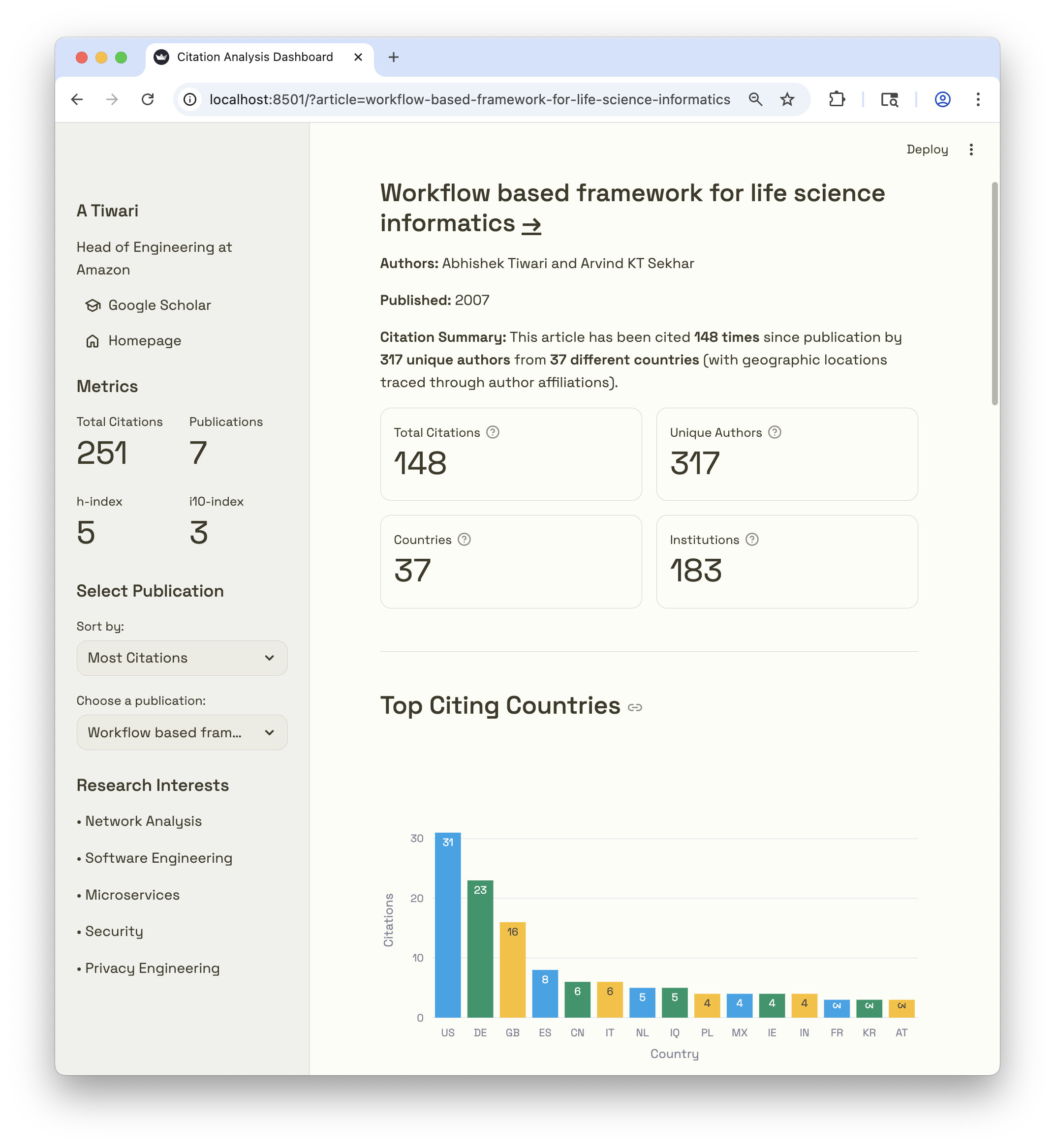
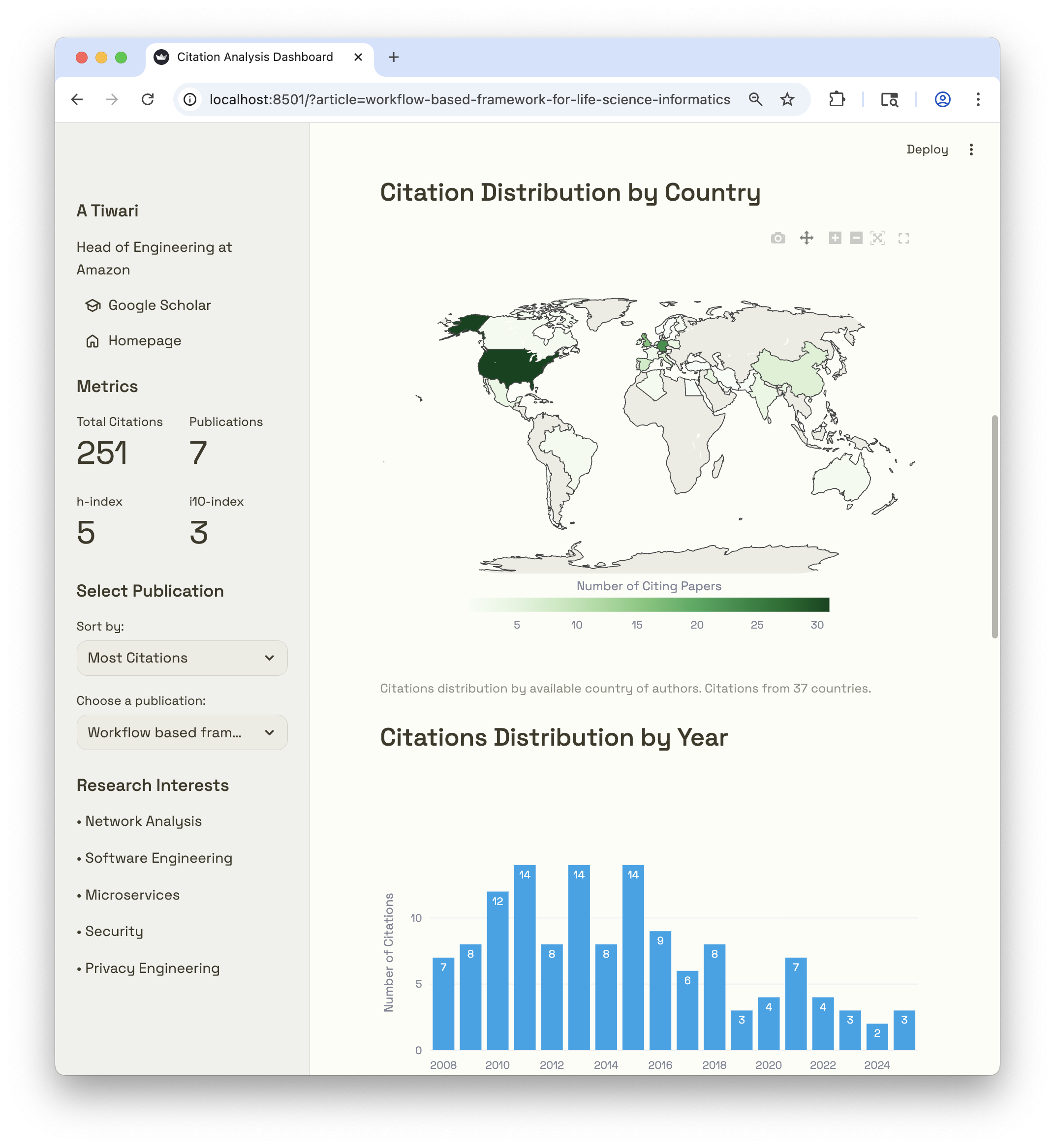
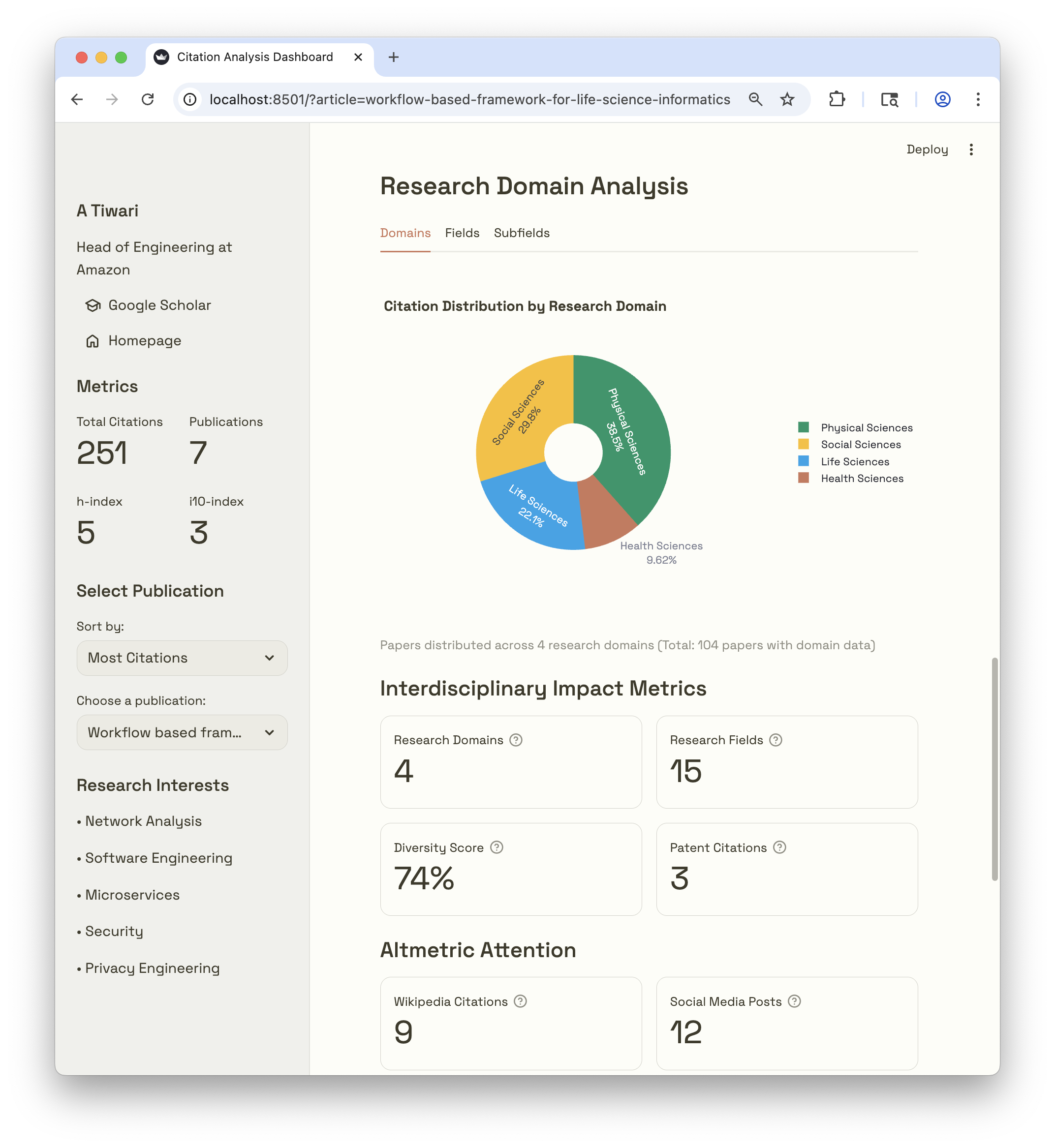
Workflow Overview
This workflow extracts author data from your Google Scholar profile, then crawls citations for each article under your Google Scholar profile. Next workflow enriches them with information using Google Scholar profiles of citing authors and OpenAlex APIs. Finally, output data is used to present your impact of your research with geographic and institutional insights.
flowchart TD
    A[Your Google Scholar Profile] --> B[Your Articles]
    B --> C[Citing Articles]
    C --> D[Enhanced Citation Data]
    D --> E[Streamlit Dashboard]

    C --> F[OpenAlex API]
    C --> G[Google Scholar Profiles of citing Authors]
    F --> D
    G --> D

    F -.-> H[Author Affiliations]
    F -.-> I[Country Codes]
    F -.-> J[Research Domains]
    G -.-> K[Verified Email Domain]
    G -.-> L[Profile Details including Affiliations]

    H --> D
    I --> D
    J --> D
    K --> D
    L --> D

    style A fill:#0ea5e9,stroke:#0ea5e9,color:#ffffff
    style E fill:#cb785c,stroke:#cb785c,color:#ffffff
    style F fill:#059669,stroke:#059669,color:#ffffff
    style G fill:#fbbf24,stroke:#fbbf24,color:#3d3a2a
    style D fill:#ecebe3,stroke:#ecebe3,color:#3d3a2a
Quick Start
Prerequisites
Install
pip install scholarimpact
Caution
This system is designed for academic research purposes. Please use responsibly and in accordance with Google Scholar and OpenAlex's terms of services.
Step-by-Step Guide
Option 1: For Deployment (Recommended)
This approach creates a standalone project suitable for deployment to Streamlit Cloud or local development.
Step 1: Generate Dashboard Project
# Generate a dashboard project
scholarimpact generate-dashboard --output-dir my-research-dashboard --name app.py

# Navigate to the generated folder
cd my-research-dashboard
This creates a complete project structure with app.py, requirements.txt, .streamlit/config.toml, and a static folder containing fonts used by default theme.
Step 2: Extract Author Publications
# Extract your publications from Google Scholar (OpenAlex and Altmetric enabled by default)
scholarimpact extract-author "YOUR_SCHOLAR_USER_ID"

# With email for higher OpenAlex rate limits (recommended)
scholarimpact extract-author "YOUR_SCHOLAR_USER_ID" --openalex-email your.email@example.com

# Or use full URL
scholarimpact extract-author "https://scholar.google.com/citations?user=YOUR_SCHOLAR_USER_ID"
This creates data/author.json with your publication list, enriched with OpenAlex and Altmetric metrics by default.
Step 3: Crawl Citation Data
# Crawl citations with OpenAlex enrichment
scholarimpact crawl-citations data/author.json --openalex-email your.email@example.com
This creates data/cites-{ID}.json files for each publication.
Step 4: Test Locally
# Run the dashboard locally
streamlit run app.py

# Or alternatively
python app.py
Open http://localhost:8501to view your dashboard.
Step 5: Push your changes to a Github Repository
# Initialize git repository
git init
git add .
git commit -m "Initial research dashboard"

# Create GitHub repository and push
git remote add origin https://github.com/YOUR_USERNAME/YOUR_REPO.git
git branch -M main
git push -u origin main
Step 6: Deploy on Streamlit Cloud
- Go to share.streamlit.io
- Click "New app"
- Connect your GitHub account
- Select your repository and branch
- Set main file path:
app.py(or your custom name) - Click "Deploy"
Step 7: Project Structure for Deployment
Your repository should contain:
my-research-dashboard/
├── app.py                    # Main dashboard file
├── requirements.txt          # Python dependencies
├── .streamlit/
│   └── config.toml          # Streamlit configuration
├── static/                  # Static assets (fonts from scholarimpact/assets/fonts)
│   ├── SpaceGrotesk-SemiBold.ttf
│   ├── SpaceGrotesk-VariableFont_wght.ttf
│   ├── SpaceMono-Regular.ttf
│   ├── SpaceMono-Bold.ttf
│   ├── SpaceMono-Italic.ttf
│   ├── SpaceMono-BoldItalic.ttf
│   └── OFL-*.txt           # Font licenses
└── data/
    ├── author.json          # Author profile data
    └── cites-*.json         # Citation data files
Step 8: Update Data
To update citation data:
- Re-run step-2 and step-3 to update data files
- Commit changes and push them to your GitHub repository
- Streamlit Cloud will automatically detect changes and restart the app
Tips for Streamlit Cloud Deployment
- Keep data files under 100MB each for optimal performance
- Use
.gitignoreto exclude unnecessary files - Set secrets in Streamlit Cloud settings if needed
- Monitor app logs in Streamlit Cloud dashboard for debugging
Option 2: For Quick Local Testing
This approach is fastest for local analysis without deployment needs.
Step 1: Extract Author Publications
# Extract publications directly
scholarimpact extract-author "YOUR_SCHOLAR_USER_ID"
Step 2: Crawl Citation Data
# Crawl citations
scholarimpact crawl-citations data/author.json --openalex-email your.email@example.com
Step 3: Launch Dashboard
# Run dashboard directly
scholarimpact dashboard
The dashboard opens at http://localhost:8501.
CLI Options Reference
scholarimpact extract-author Command
Extract author publications from Google Scholar with OpenAlex and Altmetric enrichment:
scholarimpact extract-author [OPTIONS] SCHOLAR_ID
Arguments:
SCHOLAR_ID: Google Scholar author ID or full profile URL
Options:
| Option | Type | Default | Description |
|---|---|---|---|
--max-papers N |
int | None | Maximum number of papers to analyze (default: all) |
--delay X |
float | 2.0 | Delay between requests in seconds |
--output-dir DIR |
str | ./data | Output directory for author.json |
--output-file FILE |
str | None | Custom output file path (overrides output-dir) |
--use-openalex/--no-openalex |
flag | True | Enable OpenAlex enrichment (default: enabled) |
--openalex-email EMAIL |
str | None | Email for OpenAlex API (optional, for higher rate limits) |
--use-altmetric/--no-altmetric |
flag | True | Enable Altmetric enrichment (requires OpenAlex, default: enabled) |
OpenAlex enrichment adds (all fields prefixed with openalex_):
openalex_ids: Object containing all identifiers:openalex: OpenAlex work URLdoi: Digital Object Identifier URLmag: Microsoft Academic Graph IDpmid: PubMed ID URL
openalex_type: Publication type (article, book, etc.)openalex_citation_normalized_percentile: Percentile ranking of citationsopenalex_cited_by_percentile_year: Citation percentile by yearopenalex_fwci: Field-Weighted Citation Impactopenalex_cited_by_count: OpenAlex citation countopenalex_primary_topic: Main research topicopenalex_domain,openalex_field,openalex_subfield: Hierarchical classification
Altmetric enrichment adds (all fields prefixed with altmetric_):
altmetric_score: Overall Altmetric attention scorealtmetric_cited_by_wikipedia_count: Citations in Wikipediaaltmetric_cited_by_patents_count: Citations in patentsaltmetric_cited_by_accounts_count: Social media accounts mentioningaltmetric_cited_by_posts_count: Social media posts mentioningaltmetric_scopus_subjects: Scopus subject classificationsaltmetric_readers: Reader counts by platform (Mendeley, CiteULike, etc.)altmetric_readers_count: Total reader countaltmetric_images: Altmetric badge images (small, medium, large)altmetric_details_url: Link to detailed Altmetric page
Examples:
# Basic usage (OpenAlex and Altmetric enabled by default)
scholarimpact extract-author "ABC123DEF"

# With email for higher OpenAlex rate limits
scholarimpact extract-author "ABC123DEF" --openalex-email your.email@example.com

# Disable Altmetric enrichment (keep OpenAlex)
scholarimpact extract-author "ABC123DEF" --no-altmetric

# Disable all enrichment (Google Scholar only)
scholarimpact extract-author "ABC123DEF" --no-openalex --no-altmetric

# Limit to first 20 papers with 3-second delays
scholarimpact extract-author "ABC123DEF" --max-papers 20 --delay 3

# Custom output file with email for higher limits
scholarimpact extract-author "ABC123DEF" --output-file data/my_author.json --openalex-email your.email@example.com

# Full URL format
scholarimpact extract-author "https://scholar.google.com/citations?user=ABC123DEF"
scholarimpact crawl-citations Command
Crawl citations with OpenAlex integration:
scholarimpact crawl-citations [OPTIONS] AUTHOR_JSON
Arguments:
AUTHOR_JSON: Path to author.json file containing publications
Options:
| Option | Type | Default | Description |
|---|---|---|---|
--openalex-email EMAIL |
str | None | Email for OpenAlex API (higher rate limits) |
--max-citations N |
int | None | Maximum citations per paper |
--delay-min X |
float | 5.0 | Minimum delay between requests (seconds) |
--delay-max Y |
float | 10.0 | Maximum delay between requests (seconds) |
--output-dir DIR |
str | None | Output directory (defaults to author.json directory) |
Examples:
# Basic usage with OpenAlex
scholarimpact crawl-citations data/author.json --openalex-email me@university.edu

# Custom delays
scholarimpact crawl-citations data/author.json --delay-min 3 --delay-max 8

# Custom output directory
scholarimpact crawl-citations data/author.json --output-dir custom_data

# Limit citations per paper
scholarimpact crawl-citations data/author.json --max-citations 100
scholarimpact dashboard Command
Launch the interactive dashboard:
scholarimpact dashboard [OPTIONS]
Options:
| Option | Type | Default | Description |
|---|---|---|---|
--port N |
int | 8501 | Port to run the dashboard on |
--address ADDR |
str | localhost | Address to bind the server to |
--data-dir DIR |
str | ./data | Directory containing citation data files |
Examples:
# Basic usage
scholarimpact dashboard

# Custom port
scholarimpact dashboard --port 8502

# External access
scholarimpact dashboard --address 0.0.0.0

# Different data directory
scholarimpact dashboard --data-dir custom_data
scholarimpact quick-start Command
Complete analysis pipeline from Scholar ID to dashboard:
scholarimpact quick-start [OPTIONS] SCHOLAR_ID
Arguments:
SCHOLAR_ID: Google Scholar author ID or full profile URL
Options:
| Option | Type | Default | Description |
|---|---|---|---|
--openalex-email EMAIL |
str | None | OpenAlex email for enhanced data |
--output-dir DIR |
str | ./data | Output directory for all data |
--launch-dashboard/--no-dashboard |
flag | True | Launch dashboard after analysis |
Examples:
# Complete pipeline with dashboard
scholarimpact quick-start "ABC123DEF" --openalex-email me@university.edu

# Skip dashboard launch
scholarimpact quick-start "ABC123DEF" --no-dashboard

# Custom output directory
scholarimpact quick-start "ABC123DEF" --output-dir results
scholarimpact generate-dashboard Command
Generate a standalone dashboard project for deployment to Streamlit Cloud:
scholarimpact generate-dashboard [OPTIONS]
Options:
| Option | Type | Default | Description |
|---|---|---|---|
--output-dir DIR |
str | . | Output directory for generated files |
--name FILE |
str | my_dashboard.py | Name of the dashboard file |
--data-dir DIR |
str | ./data | Data directory path for dashboard |
--title TEXT |
str | My Citation Dashboard | Dashboard title |
Examples:
# Generate dashboard in current directory
scholarimpact generate-dashboard

# Custom output directory and title
scholarimpact generate-dashboard --output-dir my-project --title "Research Impact Analysis"

# Custom data directory location
scholarimpact generate-dashboard --data-dir ../citation_data --name app.py
This command generates:
- A dashboard Python file (default:
my_dashboard.py) .streamlit/config.tomlwith theme configurationrequirements.txtfor deploymentstaticfolder containing fonts used by default theme
Citation
If you use ScholarImpact in your research, please cite it as:
@software{tiwari2025scholarimpact,
  author = {Tiwari, Abhishek},
  title = {ScholarImpact: A bibliometric tool to analyse, visualise, and share your research impact, output and scholarly influence using Google Scholar and OpenAlex data},
  version = {0.0.1},
  year = {2025},
  month = {8},
  url = {https://github.com/abhishektiwari/scholarimpact},
}
APA Format:
Tiwari, A. (2025). ScholarImpact: A bibliometric tool to analyse, visualise, and share your research impact, output and scholarly influence using Google Scholar and OpenAlex data (Version 0.0.1) [Computer software]. https://github.com/abhishektiwari/scholarimpact
MLA Format:
Tiwari, Abhishek. ScholarImpact: A bibliometric tool to analyse, visualise, and share your research impact, output and scholarly influence using Google Scholar and OpenAlex data. Version 0.0.1, 2025, https://github.com/abhishektiwari/scholarimpact.
Project details
Verified details
These details have been verified by PyPIProject links
GitHub Statistics
Maintainers
Release history Release notifications | RSS feed


Download files
Download the file for your platform. If you're not sure which to choose, learn more about installing packages.
Source Distribution
Built Distribution
Filter files by name, interpreter, ABI, and platform.
If you're not sure about the file name format, learn more about wheel file names.
Copy a direct link to the current filters
File details
Details for the file scholarimpact-0.0.4.tar.gz.
File metadata
- Download URL: scholarimpact-0.0.4.tar.gz
- Upload date:
- Size: 360.4 kB
- Tags: Source
- Uploaded using Trusted Publishing? Yes
- Uploaded via: twine/6.1.0 CPython/3.12.9
File hashes
| Algorithm | Hash digest | |
|---|---|---|
| SHA256 |
e1929f282e600ddfd24fb5d3b8fd7098c8dda9a8b1bb7f2bcaebb15274326d4a
|
|
| MD5 |
d91b6ca6611ca276bf025817663732b0
|
|
| BLAKE2b-256 |
665eb5cf4a40f03b2842419433240c740c87e11cfffb979b9db2f25bba70e288
|
Provenance
The following attestation bundles were made for scholarimpact-0.0.4.tar.gz:
Publisher:
release.yml on abhishektiwari/scholarimpact
-
Statement:
-
Statement type:
https://in-toto.io/Statement/v1 -
Predicate type:
https://docs.pypi.org/attestations/publish/v1 -
Subject name:
scholarimpact-0.0.4.tar.gz -
Subject digest:
e1929f282e600ddfd24fb5d3b8fd7098c8dda9a8b1bb7f2bcaebb15274326d4a - Sigstore transparency entry: 420346469
- Sigstore integration time:
-
Permalink:
abhishektiwari/scholarimpact@409ca39c5e31e91c17e42b4b8021c1b7a00a7909 -
Branch / Tag:
refs/heads/main - Owner: https://github.com/abhishektiwari
-
Access:
public
-
Token Issuer:
https://token.actions.githubusercontent.com -
Runner Environment:
github-hosted -
Publication workflow:
release.yml@409ca39c5e31e91c17e42b4b8021c1b7a00a7909 -
Trigger Event:
workflow_run
-
Statement type:
File details
Details for the file scholarimpact-0.0.4-py3-none-any.whl.
File metadata
- Download URL: scholarimpact-0.0.4-py3-none-any.whl
- Upload date:
- Size: 358.6 kB
- Tags: Python 3
- Uploaded using Trusted Publishing? Yes
- Uploaded via: twine/6.1.0 CPython/3.12.9
File hashes
| Algorithm | Hash digest | |
|---|---|---|
| SHA256 |
6e91b0500706ea2d1345a745980e532769ac79862e85cc9fabe8b89b4e2253f0
|
|
| MD5 |
80d900cccaa44ace5e1432e6e6bbfacd
|
|
| BLAKE2b-256 |
190ba4519521a5a93daedcb47a1f92e562ea9e4c0036ce28148bb66d862f2e4f
|
Provenance
The following attestation bundles were made for scholarimpact-0.0.4-py3-none-any.whl:
Publisher:
release.yml on abhishektiwari/scholarimpact
-
Statement:
-
Statement type:
https://in-toto.io/Statement/v1 -
Predicate type:
https://docs.pypi.org/attestations/publish/v1 -
Subject name:
scholarimpact-0.0.4-py3-none-any.whl -
Subject digest:
6e91b0500706ea2d1345a745980e532769ac79862e85cc9fabe8b89b4e2253f0 - Sigstore transparency entry: 420346488
- Sigstore integration time:
-
Permalink:
abhishektiwari/scholarimpact@409ca39c5e31e91c17e42b4b8021c1b7a00a7909 -
Branch / Tag:
refs/heads/main - Owner: https://github.com/abhishektiwari
-
Access:
public
-
Token Issuer:
https://token.actions.githubusercontent.com -
Runner Environment:
github-hosted -
Publication workflow:
release.yml@409ca39c5e31e91c17e42b4b8021c1b7a00a7909 -
Trigger Event:
workflow_run
-
Statement type:






