
SciAgent
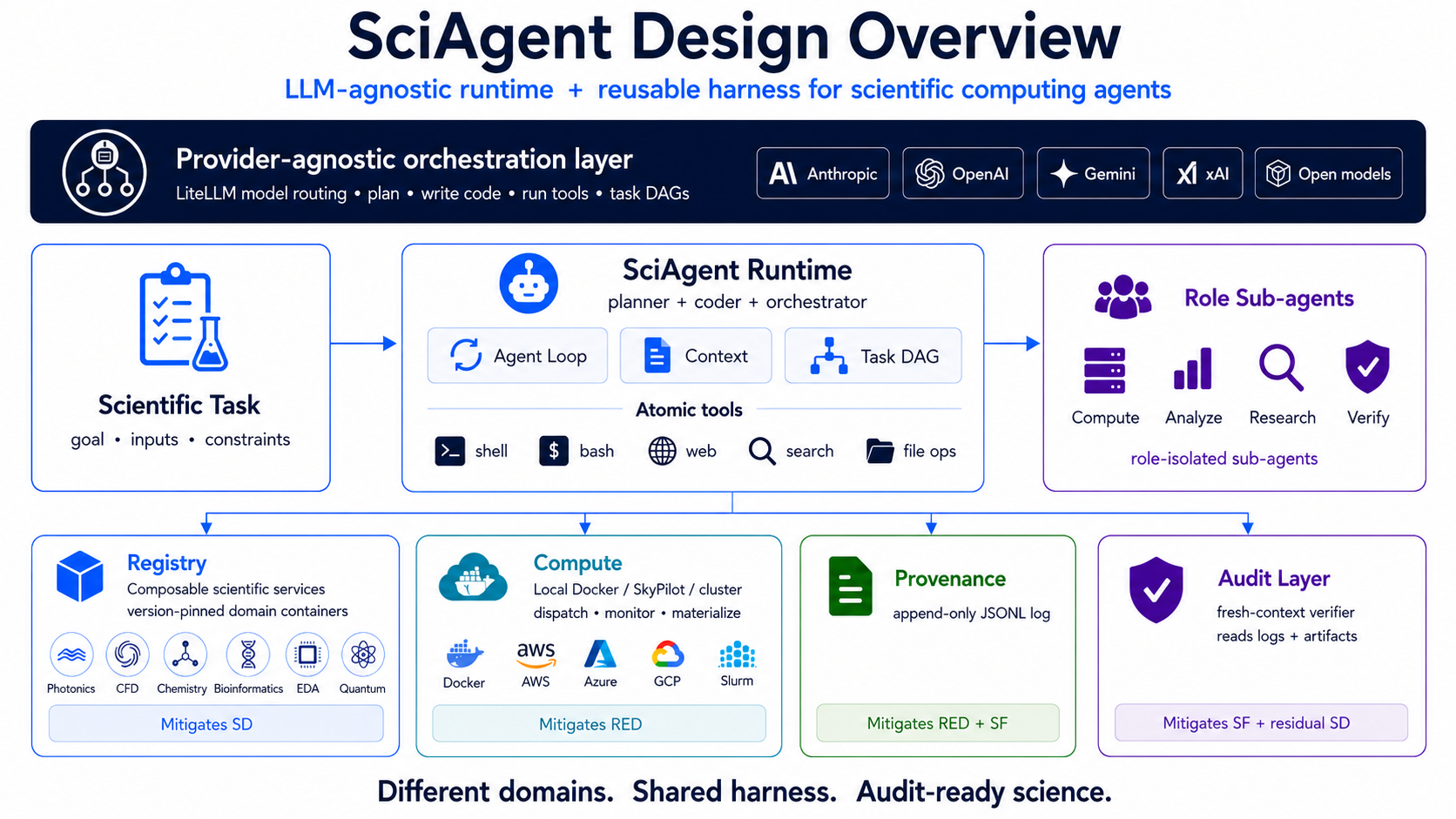
SciAgent is an LLM-agnostic framework — a runtime and reusable harness — for scientific computing agents. A user submits a scientific task — a simulation to run, a hypothesis to test, results to reproduce or extend — and the framework plans the work, delegates to role-isolated sub-agents (compute, analyze, research, verify), executes the heavy work in containerised services on local Docker or SkyPilot-managed cloud clusters, and writes every tool call, cloud job, artifact, and verification to an append-only provenance log. A separate verifier sub-agent reads the log in a fresh context to check the trail before the result is returned.
The architecture has five layers (see diagram):
- Provider-agnostic orchestration routes through LiteLLM so the same harness runs against Anthropic, OpenAI, Gemini, xAI, DeepSeek, or open-source models.
- Runtime is a standard agent loop (planner + context + task DAG) over atomic tools (
bash,file_ops,web,search,todo). - Role sub-agents (compute, analyze, research, verify) run with isolated tool surfaces and per-role model tiers.
- Registry, Compute, Provenance, Audit are the four side-layers: registered scientific service containers, local-Docker / SkyPilot / cluster execution, append-only JSONL log, and an independent verifier that reads the log + artifacts.
v2.0 is current. Highlights: cloud compute via SkyPilot, durable provenance log, task orchestration with background subagents and checkpoint/resume. See What's New in v2.0. v1.0 is preserved on branch
release/v1.0and tagv1.0.
How it works
Properties of this loop:
- Cloud compute.
computeruns simulations on SkyPilot-managed clusters with a per-session S3/GCS/Azure/R2/OCI workspace bucket. Outputs survive cluster teardown. - Durable log. Every tool call, cloud job, artifact, and verification appends to a per-session JSONL log. The audit trail comes out of normal operation.
- Verifier with fresh context. The
verifiersub-agent has no memory of the main agent's reasoning. It reads only the log and the on-disk artifacts. A different model in a different process can audit a session it didn't run. - Scientific services in registered containers. Twenty-plus images (RCWA, MEEP, OpenFOAM + SWAK4Foam, GROMACS, ParaView, OpenROAD, ...). The user does not manage container builds or host environments.
- Background sub-agents with checkpoints. Per-iteration checkpoints; if a long-running run is interrupted, the next spawn matches by description hash and offers the parent a 3-way resume (skip · use prior · retry).
Features
-
Cloud compute – Run scientific simulations on cloud clusters via SkyPilot, with a local Docker fallback for small jobs. Per-session workspace bucket persists outputs across cluster lifecycle. See Cloud Compute.
-
Durable provenance log – Every tool call, compute job, artifact, and verification result lands in an append-only JSONL log per session — cross-LLM verifiable. See Provenance Log Schema.
-
Task orchestration – Unified registry for in-flight work (
task_index) covering cloud jobs and background subagents. Background subagents support checkpoint and 3-way resume. See Task Orchestration. -
Skill-based workflows – Load specialised workflows from SKILL.md files for complex tasks like service building and code review. Skills auto-trigger based on user input patterns.
-
Image & multimodal analysis – Analyze scientific plots, microscopy images, diagrams, and data visualisations. Supports PNG, JPG, GIF, and WebP formats.
-
Service isolation – Run all scientific computations inside isolated Docker containers for reproducibility, security, and portability.
-
Task DAG orchestration – Define a graph of tasks with dependencies (
depends_on), batch parallelisable steps and pass data between tasks viaresult_key. -
Artifact & target validation – Verify that expected files exist or that computed metrics meet user-defined criteria;
produces_urisvalidation on subagent outputs. -
Scientific services – Run simulations inside Docker containers for electromagnetics (RCWA, MEEP), fluid dynamics (OpenFOAM + swak4foam), molecular dynamics (GROMACS), cheminformatics (RDKit), symbolic math (SymPy), optimisation (CVXPY), post-processing (ParaView), digital IC (OpenROAD, iic-osic-tools) and more.
-
Multi-model support – Choose between Anthropic Claude, OpenAI (GPT-4.1, o3, o4-mini), Google Gemini 3, xAI Grok 4, DeepSeek, or open-source models via LiteLLM. Caching reduces cost and latency.
-
Sub-agents – Spawn specialised agents for exploration, debugging, research, planning, cloud compute, post-job analysis, general implementation, and verification. Each agent uses a cost-optimised model tier (scientific for planning, coding for implementation, fast for exploration).
Quick start
Installation
SciAgent requires Python 3.9 or newer. We recommend installing it inside a virtual environment:
pip install sciagent-cli                       # base install (local Docker compute)
pip install 'sciagent-cli[cloud]'              # optional: SkyPilot + AWS extras
pip install 'sciagent-cli[cloud-all]'          # optional: SkyPilot + AWS, GCP, Azure
Or install from source:
python3 -m venv venv
source venv/bin/activate
pip install -e .
Set API keys
SciAgent communicates with large-language models and search engines via external APIs. At a minimum you need to export an API key for your chosen LLM provider and for the Brave search tool used by the web tool:
export ANTHROPIC_API_KEY="your-claude-key"      # or OPENAI_API_KEY, GOOGLE_API_KEY, etc.
export BRAVE_SEARCH_API_KEY="your-brave-key"   # required for web search
Additional environment variables (e.g. OPENAI_API_KEY, GOOGLE_API_KEY) can be set as needed depending on the model.
Run a task
Invoke SciAgent via the sciagent CLI and pass a natural-language task description. A project directory is created to store generated code and artifacts:
sciagent --project-dir ~/my-project "Create a Python script that calculates Fibonacci numbers"
Use the --interactive flag to enter a REPL for iterative control:
sciagent --interactive
Select a different model or enable sub-agents when needed:
sciagent -m openai/gpt-4.1 "Analyze this codebase"
sciagent -m gemini/gemini-3-pro-preview "Explain this diagram"
sciagent --subagents "Research and refactor this module"
For more details on CLI flags see the Configuration guide or run sciagent --help.
Image analysis examples
SciAgent can analyze images including scientific plots, microscopy, diagrams, and data visualisations:
# Analyze a scientific plot
sciagent "Read and interpret the graph at ./results/figure1.png"

# Examine microscopy images
sciagent "Analyze the cell structure in ./data/microscopy.jpg"

# Interpret simulation output
sciagent "What does the CFD velocity field in ./output/velocity.png show?"

# Review data visualisation
sciagent "Explain the trends in ./plots/timeseries.png and suggest improvements"
Supported formats: PNG, JPG/JPEG, GIF, WebP.
Scientific computing examples
SciAgent can run simulations directly in specialised Docker containers. Some examples:
# RCWA electromagnetic simulation
sciagent "Design a photonic crystal with bandgap at 1550 nm using rcwa"

# Molecular dynamics (GROMACS)
sciagent "Run a GROMACS simulation for a protein in water"

# Convex optimisation (CVXPY)
sciagent "Solve a portfolio optimisation problem using cvxpy"

# Symbolic math (SymPy)
sciagent "Derive equations of motion for a double pendulum using sympy"

# Cloud-scale CFD (SkyPilot + OpenFOAM)
sciagent "Reproduce Fig 3 of the datacenter CFD paper on a SkyPilot cluster"
For an end-to-end cloud example, see the Datacenter CFD case study.
See Available Services below for the full list of containerised environments.
Available services
| Domain | Services | Capabilities |
|---|---|---|
| Math & Optimisation | scipy-base, sympy, cvxpy, optuna |
Numerical computing, symbolic math, convex optimisation, hyperparameter tuning |
| Chemistry & Materials | rdkit, ase, dwsim |
Molecular analysis, atomistic simulations, chemical process simulation |
| Molecular Dynamics | gromacs |
Biomolecular simulations, soft matter |
| Photonics & Optics | rcwa, meep, pyoptools |
RCWA for gratings, FDTD electromagnetics, optical ray tracing |
| CFD & FEM | openfoam, gmsh, elmer |
Fluid dynamics, mesh generation, multiphysics FEM |
| Post-processing & Visualisation | paraview |
Multi-arch (with EGL) — pairs with the OpenFOAM services |
| Circuits & EDA | ngspice, openroad, iic-osic-tools |
SPICE simulation, RTL-to-GDS flow, 80+ IC design tools |
| Quantum Computing | qiskit |
Quantum circuits, gates, algorithms (Grover, VQE, QAOA) |
| Bioinformatics | biopython, blast |
Sequence analysis, BLAST searching, phylogenetics |
| Network Analysis | networkx |
Graph algorithms, centrality, community detection |
| Scientific ML | sciml-julia |
Julia ODE/SDE solving, symbolic modelling, neural DEs |
Services are automatically selected and managed when you request scientific computations. Refer to the Architecture page for details.
Skills
SciAgent uses a skill-based workflow system for complex, multi-phase tasks. Skills are defined in SKILL.md files and auto-trigger based on user input:
| Skill | Purpose |
|---|---|
use-service |
Look up a registered scientific service and run a simulation |
build-service |
Build and publish Docker services to GHCR |
code-review |
Comprehensive code review with security analysis |
The use-service skill implements a research-first workflow: discover the right service, read its docs, write the simulation code, run it in the container, debug. This ensures correct API usage by researching official documentation before writing simulation code.
Sub-agents
SciAgent uses a tiered model system for cost-effective sub-agent delegation:
| Agent | Model Tier | Purpose |
|---|---|---|
explore |
Fast | Quick codebase searches and file lookups |
debug |
Coding | Error investigation with web research |
research |
Coding | Web research, documentation, literature review |
plan |
Scientific | Break down complex problems (needs deep reasoning) |
compute |
Coding | Cloud-job orchestration with token-isolated context |
analyze |
Coding | Post-job derivation (plots, statistics, light fits, DSE) |
general |
Coding | Complex multi-step implementation tasks |
verifier |
Verification | Independent validation against the provenance log |
Model tiers are defined in src/sciagent/defaults.py. Current Anthropic defaults:
- Scientific —
claude-sonnet-4-6(main agent, planning) - Coding —
claude-sonnet-4-6(debug, research, compute, analyze, verifier, general subagents) - Vision —
claude-opus-4-7(image and multimodal analysis) - Verification —
claude-sonnet-4-6(independent verifier subagent, fresh context) - Fast —
claude-haiku-4-5-20251001(explore subagent, web extraction, summarisation)
All tiers are provider-agnostic via LiteLLM — substitute any tier with openai/..., gemini/..., xai/..., deepseek/..., etc. See Configuration for tested vs. untested options.
Architecture
SciAgent consists of a Task Orchestrator that schedules tasks in a directed acyclic graph and a set of Agents that execute those tasks. Each agent follows a Think → Act → Observe loop and can call core tools (bash, file_ops, search, web, todo, skill, ask_user), compute tools (compute_run, compute_exec, compute_cluster, materialize, materialize_workspace), task-orchestration tools (task_list, task_get, task_wait, bg_*), and verification tools (verify_session) to interact with the file system, shell, web, containerised simulations, cloud clusters, and the durable provenance log.
┌─────────────────────────────────────────────────┐
│                Task Orchestrator                │
│  ┌─────┐   ┌─────┐   ┌─────┐                   │
│  │ T1  │──▶│ T3  │──▶│ T4  │  (Task DAG)       │
│  └─────┘   └──┬──┘   └─────┘                   │
│  ┌─────┐     │       • depends_on              │
│  │ T2  │─────┘       • result_key              │
│  └─────┘             • parallel batching       │
└─────────────────────┬───────────────────────────┘
                      │
        ┌─────────────┼─────────────┐
        ▼             ▼             ▼
   ┌─────────┐   ┌─────────┐   ┌─────────┐
   │ Agent   │   │ Agent   │   │ Agent   │
   │ (T1)    │   │ (T2)    │   │ (T3)    │
   └────┬────┘   └────┬────┘   └────┬────┘
        │             │             │
        └─────────────┼─────────────┘
                      ▼
┌─────────────────────────────────────────────────┐
│  Tools: bash, file_ops, search, web, todo,      │
│         skill, ask_user                         │
│  Services: rcwa, meep, openfoam, gromacs, ...   │
└─────────────────────────────────────────────────┘
The v2.0 cloud + audit layer sits underneath:
┌──────────────────────────────────────────────────────┐
│ Compute subagent                                     │
│  compute_run / compute_exec / compute_cluster        │
│  materialize / materialize_workspace                 │
└──────────────┬───────────────────────────────────────┘
               │
       ┌───────┴────────┐
       ▼                ▼
  ┌──────────┐    ┌──────────────┐
  │  Local   │    │  SkyPilot    │     ┌──────────────────────┐
  │  Docker  │    │  managed     │◀────│ Workspace bucket     │
  │          │    │  / cluster   │     │ <cloud>://...-<sid>/ │
  └──────────┘    └──────┬───────┘     └──────────────────────┘
                         │
                         ▼
              ┌─────────────────────────┐
              │ Task index              │
              │ ~/.sciagent/tasks/*.json│
              │ kind=compute_job|sub…   │
              └─────────────────────────┘
                         │
                         ▼
              ┌─────────────────────────┐
              │ Provenance log (JSONL)  │
              │ tool_call/result        │
              │ compute_job_*           │
              │ artifact_produced       │
              │ verification_result     │
              └─────────────────────────┘
Documentation
Comprehensive documentation is available in the docs folder. Start with the following pages:
- What's New in v2.0 – migration notes from v1.0, headline features, link to v1.0 archive.
- Getting Started – installation, running your first task and CLI basics.
- Configuration – customise the model, system prompt, caching, tool registry, sub-agents, and cloud setup.
- Cloud Compute – SkyPilot integration, cluster lifecycle, workspace bucket, materialize.
- Task Orchestration – task index, background subagents, checkpoint and resume.
- Use Cases – real-world examples of how to apply SciAgent to coding, research and simulation.
- Architecture – detailed explanation of the agent loop, context management, tools, skills, sub-agents, SkyPilot integration, and the provenance log.
- Comparison – what sets SciAgent apart from other agent frameworks.
Requirements
- Python 3.9+
- Docker (for containerised services running locally)
- SkyPilot extras (
pip install '.[cloud]') — only required for cloud compute - Cloud credentials (
aws configure/gcloud auth application-default login/az login) — only required for cloud compute - API key for your chosen LLM provider (e.g. Anthropic, OpenAI, Google) and
BRAVE_SEARCH_API_KEYfor web search
Citing
If you use SciAgent in your work, please cite:
- SciAgent: Containerized Code Generation for Scientific Computing with Verification. Shruti Badhwar. AI4X – Accelerate, Singapore, 16–19 June 2026. OpenReview PDF
- Audit-Grade Harness for Agent-driven Scientific Computation Workflows. Shruti Badhwar. ICML 2026 AI4Science Workshop. OpenReview PDF
License
This project is released under the Apache 2.0 License.
© 2026 SciAgent Team – building an open platform for AI-powered scientific computing and engineering.
1 maintainer

Download files
Download the file for your platform. If you're not sure which to choose, learn more about installing packages.
Source Distribution
Built Distribution
Filter files by name, interpreter, ABI, and platform.
If you're not sure about the file name format, learn more about wheel file names.
Copy a direct link to the current filters
File details
Details for the file sciagent_cli-2.1.2.tar.gz.
File metadata
- Download URL: sciagent_cli-2.1.2.tar.gz
- Upload date:
- Size: 404.6 kB
- Tags: Source
- Uploaded using Trusted Publishing? No
- Uploaded via:
twine/7.0.0 CPython/3.12.12
File hashes
| Algorithm | Hash digest | |
|---|---|---|
| SHA256 |
a0b611c3651c087185ea2d5f2bc2ac6b24d903a903109c82464e2c4aba3bb488
|
|
| MD5 |
4599ec6d8ac6c7b4c65be6d2804878dc
|
|
| BLAKE2b-256 |
b14a29d8ca52674fcd8851c423cad7af35070828a558fcdcfa85425e980a3c30
|
File details
Details for the file sciagent_cli-2.1.2-py3-none-any.whl.
File metadata
- Download URL: sciagent_cli-2.1.2-py3-none-any.whl
- Upload date:
- Size: 421.1 kB
- Tags: Python 3
- Uploaded using Trusted Publishing? No
- Uploaded via:
twine/7.0.0 CPython/3.12.12
File hashes
| Algorithm | Hash digest | |
|---|---|---|
| SHA256 |
65e576c3e18822c4e3ed538391caf2b7bf1cde19fdc7bf5d8b9ad71cbbe62bc4
|
|
| MD5 |
8f7bd37f28e8351fc19383e84285b822
|
|
| BLAKE2b-256 |
8182247285ee965532f2fe727af5ec793dcb448ff2a0f4ac754feedfeb1d3139
|







