
This release is a pre-release and may not be stable for production use.





ScienceFlow turns an executable task with a measurable objective into persistent, evaluator-guided research. It coordinates parallel workers, promotes valid results into recoverable stages, preserves the best artifacts, and exposes the full process through a TUI and Web monitor.
Quick start
Requirements: Python 3.11+ and access to a supported model API.
Install
Install ScienceFlow with pipx so the command is available from any directory while its Python dependencies remain isolated:
pipx install scienceflow==0.2.0b7
scienceflow --help
Other installation methods
Conda
conda create -n scienceflow python=3.12 -y
conda activate scienceflow
python -m pip install scienceflow==0.2.0b7
uv
uv tool install scienceflow==0.2.0b7
Python virtual environment
python3 -m venv .venv
source .venv/bin/activate
python -m pip install scienceflow==0.2.0b7
Configure and start
scienceflow config init
scienceflow config path     # edit the generated private model registry
scienceflow tui --workspace "$PWD/sf_workspace"
Chat normally in the TUI, or enter /long-research to configure and launch a
managed task. Esc cancels the current interaction; press Ctrl+C
twice within two seconds to exit, or use Ctrl+Q.
With text selected in the editor or transcript, Ctrl+C copies instead.
Exiting detaches from research without terminating its workers.
New research tasks default to the selected chat model for both code and feedback;
change either model during preparation if needed. Running tasks keep their own settings.
After a successful launch, preparation messages collapse into an expandable configuration
summary. This only changes the display; conversation and research records remain intact.
Starting a new chat collapses earlier completed exchanges into two-row user/assistant
summaries. The latest four history summaries remain visible; older rounds share an
expandable History entry. Click or press Enter to expand; the footer keeps context/cache/cost
values on the right, with only Cache labeled.
Initial SCIENCEFLOW instructions stay visible until a chat completes, then collect
in the same History entry, with a separate notice count. Task launch notices fold separately;
errors remain visible. These records are UI-only and do not count as chat rounds.
User messages use a display-only > prefix without a shaded background.
Copy appears only on command/code blocks, not ordinary replies,
and copies source text without display decoration or automatic line wrapping.
Use /compact to manually compress idle Chat context without an API call.
Saved conversation, reasoning and tool records remain intact; Long Research tasks
are unaffected. Resume retains the compacted context, and footer tokens update
after the next actual request.
Minimal TUI example
The built-in circle-packing example needs no dataset. After starting the TUI,
complete these prompts in order:
1 · Prepare the task
/long-research circle-packing data=none workers=2 cpu=16 gpu=cpu duration=1h
2 · Accept the model defaults
default
3 · Start after preflight passes
run
ScienceFlow runs preflight checks, starts two CPU workers, evaluates candidate solutions,
and retains the best valid artifact under the workspace. Follow it with
/tasks or /status 1.
| Command | Purpose |
|---|---|
/long-research DESCRIPTION | Prepare and launch a research task. |
/tasks, /status N | List tasks or inspect one task. |
/stop N, /resume N, /attach N | Control or follow a task. |
/research-usage N, /resources | Inspect model, cost, and resource usage. |
/models | Select the fixed chat model. |
/web, /web stop | Start or stop the workspace Web monitor. |
Resume the latest chat session with:
scienceflow tui --workspace "$PWD/sf_workspace" --resume
How it works
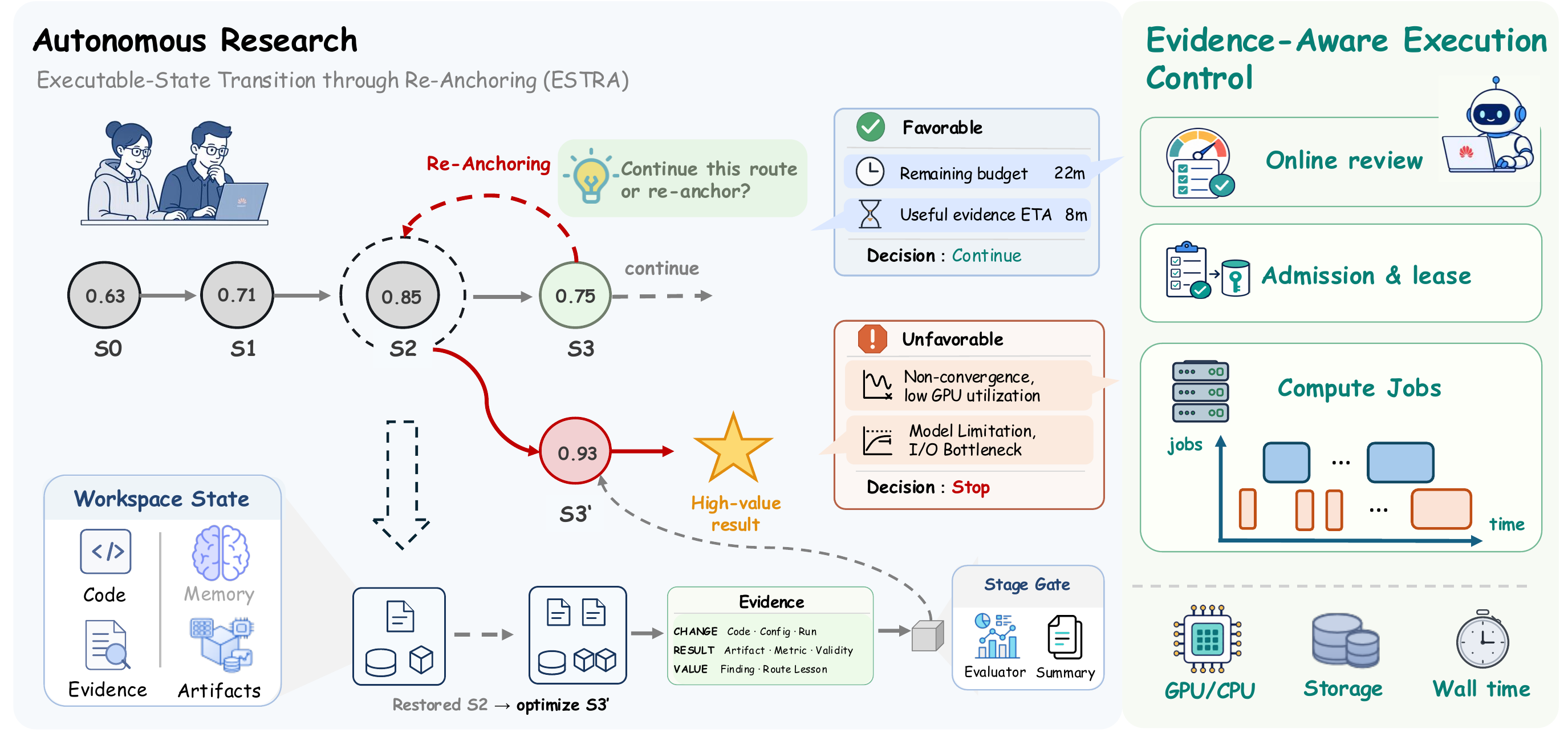
- Explore: isolated workers advance executable workspaces under explicit CPU, GPU, model, and time budgets.
- Evaluate: task evaluators convert artifacts into normalized evidence and final scores.
- Preserve: Stage Gate admits valid results as immutable, recoverable stages while the best artifact remains available independently of submission state.
- Adapt: ESTRA continues the current route or re-anchors work to a stronger archived stage at research boundaries.
Agent messages, reasoning, tool calls, evaluator results, resource samples, costs, and stage lineage are retained as structured events for inspection and future training workflows.
Task contract
| You provide | ScienceFlow manages |
|---|---|
| Objective, constraints, and metric direction | Research lifecycle and parallel workers |
| Executable task code and required data | Isolated workspaces and resource leases |
| Evaluator and valid artifact contract | Evidence normalization and Stage admission |
| Baseline or starting implementation | Exploration, recovery, selection, and finalization |
A registered task.yaml is the source of truth for measurement and valid
artifacts. ScienceFlow does not invent a missing evaluator or silently replace required
task data.
Models, resources, and task environments
Model settings stay local in ~/.config/scienceflow/models.json (mode
600); API keys are excluded from task manifests, sessions, and reports. See the
redacted example.
The base package provides the control plane and TUI. Install task-specific ML/GPU dependencies only when needed:
python -m pip install "scienceflow[full]"==0.2.0b7
CPU and GPU allocations form task boundaries; CPU capacity is divided across workers. Model
pricing is optional—without it, the UI reports Cost —. Do not resume a
workspace with a different task, dataset, evaluator, prompt, or artifact contract.
Develop from source
git clone --branch preview https://github.com/science-learner/ScienceFlow.git
cd ScienceFlow
uv sync --python 3.12 --group dev
uv run scienceflow config init
uv run scienceflow tui --workspace "$PWD/sf_workspace"
Use uv sync --extra full --group dev only when tests require the full ML/GPU
environment.
Research
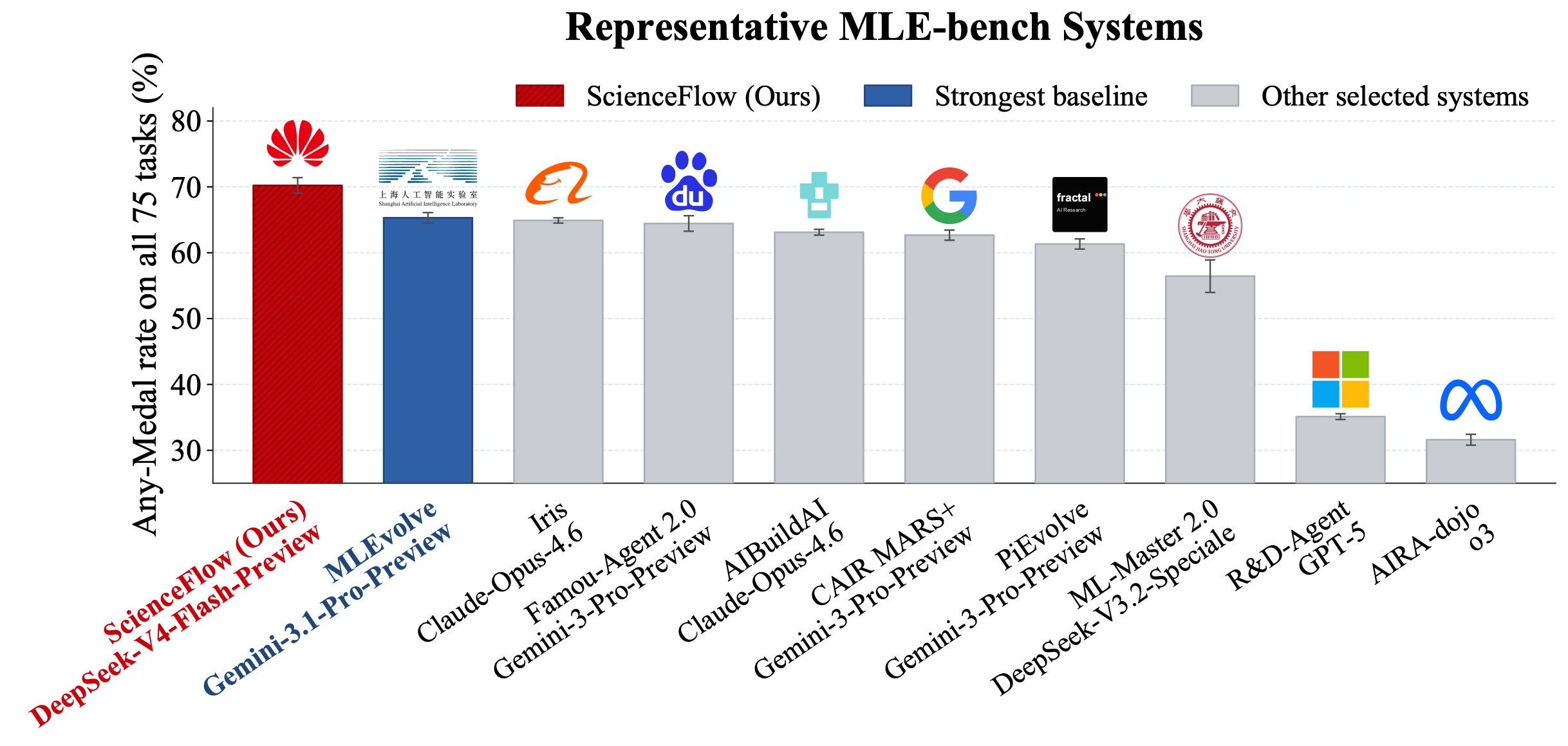
ScienceFlow uses the same Stage Gate and evaluator contract across machine-learning engineering, scientific modeling, and mathematical optimization. In the reported 24-hour, 75-task MLE-bench evaluation, it reaches 70.22 ± 1.18% Any-Medal over three runs.
Citation
If ScienceFlow supports your research, please cite:
@misc{zhao2026scienceflow,
  title         = {{ScienceFlow}: A Long-Horizon Agent for {ML} Research, Scientific Discovery and Beyond},
  author        = {Mingming Zhao and Jiqian Dong and Kangping Xu and Zadid Hasan and Chengrui Fan and Shan Jiang and Shuai Mao and Yating Ling and Linyi Zou and Tailin Zhou and Yun Hin Chan and Wenkai Zhang and Zhanhong Zhou and Guowei Huang and Hongliang Li and Wenjing Cun and Zhitang Chen and Mingxuan Yuan and Yanhui Geng},
  year          = {2026},
  eprint        = {2608.14354},
  archivePrefix = {arXiv},
  primaryClass  = {cs.AI},
  doi           = {10.48550/arXiv.2608.14354},
  url           = {https://arxiv.org/abs/2608.14354}
}
1 maintainer

Metadata
1 maintainer
Release files for scienceflow 0.2.0b7
For a detailed explanation of source distributions (sdists) and built distributions (wheels), please see the package formats documentation.
Source distribution (sdist)
| File | Size | Uploaded | Provenance | Actions |
|---|---|---|---|---|
| scienceflow-0.2.0b7.tar.gz | 1.9 MB | With provenance | Details for scienceflow-0.2.0b7.tar.gz |
Built distribution (wheel)
| File | Interpreter | ABI | Platform | Actions Reset |
|---|---|---|---|---|
| scienceflow-0.2.0b7-py3-none-any.whl | Python 3 | none | any | Details for scienceflow-0.2.0b7-py3-none-any.whl |
Total release size: 4.0 MB
Release files / scienceflow-0.2.0b7.tar.gz
| Download URL | scienceflow-0.2.0b7.tar.gz |
|---|---|
| Size | 1.9 MB |
| Tags | Source |
|
SHA-256 checksum How to use checksums |
ed796ee3a16b45bf03c7428c29ad784a3595df3ac29b557035e485ad1d36a036
|
|
BLAKE2b-256 checksum How to use checksums |
558b115635d2520689b68548e205214098c3ae159f4f14b89d5c94ba5b91576b
|
| Upload date | |
|
Uploaded using Trusted Publishing? What is trusted publishing? |
Yes |
| Uploaded via |
twine/7.0.0 CPython/3.13.14
|
Provenance
Provenance describes where a file came from. On PyPI, provenance is shared via attestations, which provide a verifiable record of the build or publishing details. View details, limitations and caveats.


PyPI Publish Attestation
PyPI verified that this artifact, at this checksum, originated from the publisher listed below.
Signed by GitHub Actions, verified by PyPI on Sep 29, 2026.
Transparency logRelease files / scienceflow-0.2.0b7-py3-none-any.whl
| Download URL | scienceflow-0.2.0b7-py3-none-any.whl |
|---|---|
| Size | 2.0 MB |
| Tags | Python 3 |
|
SHA-256 checksum How to use checksums |
00b17c67d63bf4db0d533f1efaf26f9dda455ae13545052c5b19a3de6dd63d95
|
|
BLAKE2b-256 checksum How to use checksums |
a1925b70074ede001fd7a744faab9ca07518ce1bd0e53f4a06253c3e20718a03
|
| Upload date | |
|
Uploaded using Trusted Publishing? What is trusted publishing? |
Yes |
| Uploaded via |
twine/7.0.0 CPython/3.13.14
|
Provenance
Provenance describes where a file came from. On PyPI, provenance is shared via attestations, which provide a verifiable record of the build or publishing details. View details, limitations and caveats.
PyPI Publish Attestation
PyPI verified that this artifact, at this checksum, originated from the publisher listed below.
Signed by GitHub Actions, verified by PyPI on Sep 29, 2026.
Transparency logSecurity for scienceflow 0.2.0b7
Provenance
Provenance describes where a file came from. On PyPI, provenance is shared via attestations, which provide a verifiable record of the build or publishing details. View details, limitations and caveats.
Full provenance
All 2 files in this release have been uploaded with provenance metadata.
Attestation for scienceflow-0.2.0b7.tar.gz
PyPI Publish Attestation
PyPI verified that this artifact, at this checksum, originated from the publisher listed below.
Signed by GitHub Actions, verified by PyPI on Sep 29, 2026.
Transparency logA note on package security
PyPI is a repository for distributing packages, not a service for auditing them. While third-party security researchers and our staff do their best to detect and remove malicious packages, PyPI cannot guarantee the quality, security or suitability of any given package.
To learn more about protecting yourself from malicious actors, visit our package security documentation.














