
A user-friendly python package for computing and plotting machine learning explainability output.

Project description





scikit-explain
A user-friendly Python module for tabular machine learning explainability. For a comprehensive tutorial, see Flora et al. (2024).
Explainability Methods
Feature Importance
- Single- and Multi-pass Permutation Importance (Breiman et al. 2001; Lakshmanan et al. 2015; McGovern et al. 2019)
- First-order PD/ALE Variance (Greenwell et al. 2018)
- Grouped Permutation Importance (Au et al. 2021)
Feature Effects/Attributions
- Partial Dependence (PD)
- Accumulated Local Effects (ALE)
- Individual Conditional Expectations (ICE)
- SHapley Additive Explanations (SHAP)
- Local Interpretable Model-Agnostic Explanations (LIME)
- TreeInterpreter (tree-based feature contributions)
Feature Interactions
- Second-order PD/ALE
- Interaction Strength (IAS) and Main Effect Complexity (MEC) (Molnar et al. 2019)
- Second-order PD/ALE Variance (Greenwell et al. 2018)
- Second-order Permutation Importance (Oh et al. 2019)
- Friedman H-statistic (Friedman and Popescu 2008)
- Sobol Indices
These methods are discussed in Christoph Molnar's Interpretable Machine Learning. A primary feature of scikit-explain is the built-in plotting methods, designed to be easy to use while producing publication-quality figures. Documentation is available at Read the Docs.
Installation
pip (PyPI):
pip install scikit-explain
conda (conda-forge):
conda install -c conda-forge scikit-explain
Development version (most up-to-date):
git clone https://github.com/monte-flora/scikit-explain.git
cd scikit-explain
pip install -e .
Dependencies
scikit-explain is compatible with Python 3.8 or newer and requires:
numpy, scipy, pandas, scikit-learn, matplotlib, shap>=0.30.0,
xarray>=0.16.0, tqdm, statsmodels, seaborn>=0.11.0
Quick Start
import skexplain

# Load pre-trained models and data
estimators = skexplain.load_models()
X, y = skexplain.load_data()

# Create the explainer
explainer = skexplain.ExplainToolkit(estimators=estimators, X=X, y=y)

# Configure plot display settings once (optional)
explainer.set_plotting_config(
    display_feature_names={"sfc_temp": "$T_{sfc}$", "temp2m": "$T_{2m}$"},
    display_units={"sfc_temp": "$^\\circ$C", "temp2m": "$^\\circ$C"},
)
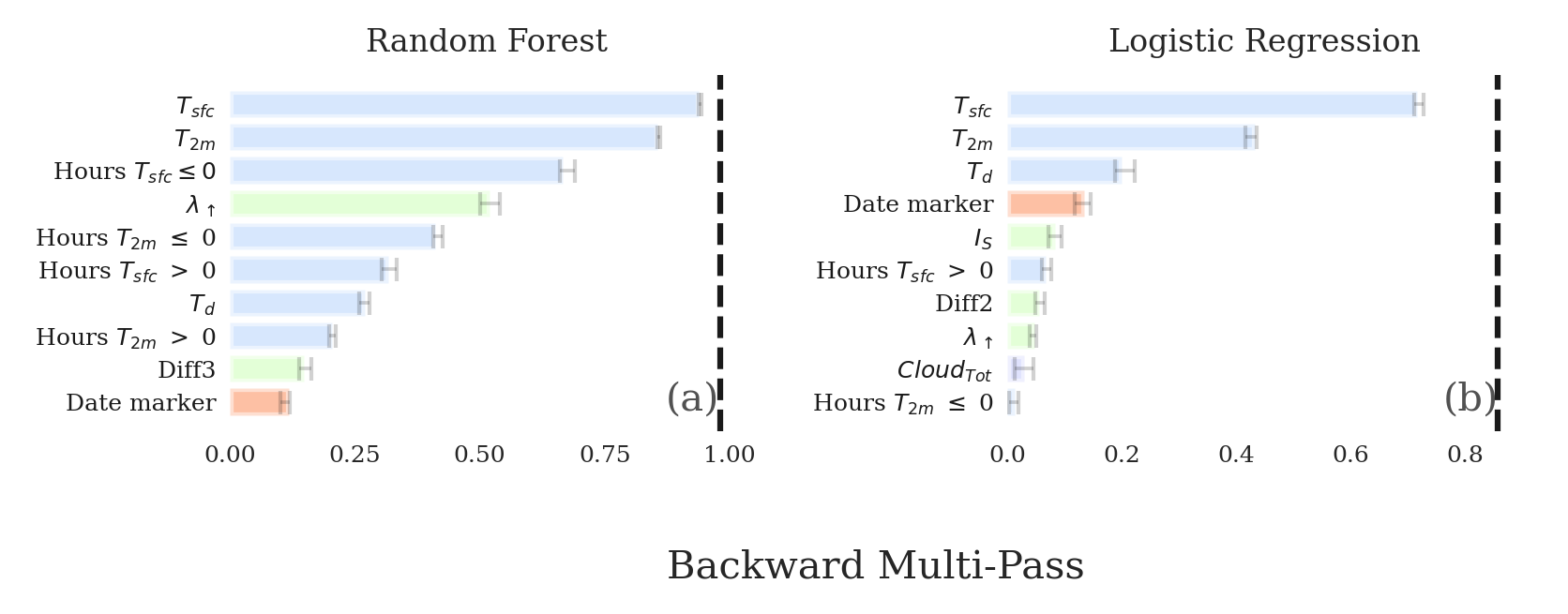
Permutation Importance
perm_results = explainer.permutation_importance(n_vars=10, evaluation_fn='norm_aupdc')
explainer.plot_importance(data=perm_results, panels=[('multipass', 'Random Forest')])
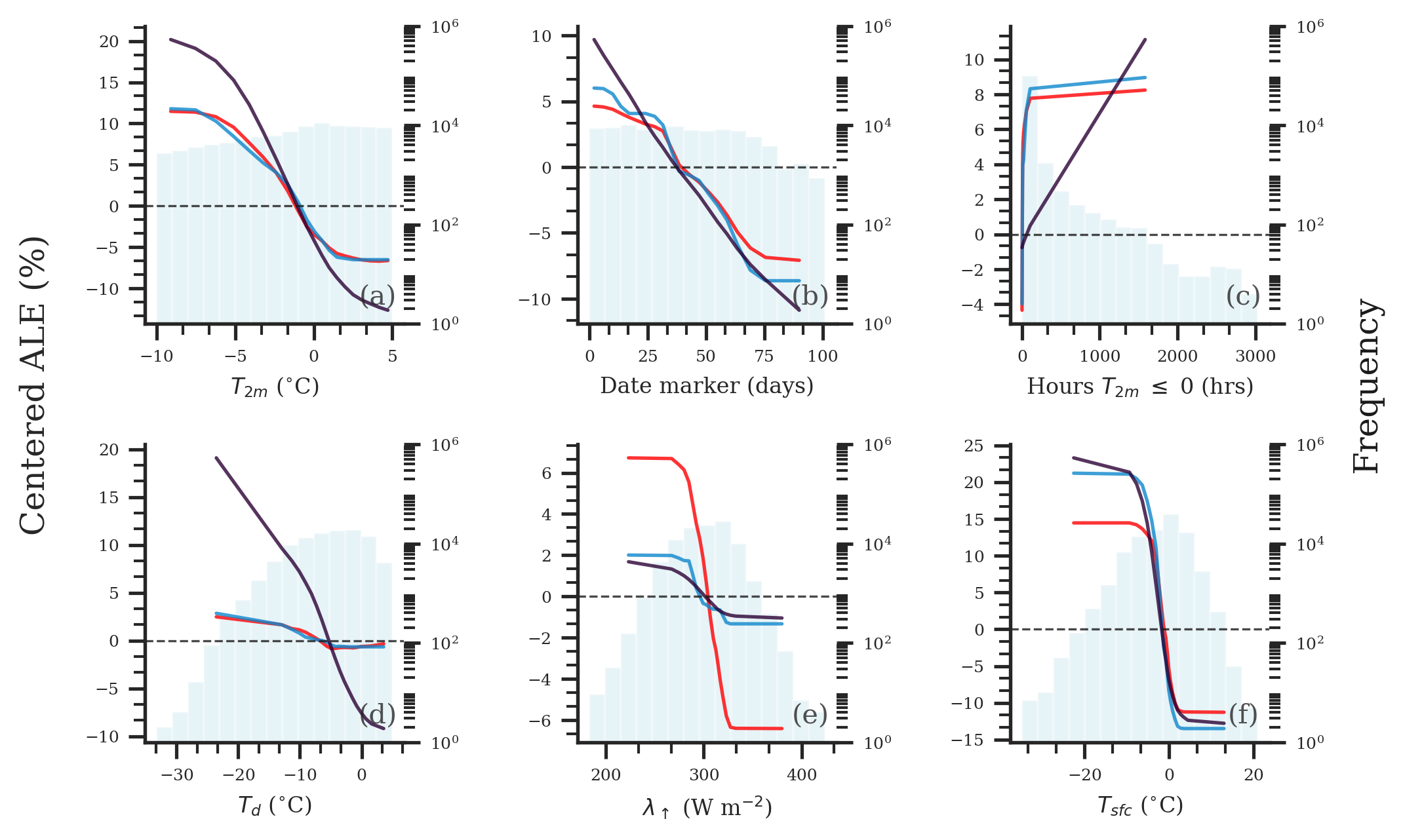
Accumulated Local Effects
important_vars = explainer.get_important_vars(perm_results, multipass=True, nvars=7)
ale = explainer.ale(features=important_vars, n_bins=20)
explainer.plot_ale(ale=ale)
Feature Attributions
import shap

single_example = X.iloc[[0]]
explainer = skexplain.ExplainToolkit(estimators=estimators, X=single_example)

shap_kws = {
    'masker': shap.maskers.Partition(X, max_samples=100, clustering="correlation"),
    'algorithm': 'auto',
}
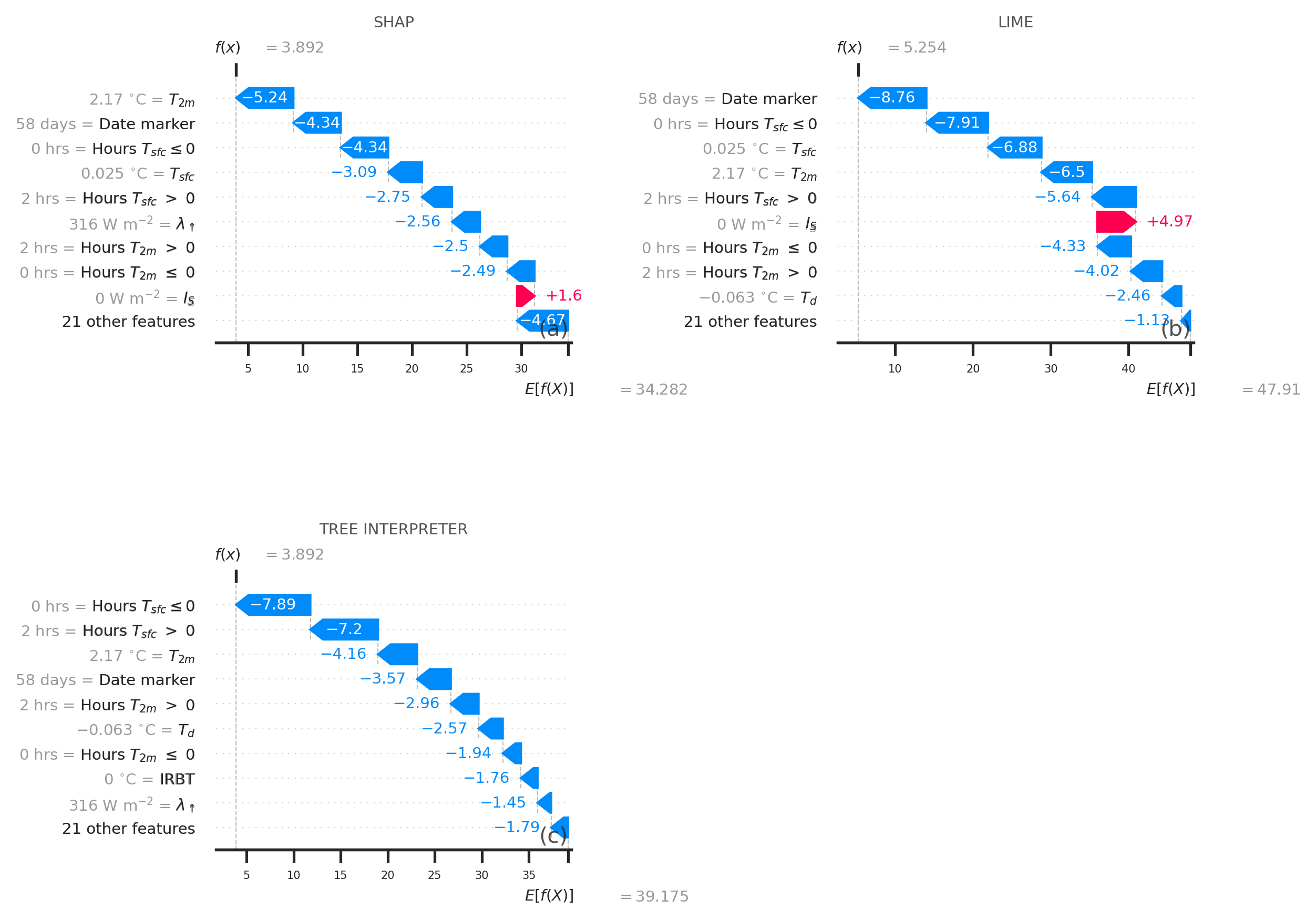
attr_results = explainer.local_attributions(
    method=['shap', 'lime', 'tree_interpreter'],
    shap_kws=shap_kws,
)
explainer.plot_contributions(attr_results)
Tutorial Notebooks
| Notebook | Description |
|---|---|
| 01 Quickstart | Minimal workflow from model to explanation |
| 02 Permutation Importance | Single/multi-pass permutation importance |
| 03 Grouped Importance | Grouped PI and comparing ranking methods |
| 04 ALE | 1D Accumulated Local Effects |
| 05 Partial Dependence | 1D Partial Dependence |
| 06 ICE Curves | Individual Conditional Expectations |
| 07 2D Effects | 2D ALE and Partial Dependence |
| 08 Local Attributions | SHAP, LIME, and TreeInterpreter |
| 09 SHAP Plots | Summary and dependence plots |
| 10 Interactions | H-statistic, IAS, MEC, Sobol indices |
| 11 Multiclass | Multiclass classification support |
| 12 Plot Configuration | Customizing plots with PlotConfig |
Citation
If you use scikit-explain in your research, please cite:
@article{Flora_2024,
  author  = {Flora, Montgomery L. and McGovern, Amy and Handler, Shawn},
  title   = {A Machine Learning Explainability Tutorial for Atmospheric Sciences},
  journal = {Artificial Intelligence for the Earth Systems},
  volume  = {3},
  number  = {1},
  pages   = {e230018},
  year    = {2024},
  doi     = {10.1175/AIES-D-23-0018.1},
}
Acknowledgments
This package includes adapted code from: PyALE, PermutationImportance, ALEPython, SHAP, scikit-learn, LIME, Faster-LIME, treeinterpreter
Contributing
- Issue Tracker: https://github.com/monte-flora/scikit-explain/issues
- Source Code: https://github.com/monte-flora/scikit-explain
License
BSD license.
Release history Release notifications | RSS feed


Download files
Download the file for your platform. If you're not sure which to choose, learn more about installing packages.
Source Distribution
Built Distribution
Filter files by name, interpreter, ABI, and platform.
If you're not sure about the file name format, learn more about wheel file names.
Copy a direct link to the current filters
File details
Details for the file scikit_explain-1.0.0.tar.gz.
File metadata
- Download URL: scikit_explain-1.0.0.tar.gz
- Upload date:
- Size: 34.9 MB
- Tags: Source
- Uploaded using Trusted Publishing? No
- Uploaded via: twine/6.1.0 CPython/3.13.7
File hashes
| Algorithm | Hash digest | |
|---|---|---|
| SHA256 |
189c343ebd363f23831808df53cda31d04af476c1780f651a7b902bc36ca35fc
|
|
| MD5 |
2f4c445350a3242ae33c6d820d40234f
|
|
| BLAKE2b-256 |
647d03efef8abebd348cf972137d25e59727fa562a16fdf678205507a9debfc7
|
File details
Details for the file scikit_explain-1.0.0-py3-none-any.whl.
File metadata
- Download URL: scikit_explain-1.0.0-py3-none-any.whl
- Upload date:
- Size: 35.1 MB
- Tags: Python 3
- Uploaded using Trusted Publishing? No
- Uploaded via: twine/6.1.0 CPython/3.13.7
File hashes
| Algorithm | Hash digest | |
|---|---|---|
| SHA256 |
e45abfa926c220ae35a1f0289861eee6ab92c9986b60e1e24722d3b060c4fa00
|
|
| MD5 |
f28ba94f25e58981e3200d7fedca3b69
|
|
| BLAKE2b-256 |
a638c5ea34f281bc925979ead6569d66a9d46344c712f39434c4df5c74d70bf9
|






