
scikit-stats: statistics tools and utilities


Installation
Install scikit-stats like any other Python package:
pip install scikit-stats
or similar (use --user, virtualenv, etc. if you wish).
Getting Started
The scikit-stats module includes modeling and hypothesis tests submodules. This a quick user guide to each submodule. The binder examples are also a good way to get started.
modeling
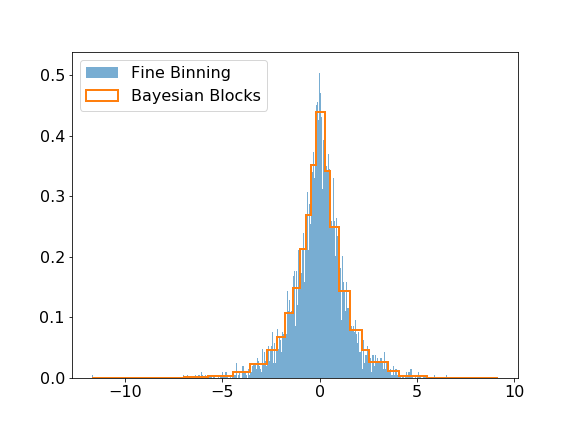
The modeling submodule includes the Bayesian Block algorithm that can be used to improve the binning of histograms. The visual improvement can be dramatic, and more importantly, this algorithm produces histograms that accurately represent the underlying distribution while being robust to statistical fluctuations. Here is a small example of the algorithm applied on Laplacian sampled data, compared to a histogram of this sample with a fine binning.
>>> import numpy as np
>>> import matplotlib.pyplot as plt
>>> from skstats.modeling import bayesian_blocks

>>> data = np.random.laplace(size=10000)
>>> blocks = bayesian_blocks(data)

>>> plt.hist(data, bins=1000, label='Fine Binning', density=True, alpha=0.6)
>>> plt.hist(data, bins=blocks, label='Bayesian Blocks', histtype='step', density=True, linewidth=2)
>>> plt.legend(loc=2)
hypotests
This submodule provides tools to do hypothesis tests such as discovery test and computations of upper limits or confidence intervals. scikit-stats needs a fitting backend to perform computations such as zfit. Any fitting library can be used if their API is compatible with scikit-stats (see api checks).
We give here a simple example of a discovery test, using zfit as backend, of gaussian signal with known mean and sigma over an exponential background.
>>> import zfit
>>> from zfit.loss import ExtendedUnbinnedNLL
>>> from zfit.minimize import Minuit

>>> bounds = (0.1, 3.0)
>>> obs = zfit.Space('x', limits=bounds)

>>> bkg = np.random.exponential(0.5, 300)
>>> peak = np.random.normal(1.2, 0.1, 25)
>>> data = np.concatenate((bkg, peak))
>>> data = data[(data > bounds[0]) & (data < bounds[1])]
>>> N = data.size
>>> data = zfit.Data.from_numpy(obs=obs, array=data)

>>> lambda_ = zfit.Parameter("lambda", -2.0, -4.0, -1.0)
>>> Nsig = zfit.Parameter("Ns", 20., -20., N)
>>> Nbkg = zfit.Parameter("Nbkg", N, 0., N*1.1)
>>> signal = Nsig * zfit.pdf.Gauss(obs=obs, mu=1.2, sigma=0.1)
>>> background = Nbkg * zfit.pdf.Exponential(obs=obs, lambda_=lambda_)
>>> loss = ExtendedUnbinnedNLL(model=signal + background, data=data)

>>> from skstats.hypotests.calculators import AsymptoticCalculator
>>> from skstats.hypotests import Discovery
>>> from skstats.hypotests.parameters import POI

>>> calculator = AsymptoticCalculator(loss, Minuit())
>>> poinull = POI(Nsig, 0)
>>> discovery_test = Discovery(calculator, [poinull])
>>> discovery_test.result()

p_value for the Null hypothesis = 0.0007571045424956679
Significance (in units of sigma) = 3.1719464825102244
The discovery test prints out the pvalue and the significance of the null hypothesis to be rejected.
3 maintainers


Metadata
3 maintainers
Release files for scikit-stats 0.1.2
For a detailed explanation of source distributions (sdists) and built distributions (wheels), please see the package formats documentation.
Source distribution (sdist)
| File | Size | Uploaded | Provenance | Actions |
|---|---|---|---|---|
| scikit-stats-0.1.2.tar.gz | 16.7 kB | Without provenance | Details for scikit-stats-0.1.2.tar.gz |
Built distribution (wheel)
| File | Interpreter | ABI | Platform | Actions Reset |
|---|---|---|---|---|
| scikit_stats-0.1.2-py2.py3-none-any.whl | Python 2, Python 3 | none | any | Details for scikit_stats-0.1.2-py2.py3-none-any.whl |
Total release size: 41.3 kB
Release files / scikit-stats-0.1.2.tar.gz
| Download URL | scikit-stats-0.1.2.tar.gz |
|---|---|
| Size | 16.7 kB |
| Tags | Source |
|
SHA-256 checksum How to use checksums |
e38ca051873bcebfec88f7b329eb546862469ca08088ea4380a316d5cec6d25e
|
|
BLAKE2b-256 checksum How to use checksums |
4d22e4d823bfd16b44e6c4f7a42dde478d50c34d5c0507e1d185411a633c2d90
|
| Upload date | |
|
Uploaded using Trusted Publishing? What is trusted publishing? |
No |
| Uploaded via |
twine/2.0.0 pkginfo/1.5.0.1 requests/2.22.0 setuptools/40.6.2 requests-toolbelt/0.9.1 tqdm/4.38.0 CPython/3.6.8
|
Release files / scikit_stats-0.1.2-py2.py3-none-any.whl
| Download URL | scikit_stats-0.1.2-py2.py3-none-any.whl |
|---|---|
| Size | 24.6 kB |
| Tags | Python 2 Python 3 |
|
SHA-256 checksum How to use checksums |
d31e1bf9f2f1f22054004be8e680a56695554ec732a51c056d4cc6513b2f7eed
|
|
BLAKE2b-256 checksum How to use checksums |
bed758aab05cec63439787c3e6b1cc458197382e83b7b709ac5baddb7d103c17
|
| Upload date | |
|
Uploaded using Trusted Publishing? What is trusted publishing? |
No |
| Uploaded via |
twine/2.0.0 pkginfo/1.5.0.1 requests/2.22.0 setuptools/40.6.2 requests-toolbelt/0.9.1 tqdm/4.38.0 CPython/3.6.8
|
Security for scikit-stats 0.1.2
Provenance
Provenance describes where a file came from. On PyPI, provenance is shared via attestations, which provide a verifiable record of the build or publishing details. View details, limitations and caveats.
No provenance found
None of the files in this release were uploaded with provenance metadata.
A note on package security
PyPI is a repository for distributing packages, not a service for auditing them. While third-party security researchers and our staff do their best to detect and remove malicious packages, PyPI cannot guarantee the quality, security or suitability of any given package.
To learn more about protecting yourself from malicious actors, visit our package security documentation.














