




SciQLopPlots
A high-performance scientific plotting library built on C++20/Qt6 with Python bindings via Shiboken6 (PySide6). Designed for the SciQLop data analysis platform but usable standalone.
Try it in your browser: the gallery runs the same library as WebAssembly, with examples you can edit and run. The JavaScript guide shows how to use it in your own pages.


Features
- Async resampling — render millions of points smoothly; data is downsampled in background threads via NeoQCP pipelines
- Multiple plot types — time series (line graphs), spectrograms (color maps), 2D histograms, parametric curves, N-D projection curves, waterfall plots
- Interactive — pan, zoom, data-driven callbacks, vertical/horizontal/rectangular spans, tracers, straight lines, text, shapes, pixmaps
- Multi-plot panels — synchronized axes, aligned margins, drag-and-drop from product trees
- Interval timelines — events and instrument modes as bars on named lanes, drawn like a logic analyzer's wave view; overlaps stacked by time or category, or forbidden; editable with the mouse
- Reactive pipelines — connect plot properties with
>>to build live data flows - Export — PDF (vector), PNG, JPG, BMP for both individual plots and panels
- Busy indicator — visual feedback when data is loading or being processed
- Runtime inspector — tree model/view for inspecting and editing plot properties
- Signal processing — gap-aware filters, FFT, spectrograms and rolling statistics on NumPy arrays (
SciQLopPlots.dsp) - In the browser — the same plots from JavaScript, compiled to WebAssembly (gallery, guide)
- Cross-platform — Linux, macOS and Windows, on x86-64 and ARM64
Architecture
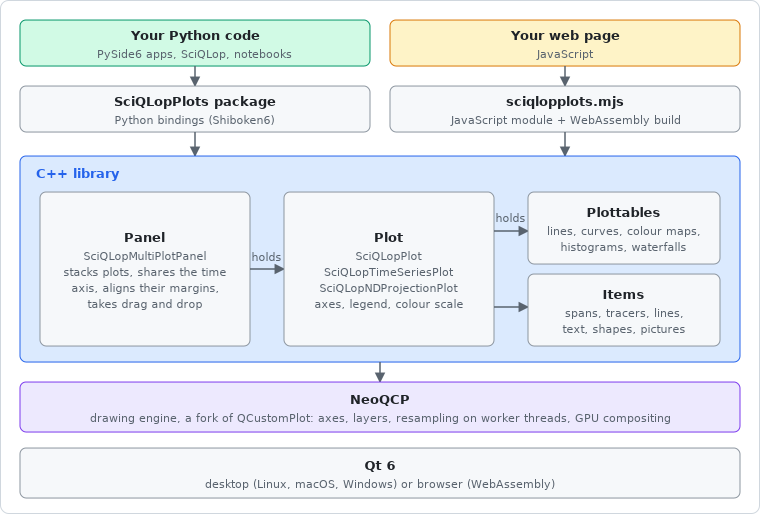
Data flow
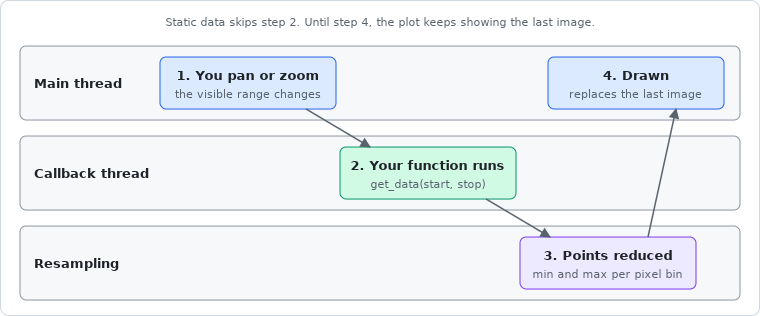
Quick start
The user guide walks through everything below and more: plot types, live data, time series, panels, overlays, pipelines and export. Every example in it is tested. The API reference lists every class and method.
pip install SciQLopPlots
Wheels exist for Python 3.12 to 3.14. They pin PySide6 to an exact version, so installing replaces any other PySide6 in the environment.
import numpy as np
from PySide6.QtWidgets import QApplication
from SciQLopPlots import SciQLopPlot

app = QApplication([])
plot = SciQLopPlot()

# Static data and a data function, both on the same plot
x = np.arange(0, 1000, dtype=np.float64)
y = np.sin(x / 100) * np.cos(x / 10)
plot.plot(x, y, labels=["signal"])

# Data callback (called on pan/zoom with visible range)
def get_data(start, stop):
    x = np.arange(start, stop, dtype=np.float64)
    y = np.column_stack([np.sin(x / 100), np.cos(x / 100)])
    return x, y

plot.plot(get_data, labels=["sin", "cos"])

plot.show()
app.exec()
Reactive pipelines
Connect plot properties with the >> operator, optionally through a function:
import numpy as np
from PySide6.QtGui import QColor
from SciQLopPlots import SciQLopPlot, SciQLopPlotRange

plot = SciQLopPlot()
x = np.linspace(0, 10, 1000)
plot.plot(x, np.sin(x), labels=["sin"])
span = plot.vertical_span(SciQLopPlotRange(2.0, 4.0), QColor(100, 200, 100, 80),
                          read_only=False, visible=True, tooltip="")

def describe(event):
    return f"{event.value.start():.2f} .. {event.value.stop():.2f}"

span.on.range >> describe >> span.on.tooltip   # the tooltip follows the span

zoomed = SciQLopPlot()
zoomed.plot(x, np.sin(x), labels=["zoom"])
span.on.range >> zoomed.x_axis().on.range      # a second plot shows the span's interval
The function gets an event whose .value is the new value. The user guide lists the properties you can connect.
To see every feature, try the browser gallery, or run the desktop gallery from a source checkout:
python tests/manual-tests/gallery.py
Runtime tracing
A built-in tracer writes Chrome trace JSON, to open in Perfetto,
Speedscope or chrome://tracing. It is always compiled in and
costs about 1 ns when off. Your own Python zones show next to the library's:
import numpy as np
from SciQLopPlots import tracing

with tracing.session("/tmp/sciqlop.json"):
    with tracing.zone("my.fetch", cat="data"):
        data = np.random.default_rng().normal(size=1_000_000)   # your code here
SCIQLOP_TRACE=/tmp/sciqlop.json python my_script.py turns it on for a whole run. The
API reference lists the rest:
decorators, counters, and Tracy when built with tracy_enable=true.
Building from source
You need Qt 6.12, a C++20 compiler, libclang (for Shiboken) and, in a virtual environment, the exact PySide6 version the package pins:
pip install pyside6==6.12.0 shiboken6==6.12.0 shiboken6-generator==6.12.0 \
    numpy meson meson-python ninja

# Qt's tools must be on PATH
export PATH=/path/to/Qt/6.12.0/gcc_64/bin:$PATH
export PKG_CONFIG_PATH=/path/to/Qt/6.12.0/gcc_64/lib/pkgconfig:$PKG_CONFIG_PATH

# debugoptimized, not debug: without optimisations the resampling is slow
meson setup build --buildtype=debugoptimized
meson compile -C build

# or build and install it as a Python package
pip install . --no-build-isolation
Build options: -Dtracy_enable=true turns on Tracy profiling, -Dtrace_refcount=true traces
Python reference counts, and -Dwith_opengl=false builds without OpenGL.
The browser build is described in the JavaScript guide.
Contributing
Bug reports, feature requests and pull requests are welcome on GitHub. A bug fix comes with a test that fails without it. Run the tests from outside the source tree, so the built package is the one imported:
cd /tmp && PYTHONPATH=/path/to/SciQLopPlots/build python -m pytest \
    /path/to/SciQLopPlots/tests/{integration,unit,fuzzing,resampler,tracing}
Credits
Development is supported by CDPP. We acknowledge support from Plas@Par.
Thanks
- PySide6 — Qt bindings and Shiboken6 binding generator
- NeoQCP — our fork of QCustomPlot, which draws on the GPU and plots large data without copying it
1 maintainer

Metadata
1 maintainer
Release files for SciQLopPlots 0.53.0
For a detailed explanation of source distributions (sdists) and built distributions (wheels), please see the package formats documentation.
Source distribution (sdist)
| File | Size | Uploaded | Provenance | Actions |
|---|---|---|---|---|
| sciqlopplots-0.53.0.tar.gz | 5.7 MB | Without provenance | Details for sciqlopplots-0.53.0.tar.gz |
Built distributions (wheels)
| File | Actions Reset | |||
|---|---|---|---|---|
| sciqlopplots-0.53.0-cp312-abi3-win_arm64.whl | CPython 3.12 | abi3 | Windows ARM64 | Details for sciqlopplots-0.53.0-cp312-abi3-win_arm64.whl |
| sciqlopplots-0.53.0-cp312-abi3-win_amd64.whl | CPython 3.12 | abi3 | Windows x86-64 | Details for sciqlopplots-0.53.0-cp312-abi3-win_amd64.whl |
| sciqlopplots-0.53.0-cp312-abi3-manylinux_2_39_aarch64.whl | CPython 3.12 | abi3 | Linux glibc 2.39+ ARM64 | Details for sciqlopplots-0.53.0-cp312-abi3-manylinux_2_39_aarch64.whl |
| sciqlopplots-0.53.0-cp312-abi3-manylinux_2_34_x86_64.whl | CPython 3.12 | abi3 | Linux glibc 2.34+ x86-64 | Details for sciqlopplots-0.53.0-cp312-abi3-manylinux_2_34_x86_64.whl |
| sciqlopplots-0.53.0-cp312-abi3-macosx_13_0_x86_64.whl | CPython 3.12 | abi3 | macOS 13.0+ x86-64 | Details for sciqlopplots-0.53.0-cp312-abi3-macosx_13_0_x86_64.whl |
| sciqlopplots-0.53.0-cp312-abi3-macosx_13_0_arm64.whl | CPython 3.12 | abi3 | macOS 13.0+ ARM64 | Details for sciqlopplots-0.53.0-cp312-abi3-macosx_13_0_arm64.whl |
Total release size: 43.5 MB
Release files / sciqlopplots-0.53.0.tar.gz
| Download URL | sciqlopplots-0.53.0.tar.gz |
|---|---|
| Size | 5.7 MB |
| Tags | Source |
|
SHA-256 checksum How to use checksums |
fc83884e153663c92d9f5ac02bb39329877c39b2135014c17deb4e46a59631b3
|
|
BLAKE2b-256 checksum How to use checksums |
d42811eb93f982f7c0f8762c4b4164dd6cb478ed4bf9b2bb44b4b3761d57135f
|
| Upload date | |
|
Uploaded using Trusted Publishing? What is trusted publishing? |
No |
| Uploaded via |
twine/7.0.0 CPython/3.13.16
|
Release files / sciqlopplots-0.53.0-cp312-abi3-win_arm64.whl
| Download URL | sciqlopplots-0.53.0-cp312-abi3-win_arm64.whl |
|---|---|
| Size | 5.1 MB |
| Tags | CPython 3.12 Windows ARM64 abi3 |
|
SHA-256 checksum How to use checksums |
0b88a5c9c09286b27767ff0030031b1a5286412cf111aa125fe2d2a068b446ad
|
|
BLAKE2b-256 checksum How to use checksums |
e2b35e7d77567c55f05f49b10c5f1b83f1d22ba1221b088fbbafa03c6954ec7f
|
| Upload date | |
|
Uploaded using Trusted Publishing? What is trusted publishing? |
No |
| Uploaded via |
twine/7.0.0 CPython/3.13.16
|
Release files / sciqlopplots-0.53.0-cp312-abi3-win_amd64.whl
| Download URL | sciqlopplots-0.53.0-cp312-abi3-win_amd64.whl |
|---|---|
| Size | 4.8 MB |
| Tags | CPython 3.12 Windows x86-64 abi3 |
|
SHA-256 checksum How to use checksums |
5b6b241e2f55733916d2c024be40dee341105b36ee48108b5671a260e7b61256
|
|
BLAKE2b-256 checksum How to use checksums |
4e4808c9b949dc96cc4d0ba8c02232c15106cbdf7020e0cceeaaaf8da52582a4
|
| Upload date | |
|
Uploaded using Trusted Publishing? What is trusted publishing? |
No |
| Uploaded via |
twine/7.0.0 CPython/3.13.16
|
Release files / sciqlopplots-0.53.0-cp312-abi3-manylinux_2_39_aarch64.whl
| Download URL | sciqlopplots-0.53.0-cp312-abi3-manylinux_2_39_aarch64.whl |
|---|---|
| Size | 7.6 MB |
| Tags | CPython 3.12 Linux glibc 2.39+ ARM64 abi3 |
|
SHA-256 checksum How to use checksums |
0549ffec4228c44eb29cebea427ce80f08156e36bc331524ad398210a60c6165
|
|
BLAKE2b-256 checksum How to use checksums |
155da0863d5d1c5419215ba1262d4744f68185b565cda0ee1ddaa70e5eeb4a11
|
| Upload date | |
|
Uploaded using Trusted Publishing? What is trusted publishing? |
No |
| Uploaded via |
twine/7.0.0 CPython/3.13.16
|
Release files / sciqlopplots-0.53.0-cp312-abi3-manylinux_2_34_x86_64.whl
| Download URL | sciqlopplots-0.53.0-cp312-abi3-manylinux_2_34_x86_64.whl |
|---|---|
| Size | 8.2 MB |
| Tags | CPython 3.12 Linux glibc 2.34+ x86-64 abi3 |
|
SHA-256 checksum How to use checksums |
fe416fcb68dc311f4b58403421bad59482ee701a7c59d81c62f70b9acaf23d93
|
|
BLAKE2b-256 checksum How to use checksums |
2b54b15b72ec9f2459ec6acced02fe55e22e181d83ce6b739dddf7cd5a4e92a1
|
| Upload date | |
|
Uploaded using Trusted Publishing? What is trusted publishing? |
No |
| Uploaded via |
twine/7.0.0 CPython/3.13.16
|
Release files / sciqlopplots-0.53.0-cp312-abi3-macosx_13_0_x86_64.whl
| Download URL | sciqlopplots-0.53.0-cp312-abi3-macosx_13_0_x86_64.whl |
|---|---|
| Size | 6.3 MB |
| Tags | CPython 3.12 abi3 macOS 13.0+ x86-64 |
|
SHA-256 checksum How to use checksums |
86a9e606cf860fb345b769cc4778a15e9efbd79f5a4e01726951fbe69786fb54
|
|
BLAKE2b-256 checksum How to use checksums |
6ac33435d753b35272b6069da4d23e6c8301e7bac6bd7e123e6cd577455e002d
|
| Upload date | |
|
Uploaded using Trusted Publishing? What is trusted publishing? |
No |
| Uploaded via |
twine/7.0.0 CPython/3.13.16
|
Release files / sciqlopplots-0.53.0-cp312-abi3-macosx_13_0_arm64.whl
| Download URL | sciqlopplots-0.53.0-cp312-abi3-macosx_13_0_arm64.whl |
|---|---|
| Size | 5.8 MB |
| Tags | CPython 3.12 abi3 macOS 13.0+ ARM64 |
|
SHA-256 checksum How to use checksums |
a2acbcdd757dc4b11874c9aa4cc453e31c0b935dcf4104a2e14649b5013808dc
|
|
BLAKE2b-256 checksum How to use checksums |
d81deeb2043d8c6c70a39749230e2d32f230c34c2c85af18eec84eaba48c232c
|
| Upload date | |
|
Uploaded using Trusted Publishing? What is trusted publishing? |
No |
| Uploaded via |
twine/7.0.0 CPython/3.13.16
|
Security for SciQLopPlots 0.53.0
Provenance
Provenance describes where a file came from. On PyPI, provenance is shared via attestations, which provide a verifiable record of the build or publishing details. View details, limitations and caveats.
No provenance found
None of the files in this release were uploaded with provenance metadata.
A note on package security
PyPI is a repository for distributing packages, not a service for auditing them. While third-party security researchers and our staff do their best to detect and remove malicious packages, PyPI cannot guarantee the quality, security or suitability of any given package.
To learn more about protecting yourself from malicious actors, visit our package security documentation.














