
SciStack GUI
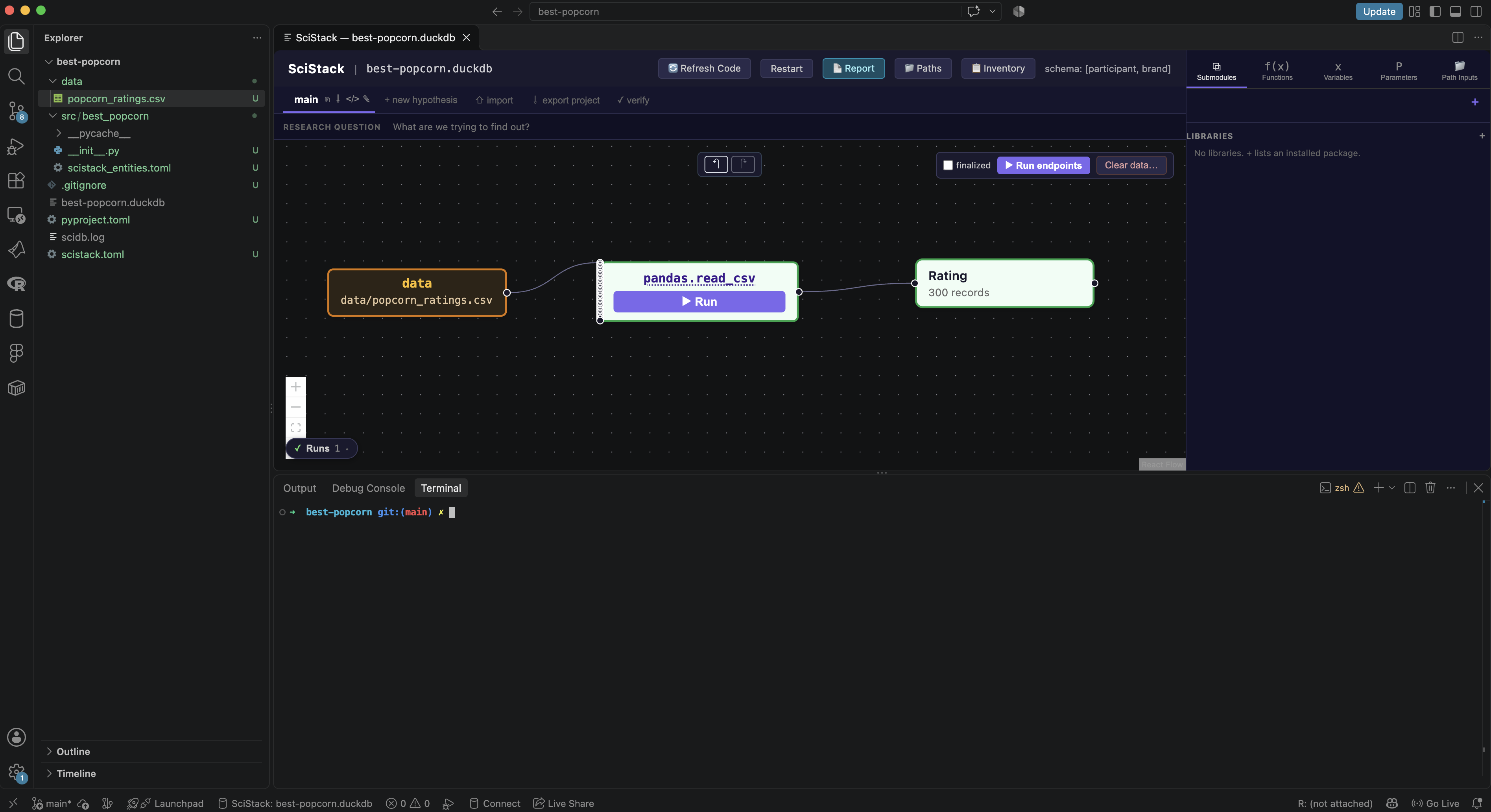
The Python backend for the SciStack Pipeline GUI VS Code extension. It draws your SciStack pipeline as a diagram you can run, inspect, and plot from.
📖 Documentation: GUI docs
Install
Most people don't install this package directly. It comes with scistack:
pip install scistack
Install it into the Python environment that VS Code uses (Python: Select Interpreter in the Command Palette), at the same version as the extension. The extension warns on startup if the two versions differ, and shows the exact pip install command that fixes it.
What it does
- Canvas. Functions, variables, parameters and path inputs are drawn as nodes, connected by what feeds into what. Each step is coloured by whether its results are up to date.
- Runs. Run one step or the whole pipeline from the canvas, for Python and MATLAB functions alike, and watch the progress.
- Plot Studio. Turn any variable into a publication-ready figure without writing plotting code: group by condition, split into panels, show each participant, and save.
- Stat Studio. Answer a few questions about your study, and it recommends a statistical test, runs it, and draws the result on the linked figure.
- Variants and Inventory. See every version of a result side by side, and find which combinations of your schema keys have no data.
- Project bundles. Export a project that a colleague can import and re-run.
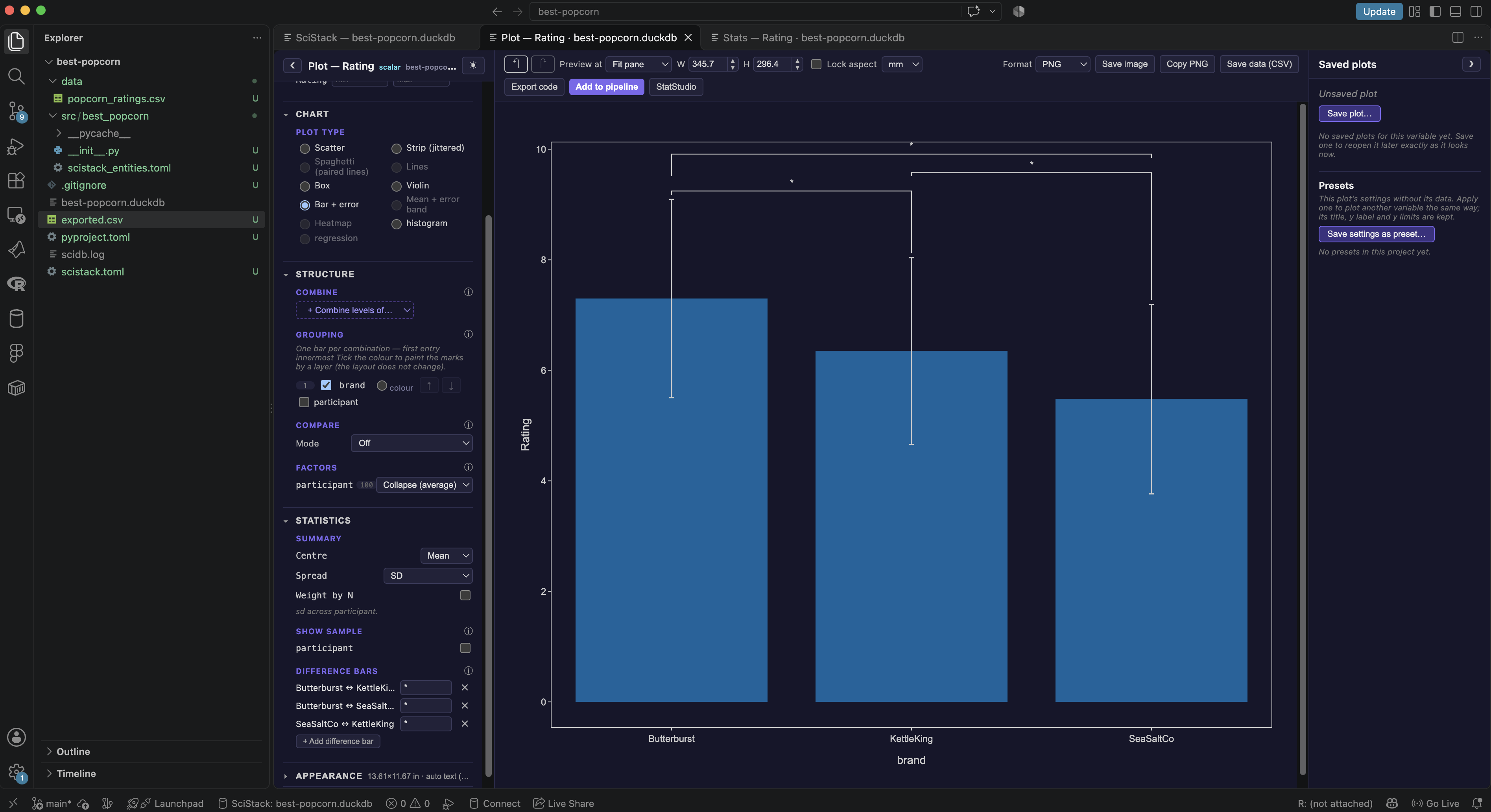
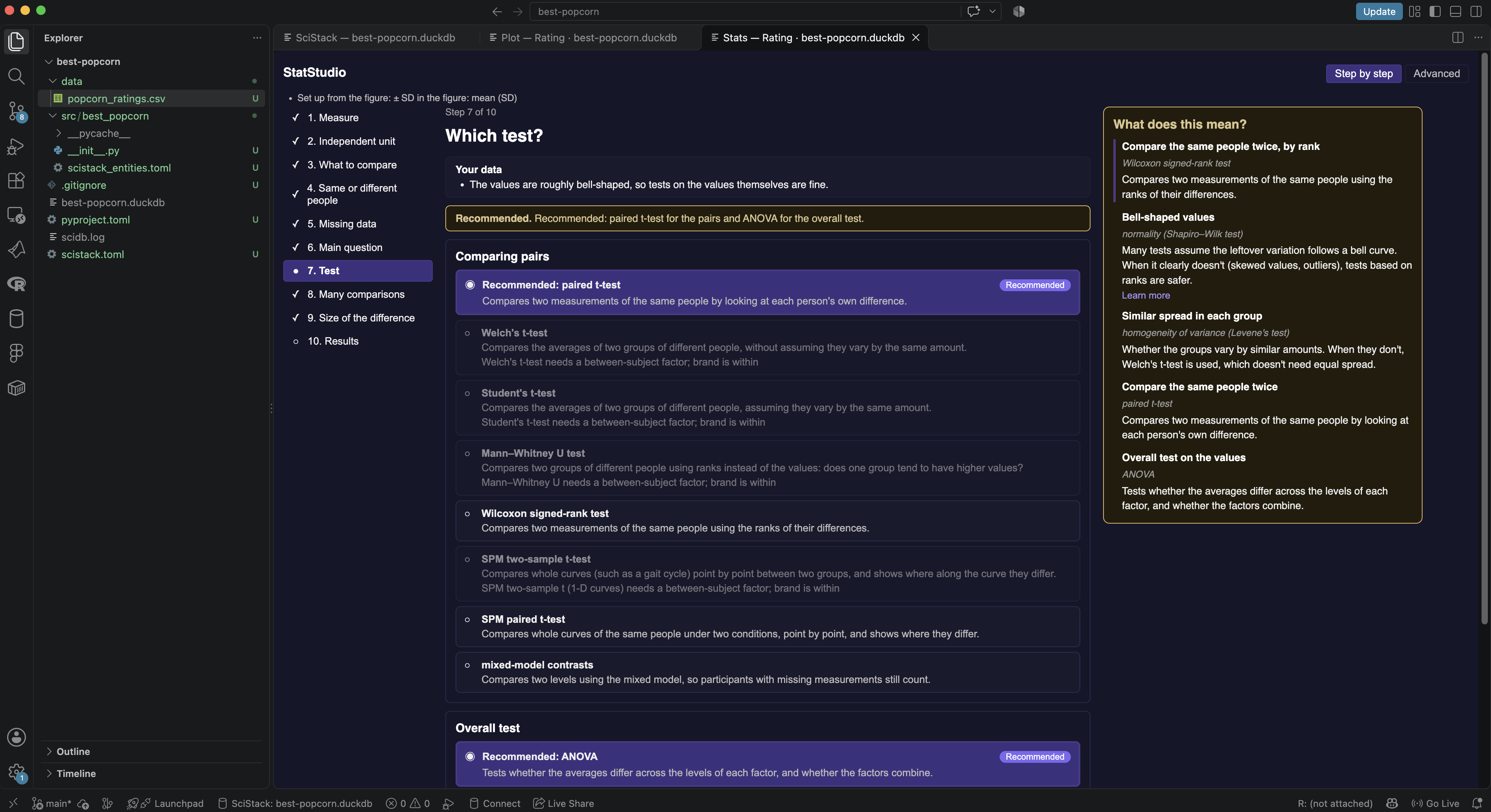
The Best Popcorn walkthrough goes from a CSV to a figure with statistics, without writing any code.
How the extension uses it
The extension starts one backend process per open database:
python -m scistack_gui.server --db experiment.duckdb
It talks to that process with JSON-RPC over stdin and stdout, and forwards the process's log output to the SciStack Output Channel. The extension chooses the Python interpreter in this order: the scistack.pythonPath setting, then the interpreter selected in the VS Code Python extension, then python3 on PATH.
Running it in a browser
The same GUI can also run outside VS Code, in your browser:
scistack-gui experiment.duckdb
This serves the GUI on localhost:8765 and opens a browser tab. Run it with no database to open the project-creation screen instead. Options:
| Option | What it does |
|---|---|
--port N |
Serve on port N instead of 8765 |
--schema-keys subject,session |
Create the database with these schema keys if it doesn't exist yet |
--module pipeline.py |
Load pipeline functions from a single .py file |
--project PATH |
Use this scistack.toml, or the folder that contains one |
--project-root PATH |
Where to write a new scistack.toml and entities file when the project has none yet (default: the current folder) |
--no-browser |
Don't open a browser tab |
License
MIT
1 maintainer

Metadata
1 maintainer
Release files for scistack-gui 0.4.10
For a detailed explanation of source distributions (sdists) and built distributions (wheels), please see the package formats documentation.
Source distribution (sdist)
| File | Size | Uploaded | Provenance | Actions |
|---|---|---|---|---|
| scistack_gui-0.4.10.tar.gz | 1.9 MB | With provenance | Details for scistack_gui-0.4.10.tar.gz |
Built distribution (wheel)
| File | Interpreter | ABI | Platform | Actions Reset |
|---|---|---|---|---|
| scistack_gui-0.4.10-py3-none-any.whl | Python 3 | none | any | Details for scistack_gui-0.4.10-py3-none-any.whl |
Total release size: 3.9 MB
Release files / scistack_gui-0.4.10.tar.gz
| Download URL | scistack_gui-0.4.10.tar.gz |
|---|---|
| Size | 1.9 MB |
| Tags | Source |
|
SHA-256 checksum How to use checksums |
359da57f876a11ce9742e1790cbfcf3a9c019b706910a48e48873422d6e7ce3b
|
|
BLAKE2b-256 checksum How to use checksums |
eb843a176ce8261c8666d7093baec4cf53868966d51087df6427f014660d5ad8
|
| Upload date | |
|
Uploaded using Trusted Publishing? What is trusted publishing? |
Yes |
| Uploaded via |
twine/7.0.0 CPython/3.13.16
|
Provenance
Provenance describes where a file came from. On PyPI, provenance is shared via attestations, which provide a verifiable record of the build or publishing details. View details, limitations and caveats.


PyPI Publish Attestation
PyPI verified that this artifact, at this checksum, originated from the publisher listed below.
Signed by GitHub Actions, verified by PyPI on Nov 19, 2026.
Transparency logRelease files / scistack_gui-0.4.10-py3-none-any.whl
| Download URL | scistack_gui-0.4.10-py3-none-any.whl |
|---|---|
| Size | 2.0 MB |
| Tags | Python 3 |
|
SHA-256 checksum How to use checksums |
3bb9b106bb7ebee33b3b7ade1a7fb0791c3385824840713f6bc7788764b7560f
|
|
BLAKE2b-256 checksum How to use checksums |
f61e3b2b1fa03121e072d7cea531b0e4f55fbed6c08537a6c3bc18b641c07b36
|
| Upload date | |
|
Uploaded using Trusted Publishing? What is trusted publishing? |
Yes |
| Uploaded via |
twine/7.0.0 CPython/3.13.16
|
Provenance
Provenance describes where a file came from. On PyPI, provenance is shared via attestations, which provide a verifiable record of the build or publishing details. View details, limitations and caveats.
PyPI Publish Attestation
PyPI verified that this artifact, at this checksum, originated from the publisher listed below.
Signed by GitHub Actions, verified by PyPI on Nov 19, 2026.
Transparency logSecurity for scistack-gui 0.4.10
Provenance
Provenance describes where a file came from. On PyPI, provenance is shared via attestations, which provide a verifiable record of the build or publishing details. View details, limitations and caveats.
Full provenance
Both files in this release have been uploaded with provenance metadata.
Attestation for scistack_gui-0.4.10.tar.gz
PyPI Publish Attestation
PyPI verified that this artifact, at this checksum, originated from the publisher listed below.
Signed by GitHub Actions, verified by PyPI on Nov 19, 2026.
Transparency logA note on package security
PyPI is a repository for distributing packages, not a service for auditing them. While third-party security researchers and our staff do their best to detect and remove malicious packages, PyPI cannot guarantee the quality, security or suitability of any given package.
To learn more about protecting yourself from malicious actors, visit our package security documentation.














