
Single Cell Interactive Viewer (Sciviewer)
This is an interactive viewer for 2D embeddings such as UMAP or tSNE of high dimensional single-cell RNA-seq data that is run directly out of the Jupyter Notebook environment. The user can select cells in the 2D plane and the viewer will calculate the differential expression between the selected and the unselected cells. Alternatively, the user can select a group of cells and a direction and the viewer will identify the genes with the greatest variation (Pearson correlation) along that direction. See a video of how this works below. Also, see the example tutorial in this repository (a small example of 3000 PBMCs that illustrates all the input options, and a larger one of 50,000 circulating T-cells).
Installation
The main requirement for sciviewer is py5 which in turn requires Python 3.8. We recommend using the conda package manager to install the necessary dependencies fo sciviewer. Conda can be installed following the instructions here. Then follow the steps below to install sciviewer.
- Prepare and activate the conda environment containing dependencies for py5:
conda env create -n sciviewer -f https://raw.githubusercontent.com/colabobio/sciviewer/master/sciviewer-env.yml
conda activate sciviewer
Alternatively, if you want to append the needed dependencies to an existing conda environment, instead of creating a new one, you can do the following:
conda env update -n your_existing_environment -f https://raw.githubusercontent.com/colabobio/sciviewer/master/sciviewer-env.yml
conda activate your_existing_environment
Note, Sciviewer currently requires Python 3.8 or greater.
- Next, install the sciviewer package using pip:
pip install sciviewer
And that is it, the module is now installed and ready to be used.
To uninstall, use:
pip uninstall sciviewer
- Now launch jupyter from within the activated conda environment and you are good to go.
jupyter lab
Quick start
Sciviewer is executed from a Jupyter notebook such as in the examples directory. It is run by initializing a SCIViewer object with the 2D embedding (# cells X 2) and the expression data (# cells X # genes) and then running the explore_data method. E.g.
from sciviewer import SCIViewer
svobj = SCIViewer(expr, umap)
svobj.explore_data()
Running the code above will cause the visualizer to appear. The umap and expression data can also now be provided directly as a Scanpy AnnData, see below or tutorials for details.
Click the video link below for a ~3 minute tutorial on how to use the visualizer:
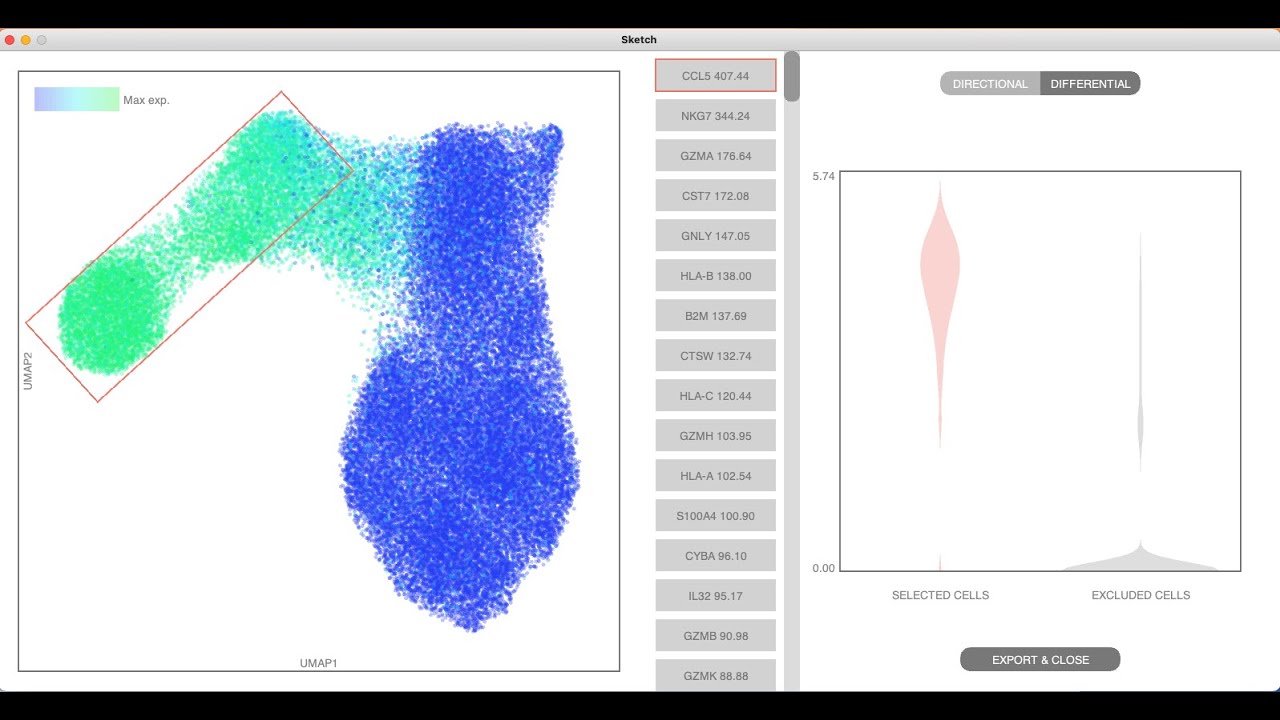
Note, if you are running Sciviewer from the Jupyter notebook as in the tutorials, you need to load the py5 magic extension before you can start the visualizer
%load_ext py5
and if you are running it from a jupyter notebook on a mac computer, you need to add an additional magic extension
%gui osx
Some key usage points:
- Inputs: The expression data can be provided as a Scanpy AnnData, Pandas DataFrame, a Numpy ndarray, or as a scipy sparse csc_matrix.
- AnnData expression: For AnnData objects, the expression data are accessed from the .X attribute by default. Setting the use_raw argument to True causes it to be accessed from the .raw.X attribute instead. If the data are sparse, sciviewer requires it to be in the csc_matrix format. See the tutorial for how to convert between sparse matrix formats
- Sparsity: Providing the data as a sparse csc_matrix is recommended for large datasets as it can lead to a considerable (1-2 order or magnitude) performance speedup. See this notebook as an example.
- Gene/cell names: If the expression data is provided as a Pandas DataFrame, the cell names are inferred from the index and the gene names are inferred from the columns. If it is provided as a Scanpy AnnData, the gene names come from the index of the .var attribute and the cell names come from the index of the .obs attribute. Otherwise, the gene names and cell names can be provided when initializing the SCIViewer class with the gene_names and cell_names arguments, or will be initialized with generic names.
- Real time updating of python variables The selected_cells attribute of the sciviewer object is updated whenever a new set of cells are selected, regardless of the mode, and contains information about the selected cells. The results_proj_correlation attribute of the sciviewer object is updated whenever a new selection is made in the "directional" mode and contains the Pearson correlation and P-values of all genes for the selected direction and cells. The results_diffexpr attribute is updated when a new selection is made in the "differential" mode and contains the T-statistic and P-value for the differential expression test (simple Welch's T-test). These are updated in real time as the visualizer is in use.
See the tutorial notebooks for more details
Development / debugging
For development purposes, it can be helpful to import sciviewer directly rather than installing the package. See the extras/debugging directory for notebooks with examples of how to do this e.g. debug_example_3K_PBMC.ipynb.
1 maintainer

Metadata
1 maintainer
Release files for sciviewer 0.13
For a detailed explanation of source distributions (sdists) and built distributions (wheels), please see the package formats documentation.
Source distribution (sdist)
| File | Size | Uploaded | Provenance | Actions |
|---|---|---|---|---|
| sciviewer-0.13.tar.gz | 17.9 kB | Without provenance | Details for sciviewer-0.13.tar.gz |
Built distribution (wheel)
| File | Interpreter | ABI | Platform | Actions Reset |
|---|---|---|---|---|
| sciviewer-0.13-py3-none-any.whl | Python 3 | none | any | Details for sciviewer-0.13-py3-none-any.whl |
Total release size: 34.4 kB
Release files / sciviewer-0.13.tar.gz
| Download URL | sciviewer-0.13.tar.gz |
|---|---|
| Size | 17.9 kB |
| Tags | Source |
|
SHA-256 checksum How to use checksums |
dd85444eb783225a8e94df7fc2ae0505bec5a4bb67d03ec9333388e26b0929fe
|
|
BLAKE2b-256 checksum How to use checksums |
c555b519f05a4fa60f0e88c50b88ae21bfd2fcfc712cf93dd8b057857a3ca9b9
|
| Upload date | |
|
Uploaded using Trusted Publishing? What is trusted publishing? |
No |
| Uploaded via |
twine/3.4.2 importlib_metadata/4.6.3 pkginfo/1.7.1 requests/2.26.0 requests-toolbelt/0.9.1 tqdm/4.62.0 CPython/3.8.10
|
Release files / sciviewer-0.13-py3-none-any.whl
| Download URL | sciviewer-0.13-py3-none-any.whl |
|---|---|
| Size | 16.4 kB |
| Tags | Python 3 |
|
SHA-256 checksum How to use checksums |
4fbe67dc26ab077e0d7aa30b1b7148caaefd921db92772076cb45db39381d383
|
|
BLAKE2b-256 checksum How to use checksums |
ddd5870b3c9cf462dcceb415c05c9483c2a9bda3ace4bc554e8d478ebe99e364
|
| Upload date | |
|
Uploaded using Trusted Publishing? What is trusted publishing? |
No |
| Uploaded via |
twine/3.4.2 importlib_metadata/4.6.3 pkginfo/1.7.1 requests/2.26.0 requests-toolbelt/0.9.1 tqdm/4.62.0 CPython/3.8.10
|
Security for sciviewer 0.13
Provenance
Provenance describes where a file came from. On PyPI, provenance is shared via attestations, which provide a verifiable record of the build or publishing details. View details, limitations and caveats.
No provenance found
None of the files in this release were uploaded with provenance metadata.
A note on package security
PyPI is a repository for distributing packages, not a service for auditing them. While third-party security researchers and our staff do their best to detect and remove malicious packages, PyPI cannot guarantee the quality, security or suitability of any given package.
To learn more about protecting yourself from malicious actors, visit our package security documentation.














