
sciwidgets
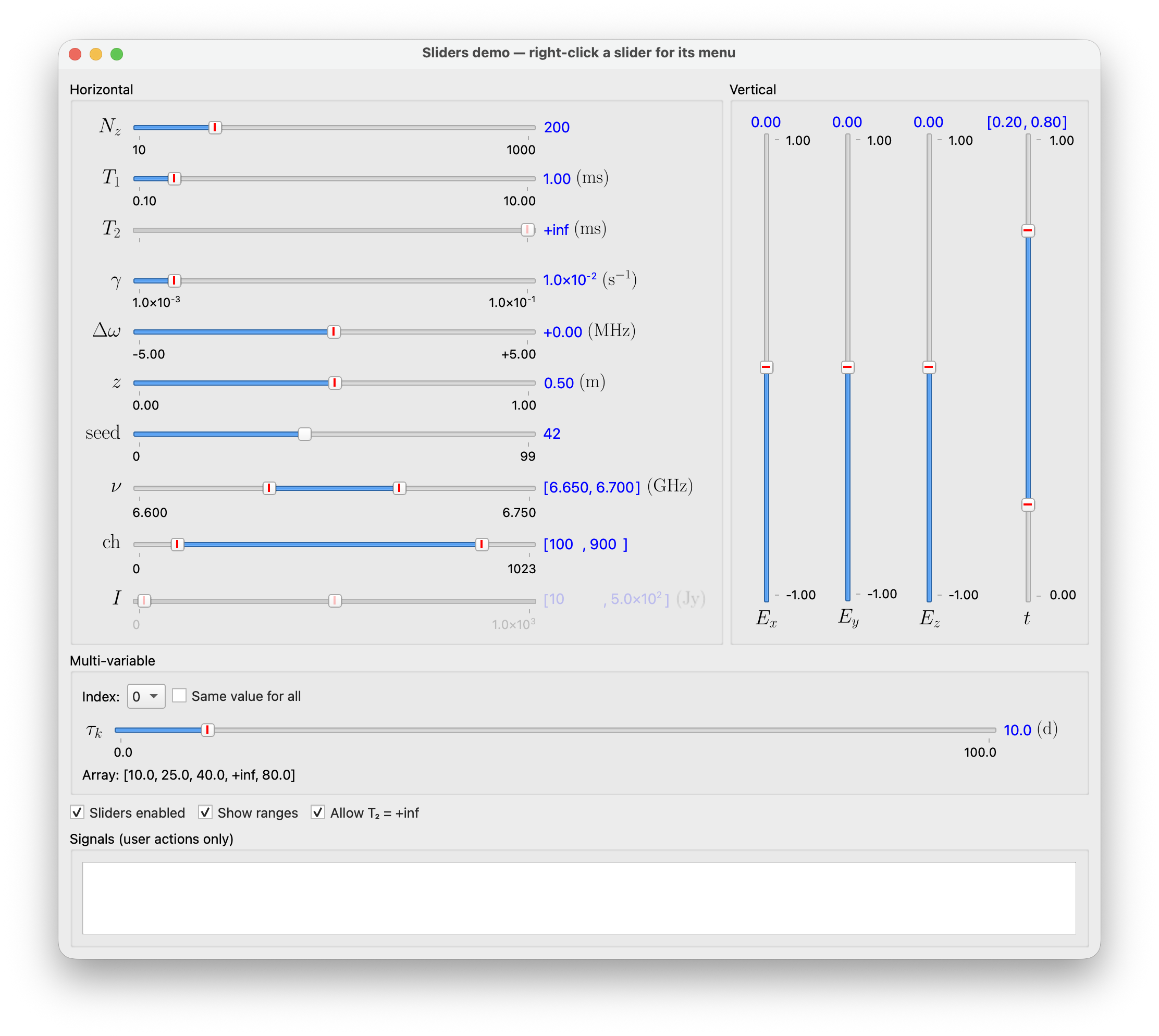
PySide6 widgets for scientific desktop apps: math labels rendered with LaTeX/mathtext, dialogs, and parameter inputs such as sliders, range sliders and validated number fields.
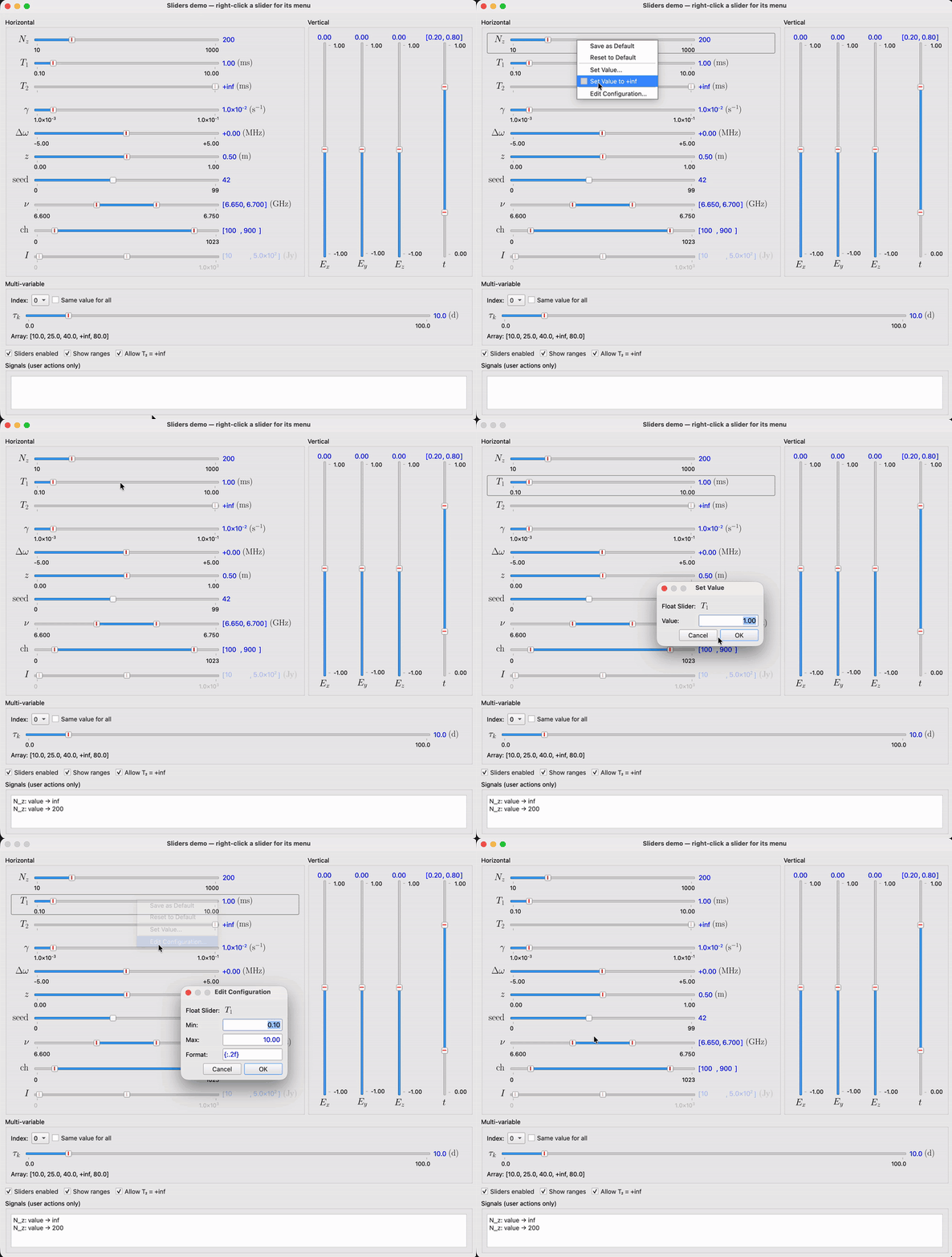
Right-click menu, Set Value and Edit Configuration:
The widgets were written for the Maxwell Bloch Solver and moved into this package so other apps can share them.
Features
- Math labels:
MathLabelrenders LaTeX through Matplotlib and scales cleanly as SVG. It uses your system LaTeX when installed and falls back to Matplotlib's mathtext otherwise. - Sliders: integer, float, array, range and multi-variable sliders with LaTeX names and units, optional range labels, a default-value marker and a right-click menu (save/reset default, set value, ±inf, edit range and format).
- Scientific number format:
"{:.3S}"displays values as1.23×10⁴. - Validated input:
NumericLineEditchecks numbers and limits while typing and marks invalid input with a red frame. - Parameter widgets: line edit, combo box and toggle sharing one interface
with the sliders (
get_value/set_value,get_config/set_config) and name/value columns that line up across a panel. - Dialogs: information, warning, error, question, rich-text and About dialogs.
Components
| Import | Contents | Docs |
|---|---|---|
sciwidgets.params (sliders) |
FloatSlider, IntSlider, ArraySlider, FloatRangeSlider, IntRangeSlider, MultiVariableSlider, SliderFeature |
Sliders |
sciwidgets.params (inputs) |
ParameterLineEdit, ParameterComboBox, ParameterToggle, NumericLineEdit |
Parameter widgets |
sciwidgets.labels |
MathLabel, set_latex_enabled |
Labels |
sciwidgets.dialogs |
show_information, show_warning, show_critical, show_rich_information, show_about_dialog, ask_question |
Dialogs |
sciwidgets.window |
MenuBarController, StatusBarController |
Window helpers |
sciwidgets.style, sciwidgets.formatting |
apply_sci_style, SciStyle, value_to_text, pretty_sci_text |
Style and formatting |
Install
pip install sciwidgets
Requires Python 3.10+, PySide6 6.5+, Matplotlib and NumPy (installed automatically). A LaTeX installation is optional.
For development, from the repo root:
pip install -e .
Quick start
import sys

from PySide6.QtWidgets import QApplication, QVBoxLayout, QWidget

from sciwidgets.params import FloatRangeSlider, FloatSlider
from sciwidgets.style import apply_sci_style

app = QApplication(sys.argv)
apply_sci_style(app)  # required, see "Style" below

win = QWidget()
layout = QVBoxLayout(win)

t1 = FloatSlider(
    label="T_1", unit=r"\mathrm{ms}",
    min_val=0.1, max_val=10.0, init_val=1.0, val_fmt="{:.2f}",
    min_limit=0.0, min_limit_inclusive=False,
)
band = FloatRangeSlider(
    label=r"\nu", unit=r"\mathrm{GHz}",
    min_val=6.60, max_val=6.75, init_vals=(6.65, 6.70), val_fmt="{:.3f}",
)
layout.addWidget(t1)
layout.addWidget(band)

t1.valueChanged.connect(lambda v: print("T1 =", v))
band.valueChanged.connect(lambda v: print("band =", v["range"]))

win.show()
sys.exit(app.exec())
Labels and units are written in LaTeX math mode, without the $ signs.
Style
The widgets rely on SciStyle, a Fusion-based Qt style, for part of their
behaviour: clicking a slider groove moves the handle there, disabled sliders
get a flat groove, and invalid numeric input gets a red frame. Apply it once
at startup:
from sciwidgets.style import apply_sci_style

apply_sci_style(app, my_app_style_sheet)  # your own rules are appended
Signals
valueChanged, defaultChanged and configChanged are emitted only for
user actions (dragging, typing, the context menu, dialogs). Setting values
from code with set_value, set_config and similar methods is silent, so
loading saved parameters never triggers your handlers. Read the new state
with get_value() / get_config() after setting it.
Demos
Each subpackage has a runnable demo:
python -m sciwidgets.labels
python -m sciwidgets.dialogs
python -m sciwidgets.params
python -m sciwidgets.params.sliders
Versions
Releases are Git tags following semantic versioning. Pin an exact tag in your app's requirements, as in the install line above, and move to a newer tag when you are ready to test it.
License
MIT License. See LICENSE.
Author
1 maintainer

Metadata
1 maintainer
Release files for sciwidgets 0.2.0
For a detailed explanation of source distributions (sdists) and built distributions (wheels), please see the package formats documentation.
Source distribution (sdist)
| File | Size | Uploaded | |
|---|---|---|---|
| sciwidgets-0.2.0.tar.gz | 78.9 kB | Details |
Built distribution (wheel)
| File | Interpreter | ABI | Platform | Reset |
|---|---|---|---|---|
| sciwidgets-0.2.0-py3-none-any.whl | Python 3 | none | any | Details |
Total release size: 167.7 kB
Release files / sciwidgets-0.2.0.tar.gz
| Download URL | sciwidgets-0.2.0.tar.gz |
|---|---|
| Size | 78.9 kB |
| Tags | Source |
|
SHA-256 checksum How to use checksums |
ad20e7e8c51aee0a52b6d8fbe4e869d6901f6e0ab0c713e9721e605d6180692b
|
|
BLAKE2b-256 checksum How to use checksums |
8fbbf3384abfd40ec28c749c26f6212c77d064c8cf79ee57b279cfecb26098f7
|
| Upload date | |
|
Uploaded using Trusted Publishing? What is trusted publishing? |
No |
| Uploaded via |
twine/7.0.0 CPython/3.12.12
|
Release files / sciwidgets-0.2.0-py3-none-any.whl
| Download URL | sciwidgets-0.2.0-py3-none-any.whl |
|---|---|
| Size | 88.8 kB |
| Tags | Python 3 |
|
SHA-256 checksum How to use checksums |
3e8b783a532c3d0627be6442e353305ec6bae40759a29d9323d486954948c8ed
|
|
BLAKE2b-256 checksum How to use checksums |
89d7f5f709bb38abc3631a9b28a47fb638b78a77554f000becd290a853d6bd44
|
| Upload date | |
|
Uploaded using Trusted Publishing? What is trusted publishing? |
No |
| Uploaded via |
twine/7.0.0 CPython/3.12.12
|














