
A linter for scientific manuscripts — reference verification, consistency checking, and structural validation.

Project description
sciwrite-lint

A linter for scientific manuscripts. Checks that your references exist, your metadata is accurate, your citations support the claims you make, and your cited papers' own bibliographies are real. Works on LaTeX and PDF. Runs entirely on your machine. Produces a SciLint Score.
The only open-source tool that combines reference verification, claim checking, manuscript consistency, figure analysis, and bibliography verification in one pipeline — powered entirely by a local LLM on your own GPU.
Why
AI writing tools produce text that looks like good science — fluent prose, correct formatting, plausible-sounding citations. But they don't verify whether the references are real, whether the cited papers actually say what you claim, or whether the numbers in your abstract match your results.
sciwrite-lint does. It checks your references against academic databases, downloads the cited papers, verifies that they actually say what you claim, and follows one level deeper to check your references' own bibliographies. Fully local — no manuscripts leave your machine.
Features
23 automated checks:
Reference verification
- Do your references exist? — checked against CrossRef, OpenAlex, Semantic Scholar, Open Library, and Library of Congress
- Is the metadata accurate? — title, authors, year, venue compared against canonical records
- Are any retracted? — every DOI cross-referenced against 60,000+ entries in the Retraction Watch database
- Robust matching — when references lack DOIs, a multi-signal matching engine scores candidates across title, author, year, and venue (handles the metadata errors that LLMs routinely introduce)
Claim verification (local LLM)
- Do cited papers support your claims? — downloads full text from 14 open-access sources (arXiv, Semantic Scholar, OpenAlex, PubMed Central, Europe PMC, Unpaywall, bioRxiv/medRxiv, NBER, RePEc/IDEAS, HAL, ERIC, NASA ADS, OSF Preprints, CORE), parses via GROBID, embeds sections, and verifies each claim against the actual source text
- What role does each citation play? — classifies citation purpose (evidence, contrast, method, attribution, context…) with graduated weights: an unsupported evidence citation is serious; an unsupported context citation barely matters
- Are your references' own bibliographies real? — batch-checks cited papers' reference lists for existence, metadata accuracy, and retraction. Papers built on fabricated evidence are flagged
Manuscript consistency (local LLM)
- Cross-section contradictions — numbers, claims, and framing that drift between sections
- Numbers vs. tables — text claims that contradict the corresponding table or figure
- Arithmetic and percentages — stated totals that don't match components; percentages that don't sum to 100%
- Sample size tracking — N values that change across sections without explanation
- Causal language — unhedged causal claims in correlational studies
- Abstract–body alignment — abstract makes factual claims the body contradicts
- Statistical reporting — p-values vs. their verbal interpretation
- Structure promises — contributions promised in the introduction but never delivered
- Prose quality — syntactic grammar errors and semantic word-choice mistakes (e.g. "object" where "purpose" is intended). Per-sentence review with paragraph context; severity driven by the model's confidence
Figure checks (vision model + LLM)
- Caption vs. content — does the caption match what the figure actually shows?
- Text vs. figure — does the text describe the figure accurately?
- Axis labels — units, labels, and scales consistent with the text
- Figure–table agreement — same data in a figure and table should agree
Text checks (deterministic, no services needed)
- Dangling citations —
\cite{key}with no matching bib entry - Dangling cross-references —
\ref{X}with no matching\label{X} - Unreferenced figures — figures included but never referenced in the text
Per-reference reliability score
All signals — metadata, retraction status, claim support, consistency, bibliography health — aggregate into a single reliability score per reference. When multiple independent checks flag the same reference, it is flagged as unreliable with specific reasons.
SciLint Score
SciLint Score = Internal Consistency × Referencing Quality × Contribution
A single number combining:
- Internal Consistency — fraction of checks passed within the manuscript
- Referencing Quality — are references real, accurate, and do they support your claims? Each reference weighted by its reliability score and citation purpose
- Contribution (experimental) — five axes from philosophy of science (Popper, Lakatos, Kitcher, Laudan, Mayo): empirical content, progressiveness, unification, problem-solving effectiveness, test severity. Defaults to 1.0 until
contributionsruns
sciwrite-lint contributions paper.pdf --format json
Privacy and security
- Your manuscript never leaves your machine. All parsing, LLM inference, and figure analysis run locally
- Only citation metadata is sent externally — DOIs, titles, author names for API verification. No paper content
- Open-weights models pinned to specific versions — results are reproducible forever, not dependent on a cloud provider's API updates
- No API keys required — all verification uses free public databases. Optional keys increase rate limits
Two audiences
- Humans — colored terminal output with severity levels, locations, and explanations. Decide in seconds whether each finding is real
- AI writing agents —
--format jsonoutput with structured fields (level,rule_id,message,context). Run sciwrite-lint in a write → check → fix → recheck loop. Standardruff/mypy-style exit codes:0clean,1findings at error level,2tool error. Python-API consumers canexcept sciwrite_lint.LLMConnectionError(typed exception hierarchy underSciWriteLintError) instead of matching on error strings
Optimizations
Three models — a vision model (Qwen3-VL-2B default, or 8B FP8 via --vision-backend vllm for +15% accuracy), an embedding model (Arctic Embed), and an 8B reasoning LLM (Qwen3 via vLLM) — share a single consumer GPU. The pipeline runs each in its own stage and explicitly stops one before starting the next, so only one ever owns GPU memory at a time (same code path on WSL2 and native Linux). FP8 weights and KV cache (Ada Lovelace+) and per-paper SQLite caching with hash-based invalidation are baseline. On top of that:
- Cost-aware verify-claim ladder — sentence chunk → paragraph chunk → whole section. Each level fans out top-N candidates in parallel; stops on a conclusive verdict. Most claims resolve at the cheap sentence level (~200-token prompts) instead of paying for whole sections (~5K tokens), with full-section escalation reserved for hard cases
- Prefix-first prompt structure — shared context placed before variable content in all prompts, maximizing vLLM's automatic prefix caching
- Per-call-site thinking budgets — each LLM call site has its own (max_tokens, thinking_preset) pair tuned for that check's prompt and output shape
- Adaptive embedding batches — token-aware batch sizing gives ~50x speedup over CPU while staying within VRAM limits
- Batch-staged multi-paper pipeline — when checking 2+ papers, GPU models load once per batch (vision/embedding/cited-vision) and vLLM/network stages run concurrently, giving a meaningful speedup over sequential per-paper runs. Tune via
--concurrency(default 2, validated up to 4 on a single consumer GPU) - Phased API resolution — citations flow through OpenAlex → Semantic Scholar → CrossRef → Open Library/LoC, each phase only processing what previous phases didn't resolve
- 14-source full-text cascade — early exit on first successful download across arXiv, Semantic Scholar, OpenAlex, PubMed Central, Europe PMC, Unpaywall, bioRxiv, NBER, RePEc/IDEAS, HAL, ERIC, NASA ADS, OSF Preprints, CORE
- Live monitoring (advanced) —
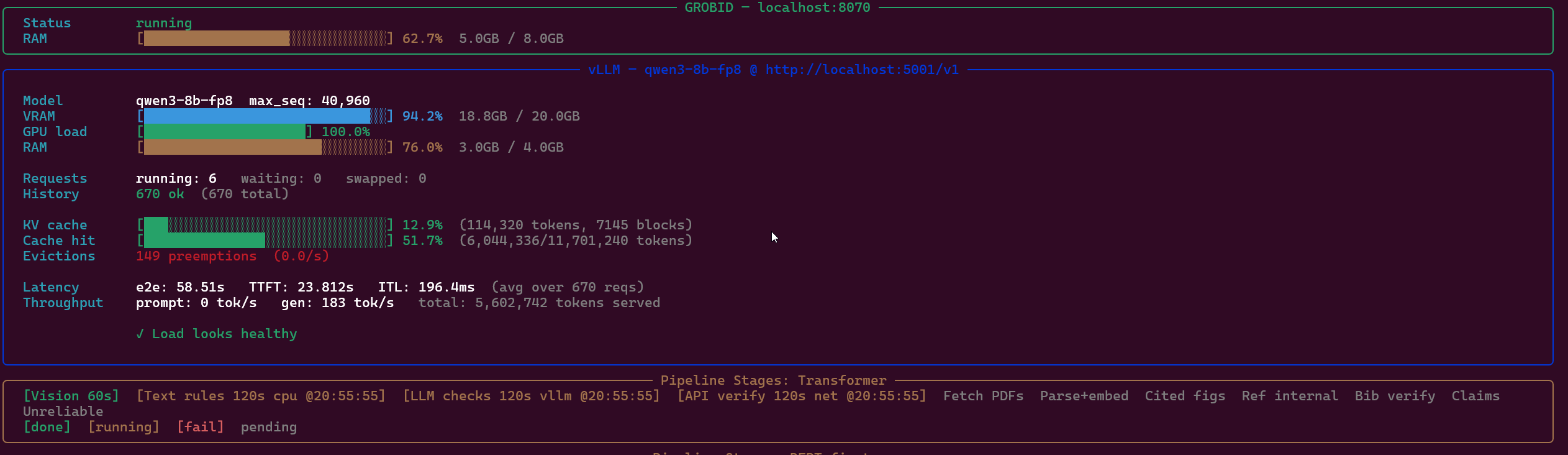
sciwrite-lint containers monitorshows service health, VRAM usage, and KV cache utilization in a terminal dashboard
Full pipeline on a 50-reference paper: ~30 minutes initial (dominated by downloads and claim verification), minutes on cached reruns. The pipeline automatically swaps vLLM containers to free GPU for embedding and vision stages (~50× faster than CPU) — same code path on WSL2 and native Linux.
Install
Assumed setup: A workstation with an NVIDIA GPU (16+ GB VRAM). Tested on WSL2 with NVIDIA driver 546.01+. Native Linux is likely to work with GPU memory allocation tuning (see docs/services.md). Not tested on macOS.
Requires uv, a container runtime (podman or docker), CUDA drivers, and NVIDIA Container Toolkit.
uv tool install sciwrite-lint --python 3.13
uv downloads Python 3.13 automatically (does not affect any Python you may already have) and installs sciwrite-lint as a globally available command.
Reproducible environment (optional)
pyproject.toml declares lower bounds for dependencies, so uv tool install / pip install may resolve newer versions as upstream releases ship. If you want the exact versions the maintainer develops and tests against — for reproducing benchmarks, debugging version-drift issues, or CI — install from requirements-pinned.txt instead.
What's in it: top-level packages declared in pyproject.toml pinned to == versions. Transitive dependencies are not pinned — pip resolves them within each top-level package's own constraints. This is a deliberate middle ground: it locks the packages sciwrite-lint actually imports and tests against, without over-constraining the dep tree.
# Clone the public repo (required — uv tool install can't read a local file)
git clone https://github.com/authentic-research-partners/sciwrite-lint.git
cd sciwrite-lint

# With uv (recommended — fast, isolated, manages Python itself)
uv venv --python 3.13 .venv
source .venv/bin/activate
uv pip install -r requirements-pinned.txt
uv pip install -e . --no-deps    # install sciwrite-lint source; deps already pinned

# Or with plain pip
python3.13 -m venv .venv
source .venv/bin/activate
pip install -r requirements-pinned.txt
pip install -e . --no-deps
Activate the venv in each new terminal with source .venv/bin/activate. For most users, the plain uv tool install sciwrite-lint above is simpler — use the pinned file only when you need exact version reproduction.
Setup
sciwrite-lint init                     # scaffold .sciwrite-lint.toml + references/ + local_pdfs/ + local_web/
sciwrite-lint config set-email you@example.com  # required for Unpaywall + Retraction Watch
sciwrite-lint containers start         # start GROBID + vLLM (needs GPU for vLLM)
sciwrite-lint containers monitor       # live dashboard: service health, VRAM, KV cache
WSL2: disable CUDA Sysmem Fallback (recommended)
By default Windows silently spills GPU overflow into system RAM via PCIe (30–100× slower than VRAM); you'll see this as a sudden throughput collapse during the heaviest pipeline stages with no error in the logs. Tell the NVIDIA driver to fail loudly instead:
NVIDIA Control Panel → 3D Settings → Manage 3D Settings → CUDA - Sysmem Fallback Policy → Prefer No Sysmem Fallback → Apply.
Driver 546.01+. After this, WSL2 behaves like native Linux on overflow (CUDA OOM error). The pipeline already sequences GPU consumers so OOM should not happen in normal use; the setting just prevents silent slowdowns when something does go wrong. No setting needed on native Linux — cudaMalloc is already loud there.
init detects .tex files and their .bib references and generates a .sciwrite-lint.toml config. Review to confirm the right files were detected.
Providing references manually — two drop folders. sciwrite-lint reads two local directories before going to the open-access waterfall, kept separate because the folder itself signals how much to trust the source:
local_pdfs/— academic sources. Accepts.pdf(primary) and.mdsummaries you've written yourself. Use this for paywalled papers, for OA papers whose publisher requires a browser (Cloudflare/JS walls, Cell, Springer, some PMC pages), and for anything you'd cite as peer-reviewed evidence.local_web/— web captures. Accepts.md(hand-written or pre-extracted) and.mhtml/.mhtsaved from a browser via File → Save As → Webpage (Single File). Use this for JavaScript-heavy pages where a headless HTTP fetch would only see the pre-hydration shell; MHTML captures the rendered DOM post-JS. sciwrite-lint converts MHTML to markdown at ingest using the same trafilatura extractor it uses for live web fetches, so the output format is consistent either way. Anything landing here is classifiedlocal_type=web_page— softer evidence than a peer-reviewed PDF.
Name files by the reference title, or prefix them with the citekey:
local_pdfs/                                     local_web/
├── States of Curiosity … Learning.pdf          ├── dewey1910_How_We_Think.mhtml
├── Mind in Society.pdf                         ├── earthwatch2025_About.md
├── vanfraassen1980_The_Scientific_Image.pdf    └── bca2026_Research_Teachers.md
└── dewey2016_summary.md   # reader-written
Matching runs in two passes for both folders. (1) Citekey prefix: if the filename begins with a known bib citekey (case-insensitive, e.g. vanfraassen1980_…), the file is matched directly to that reference — no fuzzy scoring. This is the authoritative path and works reliably for archives that follow a {citekey}_{Title}.<ext> convention, including short titles where length differences would otherwise penalize the score. (2) Fuzzy title: filenames without a recognized citekey prefix fall through to fuzzy matching against .bib titles (threshold 0.80). Academic matches win over web matches when the same reference is present in both folders — PDF trumps web capture. Matched files are copied into the workspace; on the next run the reference upgrades from T2 to T1 and goes through GROBID parsing (for PDFs) or direct read (for .md) during claim verification.
Per-paper curated archives. Each paper can point both drop folders at its own directories in its [[papers]] block:
[[papers]]
name = "my-paper"
file_path = "papers/my-paper/my-paper.tex"
bib = "papers/my-paper/my-paper.bib"
local_pdfs_dir = "papers/my-paper/Sources/full_text"      # academic archive
local_web_dir  = "papers/my-paper/Sources/full_text_web"  # web captures
If you don't set them explicitly, sciwrite-lint auto-detects sibling Sources/full_text/ and Sources/full_text_web/ directories next to file_path. Resolution order per paper: explicit override → auto-detected Sources/full_text{,_web}/ → project-wide default.
Refreshing a source file in place. sciwrite-lint records the SHA-256 of each drop-folder file when it first ingests it. On every subsequent run the hash is re-checked: if you overwrite dewey1910.pdf with a corrected scan (or re-capture an MHTML, or edit a markdown summary) under the same filename, the hash changes and the tool automatically re-copies the file into the workspace — triggering a fresh GROBID parse and embedding for PDFs, a fresh MHTML-to-markdown conversion for web captures. You don't need --fresh, and you don't need to rename files. Unchanged files cost a single hash read per run and are otherwise skipped.
Footnote URLs (\footnote{\url{…}}) get verified too. Papers often cite informational web pages inline as a footnote URL rather than through a formal .bib entry — organisation pages, program descriptions, press releases, FAQs. sciwrite-lint matches every such URL to a .md file in local_web_dir by reading a Source: https://… (or Source URL: …) header from the first 20 lines of each file. The matched capture becomes a T1 source for claim verification — same as a cited reference. Browser-saved .mhtml gets this header written automatically at ingest; for hand-authored .md you add one line at the top. See docs/local-sources.md for details and examples.
Finding what to download: sciwrite-lint verify lists T2 references that are confirmed open access with direct URLs — open each in your browser and save to local_pdfs/ (or local_web/ if the "paper" is actually a blog post or documentation page that the publisher serves as HTML). For paywalled papers, use your institution's library access.
Fetched-PDF match validation. Every downloaded PDF goes through a multi-signal match gate (title similarity, author surname, DOI, year, plus hard rejects for common bibliographic-record landing pages) before being cached. Wrong-paper downloads from API mismatches and template landing pages are rejected and deleted; the tool moves on to the next open-access source. You can still drop the correct PDF into local_pdfs_dir to skip the waterfall entirely.
API keys increase rate limits for Semantic Scholar, NCBI, and CORE, and enable NASA ADS (required for that source):
sciwrite-lint config show              # see what's configured
sciwrite-lint config set-key semantic-scholar YOUR_KEY  # dedicated rate limit
See docs/services.md for GPU requirements, all external APIs, and API key details.
Usage
sciwrite-lint check --paper my_paper            # full pipeline + SciLint Score
sciwrite-lint check --paper my_paper --fresh    # same, ignoring all caches
sciwrite-lint check                             # all papers (batch-staged when 2+, ~4-5x faster than sequential)
sciwrite-lint check --concurrency 4             # batch parallelism (default 2, validated up to 4)
sciwrite-lint check paper.tex                   # text + LLM rules on a .tex file
sciwrite-lint check paper.pdf                   # check a PDF (GROBID required)
sciwrite-lint check --checks prose-quality paper.tex   # run only the listed checks (comma-separated)
sciwrite-lint contributions --paper my_paper    # add contribution axes to SciLint Score
sciwrite-lint contributions paper.pdf           # standalone file scoring
check runs the full pipeline in one command: text checks → figure analysis → LLM consistency → reference verification via APIs → download and parse cited papers → claim verification → consistency checks on cited papers → bibliography verification → aggregate reliability scores → SciLint Score. An initial run on a 50-reference paper takes up to 30 minutes (dominated by downloads and claim verification); subsequent cached runs complete in minutes.
Use --fresh to start from scratch (backs up the existing workspace before recreating it).
Use --checks ID[,ID...] to run only the listed checks (comma-separated), disabling the rest for this invocation. Useful for fast iteration during editing (--checks prose-quality runs just the prose review), for debugging a single check, or for scripting a two-pass workflow. Unknown check IDs fail loudly — run sciwrite-lint checks to list available IDs.
Contribution axes (sciwrite-lint contributions)
contributions computes 5 contribution axes from philosophy of science (Popper, Lakatos, Kitcher, Laudan, Mayo) and updates the SciLint Score. Requires vLLM.
sciwrite-lint check --paper my_paper           # SciLint Score (contribution = 1.0)
sciwrite-lint contributions --paper my_paper   # add 5 contribution axes, update score
Individual stages
For debugging or advanced workflows, each pipeline stage is also available as a standalone command:
| Command | What it does |
|---|---|
verify --paper NAME |
API verification only (CrossRef, OpenAlex, Semantic Scholar, Open Library, Library of Congress) |
fetch --paper NAME |
Download full-text PDFs for verified references |
parse --paper NAME |
Parse PDFs via GROBID and compute embeddings |
verify-claims --paper NAME |
LLM reads cited sources, checks claim support |
ref-health --paper NAME |
Fast reference health check: cite/bib mismatches, ID coverage, local PDF matches (no API calls) |
contributions --paper NAME |
Add 5 contribution axes to SciLint Score (requires vLLM) |
Output
Each finding has a severity level, a rule ID, and a message explaining the issue:
- error — a concrete manuscript problem (hallucinated reference, unsupported claim, retracted source)
- warning — needs human judgment (metadata mismatch, weak citation purpose, cross-section inconsistency)
- info — the tool could not complete a check (LLM error, API timeout, internal crash) or informational note
Findings also carry a context field with the reasoning behind the verdict: the LLM's explanation, which identifiers were searched, or which API provided the canonical data. This lets you distinguish "the tool found a problem" from "the tool couldn't check this."
Example terminal output:
 ERROR  reference-exists        johnson2024: Not found in any API
                                Searched with: title="Deep Learning for Climate", author="Johnson"

 ERROR  claim-support           smith2023: Cited paper does not support this claim
                                Claim: "transformers outperform RNNs by 15% on BLEU"
                                Verdict: paper reports 8% improvement, not 15%

 WARN   reference-accuracy      lee2022: Year mismatch (bib: 2022, canonical: 2021)
                                Source: OpenAlex (DOI: 10.1234/example)

 WARN   cross-section-consistency
                                Abstract claims "three novel contributions" but
                                Section 5 delivers two

 WARN   reference-unreliable    chen2019: Low reliability (0.35)
                                Metadata mismatch, 2 unsupported claims,
                                23% hallucinated bibliography entries

 INFO   caption-vs-content      Figure 3: could not extract figure from PDF

  SciLint Score: 0.41
    Internal Consistency:  0.85
    Referencing Quality:   0.48
  (Run 'sciwrite-lint contributions' to add contribution axes)
Output formats: terminal (default) or --format json.
Documentation
sciwrite-lint checks— list all checkssciwrite-lint <command> --help— detailed usage for any command- docs/services.md — GROBID, vLLM, external APIs, configuration
- docs/local-sources.md — drop directories, filename conventions,
Source:header for footnote URLs
For contributors and advanced users:
- docs/evals.md — detection evaluation framework, adding test cases
- docs/calibration.md — SciLint Score calibration against ground-truth papers
Citation
If you use sciwrite-lint in your research, please cite the accompanying paper (arXiv:2604.08501):
@article{samsonau2026sciwritelint,
  title   = {sciwrite-lint: Verification Infrastructure for the Age of Science Vibe-Writing},
  author  = {Samsonau, Sergey V.},
  journal = {arXiv preprint arXiv:2604.08501},
  year    = {2026},
}
GitHub's "Cite this repository" button (powered by CITATION.cff) will also generate this for you.
License
MIT


Download files
Download the file for your platform. If you're not sure which to choose, learn more about installing packages.
Source Distribution
Built Distribution
Filter files by name, interpreter, ABI, and platform.
If you're not sure about the file name format, learn more about wheel file names.
Copy a direct link to the current filters
File details
Details for the file sciwrite_lint-0.4.0.tar.gz.
File metadata
- Download URL: sciwrite_lint-0.4.0.tar.gz
- Upload date:
- Size: 446.2 kB
- Tags: Source
- Uploaded using Trusted Publishing? No
- Uploaded via: twine/6.2.0 CPython/3.13.9
File hashes
| Algorithm | Hash digest | |
|---|---|---|
| SHA256 |
a830091b06c5f73689b956de1d007f3aa50504206f218f0a2cd534ad20692af4
|
|
| MD5 |
957230ee07d7ba3d535ac3517ed9ca08
|
|
| BLAKE2b-256 |
c21428d4ca60397f252bf2cb9b858668489c8193e9d93b64146366e3ba9e77e0
|
File details
Details for the file sciwrite_lint-0.4.0-py3-none-any.whl.
File metadata
- Download URL: sciwrite_lint-0.4.0-py3-none-any.whl
- Upload date:
- Size: 516.7 kB
- Tags: Python 3
- Uploaded using Trusted Publishing? No
- Uploaded via: twine/6.2.0 CPython/3.13.9
File hashes
| Algorithm | Hash digest | |
|---|---|---|
| SHA256 |
2dde9811987086f81f6d75078c9941898c944617cc4ce436cc4cdf13539e378b
|
|
| MD5 |
6de92a3fc64731a8ac43daa13a96c827
|
|
| BLAKE2b-256 |
c5daef8ff8e57c2ff84687c4cf5725c3aa0d1f1f173c591505f3fad13b7a9e37
|






