
scMIAC: Single-Cell Multi-modality Integration via cell type filtered Anchors using Contrastive learning
Overview
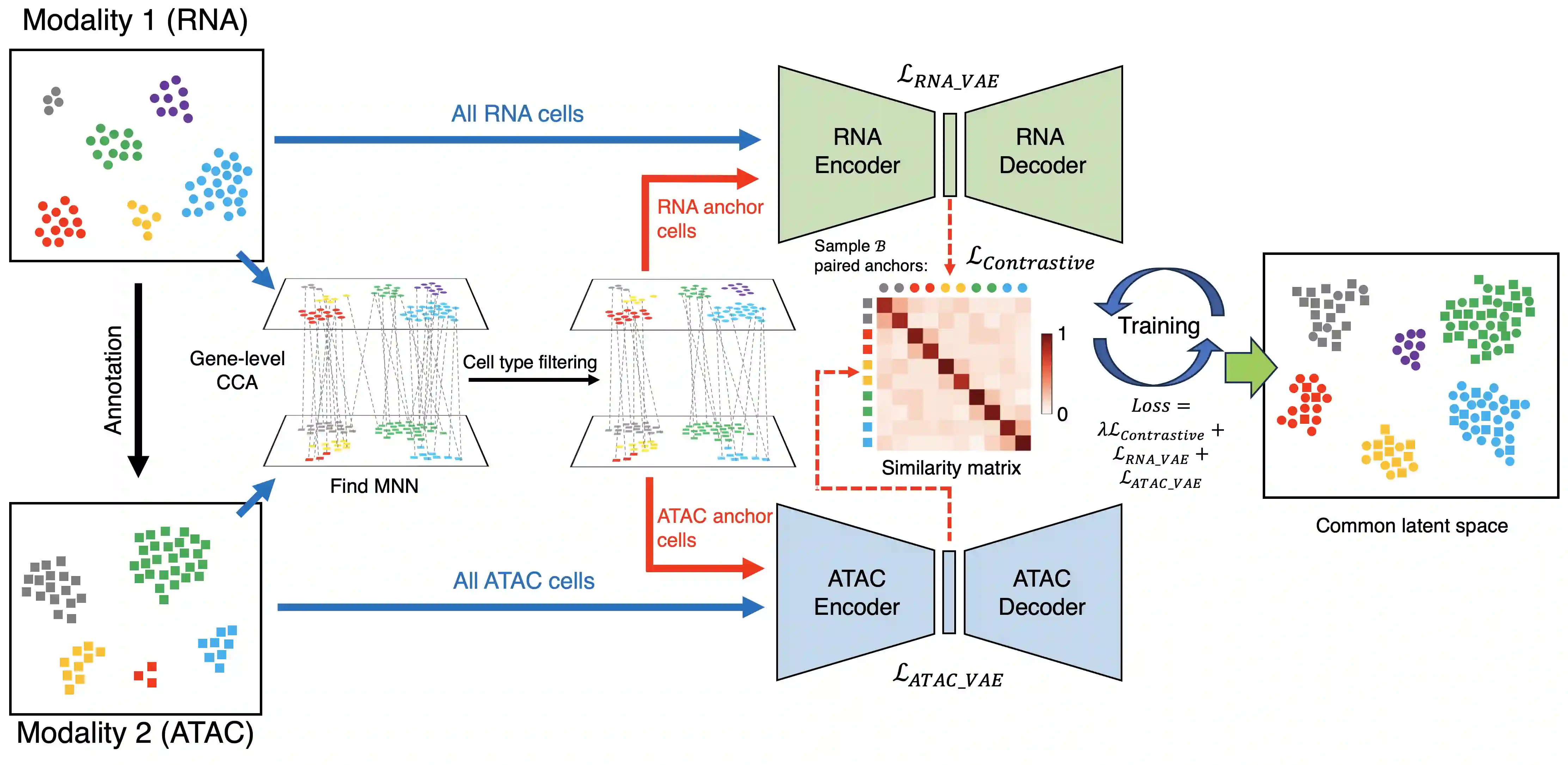
scMIAC is a comprehensive framework for single-cell multi-modality data integration, designed to tackle the most challenging problem in single-cell integration: diagonal integration (integrating unpaired cells from different feature spaces across modalities).
The methodological innovations of scMIAC include:
- scMIAC utilizes cell type information to select high-quality anchor cells for contrastive learning, improving integration of challenging cells such as imbalanced, rare, or isolated cell types.
- scMIAC innovatively introduces contrastive learning to diagonal integration task, where previous methods could only be applied to horizontal or vertical integration scenarios.
- As a diagonal integration approach, scMIAC preserves each modality's original biological characteristics through modality-specific VAEs, which serves as a regularizer preventing over-emphasis on modality alignment.
Installation
-
Create and activate a Conda environment:
conda create -n scmiac python=3.11
conda activate scmiac
-
Clone the repository and install:
git clone https://github.com/TianLab-Bioinfo/scMIAC.git
cd scMIAC
pip install .
Usage
scMIAC provides two usage modes:
1. CLI Mode - Quick start for non-interactive, command-line workflow:
scmiac train \
  --rna-h5ad data/10x/input/adata_rna_10x.h5ad \
  --atac-h5ad data/10x/input/adata_atac_10x.h5ad \
  --output-dir data/10x/output/scmiac_results/ \
  --rna-latent-key X_pca \
  --atac-latent-key lsi49 \
  --rna-celltype-key cell_type \
  --atac-celltype-key pred

scmiac train -h  # For viewing all available parameters
MUST Required parameters:
--rna-h5ad: Path to RNA AnnData file--atac-h5ad: Path to ATAC AnnData file--output-dir: Output directory
Output files:
anchors.csv: Anchor pairsrna_vae.pth: RNA VAE model weightsatac_vae.pth: ATAC VAE model weightsrna_embeddings.csv: RNA cell embeddingsatac_embeddings.csv: ATAC cell embeddingsscmiac_latent_umap.png: UMAP visualization
2. API Mode - For flexible research and experimentation:
Refer to the Full API Tutorial & Examples for detailed usage and examples.
1 maintainer

Metadata
1 maintainer
Release files for scmiac 0.1.0
For a detailed explanation of source distributions (sdists) and built distributions (wheels), please see the package formats documentation.
Source distribution (sdist)
| File | Size | Uploaded | |
|---|---|---|---|
| scmiac-0.1.0.tar.gz | 49.6 kB | Details |
Built distribution (wheel)
| File | Interpreter | ABI | Platform | Reset |
|---|---|---|---|---|
| scmiac-0.1.0-py3-none-any.whl | Python 3 | none | any | Details |
Total release size: 101.9 kB
Release files / scmiac-0.1.0.tar.gz
| Download URL | scmiac-0.1.0.tar.gz |
|---|---|
| Size | 49.6 kB |
| Tags | Source |
|
SHA-256 checksum How to use checksums |
8806ffb4adb68e34a61eec82d3a353fe5867ec941a92274d8f83961367627a9a
|
|
BLAKE2b-256 checksum How to use checksums |
150dcb87ad318de8f89d48ceadece06bf15953b9dcd50703bcd99eaec5c48e4a
|
| Upload date | |
|
Uploaded using Trusted Publishing? What is trusted publishing? |
No |
| Uploaded via |
twine/6.2.0 CPython/3.11.13
|
Release files / scmiac-0.1.0-py3-none-any.whl
| Download URL | scmiac-0.1.0-py3-none-any.whl |
|---|---|
| Size | 52.2 kB |
| Tags | Python 3 |
|
SHA-256 checksum How to use checksums |
48ebc40258e859740345a538d2f36ad29b14a86f2c097ab2e6528df395b8f485
|
|
BLAKE2b-256 checksum How to use checksums |
dc99fceb5a07bd106140a56327786cccdc53b554e1431368500959831409a63b
|
| Upload date | |
|
Uploaded using Trusted Publishing? What is trusted publishing? |
No |
| Uploaded via |
twine/6.2.0 CPython/3.11.13
|













