
A CLI tool for visualizing directory sizes and checking port usage.

Project description
Scope-CLI: The AI-Powered Command Line Tool
Scope-CLI is a versatile, AI-powered command-line tool designed for developers. It combines traditional CLI utilities with the power of an LLM assistant to provide precise, safe, and actionable command-line suggestions. Whether you need intelligent command-line recommendations, check ports, or visualize directory sizes, Scope-CLI has you covered.
Installation
Core Features
Install the lightweight version with basic functionality:
pip install scope-cli
LLM Add-On
Enable the AI-powered assistant by installing the optional LLM module:
pip install scope-cli[llm]
On Linux/MacOS:
Add the following line to your shell configuration file (e.g., .bashrc, .zshrc):
export OPENAI_API_KEY="your-openai-api-key"
Then reload your shell:
source ~/.zshrc # Or source ~/.bashrc
Features and Usage
1. LLM-Powered Command Line Assistant
Leverage an LLM to suggest safe and actionable CLI commands, explain commands, or execute tasks.
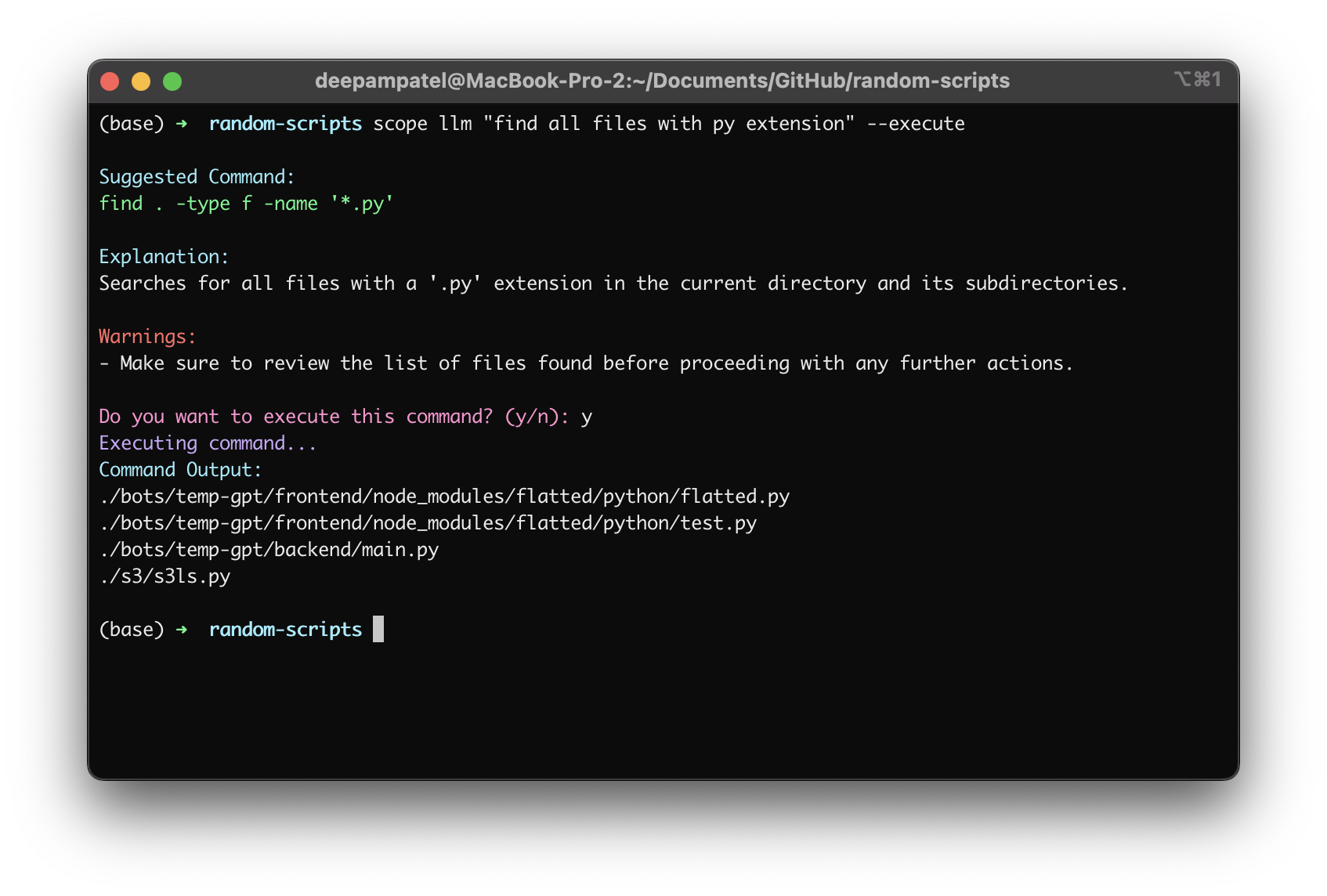
Suggest a Command
Ask the assistant to suggest a command for your query:
scope llm "List all Python files in the current directory"
Example Output:
Suggested Command:
ls *.py
Explain a Command
Get detailed information about a specific command:
scope llm "Explain the port command"
Example Output:
The 'port' command checks if a specific port is in use. It provides details about the process using the port and optionally allows you to terminate the process.
Example:
scope port 8080 --kill
Execute a Suggested Command
Use the --execute flag to directly run the suggested command:
scope llm "List all Python files in the current directory" --execute
Interactive Prompt:
Suggested Command:
ls *.py

Do you want to execute this command? (y/n): y
Executing command...
Command Output:
script1.py
script2.py
2. Port Checker
Check if a specific port is in use, get detailed process information, and optionally kill the process.
Important Note
On some systems, accessing detailed port information may require elevated permissions. Use sudo if necessary.
Check Port Usage
sudo scope port 8080
Example Output:
Port 8080 is in use by process:
  - PID: 1234
  - Name: python
  - Command: python manage.py runserver
  - Working Directory: /Users/yourname/project
  - Status: running
  - User: yourname
Kill Process Using Port
sudo scope port 8080 --kill
Interactive Prompt:
Do you want to kill process python (PID 1234)? (y/n): y
Process python (PID 1234) terminated.
3. Directory Size Visualization
Quickly display a directory's structure and the size of each folder and file.
scope tree /path/to/directory
Example Output:
project (120 MB)
  src (40 MB)
    main.py (15 KB)
    utils.py (25 KB)
  assets (50 MB)
    image1.png (25 MB)
    image2.png (25 MB)
Why Scope-CLI?
- AI-Powered Recommendations: Get intelligent, context-aware command-line suggestions.
- Safe and Developer-Focused: Designed to prioritize safety and precision, ensuring no accidental data loss.
- Modular Design: Lightweight by default, with optional AI-powered functionality.
- Ease of Use: Simple commands for common developer tasks like visualizing directories or checking ports.
Contributing
We welcome contributions from the community! Whether it���s a bug fix, feature suggestion, or documentation improvement, feel free to open an issue or pull request on the GitHub repository.
License
Scope-CLI is licensed under the MIT License. See the LICENSE file for more details.


Download files
Download the file for your platform. If you're not sure which to choose, learn more about installing packages.
Source Distribution
Built Distribution
Filter files by name, interpreter, ABI, and platform.
If you're not sure about the file name format, learn more about wheel file names.
Copy a direct link to the current filters
File details
Details for the file scope_cli-0.2.3.tar.gz.
File metadata
- Download URL: scope_cli-0.2.3.tar.gz
- Upload date:
- Size: 9.4 kB
- Tags: Source
- Uploaded using Trusted Publishing? No
- Uploaded via: twine/5.1.1 CPython/3.8.8
File hashes
| Algorithm | Hash digest | |
|---|---|---|
| SHA256 |
403793e7e7b8f8182470ce2f952f7d2d45eaca6a82bf514d509926c8bfef53b3
|
|
| MD5 |
5dd0aeeb04870d5d474339002e2e7685
|
|
| BLAKE2b-256 |
2e051e053f747ec4936d480bb1703794b8d0ebe4884fa0eff6dcda927a88c620
|
File details
Details for the file scope_cli-0.2.3-py3-none-any.whl.
File metadata
- Download URL: scope_cli-0.2.3-py3-none-any.whl
- Upload date:
- Size: 7.9 kB
- Tags: Python 3
- Uploaded using Trusted Publishing? No
- Uploaded via: twine/5.1.1 CPython/3.8.8
File hashes
| Algorithm | Hash digest | |
|---|---|---|
| SHA256 |
814add40e90699e42ff053256d2ff96bcbee50c41e331241f4f391813a5e0b8a
|
|
| MD5 |
ba4d5fbe86f50ba5a4f93e94be5c2af7
|
|
| BLAKE2b-256 |
604815c45216d8e1fb8cd44c964e4212af3dbd993532142d408d9ef2f7dfae2d
|






