
A Scrapy spider-middleware that performs automatic translation when the spider is working

Project description
scrapy-auto-translation-middleware
Overview: why you need a middleware to do the translation work
In many circumstances you may want to automatically translate an Item field into another language, and write it into another field. For example, you have defined an Item:
class City(scrapy.Item):
    name = scrapy.Field()
    total_area = scrapy.Field()
    per_capita_gdp = scrapy.Field()
    time_zone = scrapy.Field()
The meanings are pretty straight forward. Let's assume you want the name field to be translated into some other languages, say, French, Simplfied Chinese, Japanese, by sending translation requests to Google Translation service. You obviously have an option to do this:
Option 1: do the translation in the spider (the worst approach)
For example, in your spider:
from some.google.translation.lib import Translator
Class CitySpider(scrapy.Spider):
    name = "cities"
    start_url = ["http://some.citydata.website",]
    def parse(self, response, **kwargs):
	    name = response.xpath("path.to.city.name").get()
	    translator=Translator()
	    name_zh=translator.translate(name, source="en", dest="zh-CN")
This is a bad idea as you are making a synchronous request to Google when you are working in an asynchronous framework (in the case of Scrapy for specific, twisted). A number of bad things will be resulted:
- The failure of Google Translation work will stop the entire crawling process, thus your spider will be much more vulnerable to unexpected events.
- As you are doing a synchronous work that may take unpredictable length of time, the spider will suffer from low performance (keep in mind that there's only one thread running in the Twisted framework).
- The downloader will not take care of the translation work so the states data will become inaccurate.
Option 2: send a dedicated request to Google to finish the translation (much better, but tedious)
Consider the following:
import scrapy
class CitySpider(scrapy.Spider):
    name = "cities"
    start_url = ["http://some.citydata.website",]
    def parse(self, response, **kwargs):
	    name = response.xpath("path.to.city.name").get()
	    yield scrapy.Request(url="google.translation.url", cb_kwargs={"name":name})
	def translate(self, response, **kwargs)
	    name = kwargs["name"]
	    name_zh=response.xpath("path.to.name_zh").get()
	    yield items.CityItem(name=name, name_zh=name_zh)
This a apparently much more in tune with Scrapy's design rules but it would be tiresome to introduce extra callback functions just for doing the translation. Moreover, it would lower down the maintainability and readability of the code.
Option 3: use a translation middleware (best one)
By making use of a translation middleware you are allowed to do this in the item definition:
import scrapy
class CityItem(scrapy.Item):
    name = scrapy.Field()
    name_zh = scrapy.Field(auto_translate=True, source="name", language="zh")
    name_fr = scrapy.Field(auto_translate=True, source="name", language="fr")
    name_ja = scrapy.Field(auto_translate=True, source="name", language="ja")
In your spider, you just need to populate the original information (the field "name") and the middleware will automatically handle others that are marked as auto_translate=True:
......
def parse(self, response, **kwargs):
    ......
    yield items.CityItem(name="city_name_crawled_from_web")
installation
To install scrapy-auto-translation-middleware, run:
pip install scrapy-auto-translation-middleware
Settings
Scrapy-auto-translation-middleware provides built-in support for Google Translation. If you are happy with it, add the following code into your project's settings.py file:
SPIDER_MIDDLEWARES = {
    scrapy_auto_trans.spidermiddlewares.autotrans.GoogleAutoTranslationMiddleware': 701
}
Google Translation requires an API Key for each translation service request so you need to specify the key in the settings.py as well:
GOOGLE_CLOUD_API_KEY="<api.key.you.got.from.google.cloud>"
If you don't feel comfortable to hard-code your API key in settings.py, another option is to specify the key as a command line option when you run the spider:
scrapy crawl cities -s GOOGLE_CLOUD_API_KEY="<api.key.you.got.from.google.cloud>"
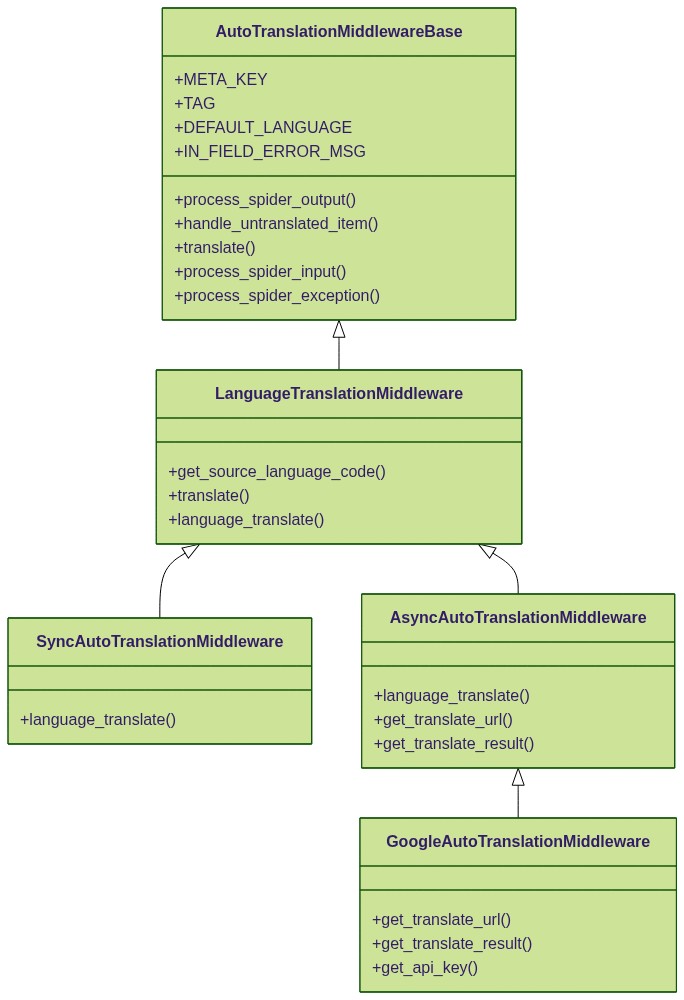
Class hierarchy
Usage
The most intuitive way of using the translation middleware is to subclass AutoTranslationMiddlewareBase and re-write a number of methods, and specify the middleware on settings.py file:
class MyTranslationMiddleware(AutoTranslationMiddlewareBase):
    def translate(self, field_name, item, **kwargs):
	    """
	    This method is called for each field with auto_translate=True.
	    Returns either the translate result, or a (request, callback) tuple.
	    """
    def get_translate_result(self, response, field_name, item, **kwargs):
	    """
	    This method is responsible to interpret the response from the translation service website (e.g. Google Translate).
	    Returns either the translate result, or a (request, callback) tuple.
	    """
Add the following in the file settings.py:
SPIDER_MIDDLEWARES = {
    scrapy_auto_trans.spidermiddlewares.autotrans.MyTranslationMiddleware': 701
}
Define your items
scrapy-auto-translation-middleware will be triggered if you set auto_translate=True in the item field definition:
class CityItem(scrapy.Item):
    name = scrapy.Field()
    name_zh = scrapy.Field(auto_translate=True, source='name', language='zh')
You must specify source and language in the field definition. They are pretty straight forward in their meanings. The following options are supported:
auto_translate
This is basically a tag for fields that should be translated by the middleware. Set auto_translate=True if you want the fields to be handled by the translator.
on_failure
Use this option to specify what you want to happen if a translation fails. The default action is REPORT_IN_FIELD.
- RAISE: raise the failure and let the exception handler to handle it.
- DROP_ITEM: silently drop the item.
- REPORT_IN_FIELD: write an error message into the target field,
"--- translation error ---"by default. - COPY_SOURCE: copy the source into the target field.
- SET_NULL: set the target field to be None (null in json).
- SET_EMPTY: set the target field to be an empty string.
Example:
from scrapy_auto_trans import FailureAction
class CityItem(scrapy.Item):
    name = scrapy.Field()
    name_zh = scrapy.Field(
        auto_translate=True,
        on_failure=FailureAction.DROP_ITEM, # drop the item on translation failure,
        language='zh',
        source="name",
    )
translate
Use this option to specify a translator function. If specified, it will override the middleware's translate() method.
The translator function will be called when an item is being translated for a field. For example:
def sqkm_to_sqmi(field_name, item, **kwargs):
    “unit conversion from sqkm to sq miles. this is a very quick translation"
    source = kwargs["source"]
    return float(item[source]) * 0.3861

def language_translator(field_name, item, **kwargs):
    "this will send a translation request to some website so we provide a callback to avoid taking too long time here"
	def callback(response, _field_name, _item, **cb_kwargs):
		return response.xpath("xpath.to.translation.result").get()
	source = kwargs["source"]
	return scrapy.Request(url="http://some.translation.service/?text=%s"%item[source]), callback

class CityItem(scrapy.Item):
	name = scrapy.Field()
	name_zh = scrapy.Field(auto_translate=True, translat=language_translator, language="zh")
	total_area = scrapy.Field()
	total_area_in_sq_miles = scrapy.Field(auto_translate=True, translate=sqkm_to_sqmi, source="total_area")
In cases where translate is present, all other field options (e.g. "source") will be provided to the translator function (and the callback function, if returned) in kwargs.
language
Use this option to specify to what language the field should be translated. If you are using Google Translate, the supported languages and the corresponding ISO language code are listed below
| Language name | Language code |
|---|---|
| Afrikaans | af |
| Afrikaans | af |
| Albanian | sq |
| Amharic | am |
| Arabic | ar |
| Armenian | hy |
| Azerbaijani | az |
| Basque | eu |
| Belarusian | be |
| Bengali | bn |
| Bosnian | bs |
| Bulgarian | bg |
| Catalan | ca |
| Cebuano | ceb (ISO-639-2) |
| Chinese (Simplified) | zh-CN or zh (BCP-47) |
| Chinese (Traditional) | zh-TW (BCP-47) |
| Corsican | co |
| Croatian | hr |
| Czech | cs |
| Danish | da |
| Dutch | nl |
| English | en |
| Esperanto | eo |
| Estonian | et |
| Finnish | fi |
| French | fr |
| Frisian | fy |
| Galician | gl |
| Georgian | ka |
| German | de |
| Greek | el |
| Gujarati | gu |
| Haitian Creole | ht |
| Hausa | ha |
| Hawaiian | haw (ISO-639-2) |
| Hebrew | he or iw |
| Hindi | hi |
| Hmong | hmn (ISO-639-2) |
| Hungarian | hu |
| Icelandic | is |
| Igbo | ig |
| Indonesian | id |
| Irish | ga |
| Italian | it |
| Japanese | ja |
| Javanese | jv |
| Kannada | kn |
| Kazakh | kk |
| Khmer | km |
| Kinyarwanda | rw |
| Korean | ko |
| Kurdish | ku |
| Kyrgyz | ky |
| Lao | lo |
| Latin | la |
| Latvian | lv |
| Lithuanian | lt |
| Luxembourgish | lb |
| Macedonian | mk |
| Malagasy | mg |
| Malay | ms |
| Malayalam | ml |
| Maltese | mt |
| Maori | mi |
| Marathi | mr |
| Mongolian | mn |
| Myanmar (Burmese) | my |
| Nepali | ne |
| Norwegian | no |
| Nyanja (Chichewa) | ny |
| Odia (Oriya) | or |
| Pashto | ps |
| Persian | fa |
| Polish | pl |
| Portuguese (Portugal, Brazil) | pt |
| Punjabi | pa |
| Romanian | ro |
| Russian | ru |
| Samoan | sm |
| Scots Gaelic | gd |
| Serbian | sr |
| Sesotho | st |
| Shona | sn |
| Sindhi | sd |
| Sinhala (Sinhalese) | si |
| Slovak | sk |
| Slovenian | sl |
| Somali | so |
| Spanish | es |
| Sundanese | su |
| Swahili | sw |
| Swedish | sv |
| Tagalog (Filipino) | tl |
| Tajik | tg |
| Tamil | ta |
| Tatar | tt |
| Telugu | te |
| Thai | th |
| Turkish | tr |
| Turkmen | tk |
| Ukrainian | uk |
| Urdu | ur |
| Uyghur | ug |
| Uzbek | uz |
| Vietnamese | vi |
| Welsh | cy |
| Xhosa | xh |
| Yiddish | yi |
| Yoruba | yo |
| Zulu | zu |
language is optional and only necessary when your translator requires it. In cases where your translator is doing things like unit-conversion, for example, it would not be needed.
Usually you need to specify the language for both the source and target field. The target language must be explicitly specified. The middleware use the following order to determin the source language:
languageoption in the source field- The middleware's
DEFAULT_LANGUAGEattribute DEFAULT_LANGUAGEin the project's settings- American English ("en")
source
This could be used to specified the field from which the translation is conducted. source is optional and only necessary when your translator requires it. In cases where your translator is doing things like unit-conversion, for example, it would not be needed.
Release history Release notifications | RSS feed


Download files
Download the file for your platform. If you're not sure which to choose, learn more about installing packages.
Source Distribution
File details
Details for the file scrapy-auto-translation-middleware-0.0.7.tar.gz.
File metadata
- Download URL: scrapy-auto-translation-middleware-0.0.7.tar.gz
- Upload date:
- Size: 12.3 kB
- Tags: Source
- Uploaded using Trusted Publishing? No
- Uploaded via: twine/3.1.1 pkginfo/1.5.0.1 requests/2.21.0 setuptools/47.1.1 requests-toolbelt/0.9.1 tqdm/4.46.1 CPython/3.6.8
File hashes
| Algorithm | Hash digest | |
|---|---|---|
| SHA256 |
95a0adf40f618d6acc8a33a0db699abedf8fbcf3ce7deb26f7c74775ee5bf589
|
|
| MD5 |
a03b8b98e66f624167109d14dacaa00d
|
|
| BLAKE2b-256 |
378792072da407c256e53b190488288fce436d26f6a90ff3d455a6005b9e49a9
|






