
Scrapy Scraper
Web crawler and scraper based on Scrapy and Playwright's headless browser.
To use the headless browser specify -p option. Browsers, unlike other standard web request libraries, have the ability to render JavaScript encoded HTML content.
Future plans:
- check if Playwright's Chromium headless browser is installed,
- add option to stop on rate limiting.
Resources:
- docs.scrapy.org - docs
- playwright.dev - docs
- scrapy/scrapy - GitHub
- scrapy-plugins/scrapy-playwright - GitHub
Tested on Kali Linux v2024.2 (64-bit).
Made for educational purposes. I hope it will help!
Table of Contents
How to Install
Install Playwright and Chromium
pip3 install --upgrade playwright

playwright install chromium
Make sure each time you upgrade your Playwright dependency to re-install Chromium; otherwise, you might get an error using the headless browser.
Standard Install
pip3 install --upgrade scrapy-scraper
Build and Install From the Source
git clone https://github.com/ivan-sincek/scrapy-scraper && cd scrapy-scraper

python3 -m pip install --upgrade build

python3 -m build

python3 -m pip install dist/scrapy-scraper-4.0-py3-none-any.whl
How to Run
Example, start in-scope crawling from https://example.com/home, download in-scope JavaScript files, and extract links:
scrapy-scraper -u https://example.com/home -o results.json -a random -s 2 -rs -d downloads
Example, start in-scope crawling from URLs specified in urls.txt, take a screenshot of only the start URLs, and extract links:
scrapy-scraper -u urls.txt -o results.json -a random -s 2 -rs -p -ss screenshots
Usage
Scrapy Scraper v4.0 ( github.com/ivan-sincek/scrapy-scraper )

Usage:   scrapy-scraper -u urls                     -o out          [-d downloads] [-ss screenshots]
Example: scrapy-scraper -u https://example.com/home -o results.json [-d downloads] [-ss screenshots]

DESCRIPTION
    Probe, crawl, scrape, and screenshot websites
URLS
    File containing URLs or a single URL to start collecting from
    -u, --urls = urls.txt | https://example.com/home | etc.
WHITELIST
    File containing whitelisted domain names to limit the scope
    Specify 'off' to disable domain whitelisting
    Default: limit the scope to domain names extracted from the starting URLs
    -w, --whitelist = whitelist.txt | off | etc.
PLAYWRIGHT
    Use Playwright's headless browser
    -p, --playwright
PLAYWRIGHT WAIT
    Wait time in seconds before fetching the page content
    -pw, --playwright-wait = 0.5 | 2 | 4 | etc.
CONCURRENT REQUESTS
    Number of concurrent requests
    Default: 30
    -cr, --concurrent-requests = 30 | 45 | etc.
CONCURRENT REQUESTS PER DOMAIN
    Number of concurrent requests per domain
    Default: 10
    -crd, --concurrent-requests-domain = 10 | 15 | etc.
SLEEP
    Sleep time in seconds between two consecutive requests to the same domain
    -s, --sleep = 1.5 | 3 | etc.
RANDOM SLEEP
    Randomize the sleep time between requests to vary between '0.5 * sleep' and '1.5 * sleep'
    -rs, --random-sleep
AUTO THROTTLE
    Automatically throttle concurrent requests based on load and latency
    Sleep time is still respected
    -at, --auto-throttle = 0.5 | 10 | 15 | 30 | etc.
RETRIES
    Number of retries per URL
    Default: 2
    -rt, --retries = 0 | 4 | etc.
RECURSION
    Recursion depth limit
    Specify 'off' to disable crawling
    Specify '0' for no limit
    Default: 1
    -r, --recursion = off | 0 | 5 | etc.
REQUEST TIMEOUT
    Request timeout in seconds
    Default: 60
    -t, --request-timeout = 30 | 90 | etc.
HEADER
    Specify any number of extra HTTP request headers
    -H, --header = "Authorization: Bearer ey..." | etc.
COOKIE
    Specify any number of extra HTTP cookies
    -b, --cookie = PHPSESSIONID=3301 | etc.
USER AGENT
    User agent to use
    Default: Scrapy Scraper/4.0
    -a, --user-agent = random[-all] | curl/3.30.1 | etc.
PROXY
    Web proxy to use
    -x, --proxy = http://127.0.0.1:8080 | etc.
DOWNLOADS
    Output directory for downloaded JavaScript files
    Automatically beautifies the files
    -d, --downloads = downloads | etc.
SCREENSHOTS
    Output directory for screenshots
    -ss, --screenshots = screenshots | etc.
OUT
    Output file
    -o, --out = results.json | etc.
DEBUG
    Enable debug output
    -dbg, --debug
Images
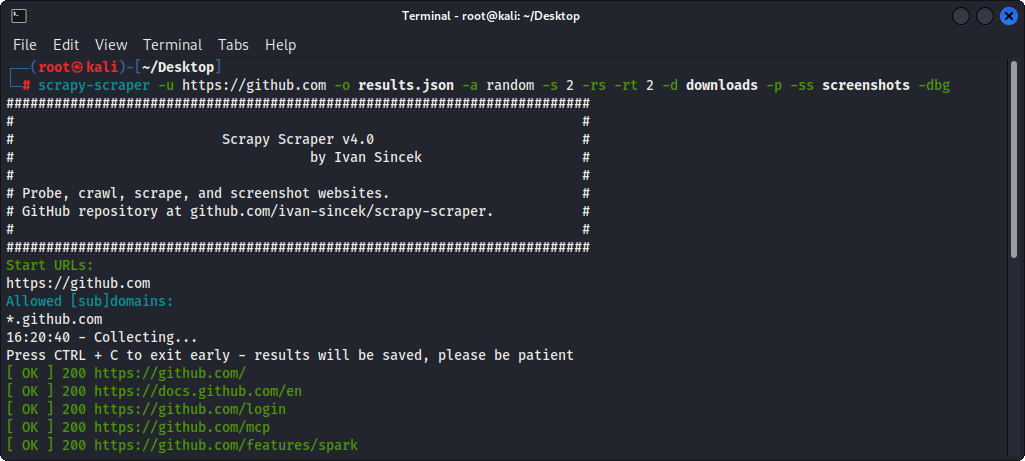
Figure 1 - Scraping
1 maintainer

Metadata
1 maintainer
Release files for scrapy-scraper 4.0
For a detailed explanation of source distributions (sdists) and built distributions (wheels), please see the package formats documentation.
Source distribution (sdist)
| File | Size | Uploaded | |
|---|---|---|---|
| scrapy_scraper-4.0.tar.gz | 14.9 kB | Details |
Built distribution (wheel)
| File | Interpreter | ABI | Platform | Reset |
|---|---|---|---|---|
| scrapy_scraper-4.0-py3-none-any.whl | Python 3 | none | any | Details |
Total release size: 31.4 kB
Release files / scrapy_scraper-4.0.tar.gz
| Download URL | scrapy_scraper-4.0.tar.gz |
|---|---|
| Size | 14.9 kB |
| Tags | Source |
|
SHA-256 checksum How to use checksums |
6c305cc92806b0e8d04ef8eda3b3cd74c03e224bbe10f219b8931ac51d0b70d5
|
|
BLAKE2b-256 checksum How to use checksums |
953ab287cfa32e25e87515ff04d2a8bc26067e8eca3aa9cd721cb529aff3cdb6
|
| Upload date | |
|
Uploaded using Trusted Publishing? What is trusted publishing? |
No |
| Uploaded via |
twine/6.2.0 CPython/3.11.8
|
Release files / scrapy_scraper-4.0-py3-none-any.whl
| Download URL | scrapy_scraper-4.0-py3-none-any.whl |
|---|---|
| Size | 16.5 kB |
| Tags | Python 3 |
|
SHA-256 checksum How to use checksums |
d4145062f9677ac033912a0230af635066efe00fffe0189182e549c8866ff7a8
|
|
BLAKE2b-256 checksum How to use checksums |
ddc090353fe977a53d3ba8de101f046659f5e27989b0170264b8678798a2a146
|
| Upload date | |
|
Uploaded using Trusted Publishing? What is trusted publishing? |
No |
| Uploaded via |
twine/6.2.0 CPython/3.11.8
|













