
ScreenForge


中文 | English
Your AI agent runs the test. You keep the pytest file.
Describe the flow in plain language. Watch the agent click through a live site. Walk away with a self-healing pytest script that survives UI changes — and runs in CI. (Drives real iOS + Android devices too, not just Chrome.)
ScreenForge is an AI-driven UI automation engine that turns natural language into executable test scripts. Unlike record-and-replay tools, you don't perform the actions yourself — the AI does it for you.
Why ScreenForge?
| Playwright Codegen | Browser Use | Midscene.js | ScreenForge | |
|---|---|---|---|---|
| Need to perform actions yourself? | Yes | No | No | No |
| Generates replayable test scripts? | Yes | No | No | Yes (pytest) |
| Self-healing when UI changes? | No | No | No | Yes |
| Works as AI Agent tool (MCP)? | No | Yes | No | Yes |
| Drives real iOS / Android devices? | No | No | No | Yes |
Core architecture: Your AI Agent is the brain (understands requirements, makes decisions). ScreenForge is the hands (executes UI actions, generates code).
Quick Start
pip install screenforge

# See the magic without any API key:
screenforge --demo

# For real usage, set your LLM key:
export OPENAI_API_KEY=sk-...

# Inspect the current page (returns DOM tree for your Agent to analyze):
echo '{"operation":"inspect_ui","platform":"web"}' | screenforge --tool-stdin

# Execute a single action:
screenforge --action click --platform web --locator-type text --locator-value "Login"
How It Works
You (or your AI Agent)          ScreenForge
        │                            │
        ├──── "Test the login" ─────►│
        │                            ├── inspect_ui (get DOM tree)
        │◄── DOM tree ──────────────┤
        │                            │
        ├──── click #email ─────────►│
        ├──── input "user@..." ─────►│
        ├──── click "Sign In" ──────►│
        │                            │
        │◄── pytest script ─────────┤
        │◄── Allure report ─────────┤
Each step: inspect → decide → act → verify. The AI decides, ScreenForge executes.
Features
- Keep a real pytest file: Every run emits a replayable
pytestscript (Allure-instrumented) you can drop straight into CI — not a black-box agent run. - Self-healing engine: When the UI changes and a locator breaks, the engine auto-repairs it with confidence scoring and AST validation, so your committed test survives.
- The agent does the clicking: You (or your AI agent) describe intent; ScreenForge inspects the DOM, acts, and verifies — you never record by hand.
- Real devices, not just browsers: Drives Android (uiautomator2) and iOS (wda) physical devices over the same protocol — the one thing pure-web agents (Playwright MCP, Browser Use) can't do.
- L1/L2 semantic cache: Same page + same instruction = instant response, no LLM call needed
- Visual fallback: When DOM can't locate elements (Canvas, games), VLM parses screenshots
- MCP server: Any MCP-compatible Agent can drive ScreenForge natively
- Structured output: JSON Lines events +
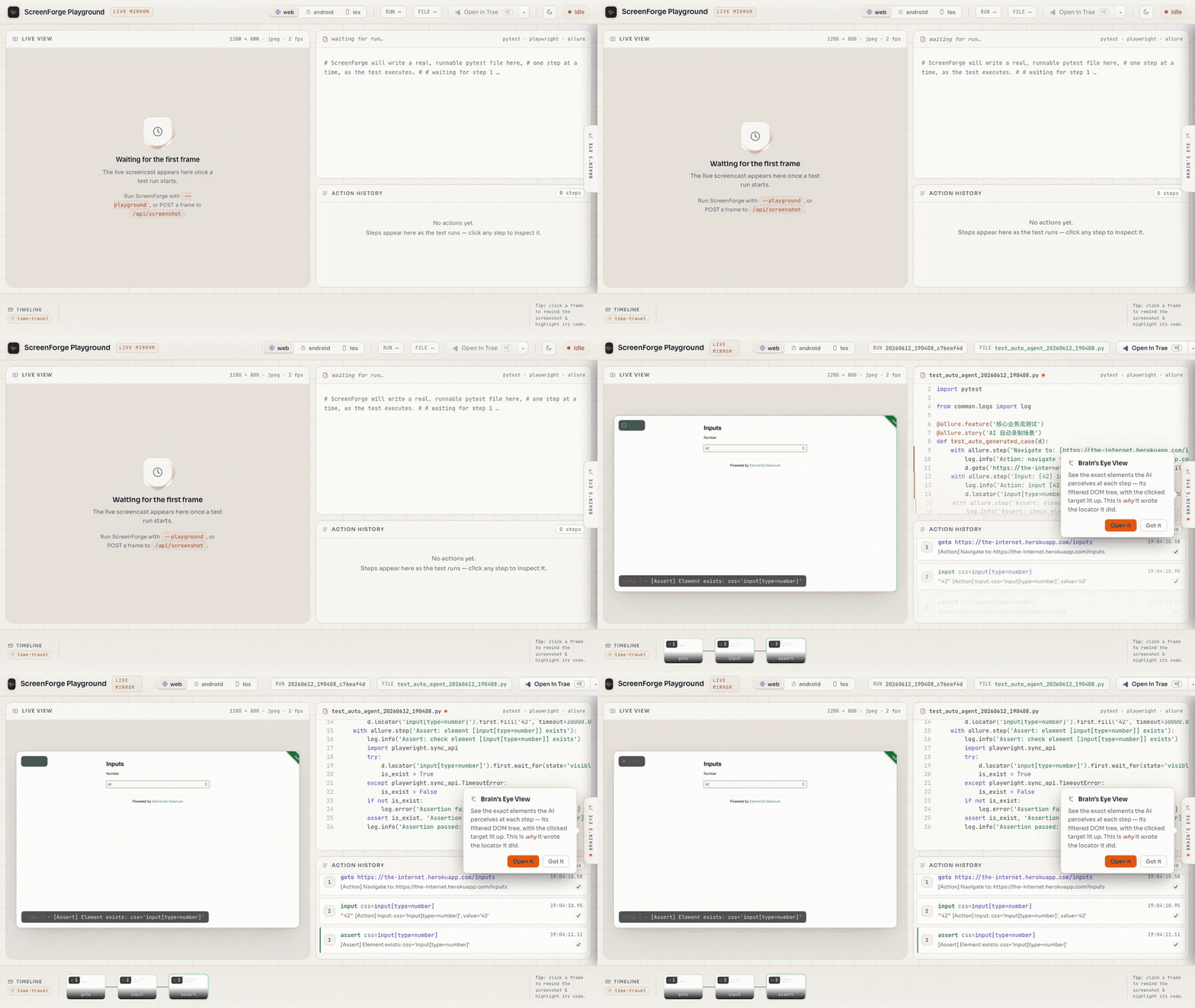
report/runs/<id>/artifacts for CI integration - Live Mirror playground: Watch the generated pytest code grow line-by-line beside a live screenshot as the test runs —
screenforge --playground. See the Playground Guide - Execution-replay review report: Run any test with
REVIEW_RECORD=1and get a self-contained, shareable offlinereport.html— a drag-timeline of each step's screenshot + the test source line that triggered it + the DOM tree, plus avideo.giffilmstrip. Default off, zero overhead. (Web verified; mobile registry/recording seam in place but unverified.) - Case memory hints on
inspect_ui: pass an optionaltasklabel and the payload'smemoryfield carries what the last run of that task did — locator, counts, and outcome — a hint the Agent weighs against the live tree, seen before it acts, never auto-replayed. It records failures too, so checklast_status/success_countbefore trusting a hint. The label must match the one the earlier run recorded (--action-name, else"{action}:{locator_value}");load_case_memorylists them. See the Agent Guide. - Plain-language element lookup on
inspect_ui: pass an optionalintentphrase (e.g."登录按钮") and the payload'scandidatesfield returns up to 3 ranked elements with ready-to-use locators — additive to the fullui_tree, never a replacement. Matching is literal string similarity, not semantic, so phraseintentin the same language as the UI. See the Agent Guide.
Agent Integration (Claude Code / Cursor / Codex)
ScreenForge exposes itself as a tool for AI Agents. The standard loop:
# 1. Get page structure (your Agent analyzes it)
echo '{"operation":"inspect_ui","platform":"web"}' | screenforge --tool-stdin

# 2. Your Agent decides what to do, sends precise actions
screenforge --action click --platform web --locator-type text --locator-value "Login"

# 3. Verify the result, repeat
echo '{"operation":"inspect_ui","platform":"web"}' | screenforge --tool-stdin
For batch operations, use workflows:
screenforge --workflow ./workflows/login.yaml --platform web --json
Or start the MCP server for native Agent integration:
screenforge --mcp-server
GitHub Actions
Add ScreenForge to your CI pipeline:
- uses: jhinzzz/ScreenForge@v1
  with:
    platform: web
    workflow: ./workflows/login.yaml
    openai-api-key: ${{ secrets.OPENAI_API_KEY }}
Results are auto-uploaded as Allure artifacts. See action.yml for all inputs.
See Agent Integration Guide for the complete protocol.
Installation (from source)
git clone https://github.com/jhinzzz/ScreenForge.git
cd ScreenForge
python -m venv .venv && source .venv/bin/activate
pip install -e ".[all]"
Platform-specific extras:
- Web only:
pip install -e .(default, includes Playwright) - Android:
pip install -e ".[android]" - iOS:
pip install -e ".[ios]" - ML/cache:
pip install -e ".[ml]"(sentence-transformers for semantic cache)
Configuration
# Required: LLM API key (OpenAI-compatible endpoint)
export OPENAI_API_KEY=sk-...

# Optional: custom endpoint (defaults to api.openai.com)
export OPENAI_BASE_URL=https://api.openai.com/v1

# Optional: model (defaults to gpt-4o)
export MODEL_NAME=gpt-4o
Or create a .env file (copy from .env_template).
Badge
If ScreenForge generates tests for your project, add this badge to your README:
[](https://github.com/jhinzzz/ScreenForge)

Learn More
| Resource | Description |
|---|---|
| Mobile Setup | Android & iOS device connection guide |
| MCP Setup (3 min) | Connect to Claude Desktop / Cursor / Cline / Claude Code |
| Agent Guide | Integration protocol for AI Agents |
| Capability Matrix | Supported platforms, actions, and locators |
| Architecture Deep-Dive | Brain/hands split, semantic cache, self-heal AST gates, hygiene-as-feature |
| Examples | Real committed workflows + the green pytest they generated |
| Playground Guide | Live Mirror — watch code + screenshots grow as the test runs |
| Workflow Examples | YAML workflow templates |
| CHANGELOG | Version history |
Contributing
See CONTRIBUTING.md for guidelines. Issues and PRs welcome!
License
1 maintainer

Metadata
1 maintainer
Release files for screenforge 0.11.1
For a detailed explanation of source distributions (sdists) and built distributions (wheels), please see the package formats documentation.
Source distribution (sdist)
| File | Size | Uploaded | |
|---|---|---|---|
| screenforge-0.11.1.tar.gz | 337.0 kB | Details |
Built distribution (wheel)
| File | Interpreter | ABI | Platform | Reset |
|---|---|---|---|---|
| screenforge-0.11.1-py3-none-any.whl | Python 3 | none | any | Details |
Total release size: 579.5 kB
Release files / screenforge-0.11.1.tar.gz
| Download URL | screenforge-0.11.1.tar.gz |
|---|---|
| Size | 337.0 kB |
| Tags | Source |
|
SHA-256 checksum How to use checksums |
a8b70424cdee079b30cdb39b7e23677bf7aa84140aaa1af75a0c7c6609272b51
|
|
BLAKE2b-256 checksum How to use checksums |
c6c8820db8e75ef9f2f8ee437fbf5b42071faf2ec1c81767937dfebb822e84be
|
| Upload date | |
|
Uploaded using Trusted Publishing? What is trusted publishing? |
Yes |
| Uploaded via |
twine/6.1.0 CPython/3.13.13
|
Provenance
Provenance describes where a file came from. On PyPI, provenance is shared via attestations, which provide a verifiable record of the build or publishing details. View details, limitations and caveats.


PyPI Publish Attestation
PyPI verified that this artifact, at this checksum, originated from the publisher listed below.
Signed by GitHub Actions, verified by PyPI on Jul 29, 2026.
Transparency logRelease files / screenforge-0.11.1-py3-none-any.whl
| Download URL | screenforge-0.11.1-py3-none-any.whl |
|---|---|
| Size | 242.5 kB |
| Tags | Python 3 |
|
SHA-256 checksum How to use checksums |
81efc90a28bd939ffc711b0ade11d647f29a18b784d206f0dee596a1f21a2096
|
|
BLAKE2b-256 checksum How to use checksums |
ce0444f9deaab39e4f286aa274590b10ad14c99ddff24366ca87d58b5b6473ae
|
| Upload date | |
|
Uploaded using Trusted Publishing? What is trusted publishing? |
Yes |
| Uploaded via |
twine/6.1.0 CPython/3.13.13
|
Provenance
Provenance describes where a file came from. On PyPI, provenance is shared via attestations, which provide a verifiable record of the build or publishing details. View details, limitations and caveats.
PyPI Publish Attestation
PyPI verified that this artifact, at this checksum, originated from the publisher listed below.
Signed by GitHub Actions, verified by PyPI on Jul 29, 2026.
Transparency log













