
Screenshare Doctor
Find out why screen sharing fails on your Linux Wayland desktop.



Status: 0.1.0 is the first release, tested on real GNOME, KDE Plasma and Hyprland sessions. Reports from other setups are very welcome; see the roadmap for what comes next.
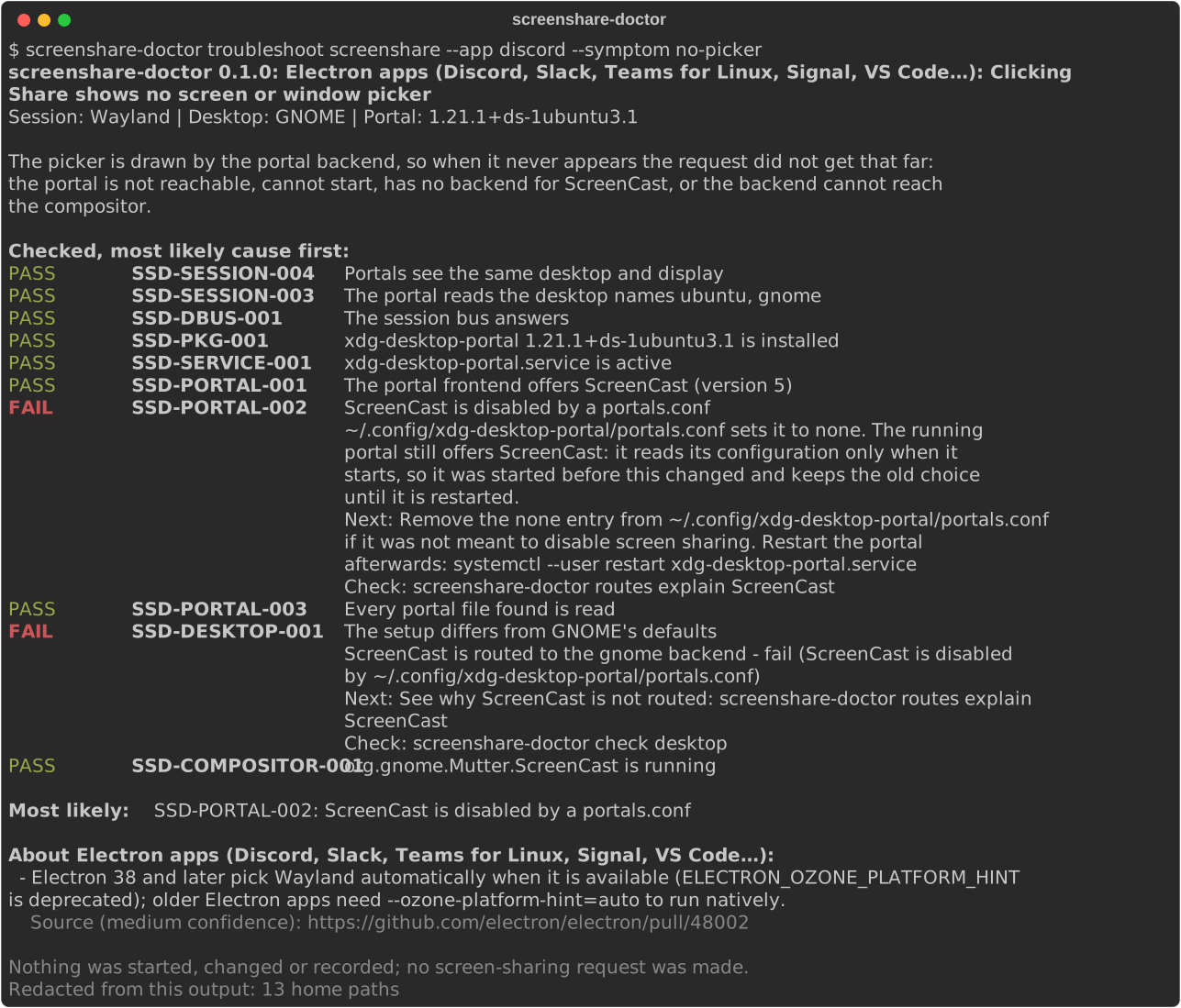
You click "Share screen" in a browser or a meeting app and get a black frame, no picker, the wrong windows or a permission error. The cause can sit in the app, the way it was launched (native, Flatpak, XWayland), the xdg-desktop-portal routing, the desktop's portal backend, PipeWire, WirePlumber or the compositor. Screenshare Doctor starts from the app and the symptom and tells you which layer is most likely at fault, with the evidence:
Install
Needs Python 3.11 or newer and a Linux desktop session to diagnose.
uv tool install git+https://github.com/BhuwanJoshi-01/screenshare-doctor   # until the PyPI release
pipx install git+https://github.com/BhuwanJoshi-01/screenshare-doctor      # or with pipx
Use
screenshare-doctor troubleshoot screenshare --app firefox --symptom no-picker
screenshare-doctor routes explain ScreenCast     # which portal backend handles screen sharing, and why
screenshare-doctor report --output screenshare-report.md   # redacted, safe to paste
It is tested on real GNOME, KDE Plasma and Hyprland sessions. A desktop is listed as supported only after such a test.
What works already (see the command reference):
screenshare-doctor troubleshoot screenshare --app firefox --symptom no-pickerstarts from the app and what you see, and shows the checks that explain it, most likely cause first (apps and symptoms).screenshare-doctor doctorruns every check, from the session to PipeWire, and explains what needs attention;--format jsonfor scripts (JSON output).screenshare-doctor report --output screenshare-report.mdwrites a redacted report to paste into a bug tracker.screenshare-doctor check sessiontells Wayland, X11, SSH and no session apart and shows the desktop names the portal reads.screenshare-doctor check servicesshows which portal backends, PipeWire and WirePlumber are installed and running, and whether portals will see the same desktop variables as your shell.screenshare-doctor check dbusshows which portal services are on the session bus and what they offer for screen sharing, without starting any of them.screenshare-doctor check desktopcompares your setup with what GNOME, KDE Plasma, Hyprland or wlroots ship by default (the defaults and their sources).screenshare-doctor routes explain ScreenCastnames the backend the portal picks, the line of theportals.confthat decides it, and whether the bus agrees, using the rules of your portal version (how routing works).
What it promises
- Passive by default. No command opens a screen-sharing request or picker, records anything, starts, restarts or stops a service, or changes configuration. A portal that isn't running is reported as such, not started. Testing a real screen-sharing request (planned for 0.2) is a separate command that asks first.
- No root. It never needs
sudo. - Configured vs observed. The report says whether a backend is predicted by your
portals.conffiles or observed answering on D-Bus. - Unknown is not a pass. A check that could not run is shown as unknown, never as green.
- Shareable reports. User names, home paths and window titles are redacted before any output is written, JSON included. No network access, no telemetry.
GNOME Shell extension
A small top-bar indicator shows the result of doctor whenever you open its menu; see
extension/README.md. It needs the command-line tool and runs nothing while the menu is closed.
Tested on
Real Wayland sessions of GNOME 50.1 (Ubuntu 26.04), KDE Plasma 6.8.2 (Fedora 45, in a VM) and Hyprland 0.57.1 (Arch Linux, in a VM). wlroots compositors such as sway are covered by upstream defaults only. See the support matrix and privacy.
Alternatives
- PortalDoctor offers thorough read-only portal, D-Bus and PipeWire diagnostics, validated on GNOME.
- wayland-cast-doctor checks the session, the ScreenCast backend and PipeWire.
Screenshare Doctor focuses on the app-centred workflow and on validated GNOME, KDE and Hyprland coverage.
Documentation
Command reference · Troubleshooting · Checks · Portal routing · Desktop defaults · Apps and symptoms · Privacy · Support matrix · JSON output · Architecture · Sample reports · Roadmap
License
The CLI is MIT. The GNOME Shell extension is GPL-2.0-or-later.
1 maintainer

Metadata
1 maintainer
Release files for screenshare-doctor 0.1.0
For a detailed explanation of source distributions (sdists) and built distributions (wheels), please see the package formats documentation.
Source distribution (sdist)
| File | Size | Uploaded | Provenance | Actions |
|---|---|---|---|---|
| screenshare_doctor-0.1.0.tar.gz | 82.0 kB | With provenance | Details for screenshare_doctor-0.1.0.tar.gz |
Built distribution (wheel)
| File | Interpreter | ABI | Platform | Actions Reset |
|---|---|---|---|---|
| screenshare_doctor-0.1.0-py3-none-any.whl | Python 3 | none | any | Details for screenshare_doctor-0.1.0-py3-none-any.whl |
Total release size: 184.3 kB
Release files / screenshare_doctor-0.1.0.tar.gz
| Download URL | screenshare_doctor-0.1.0.tar.gz |
|---|---|
| Size | 82.0 kB |
| Tags | Source |
|
SHA-256 checksum How to use checksums |
0af51d4d2902e9f6fd69179663363ed638608021de91dd59a79ad0d45313db65
|
|
BLAKE2b-256 checksum How to use checksums |
04763c40b07c89b669ab29b1ffa997b2ed64a8cc3c44bd0fff4bb8d71180ccc5
|
| Upload date | |
|
Uploaded using Trusted Publishing? What is trusted publishing? |
Yes |
| Uploaded via |
twine/7.0.0 CPython/3.13.16
|
Provenance
Provenance describes where a file came from. On PyPI, provenance is shared via attestations, which provide a verifiable record of the build or publishing details. View details, limitations and caveats.


PyPI Publish Attestation
PyPI verified that this artifact, at this checksum, originated from the publisher listed below.
Signed by GitHub Actions, verified by PyPI on Nov 4, 2026.
Transparency logRelease files / screenshare_doctor-0.1.0-py3-none-any.whl
| Download URL | screenshare_doctor-0.1.0-py3-none-any.whl |
|---|---|
| Size | 102.4 kB |
| Tags | Python 3 |
|
SHA-256 checksum How to use checksums |
3a544beb9f350549aa421f7ccd59442d05ec68dacf4eef87e0b74b5c75a8b472
|
|
BLAKE2b-256 checksum How to use checksums |
624d1b00680b58b0aa1029b2a7f741dae25a918242c88ef8ff5917bfe84a901c
|
| Upload date | |
|
Uploaded using Trusted Publishing? What is trusted publishing? |
Yes |
| Uploaded via |
twine/7.0.0 CPython/3.13.16
|
Provenance
Provenance describes where a file came from. On PyPI, provenance is shared via attestations, which provide a verifiable record of the build or publishing details. View details, limitations and caveats.
PyPI Publish Attestation
PyPI verified that this artifact, at this checksum, originated from the publisher listed below.
Signed by GitHub Actions, verified by PyPI on Nov 4, 2026.
Transparency logSecurity for screenshare-doctor 0.1.0
Provenance
Provenance describes where a file came from. On PyPI, provenance is shared via attestations, which provide a verifiable record of the build or publishing details. View details, limitations and caveats.
Full provenance
Both files in this release have been uploaded with provenance metadata.
Attestation for screenshare_doctor-0.1.0.tar.gz
PyPI Publish Attestation
PyPI verified that this artifact, at this checksum, originated from the publisher listed below.
Signed by GitHub Actions, verified by PyPI on Nov 4, 2026.
Transparency logA note on package security
PyPI is a repository for distributing packages, not a service for auditing them. While third-party security researchers and our staff do their best to detect and remove malicious packages, PyPI cannot guarantee the quality, security or suitability of any given package.
To learn more about protecting yourself from malicious actors, visit our package security documentation.













