
Speech-to-text CLI and system-tray app for dictating into any focused window. Local (vosk, faster-whisper) or cloud (groq, openai) backends, batch or streaming.
Verified details
These details have been verified by PyPIProject links
GitHub Statistics
Maintainers

Project description


Scribe 
Talk. It types. Scribe is a speech-to-text CLI and tray app that pipes transcribed text straight into the focused window. It supports local and cloud-based APIs, batch and streaming workflows.
What it does
- Records from your mic and transcribes via one of four backends — Vosk (local, streaming), Whisper (local, batch), OpenAI (cloud, batch or streaming), Groq (cloud, batch).
- Delivers the transcript three ways: paste into the focused window (default), copy to clipboard, or print to the terminal.
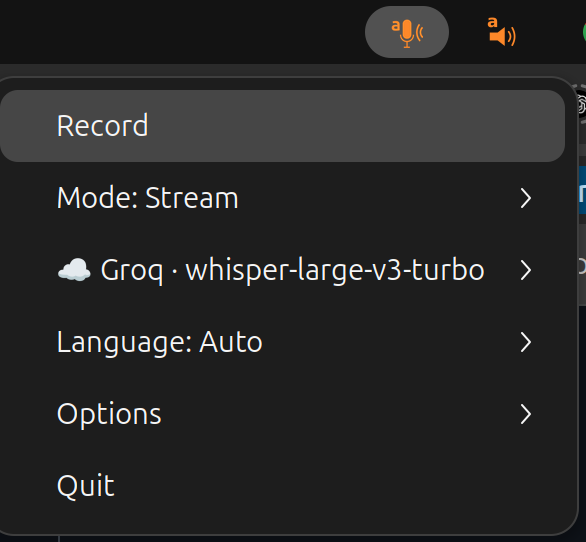
- Runs as a system tray icon with a single Record button, or as an interactive terminal TUI — same menu in both.
- Hooks into your DE's keyboard shortcuts via
SIGUSR1(toggle recording) andSIGUSR2(cancel). - Cross-platform: tested on Ubuntu (X11 and Wayland), macOS, Windows; works under Termux for clipboard / terminal output.
Install
sudo apt-get install portaudio19-dev xclip   # Ubuntu; macOS: brew install portaudio
pip install scribe-cli[all]
export GROQ_API_KEY=YOURAPIKEY                # or OPENAI_API_KEY, or skip and run local
See documentation below for setting up keyboard input on Ubuntu Wayland.
Usage
In a terminal:
scribe
This launches the system tray icon. Press Record, speak, press Stop —
the transcription lands in the focused window. Scribe picks the first
backend whose key / dependency is present, in order groq →
openai → whisper → vosk, so with GROQ_API_KEY set the
command above is equivalent to:
scribe --backend groq --model whisper-large-v3-turbo
You can override the defaults or drop the tray entirely:
scribe --backend openai --model gpt-4o-mini-transcribe # OpenAI sweet spot
scribe --backend openai --model gpt-realtime-whisper   # OpenAI streaming
scribe --backend whisper --model small                 # local, no API key
scribe --frontend terminal                             # interactive TUI menu
scribe --frontend terminal --no-interactive            # record immediately, no menu
scribe --mode clipboard                                # copy to clipboard, no keystroke
scribe --mode terminal                                 # only print to stdout
scribe -o transcript.txt                               # also append to a file
With --no-interactive (terminal frontend only), scribe skips the
interactive menu and starts recording right away — handy for scripted,
one-shot transcriptions. --no-prompt is kept as a deprecated alias.
Bias the recogniser toward names, jargon, or a domain glossary with
--prompt "free text hint" and --words word1 word2 ... (each also
accepts a --prompt-file / --words-file companion). See
docs/backends.md › Vocabulary biasing
for what each backend does with them.
Backends at a glance
| Backend | --backend |
Default model | Streaming model(s) | Requires |
|---|---|---|---|---|
| Groq (cloud) | groq |
whisper-large-v3-turbo |
— | GROQ_API_KEY |
| OpenAI (cloud) | openai |
gpt-4o-mini-transcribe |
gpt-realtime-whisper |
OPENAI_API_KEY |
| Whisper (local) | whisper |
small |
— | pip install scribe-cli[whisper] |
| Vosk (local) | vosk |
language-dependent | all Vosk models | pip install scribe-cli[vosk] |
Whether a transcription appears live as you speak or all at once when you stop depends on the model picked — see docs/backends.md.
Getting an API key
Groq is a good cloud backend to start with — very fast, quite accurate, and the
free tier is generous enough for everyday dictation. Sign up at
console.groq.com, create an API key
under Settings → API Keys, and export it as GROQ_API_KEY.
I personally use OpenAI with gpt-4o-mini-transcribe as it is also fast and perhaps more accurate for my accent-tainted English.
Documentation
- Installation & dependencies — PortAudio, extras, Ubuntu / GNOME tray libs.
- Backends in detail — model lists, when to pick which, the realtime model.
- Keyboard modes & typer backends — keystroke vs
clipboard, Wayland /
eitype,--type-direct. - System tray & global hotkeys — menu tree, icon
states,
SIGUSR1/SIGUSR2. - Desktop entry & autostart (
scribe-install) — GNOME / KDE launcher integration. - Fine tuning & CLI reference — every
scribe --helpflag with examples.
Compatibility
Initially developed for Python 3 on Ubuntu 24.04 (GNOME + Wayland);
works on macOS and Windows too. Wayland keystroke injection is
convoluted but solved. For dependencies of
individual subsystems, check pynput (keyboard) and pystray (tray
icon).
Project details
Verified details
These details have been verified by PyPIProject links
GitHub Statistics
Maintainers
Release history Release notifications | RSS feed


Download files
Download the file for your platform. If you're not sure which to choose, learn more about installing packages.
Source Distribution
Built Distribution
Filter files by name, interpreter, ABI, and platform.
If you're not sure about the file name format, learn more about wheel file names.
Copy a direct link to the current filters
File details
Details for the file scribe_cli-0.18.0.tar.gz.
File metadata
- Download URL: scribe_cli-0.18.0.tar.gz
- Upload date:
- Size: 2.1 MB
- Tags: Source
- Uploaded using Trusted Publishing? Yes
- Uploaded via: twine/6.1.0 CPython/3.13.12
File hashes
| Algorithm | Hash digest | |
|---|---|---|
| SHA256 |
3b696037dff7a75f0a3205b38d6e76f1d4e0b0371a41a5dc8b82ad84c4fa6901
|
|
| MD5 |
d051f0d9e46dbd02594df117f77faa96
|
|
| BLAKE2b-256 |
63b30987b5d3dd51a7d0ef3d36f57dd2b6f79a90cc7fad474a54521a6df259f9
|
Provenance
The following attestation bundles were made for scribe_cli-0.18.0.tar.gz:
Publisher:
pypi.yml on perrette/scribe
-
Statement:
-
Statement type:
https://in-toto.io/Statement/v1 -
Predicate type:
https://docs.pypi.org/attestations/publish/v1 -
Subject name:
scribe_cli-0.18.0.tar.gz -
Subject digest:
3b696037dff7a75f0a3205b38d6e76f1d4e0b0371a41a5dc8b82ad84c4fa6901 - Sigstore transparency entry: 1595259768
- Sigstore integration time:
-
Permalink:
perrette/scribe@d48d707c7268f84edf2a3820f2b4227acb02cdb8 -
Branch / Tag:
refs/tags/v0.18.0 - Owner: https://github.com/perrette
-
Access:
public
-
Token Issuer:
https://token.actions.githubusercontent.com -
Runner Environment:
github-hosted -
Publication workflow:
pypi.yml@d48d707c7268f84edf2a3820f2b4227acb02cdb8 -
Trigger Event:
push
-
Statement type:
File details
Details for the file scribe_cli-0.18.0-py3-none-any.whl.
File metadata
- Download URL: scribe_cli-0.18.0-py3-none-any.whl
- Upload date:
- Size: 2.0 MB
- Tags: Python 3
- Uploaded using Trusted Publishing? Yes
- Uploaded via: twine/6.1.0 CPython/3.13.12
File hashes
| Algorithm | Hash digest | |
|---|---|---|
| SHA256 |
a08bc1fff81186214efd6d908c2a30ed5db64a555f846483c2ca72963d5b0ab2
|
|
| MD5 |
d59550932d36c1dfffb01af4dffc7df4
|
|
| BLAKE2b-256 |
56b0b4f046b511142343177e84981e7eda637ae4caad4051a67d8b5ee0d9786c
|
Provenance
The following attestation bundles were made for scribe_cli-0.18.0-py3-none-any.whl:
Publisher:
pypi.yml on perrette/scribe
-
Statement:
-
Statement type:
https://in-toto.io/Statement/v1 -
Predicate type:
https://docs.pypi.org/attestations/publish/v1 -
Subject name:
scribe_cli-0.18.0-py3-none-any.whl -
Subject digest:
a08bc1fff81186214efd6d908c2a30ed5db64a555f846483c2ca72963d5b0ab2 - Sigstore transparency entry: 1595259905
- Sigstore integration time:
-
Permalink:
perrette/scribe@d48d707c7268f84edf2a3820f2b4227acb02cdb8 -
Branch / Tag:
refs/tags/v0.18.0 - Owner: https://github.com/perrette
-
Access:
public
-
Token Issuer:
https://token.actions.githubusercontent.com -
Runner Environment:
github-hosted -
Publication workflow:
pypi.yml@d48d707c7268f84edf2a3820f2b4227acb02cdb8 -
Trigger Event:
push
-
Statement type:






