
scRICH — Robust Identification of Cell-cell Communication Heterogeneity




This repository hosts the code of the scRICH method, published in Cell Systems. The method is developed by Federico Bocci at Radboud University.
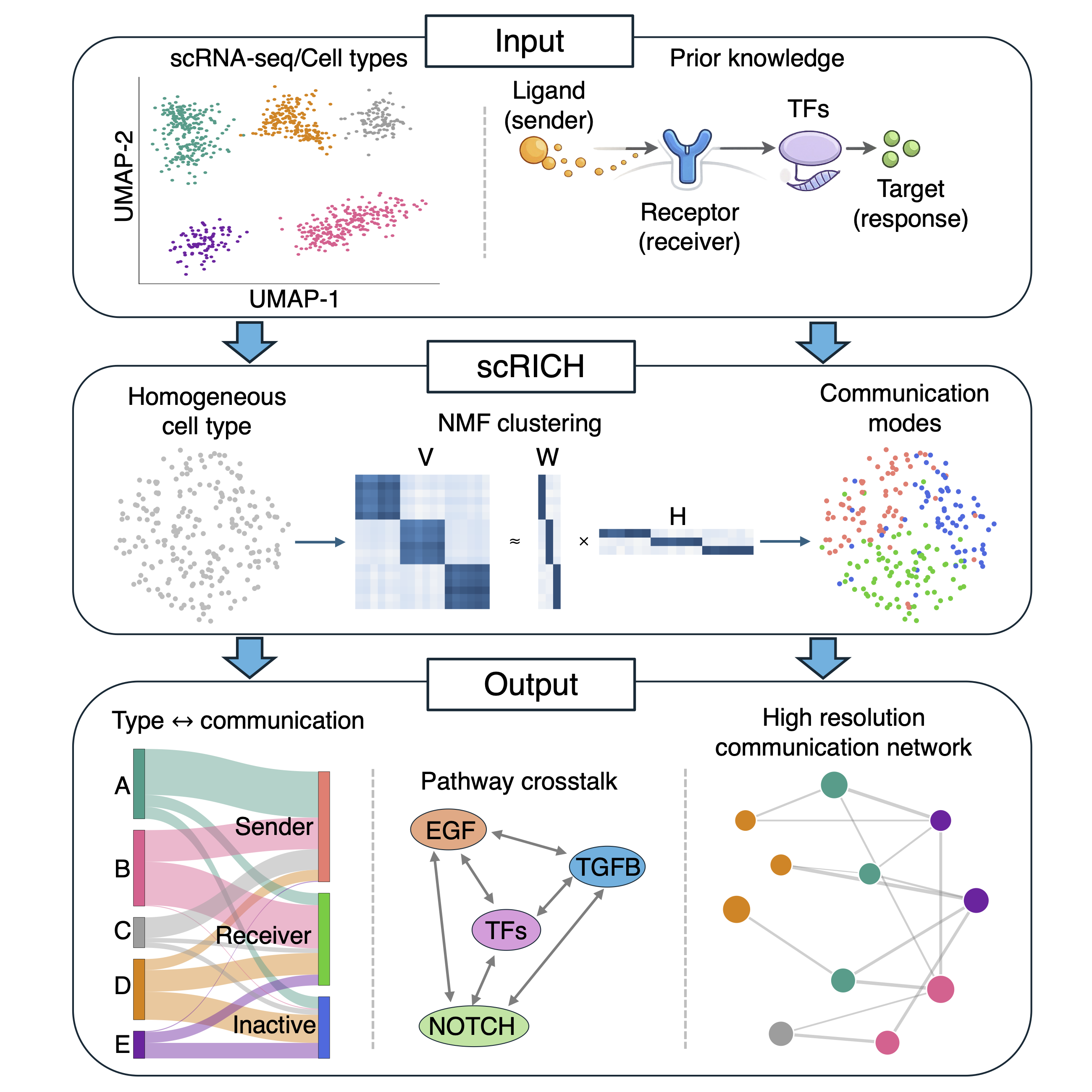
Paper version. scRICH 1.0 is an installable Python package with the same analysis methods as the paper. The exact code used in the paper is the GitHub release
v0.1.0.0(Zenodo DOI 10.5281/zenodo.20394264). See the changelog for what changed.
Installation
scRICH requires Python ≥ 3.10 (3.12 recommended). Install into a fresh environment:
python3.12 -m venv .venv
source .venv/bin/activate
pip install "scrich[tutorials]"     # or: pip install scrich   (core package only)
With uv: uv venv --python 3.12 .venv && source .venv/bin/activate && uv pip install "scrich[tutorials]".
From the source code (development)
git clone https://github.com/federicobocci/Robust-Identification-of-Cell-cell-Communication-Heterogeneity-in-single-cells scrich
cd scrich
uv venv --python 3.12 .venv
source .venv/bin/activate
uv pip install -e ".[tutorials,dev]"      # or: pip install -e ".[tutorials,dev]"
With conda (from the source code): conda env create -f environment.yml && conda activate scrich
Optional extras: velocity (scvelo + seaborn, for RNA-velocity functions and plots), alluvial (plotly +
kaleido, for scrich.pl.alluvial_*), chord (d3blocks, for scrich.pl.chord_diagram), tutorials (all of
these + JupyterLab + LIANA), dev (pytest, ruff).
A plain pip install scrich installs only the core package.
Databases
scRICH uses two kinds of database files (see scrich.db):
| Data | Size | Where it lives |
|---|---|---|
| Pathway → ligand / receptor tables (CellChatDB) | ~50 kB | Shipped inside the package |
| exFinder layers (L→R, R→TF, TF→target) + CellChat interactions, human & mouse | ~21 MB | Zenodo, downloaded on first use and cached |
The external files are only needed for scrich.tl.import_database (target genes of a pathway).
They are downloaded automatically from Zenodo (DOI
10.5281/zenodo.23319307) the first time they are needed,
then cached. Nothing needs to be set up.
On a computer without internet (e.g. a cluster compute node), download the files once from a machine that has internet and point scRICH to that folder:
import scrich as ri
ri.db.set_data_dir("/path/to/scrich_db")   # or: export SCRICH_DATA_DIR=/path/to/scrich_db
ri.db.fetch_all()   # download (or verify) all files now
Files are verified with SHA256 checksums. scripts/convert_exfinder_to_parquet.py documents how
they were produced from the original exFinder data.
Quick start
import scrich as ri

ri.tl.pathways_overview(adata, species="mouse")
ri.tl.all_path_sim(adata, "celltype", pathways_to_use=10, species="mouse", neighbor_average=True)
ri.tl.permutation_testing(adata, key="celltype")
ri.pl.pathway_heterogeneity_summary(adata, key="celltype")
Plots are shown by default and never saved automatically. To keep a plot, return it and save it:
ax = ri.pl.single_pathway_heterogeneity(adata, "IGF", "celltype", show=False)
ax.figure.savefig("IGF_heterogeneity.pdf")
Use ri.settings.autoshow = False in scripts, and ri.set_verbosity("warning") to reduce progress messages.
Tutorials
The notebooks in tutorials/ cover the main analysis (tutorial 1), modifying the ligand-receptor
set of a pathway (2), integrating LIANA (3), comparing RNA velocity methods (4) and spatial
transcriptomics (5). Datasets for tutorials 3–5 are on Zenodo, record
19859013.
Documentation
The documentation is online at https://scrich.readthedocs.io (installation, analysis steps,
databases, plotting, tutorials and the API reference generated from the docstrings). Its sources
are in docs/ and are built with Sphinx for Read the Docs (.readthedocs.yaml). To build it locally:
pip install -e ".[docs]"
sphinx-build -b html docs docs/_build/html      # then open docs/_build/html/index.html
Development
uv pip install -e ".[dev]"
pre-commit install                       # run ruff and file checks before each commit
pytest              # all tests (the database tests download ~21 MB on first run)
pytest -m "not network"   # skip the tests that need internet
Continuous integration (GitHub Actions, .github/workflows/) runs on every push and pull request:
tests.yml (Linux and macOS, Python 3.10/3.12/3.13, with and without the optional extras; also weekly),
lint.yml (the pre-commit checks) and docs.yml (documentation build, warnings as errors).
Contacts
For any question, get in touch with Federico Bocci (federico.bocci at ru.nl).
1 maintainer

Metadata
1 maintainer
Release files for scrich 1.0.0
For a detailed explanation of source distributions (sdists) and built distributions (wheels), please see the package formats documentation.
Source distribution (sdist)
| File | Size | Uploaded | Provenance | Actions |
|---|---|---|---|---|
| scrich-1.0.0.tar.gz | 82.7 kB | With provenance | Details for scrich-1.0.0.tar.gz |
Built distribution (wheel)
| File | Interpreter | ABI | Platform | Actions Reset |
|---|---|---|---|---|
| scrich-1.0.0-py3-none-any.whl | Python 3 | none | any | Details for scrich-1.0.0-py3-none-any.whl |
Total release size: 158.4 kB
Release files / scrich-1.0.0.tar.gz
| Download URL | scrich-1.0.0.tar.gz |
|---|---|
| Size | 82.7 kB |
| Tags | Source |
|
SHA-256 checksum How to use checksums |
a8a11d2f2b5d115d6529f9a75e0b72e10826a33b85d1c107b4da21ccb2a58e73
|
|
BLAKE2b-256 checksum How to use checksums |
81806824c0e43d62492cca4b2110e3d1b3bb6b47dcea4eb3e7f57e3976e5e0e0
|
| Upload date | |
|
Uploaded using Trusted Publishing? What is trusted publishing? |
Yes |
| Uploaded via |
twine/7.0.0 CPython/3.13.16
|
Provenance
Provenance describes where a file came from. On PyPI, provenance is shared via attestations, which provide a verifiable record of the build or publishing details. View details, limitations and caveats.


PyPI Publish Attestation
PyPI verified that this artifact, at this checksum, originated from the publisher listed below.
Signed by GitHub Actions, verified by PyPI on Oct 21, 2026.
Transparency logRelease files / scrich-1.0.0-py3-none-any.whl
| Download URL | scrich-1.0.0-py3-none-any.whl |
|---|---|
| Size | 75.7 kB |
| Tags | Python 3 |
|
SHA-256 checksum How to use checksums |
a8bf3990217cd96b46a8c6ffb97b2454921d0305f31c9f51076e5737a831ef55
|
|
BLAKE2b-256 checksum How to use checksums |
8cab67d8eedd1c7a418161ce586f30a4ff1597532751508ac4784ef4923a7afa
|
| Upload date | |
|
Uploaded using Trusted Publishing? What is trusted publishing? |
Yes |
| Uploaded via |
twine/7.0.0 CPython/3.13.16
|
Provenance
Provenance describes where a file came from. On PyPI, provenance is shared via attestations, which provide a verifiable record of the build or publishing details. View details, limitations and caveats.
PyPI Publish Attestation
PyPI verified that this artifact, at this checksum, originated from the publisher listed below.
Signed by GitHub Actions, verified by PyPI on Oct 21, 2026.
Transparency logSecurity for scrich 1.0.0
Provenance
Provenance describes where a file came from. On PyPI, provenance is shared via attestations, which provide a verifiable record of the build or publishing details. View details, limitations and caveats.
Full provenance
All 2 files in this release have been uploaded with provenance metadata.
Attestation for scrich-1.0.0.tar.gz
PyPI Publish Attestation
PyPI verified that this artifact, at this checksum, originated from the publisher listed below.
Signed by GitHub Actions, verified by PyPI on Oct 21, 2026.
Transparency logA note on package security
PyPI is a repository for distributing packages, not a service for auditing them. While third-party security researchers and our staff do their best to detect and remove malicious packages, PyPI cannot guarantee the quality, security or suitability of any given package.
To learn more about protecting yourself from malicious actors, visit our package security documentation.













