
ScriptRunner
GUI software for rendering arguments of CLI Python scripts and scheduling runs
Motivation
In synchrotron facilities where Linux OS is the main platform, running data acquisition, data processing, or beamline operation is often done through Python command-line interfaces. This can be a hassle for users who are not familiar with Linux or command-line interfaces.
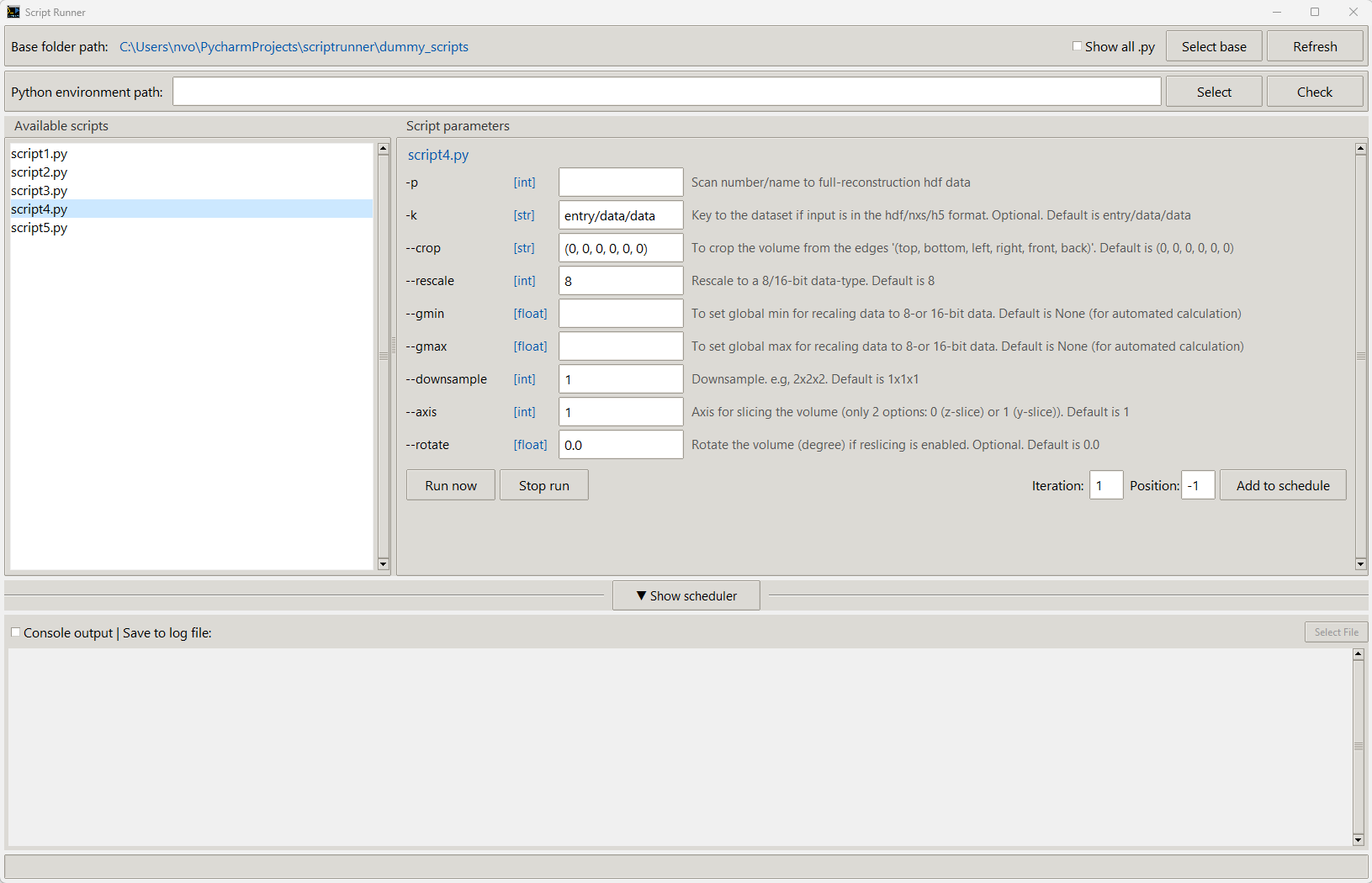
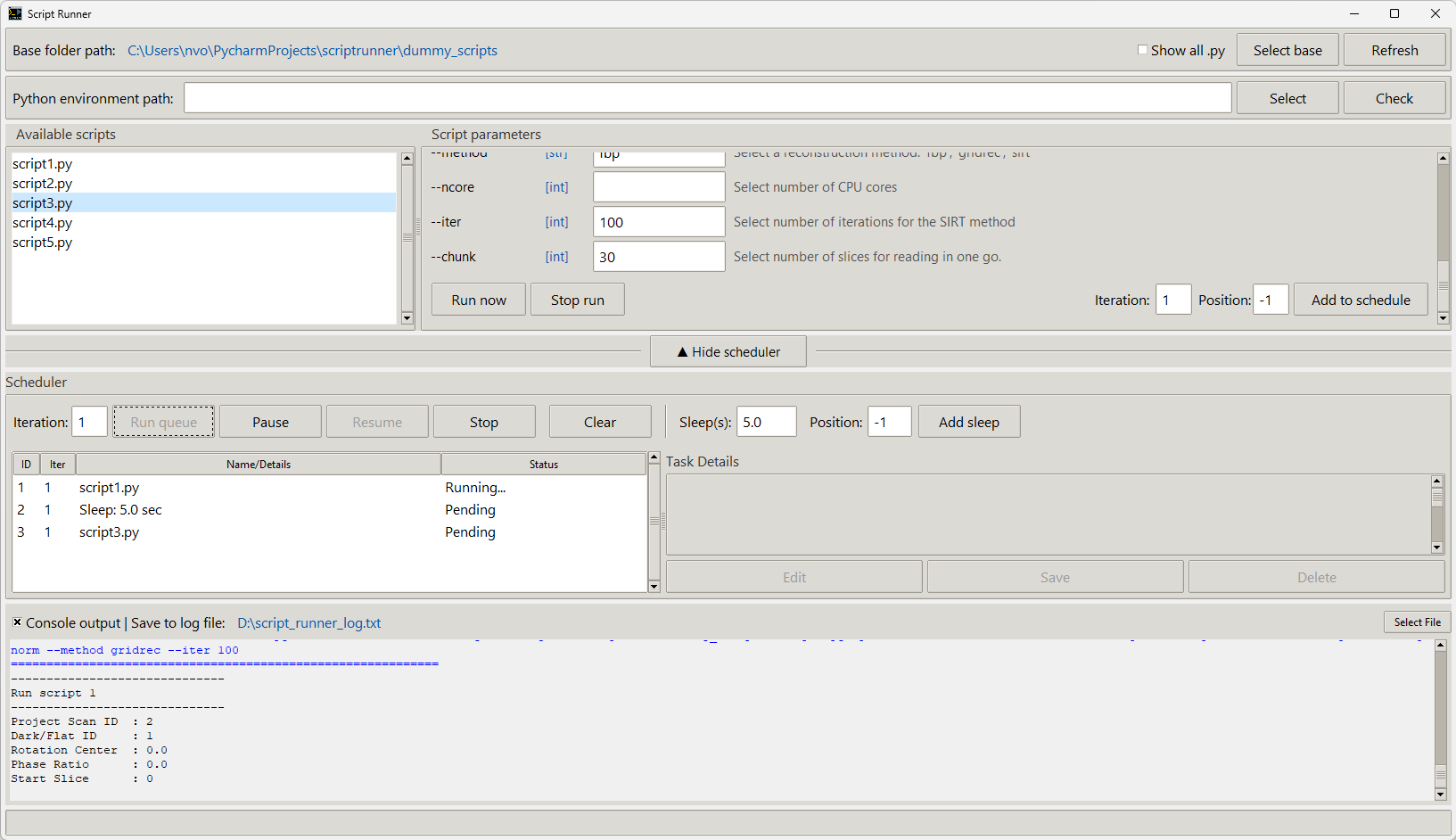
The idea of this GUI is to render the arguments of CLI scripts, making it easier for users to run Python scripts through a graphical user interface. Beyond that, ScriptRunner allows scheduling script runs in a flexible way, enabling users to run a group of scripts with ease. For example, a list of data acquisition or data processing scripts can be scheduled to run different acquisition modes or different data-processing pipelines in order.
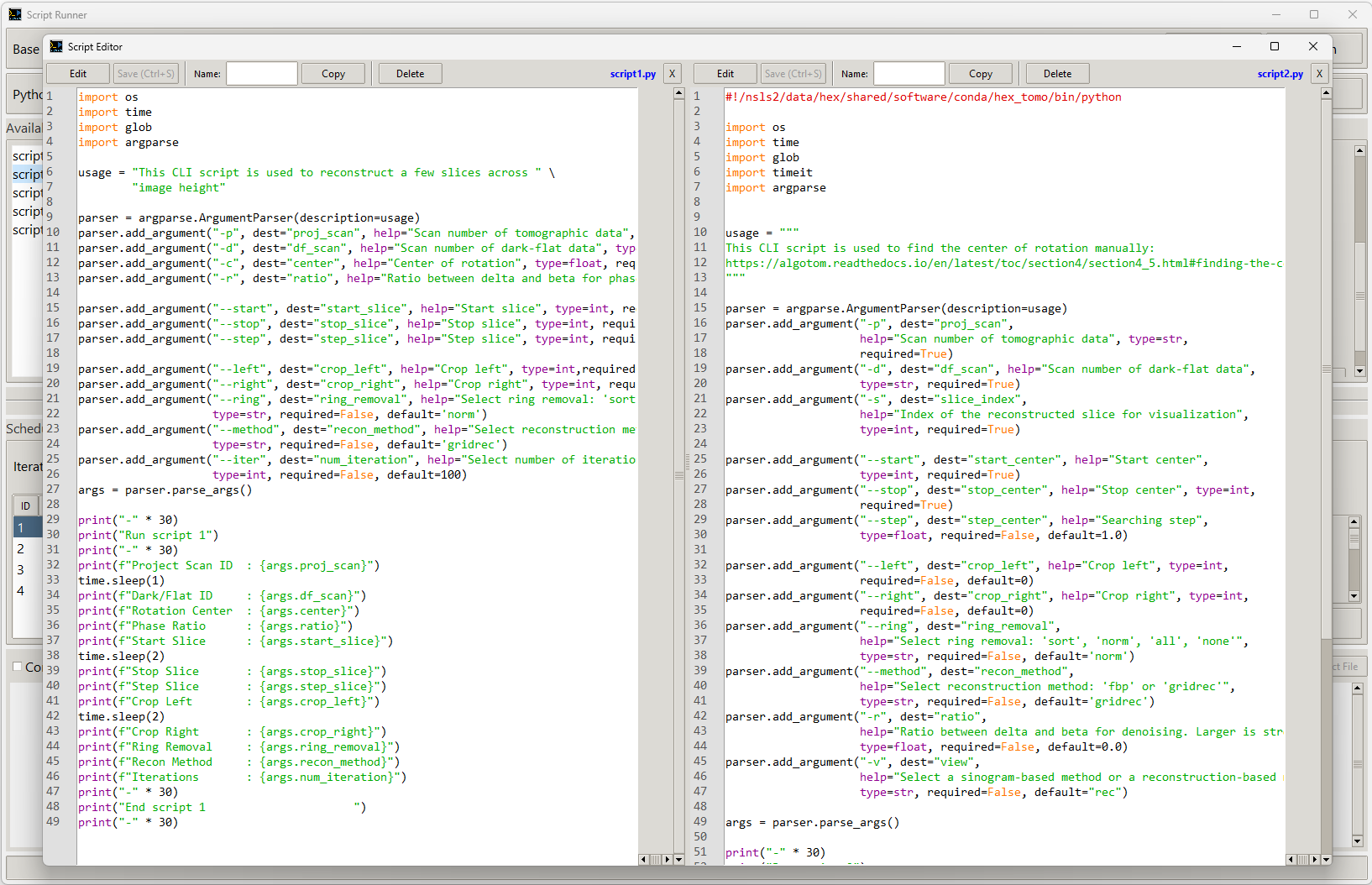
To make it even more convenient for users, ScriptRunner allows modifying and changing Python scripts without the need for another script editor like VS Code, Gedit, or Vim.
Features
-
Automatic GUI generation for CLI Python scripts:
ScriptRunner parses arguments from ArgParse-based CLI scripts and automatically renders them as user-friendly GUI input fields.
-
Run individual scripts or schedule multi-script workflows:
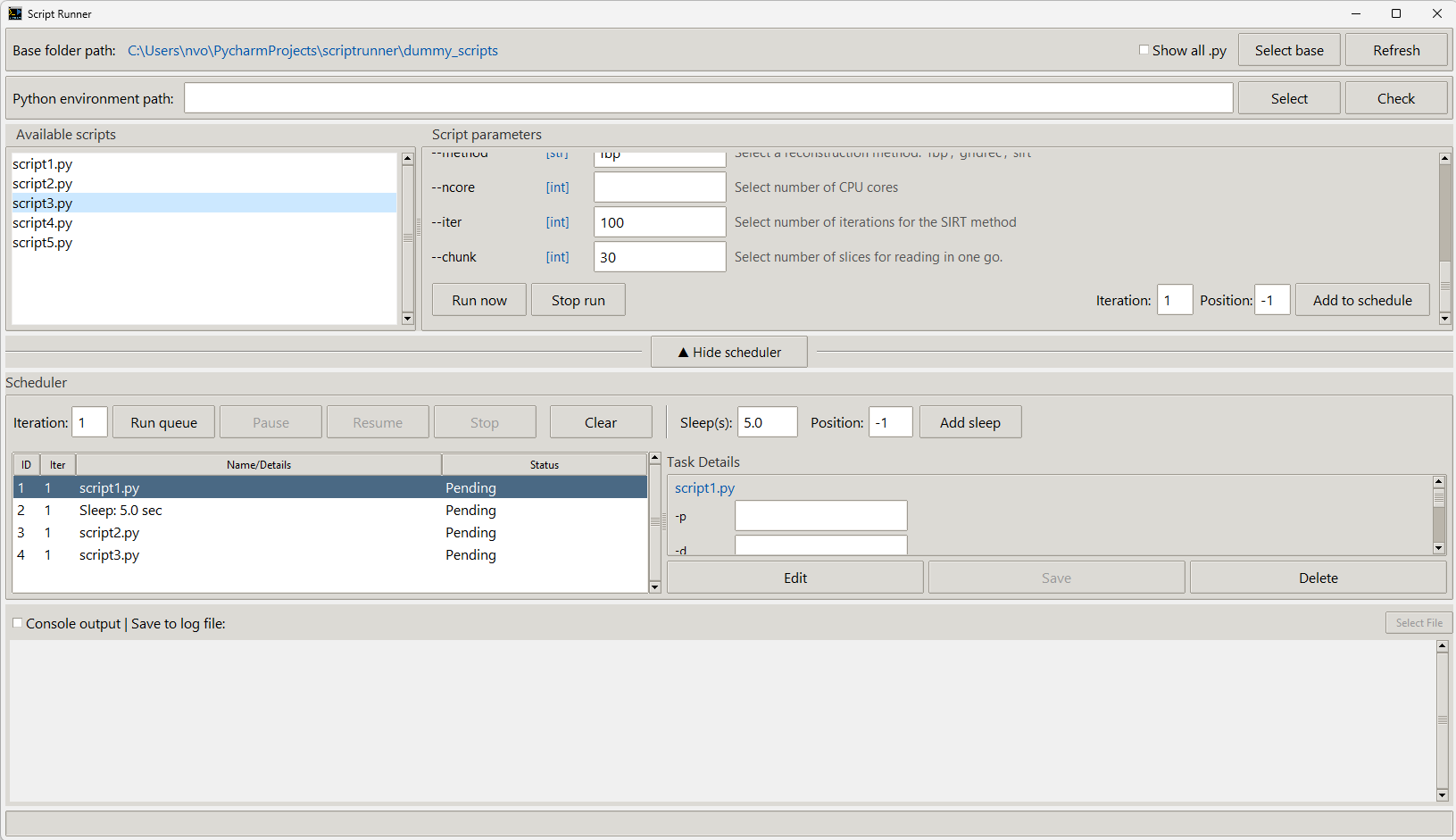
Execute a single script on demand, or create a scheduled sequence of multiple scripts. This enables automated data acquisition, processing pipelines, or batch operations without manual intervention.
-
Built-in script editor with side-by-side comparison:
Edit Python scripts directly inside the application, no need for external editors like VS Code or Vim. Compare two scripts side-by-side to track modifications or validate parameter changes.
-
Console logging and export:
View real-time console output for each script and save logs to a file for debugging, documentation, or reproducibility.
Installation
Install Miniconda, Anaconda or Miniforge, then open a Linux terminal or the Miniconda/Anaconda PowerShell prompt and use the following commands for installation.
Using pip:
pip install scriptrunner-gui
Using conda:
conda install -c algotom scriptrunner-gui
Once installed, launching ScriptRunner with
scriptrunner
Using -h for option usage
scriptrunner -h
Installing from source:
- If using a single file:
- Copy the file scriptrunner.py. Install python.
- Run:
python scriptrunner.py
- If using setup.py
- Create conda environment
conda create -n scriptrunner python=3.11
conda activate scriptrunner
- Clone the source (git needs to be installed)
git clone https://github.com/algotom/scriptrunner.git
- Navigate to the cloned directory (having setup.py file)
pip install .
- Create conda environment
Usage
-
Select a base folder containing Python scripts.
-
Clicking a script will show the arguments of that script in the right panel.
-
Double-clicking a script will open the Editor panel window.
-
Clicking "Run Now" will run the current script.
-
Select a script and use "Add to schedule" to schedule multiple scripts. There is an option to add sleep time between scripts.
-
Enable/disable saving console output to a file using the checkbox.
-
By default, ScriptRunner picks and displays ArgParse-based scripts. However, users can choose to display all Python scripts by running:
scriptrunner -t "all"
or tick the box "Show all .py"
1 maintainer

Metadata
1 maintainer
Release files for scriptrunner-gui 1.1.0
For a detailed explanation of source distributions (sdists) and built distributions (wheels), please see the package formats documentation.
Source distribution (sdist)
| File | Size | Uploaded | |
|---|---|---|---|
| scriptrunner_gui-1.1.0.tar.gz | 61.1 kB | Details |
Built distribution (wheel)
| File | Interpreter | ABI | Platform | Reset |
|---|---|---|---|---|
| scriptrunner_gui-1.1.0-py3-none-any.whl | Python 3 | none | any | Details |
Total release size: 119.8 kB
Release files / scriptrunner_gui-1.1.0.tar.gz
| Download URL | scriptrunner_gui-1.1.0.tar.gz |
|---|---|
| Size | 61.1 kB |
| Tags | Source |
|
SHA-256 checksum How to use checksums |
078b7c6fae0ae37efaa6342f78faf4b401bfd2facce14a25b63fcf6a937db33e
|
|
BLAKE2b-256 checksum How to use checksums |
c07fec80212e048df7d16bcb09a87f83063145aa22f252174f1061ab0e5a64e3
|
| Upload date | |
|
Uploaded using Trusted Publishing? What is trusted publishing? |
No |
| Uploaded via |
twine/6.2.0 CPython/3.11.14
|
Release files / scriptrunner_gui-1.1.0-py3-none-any.whl
| Download URL | scriptrunner_gui-1.1.0-py3-none-any.whl |
|---|---|
| Size | 58.7 kB |
| Tags | Python 3 |
|
SHA-256 checksum How to use checksums |
528d4552ce14f1054470a8c504118e70b7b49e6c955154c6631b82c51b798480
|
|
BLAKE2b-256 checksum How to use checksums |
8ab32e682f35312a9998956f153c3d8c98e90493c42f2e7b8d3c9c121e31bd9f
|
| Upload date | |
|
Uploaded using Trusted Publishing? What is trusted publishing? |
No |
| Uploaded via |
twine/6.2.0 CPython/3.11.14
|














