
LED Matrix Display Framework for CircuitPython and Desktop
Verified details
These details have been verified by PyPIProject links
GitHub Statistics
Maintainers

Project description
ScrollKit
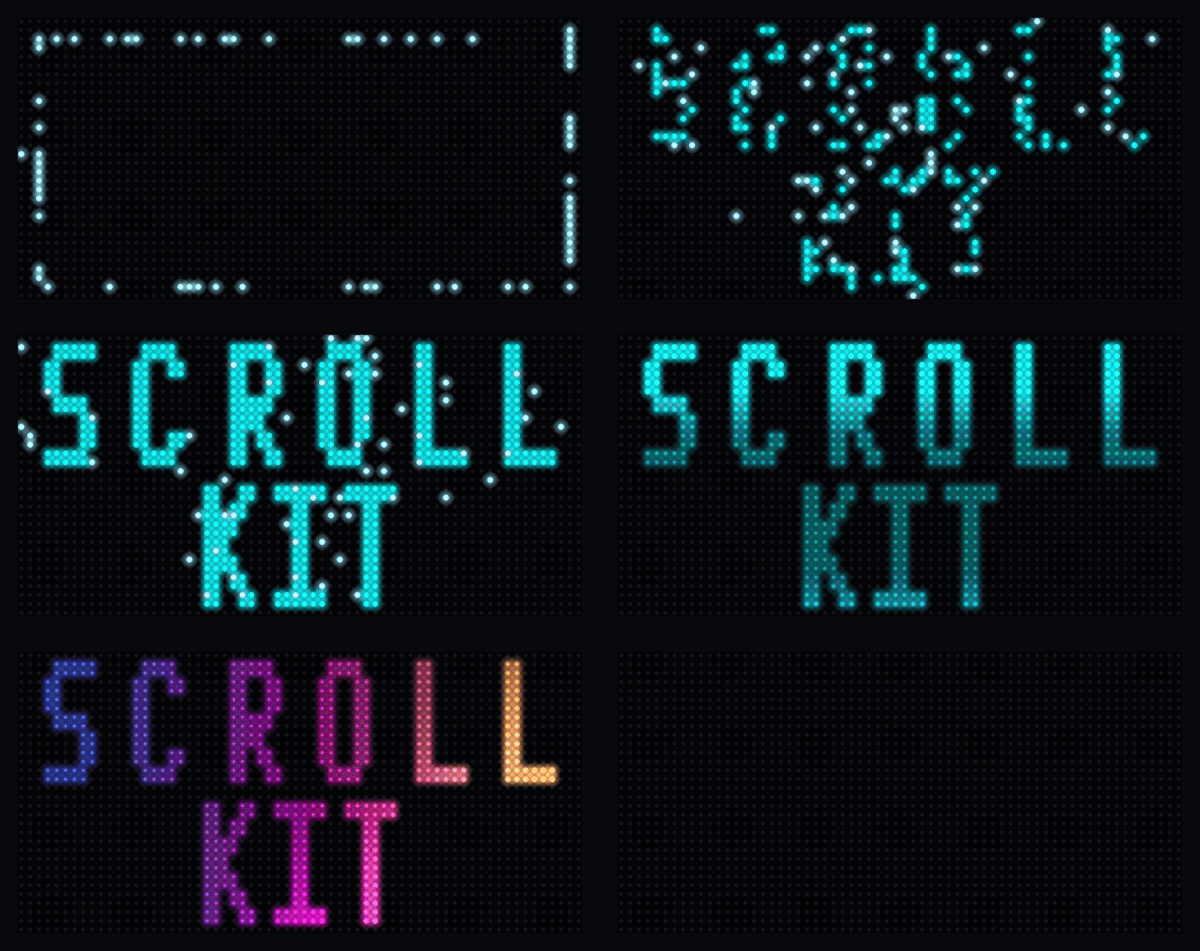
Most LED-matrix libraries get you a scrolling "Hello, World" and stop. I built ScrollKit for what comes next: over-the-air updates to boards in the field, fault-tolerant data refresh, real transitions and effects, and a built-in web server users control from a browser. The hard part isn't any single feature. It's running all of them at once on a microcontroller without the display stuttering. It also runs on a desktop simulator I wrote that exports its own GIFs and videos, like the one below.
Built by Michael Czeiszperger
📖 Full documentation: scrollkit.dev
Installation
# Desktop development with simulator
pip install "scrollkit[simulator]"

# To modify ScrollKit itself (or run the demos): clone and install editable
git clone https://github.com/czei/scrollkit.git
cd scrollkit && pip install -e ".[simulator]"

# CircuitPython — copy scrollkit/ to your device's lib/ alongside your source
Quick Start
import asyncio
from scrollkit.app.base import ScrollKitApp
from scrollkit.display.content import ScrollingText

class HelloWorldApp(ScrollKitApp):
    async def setup(self):
        self.content_queue.add(
            ScrollingText("Hello, LED Matrix!", y=12, color=0x00AAFF))

asyncio.run(HelloWorldApp().run())   # auto-detects MatrixPortal hardware vs desktop simulator
The top-level
scrollkitpackage deliberately performs no imports (every import costs RAM on CircuitPython), so you always import from submodules, e.g.from scrollkit.app.base import ScrollKitApp. See the getting-started guide for the fullScrollKitApp/UnifiedDisplayAPI.
Architecture
ScrollKit runs unchanged on the MatrixPortal S3 (CircuitPython) and a desktop
pygame simulator. Your app subclasses ScrollKitApp and talks to one display
abstraction; the library picks a backend at import time and brokers every external
system the sign touches:
flowchart TB
    app["Your app<br/>(subclasses ScrollKitApp)"] --> core["ScrollKitApp · UnifiedDisplay<br/>ContentQueue · effects · config"]
    core -->|CircuitPython| hw["MatrixPortal S3<br/>displayio → RGBMatrix panel"]
    core -->|desktop| sim["pygame simulator"]
    core <-->|HttpClient — synchronous| api(["HTTP data API"])
    core <-->|SettingsWebServer| browser(["Browser config UI"])
    core -->|raw.githubusercontent.com| gh(["GitHub OTA"])
Subsystem dependencies (dashed = lazy import; dev and simulator are
desktop-only, raising ImportError on the device):
flowchart LR
    app["app"] --> display["display"]
    app --> config["config"]
    app -.->|lazy| utils["utils"]
    app -.->|lazy| effects["effects"]
    app -.->|lazy| web["web"]
    effects --> display
    display -.->|desktop| simulator["simulator"]
    config -.->|lazy| utils
    network["network"] --> config
    network --> utils
    ota["ota"] --> exceptions["exceptions"]
    dev["dev"] --> display
    dev --> effects
    dev --> simulator
    classDef desktop stroke-dasharray:6 4;
    class dev,simulator desktop;
See the Architecture guide for the full write-up, including the invariants this graph enforces.
Package Structure
scrollkit/
├── app/               # ScrollKitApp base class, async run loop, memory helpers
├── display/           # UnifiedDisplay (auto-detects hardware vs simulator), content
│   ├── unified.py                # Production display (device + desktop)
│   ├── content.py                # DisplayContent / StaticText / ScrollingText / ContentQueue / Priority
│   ├── bitmap_text.py            # Animated bitmap-font text + palette effects
│   ├── gradient_text.py          # Gradient/multi-color text fill (GradientTextLayer)
│   └── colors.py                 # Continuous 24-bit color generators
├── effects/           # Transition contract (transitions.py) + standalone splash/particle helpers
├── network/           # Networking utilities
│   ├── http_client.py            # Dual-implementation HTTP client (raises NetworkError)
│   ├── wifi_manager.py           # WiFi connection lifecycle
│   └── mdns.py                   # <hostname>.local advertising (CircuitPython; no-op on desktop)
├── config/            # Configuration management
│   └── settings_manager.py       # JSON-based persistent settings
├── ota/               # Over-the-air updates
│   ├── client.py                 # GitHub-release-based OTA client
│   ├── manifest.py               # Update manifest model
│   ├── display_progress.py       # Display-progress adapter over OTAClient
│   └── publish.py                # Host-side release publishing (desktop/CI only)
└── utils/             # Utilities
    ├── error_handler.py          # Logging and error handling
    ├── diagnostics.py            # NVM boot/crash record + reboot-loop safe-mode breaker
    ├── color_utils.py            # Named colors + settings-UI hex-string color table (no conversion helpers; int-based conversions live in display/colors.py)
    ├── system_utils.py           # NTP / HTTP-Date system clock sync
    └── url_utils.py              # URL decoding and credential loading
Core API
Display
from scrollkit.display.unified import UnifiedDisplay
from scrollkit.display.content import ContentQueue, ScrollingText

# Create display (auto-detects CircuitPython vs desktop)
display = UnifiedDisplay(width=64, height=32)
display.initialize()

# ScrollKitApp drives this queue's render loop for you (see Quick Start above);
# add() is all a subclass's setup() typically needs to call.
queue = ContentQueue()
queue.add(ScrollingText("Scrolling text", y=12, color=0x00AAFF))
HTTP Client
from scrollkit.network.http_client import HttpClient
from scrollkit.exceptions import NetworkError

client = HttpClient()
try:
    response = await client.get("https://api.example.com/data")
    data = response.json()
except NetworkError as e:
    print("fetch failed:", e)
Settings
from scrollkit.config.settings_manager import SettingsManager

settings = SettingsManager("app_settings.json",
    defaults={"hostname": "mydevice", "brightness": "0.5"},
    bool_keys=["dark_mode"])
settings.set("hostname", "new-name")
settings.save_settings()
Utilities
from scrollkit.utils.error_handler import ErrorHandler
from scrollkit.display.colors import scale
from scrollkit.network.wifi_manager import is_dev_mode

logger = ErrorHandler("app.log")
logger.info("Application started")

color = scale(0xff0000, 0.5)  # Dim red to 50%

if is_dev_mode():
    print("running on desktop, not CircuitPython")
Platform Support
| Platform | Backend | Status |
|---|---|---|
| Adafruit MatrixPortal S3 | CircuitPython + displayio | ✅ Calibrated from device |
| Pimoroni Interstate 75 W (RP2350) | CircuitPython + rgbmatrix | ✅ Supported (perf profile uncalibrated) |
| Desktop (macOS/Linux/Windows) | SLDK Simulator | ✅ |
| Custom CircuitPython boards | displayio / rgbmatrix | 🔌 Extensible (see Adding New Hardware) |
How this was built
I wrote the first two shipping versions by hand in 2024, when all of this was still one application. Splitting it into a library and a separate app layer, then documenting the result, is the kind of project that dies quietly in a spare-time backlog. So I used Claude Code and spec-driven development to handle the refactoring and the first drafts, then went back through all of it in my own voice, with my own screenshots. Yes, AI has touched a lot of this code. It was also directed by an engineer who has shipped production software for a living, including time on one of Sun Microsystems' API teams. Both are true.
License
MIT
Project details
Verified details
These details have been verified by PyPIProject links
GitHub Statistics
Maintainers
Release history Release notifications | RSS feed

Download files
Download the file for your platform. If you're not sure which to choose, learn more about installing packages.
Source Distribution
Built Distribution
Filter files by name, interpreter, ABI, and platform.
If you're not sure about the file name format, learn more about wheel file names.
Copy a direct link to the current filters
File details
Details for the file scrollkit-0.8.3.tar.gz.
File metadata
- Download URL: scrollkit-0.8.3.tar.gz
- Upload date:
- Size: 398.5 kB
- Tags: Source
- Uploaded using Trusted Publishing? Yes
- Uploaded via: twine/6.1.0 CPython/3.13.12
File hashes
| Algorithm | Hash digest | |
|---|---|---|
| SHA256 |
426fdc90037e587408503e4e4ac54d88b17d5255af121d16e7a81c13d760a32c
|
|
| MD5 |
0f9e7a546ccc900cc2b529ca464d69ef
|
|
| BLAKE2b-256 |
73539f8055858dbd4eeb13450aee2d805a54a0e9dc1d0d75931828540d031fc3
|
Provenance
The following attestation bundles were made for scrollkit-0.8.3.tar.gz:
Publisher:
publish.yml on czei/scrollkit
-
Statement:
-
Statement type:
https://in-toto.io/Statement/v1 -
Predicate type:
https://docs.pypi.org/attestations/publish/v1 -
Subject name:
scrollkit-0.8.3.tar.gz -
Subject digest:
426fdc90037e587408503e4e4ac54d88b17d5255af121d16e7a81c13d760a32c - Sigstore transparency entry: 2047954823
- Sigstore integration time:
-
Permalink:
czei/scrollkit@f1f6eab6dffd9b7bc30a5e27b84a9a7ac27f0078 -
Branch / Tag:
refs/tags/v0.8.3 - Owner: https://github.com/czei
-
Access:
public
-
Token Issuer:
https://token.actions.githubusercontent.com -
Runner Environment:
github-hosted -
Publication workflow:
publish.yml@f1f6eab6dffd9b7bc30a5e27b84a9a7ac27f0078 -
Trigger Event:
push
-
Statement type:
File details
Details for the file scrollkit-0.8.3-py3-none-any.whl.
File metadata
- Download URL: scrollkit-0.8.3-py3-none-any.whl
- Upload date:
- Size: 441.5 kB
- Tags: Python 3
- Uploaded using Trusted Publishing? Yes
- Uploaded via: twine/6.1.0 CPython/3.13.12
File hashes
| Algorithm | Hash digest | |
|---|---|---|
| SHA256 |
943d7bba1802e736e25a4cc915d0c3204559239b6fee358ac42c3476d9771273
|
|
| MD5 |
1efea71d632d45381ada2dceb0928f59
|
|
| BLAKE2b-256 |
23d947af815938987a28174dda1a6a74fb73b34f89f38b96efecb7d178bb76af
|
Provenance
The following attestation bundles were made for scrollkit-0.8.3-py3-none-any.whl:
Publisher:
publish.yml on czei/scrollkit
-
Statement:
-
Statement type:
https://in-toto.io/Statement/v1 -
Predicate type:
https://docs.pypi.org/attestations/publish/v1 -
Subject name:
scrollkit-0.8.3-py3-none-any.whl -
Subject digest:
943d7bba1802e736e25a4cc915d0c3204559239b6fee358ac42c3476d9771273 - Sigstore transparency entry: 2047954833
- Sigstore integration time:
-
Permalink:
czei/scrollkit@f1f6eab6dffd9b7bc30a5e27b84a9a7ac27f0078 -
Branch / Tag:
refs/tags/v0.8.3 - Owner: https://github.com/czei
-
Access:
public
-
Token Issuer:
https://token.actions.githubusercontent.com -
Runner Environment:
github-hosted -
Publication workflow:
publish.yml@f1f6eab6dffd9b7bc30a5e27b84a9a7ac27f0078 -
Trigger Event:
push
-
Statement type:






