
scrollscout
Scout Vesuvius Challenge scrolls from a laptop — stream and preview the Herculaneum CT volumes without downloading terabytes or tripping the data server's rate limiter.
The scroll volumes are enormous. Scroll 1 alone is 14376 × 7888 × 8096 voxels ≈ 918 GB at full resolution. If you're on a laptop with limited disk, you can't (and shouldn't) download them to take a look. The data is streamable as multiscale OME-Zarr — but two things bite newcomers immediately:
-
You don't know which resolution level to read. Ask for a full-res cross-section and you'll try to pull hundreds of GB.
-
Naive reads get rate-limited. A large
array[z, y0:y1, x0:x1]makes zarr fire one HTTP request per chunk, all at once. The server replies429 Too Many Requestsand your read dies:aiohttp.client_exceptions.ClientResponseError: 429, message='Too Many Requests', url='https://dl.ash2txt.org/.../54keV_7.91um_Scroll1A.zarr/0/56/19/26'
scrollscout handles both for you: it auto-selects the coarsest pyramid level that satisfies your requested pixel width, and reads it in small, chunk-aligned tiles with exponential backoff on 429, so a read slows down under pressure instead of failing.
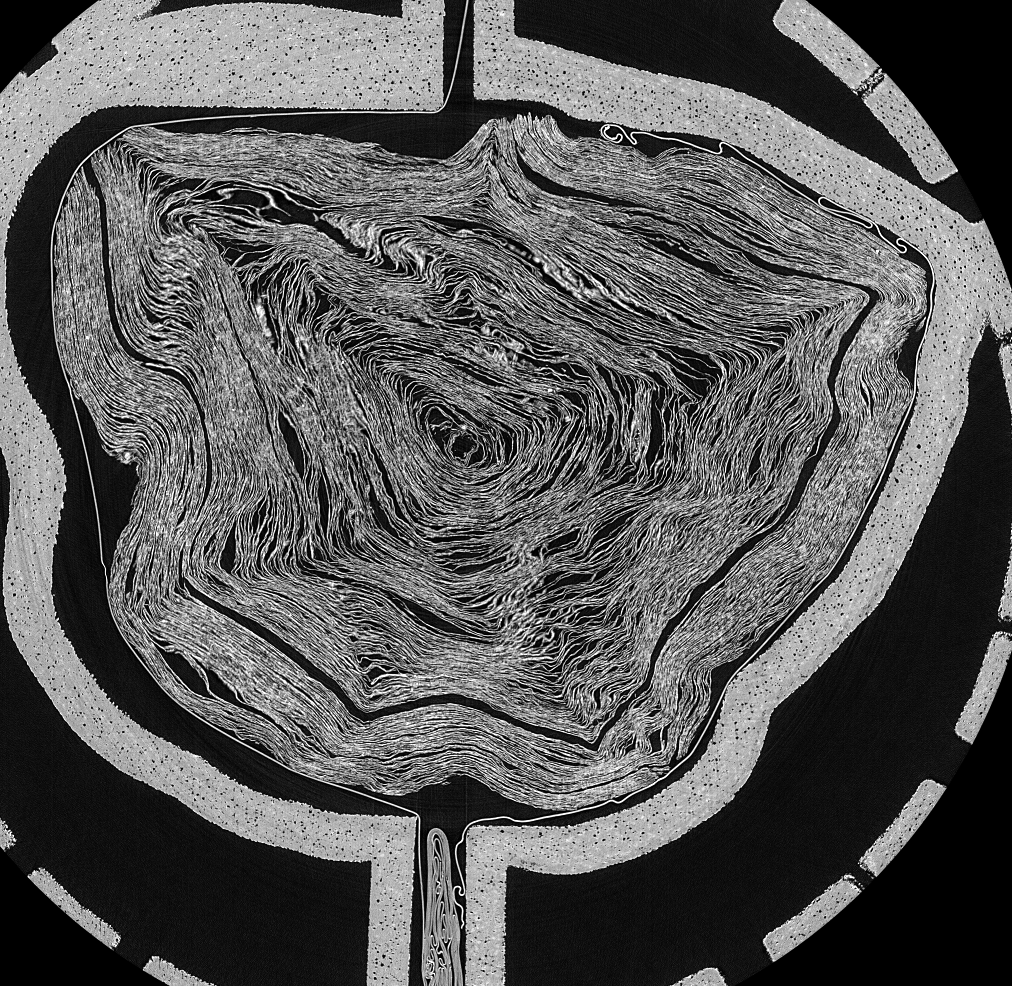
Scroll 1 (PHerc. Paris 4), middle cross-section — streamed with scrollscout thumb 1 -w 1000. Total transfer: a few MB, not 918 GB.
Install
pip install scrollscout
# optional: use the live scroll catalogue from the official `vesuvius` package
pip install "scrollscout[catalog]"
You must accept the Vesuvius Challenge data license before accessing scroll data. scrollscout does not redistribute any scroll data; it streams the public server on your behalf.
Command line
# list a scroll's multiscale pyramid — see the sizes before you read anything
scrollscout info 1

# stream a middle cross-section to a PNG (auto-picks the pyramid level)
scrollscout thumb 1 --width 1000 -o scroll1.png

# slice along a different axis: z (default, circular cross-section),
# y or x (longitudinal views down the scroll's length)
scrollscout thumb 1 --axis y --width 700 -o scroll1_length.png

# a shallower slice of scroll 2, larger
scrollscout thumb 2 --frac 0.25 --width 1200 -o scroll2_quarter.png

# scrub through slices interactively in your browser (see below)
scrollscout view
Interactive viewer
scrollscout view launches a local web app (Python stdlib only, nothing stored
on disk) where you pick a scroll, choose the z/y/x axis, set a target
width, and drag a slider to scrub through cross-sections. Each slice is
streamed on demand through the same throttle-safe reader and cached in memory,
so scrubbing back over visited slices is instant.
scrollscout view                      # opens http://127.0.0.1:8000
scrollscout view --port 9000 --no-browser
Uncached slices take a few seconds to stream at a rate-limit-safe resolution; revisited slices are instant. It's a previewer, not a real-time volume renderer.
Ink labeler
scrollscout label <segment_dir> opens a browser tool for hand-labeling ink
on a segment's flattened surface — the ground-truth masks that ink-detection
models train on. Get a segment and label it in two commands:
# 1. stream a segment's layers into a ready-to-label folder
scrollscout fetch-segment --scroll 1 --segment 20230530164535

# 2. open the labeler on it
scrollscout label segments/20230530164535      # opens http://127.0.0.1:8010
fetch-segment streams the mask + a central band of layers (--layers lo-hi
or all). Add --crop Y0 Y1 X0 X1 to grab just a window of a large segment —
it byte-range-reads only the needed rows, so cropping a multi-GB segment is
cheap. It's resumable (existing layers are skipped).
- Scrub the layer stack (slider or ←/→) to find ink at the surface depth
- Brightness / contrast sliders adjust the view live; layers are percentile-stretched server-side for visibility
- Paint over ink with the brush (adjustable size, erase, undo, clear)
- Save writes
<segment_id>_inklabels.png— a binary mask at the layer's native resolution, the format training pipelines expect
Stdlib-only and fully local; nothing is uploaded. Existing labels reload on reopen, so you can label across sessions.
From preview to ink detection (free GPU)

Once you've scouted a scroll, the companion notebook
notebooks/ink_detection_colab.ipynb
takes the next step: it streams a Scroll 1 segment and runs the open-source
Grand Prize TimeSformer ink-detection model on it, using a free Colab/Kaggle
GPU — no local GPU required. It's the on-ramp from previewing data on a laptop
to running the ML that actually reads the scrolls.
Note: the notebook runs on Scroll 1 (already-public text). Text recovered from an unread scroll is a private prize submission under the data terms — don't publish it without Vesuvius Challenge approval.
scrollscout info 1 prints:
Scroll 1
  pyramid levels (6):
    level             shape (z,y,x)          chunks         scale  approx full size
        0       (14376, 7888, 8096)  (128, 128, 128)  (1.0, 1.0, 1.0)    918.07 GB
        1        (7188, 3944, 4048)  (128, 128, 128)  (2.0, 2.0, 2.0)    114.76 GB
        2        (3594, 1972, 2024)  (128, 128, 128)  (4.0, 4.0, 4.0)     14.34 GB
        3         (1797, 986, 1012)  (128, 128, 128)  (8.0, 8.0, 8.0)      1.79 GB
        4           (899, 493, 506)  (128, 128, 128)  (16.0,16.0,16.0)     0.22 GB
        5           (450, 247, 253)  (128, 128, 128)  (32.0,32.0,32.0)     0.03 GB
Python API
import scrollscout as ss

vol = ss.open_scroll(1)            # streams only ~KB of metadata
print(vol.level_for_width(1000))   # -> Level(path='3', ...)

# get a cross-section as a numpy array (throttle-safe under the hood)
arr = ss.thumbnail(1, axis="z", frac=0.5, width=1000, out="scroll1.png", verbose=True)
print(arr.shape, arr.dtype)        # (986, 1012) uint8

# a longitudinal slice down the scroll's length
arr_y = ss.thumbnail(1, axis="y", frac=0.5, width=700)

# launch the interactive viewer from Python
ss.serve(port=8000)
How the throttle-safe read works
level_for_width(target_px)picks the coarsest pyramid level whose in-plane width still meets your target. A 1000 px view comes from level 3 (~64 chunks), never level 0 (~4000 chunks). Under-fetching is the first line of defense.read_slice()walks the chosen slice intile-sized blocks with a short pause between tiles, and retries each tile with exponential backoff (base_delay * 2**n) when the server returns 429. Non-rate-limit errors propagate immediately.
Scope & limitations
- Reads scroll volumes (the
volumes_zarr*OME-Zarr). Segment/surface meshes and ink predictions are out of scope for v0.1. - Preview/QA tool, not an analysis pipeline — it gets you looking at the data fast so you can decide where to work.
- Slices along any of the
z/y/xaxes. Oblique/arbitrary planes are not supported.
License
MIT (see LICENSE). Scroll data itself is governed by the Vesuvius Challenge /
EduceLab-Scrolls terms and is not included or redistributed here.
If you use scroll data in published work, cite EduceLab-Scrolls: Parsons, S., Parker, C. S., Chapman, C., Hayashida, M., & Seales, W. B. (2023). EduceLab-Scrolls: Verifiable Recovery of Text from Herculaneum Papyri using X-ray CT. arXiv:2304.02084.
1 maintainer

Metadata
1 maintainer
Release files for scrollscout 0.3.1
For a detailed explanation of source distributions (sdists) and built distributions (wheels), please see the package formats documentation.
Source distribution (sdist)
| File | Size | Uploaded | Provenance | Actions |
|---|---|---|---|---|
| scrollscout-0.3.1.tar.gz | 28.6 kB | Without provenance | Details for scrollscout-0.3.1.tar.gz |
Built distribution (wheel)
| File | Interpreter | ABI | Platform | Actions Reset |
|---|---|---|---|---|
| scrollscout-0.3.1-py3-none-any.whl | Python 3 | none | any | Details for scrollscout-0.3.1-py3-none-any.whl |
Total release size: 54.4 kB
Release files / scrollscout-0.3.1.tar.gz
| Download URL | scrollscout-0.3.1.tar.gz |
|---|---|
| Size | 28.6 kB |
| Tags | Source |
|
SHA-256 checksum How to use checksums |
034a4c8e3c78152244c1a08a818f19bb908e7dda54e72be32ed0dd86bb21507c
|
|
BLAKE2b-256 checksum How to use checksums |
6285d546d4a07fba0a8148eee083d4f26818fb00574d27e22d4b9dc6863086f4
|
| Upload date | |
|
Uploaded using Trusted Publishing? What is trusted publishing? |
No |
| Uploaded via |
twine/6.2.0 CPython/3.11.7
|
Release files / scrollscout-0.3.1-py3-none-any.whl
| Download URL | scrollscout-0.3.1-py3-none-any.whl |
|---|---|
| Size | 25.8 kB |
| Tags | Python 3 |
|
SHA-256 checksum How to use checksums |
85a5e8d4110d511ac379a34cd1ebc14870fb2e9a0a37809abbd6700ddec1acef
|
|
BLAKE2b-256 checksum How to use checksums |
84e10b1366a5175541a806c4724112d8ca6d8b77c50d897a159f4a05585f6267
|
| Upload date | |
|
Uploaded using Trusted Publishing? What is trusted publishing? |
No |
| Uploaded via |
twine/6.2.0 CPython/3.11.7
|
Security for scrollscout 0.3.1
Provenance
Provenance describes where a file came from. On PyPI, provenance is shared via attestations, which provide a verifiable record of the build or publishing details. View details, limitations and caveats.
No provenance found
None of the files in this release were uploaded with provenance metadata.
A note on package security
PyPI is a repository for distributing packages, not a service for auditing them. While third-party security researchers and our staff do their best to detect and remove malicious packages, PyPI cannot guarantee the quality, security or suitability of any given package.
To learn more about protecting yourself from malicious actors, visit our package security documentation.














