
Scout Vesuvius Challenge scrolls: stream and preview Herculaneum CT volumes from a laptop without downloading terabytes or tripping rate limits.

Project description
scrollscout
Scout Vesuvius Challenge scrolls from a laptop — stream and preview the Herculaneum CT volumes without downloading terabytes or tripping the data server's rate limiter.
The scroll volumes are enormous. Scroll 1 alone is 14376 × 7888 × 8096 voxels ≈ 918 GB at full resolution. If you're on a laptop with limited disk, you can't (and shouldn't) download them to take a look. The data is streamable as multiscale OME-Zarr — but two things bite newcomers immediately:
-
You don't know which resolution level to read. Ask for a full-res cross-section and you'll try to pull hundreds of GB.
-
Naive reads get rate-limited. A large
array[z, y0:y1, x0:x1]makes zarr fire one HTTP request per chunk, all at once. The server replies429 Too Many Requestsand your read dies:aiohttp.client_exceptions.ClientResponseError: 429, message='Too Many Requests', url='https://dl.ash2txt.org/.../54keV_7.91um_Scroll1A.zarr/0/56/19/26'
scrollscout handles both for you: it auto-selects the coarsest pyramid level that satisfies your requested pixel width, and reads it in small, chunk-aligned tiles with exponential backoff on 429, so a read slows down under pressure instead of failing.
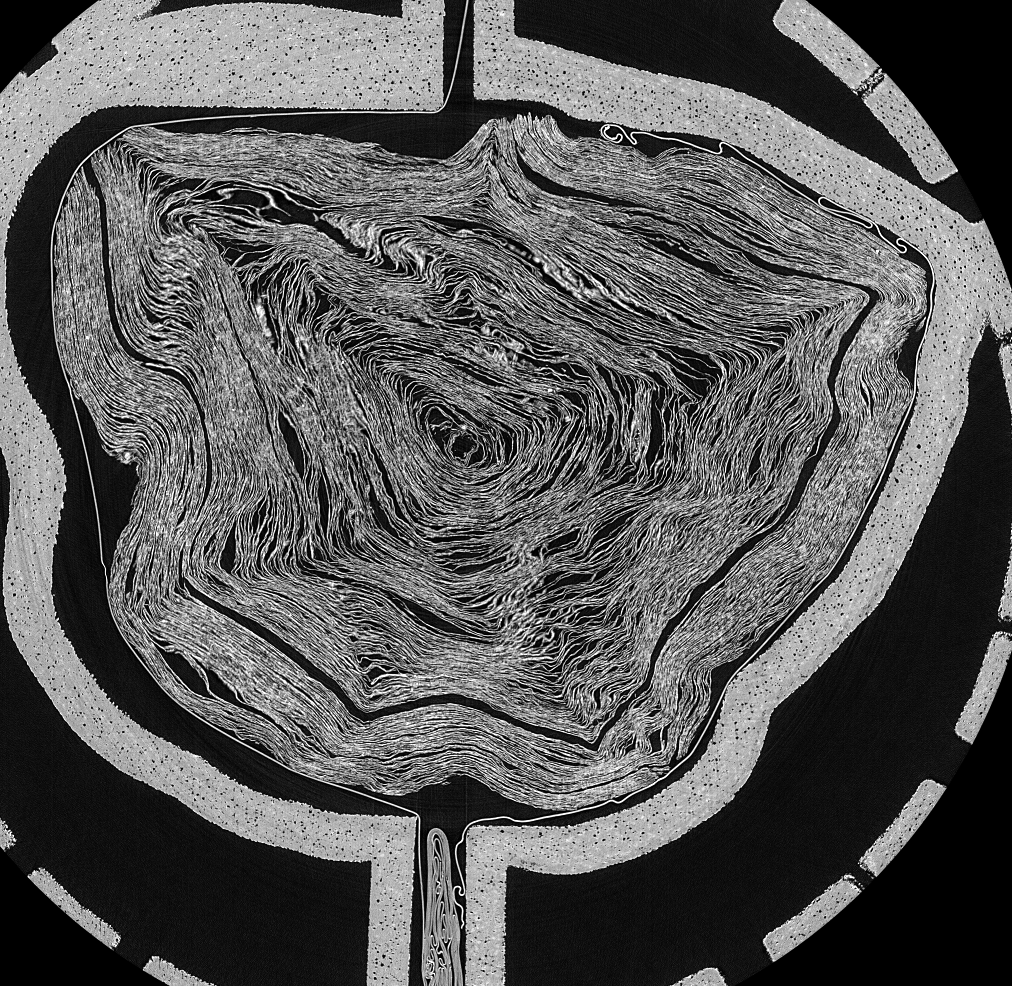
Scroll 1 (PHerc. Paris 4), middle cross-section — streamed with scrollscout thumb 1 -w 1000. Total transfer: a few MB, not 918 GB.
Install
pip install scrollscout
# optional: use the live scroll catalogue from the official `vesuvius` package
pip install "scrollscout[catalog]"
You must accept the Vesuvius Challenge data license before accessing scroll data. scrollscout does not redistribute any scroll data; it streams the public server on your behalf.
Command line
# list a scroll's multiscale pyramid — see the sizes before you read anything
scrollscout info 1

# stream a middle cross-section to a PNG (auto-picks the pyramid level)
scrollscout thumb 1 --width 1000 -o scroll1.png

# a shallower slice of scroll 2, larger
scrollscout thumb 2 --z-frac 0.25 --width 1200 -o scroll2_quarter.png
scrollscout info 1 prints:
Scroll 1
  pyramid levels (6):
    level             shape (z,y,x)          chunks         scale  approx full size
        0       (14376, 7888, 8096)  (128, 128, 128)  (1.0, 1.0, 1.0)    918.07 GB
        1        (7188, 3944, 4048)  (128, 128, 128)  (2.0, 2.0, 2.0)    114.76 GB
        2        (3594, 1972, 2024)  (128, 128, 128)  (4.0, 4.0, 4.0)     14.34 GB
        3         (1797, 986, 1012)  (128, 128, 128)  (8.0, 8.0, 8.0)      1.79 GB
        4           (899, 493, 506)  (128, 128, 128)  (16.0,16.0,16.0)     0.22 GB
        5           (450, 247, 253)  (128, 128, 128)  (32.0,32.0,32.0)     0.03 GB
Python API
import scrollscout as ss

vol = ss.open_scroll(1)            # streams only ~KB of metadata
print(vol.level_for_width(1000))   # -> Level(path='3', ...)

# get the cross-section as a numpy array (throttle-safe under the hood)
arr = ss.thumbnail(1, z_frac=0.5, width=1000, out="scroll1.png", verbose=True)
print(arr.shape, arr.dtype)        # (986, 1012) uint8
How the throttle-safe read works
level_for_width(target_px)picks the coarsest pyramid level whose in-plane width still meets your target. A 1000 px view comes from level 3 (~64 chunks), never level 0 (~4000 chunks). Under-fetching is the first line of defense.read_slice()walks the chosen slice intile-sized blocks with a short pause between tiles, and retries each tile with exponential backoff (base_delay * 2**n) when the server returns 429. Non-rate-limit errors propagate immediately.
Scope & limitations
- Reads scroll volumes (the
volumes_zarr*OME-Zarr). Segment/surface meshes and ink predictions are out of scope for v0.1. - Preview/QA tool, not an analysis pipeline — it gets you looking at the data fast so you can decide where to work.
- Cross-sections are on the
zaxis (the scan slice axis) for now.
License
MIT (see LICENSE). Scroll data itself is governed by the Vesuvius Challenge /
EduceLab-Scrolls terms and is not included or redistributed here.
If you use scroll data in published work, cite EduceLab-Scrolls: Parsons, S., Parker, C. S., Chapman, C., Hayashida, M., & Seales, W. B. (2023). EduceLab-Scrolls: Verifiable Recovery of Text from Herculaneum Papyri using X-ray CT. arXiv:2304.02084.
Release history Release notifications | RSS feed


Download files
Download the file for your platform. If you're not sure which to choose, learn more about installing packages.
Source Distribution
Built Distribution
Filter files by name, interpreter, ABI, and platform.
If you're not sure about the file name format, learn more about wheel file names.
Copy a direct link to the current filters
File details
Details for the file scrollscout-0.1.0.tar.gz.
File metadata
- Download URL: scrollscout-0.1.0.tar.gz
- Upload date:
- Size: 13.8 kB
- Tags: Source
- Uploaded using Trusted Publishing? No
- Uploaded via: twine/6.2.0 CPython/3.11.7
File hashes
| Algorithm | Hash digest | |
|---|---|---|
| SHA256 |
a56ded1767ebc224e1b2d274097b217c5876862bd81c2350ecd22274a745ec0f
|
|
| MD5 |
b35ecea0cbfee853cdaf3b449ef24097
|
|
| BLAKE2b-256 |
5deeaa67278778ea13f14bdeace4efc1c3dedbb271c60c88af207941fa7a3f61
|
File details
Details for the file scrollscout-0.1.0-py3-none-any.whl.
File metadata
- Download URL: scrollscout-0.1.0-py3-none-any.whl
- Upload date:
- Size: 12.0 kB
- Tags: Python 3
- Uploaded using Trusted Publishing? No
- Uploaded via: twine/6.2.0 CPython/3.11.7
File hashes
| Algorithm | Hash digest | |
|---|---|---|
| SHA256 |
458e8afc142f602e595d00ae2b5d918e24154f564a5f5dd4990dfd3425bc8d65
|
|
| MD5 |
b0dd145e6c5271aa6ed55fb6fc287775
|
|
| BLAKE2b-256 |
1abaf0cd942e991d107cab0a2b599136d35a21180bafd925a933ccc9d2067caa
|






