
Deterministic, judge-free response quality scoring for AI systems. No LLM judge, no API, no cost.

Project description

scroot
Deterministic quality scoring for LLM responses
Same input, same score, every time — no judge model, no API, no cost.







Why scroot?
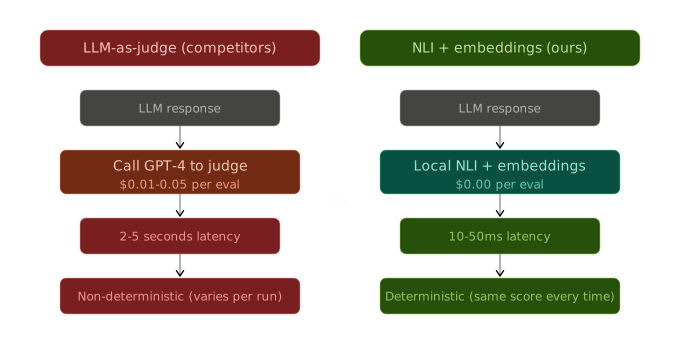
Teams deploying LLM agents and RAG systems can't manually review every response. Existing tools use a judge model — a second LLM call per evaluation — which costs $0.01–0.05/eval, takes 2–5s, and gives non-deterministic results. scroot scores every response locally using NLI models and embedding similarity. Zero cost. Deterministic. 100% coverage.
How it's different
| Capability | scroot (default) | scroot (fast) | RAGAS | DeepEval |
|---|---|---|---|---|
| Hallucination detection (AUC) | 0.991 | 0.875 | — | — |
| Human correlation (ρ) | 0.47 | 0.43 | 0.64 | 0.28 |
| Deterministic | Yes (0/5,400) | Yes | No | No |
| Cost per eval | $0.00 | $0.00 | ~$0.0005 | ~$0.00004 |
| Offline / air-gapped | Yes | Yes | No | No |
| Latency (p50) | ~4.8s | ~3.2s | API-dependent | ~8s |
All tools benchmarked on identical 396 SummEval samples with expert human consistency annotations. p-values all < 0.001. Latency on Intel i7 CPU, warm cache, n=380. "scroot (fast)" =
Auditor(groundedness_backbone="deberta-base").
See BENCHMARKS.md for full methodology, reproducibility instructions, and detailed results.
Quick start
pip install scroot
from scroot import Auditor

auditor = Auditor()

result = auditor.score(
    query="What is our refund policy?",
    response="We offer a 30-day full refund at no extra cost.",
    context=["All customers are eligible for a 30-day full refund at no extra cost."]
)

print(result.iqs)           # 0.93 - composite Information Quality Score
print(result.groundedness)  # 0.97
print(result.flags)         # [] - no issues
Two convenience functions for one-off scoring:
import scroot

# Returns full EntailmentResult
result = scroot.score(
    query="What is our refund policy?",
    response="We offer a 30-day full refund.",
    context=["30-day full refund at no extra cost."]
)

# Returns True if IQS >= threshold
passed = scroot.verify(
    query="What is our refund policy?",
    response="We offer a 30-day full refund.",
    context=["30-day full refund at no extra cost."],
    threshold=0.7
)
For repeated scoring, instantiate Auditor once and reuse it -
models are loaded once and cached.
More runnable scripts in examples/: minimal.py (the example above), rag_pipeline.py (ContextBuilder end-to-end), bulk_scoring.py (scoring a batch of logged responses), langchain_rag.py (instrument a LangChain RAG chain), snowflake_cortex.py (audit Snowflake Cortex completions).
Bring your own context
The groundedness metric - scroot's most powerful - needs to know
what documents your LLM was grounded in. Use ContextBuilder to carry
them through your pipeline:
import scroot

auditor = scroot.Auditor()
ctx = scroot.ContextBuilder()

# Drop context in as it flows through your pipeline
ctx.add_query(user_query)
ctx.add_retrieved(retriever.search(user_query))    # after retrieval
ctx.add_reranked(reranker.compress(chunks, query)) # after reranking

# Score with full context
result = auditor.score(
    query=user_query,
    response=llm_response,
    context=ctx.build(),
)

print(result.groundedness)  # now has signal
add_retrieved() accepts plain strings, LangChain Documents, ChromaDB
query results, Pinecone scored vectors, and dicts with a text key -
unrecognised types are skipped with a warning, never a crash.
No context? No problem. scroot scores the other four metrics and returns
None for groundedness. Partial integration always beats no integration.
PII scrubbing is on by default. Emails, phone numbers, SSNs, API keys,
and other sensitive entities are replaced with typed placeholders
([EMAIL], [PHONE], [SECRET]) before anything is processed.
The original values are never stored.
Full API reference: docs/context_builder.md · runnable demo: examples/context_builder.ipynb
Try the demo notebooks
Two interactive notebooks tour the full feature set - no API keys or credentials needed:
- examples/scroot_interactive_demo.ipynb - every feature: scoring, metrics, IQS, flags, sampling, agents, feedback loop
- examples/context_builder.ipynb -
carrying RAG context to
auditor.score()withContextBuilder
One command sets everything up (virtualenv, dependencies, Jupyter kernel):
# macOS / Linux
bash examples/setup_notebook_kernel.sh
# Windows
powershell -ExecutionPolicy Bypass -File examples/setup_notebook_kernel.ps1
Then open a notebook either way:
- VS Code / Cursor - open the
.ipynband pick the kernel Python (scroot-demo) from the kernel picker (top right) - Browser -
.venv/bin/jupyter notebook examples/scroot_interactive_demo.ipynb(Windows:.venv\Scripts\jupyter notebook examples\scroot_interactive_demo.ipynb)
The script is idempotent - rerun it any time to repair the environment. First execution downloads the scoring models (~440 MB) from Hugging Face; after that everything runs fully offline. See Model downloads for a full size breakdown.
How it works
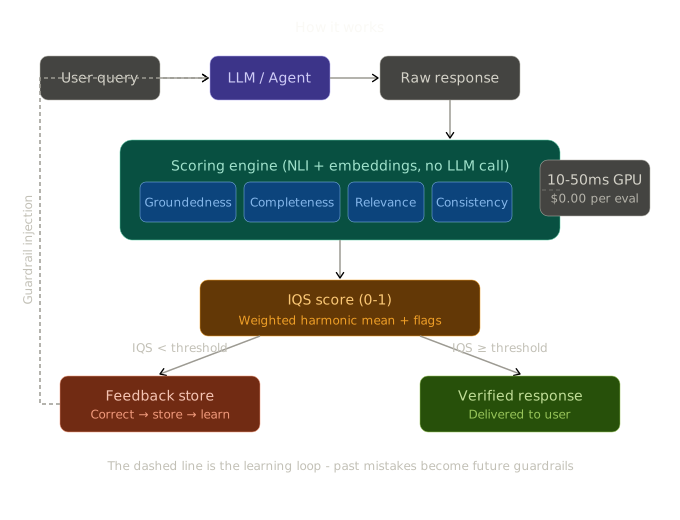
Every response flows through the scoring engine which checks five independent quality dimensions using NLI cross-encoders and embedding similarity - no LLM calls anywhere in the pipeline. Responses below threshold enter the feedback loop where corrections become guardrails for future responses.
Metrics
Five independent quality dimensions, each scored 0–1:
| Metric | What it measures | How | Typical CPU latency |
|---|---|---|---|
| Groundedness | Is the response faithful to source context? | NLI cross-encoder per claim, batched | ~800ms |
| Completeness | Did the response address all parts of the query? | Embedding similarity per query segment | ~150ms |
| Relevance | Is the response on-topic? | Cosine similarity query↔response | ~100ms |
| Consistency | Does the response contradict itself? | Pairwise NLI between sentences (capped at 25) | ~400ms |
| Confidence | How assertive vs hedged is the response? | Regex pattern matching | <1ms |
Note: Latencies are for CPU (DeBERTa-v3-base). Use
device="cuda"for 10–50× speedup on GPU. First call also loads model weights (~5s).
IQS - the composite score
IQS (Information Quality Score) is the weighted harmonic mean of all five metrics. Harmonic mean penalizes low scores hard: a response with 0.95 groundedness but 0.1 completeness scores ~0.3, not 0.5.
Default weights:
  groundedness  0.35    # most important - is it faithful?
  completeness  0.25    # did it answer the full question?
  relevance     0.20    # is it on topic?
  consistency   0.15    # does it contradict itself?
  confidence    0.05    # calibration check
When no context is provided, the groundedness weight is redistributed proportionally across the other four metrics.
Flags
scroot automatically flags specific quality issues:
| Flag | Condition |
|---|---|
hallucination_risk |
groundedness < 0.5 AND confidence > 0.7 |
off_topic |
relevance < 0.3 |
self_contradictory |
consistency < 0.7 |
incomplete |
completeness < 0.3 |
ungrounded |
groundedness < 0.3 |
Quality gates & CI
Every EntailmentResult can act as a pass/fail gate - no LLM judge required:
result = score(query=query, response=response, context=context)

if not result.passes_gate(0.80, require_groundedness=0.95):
    print(result.gate_reason(0.80, require_groundedness=0.95))
    # "groundedness 0.85 below required floor 0.95."
result.iqs_explanation(), result.weakest_metric, and
result.score_variance explain why a response scored the way it
did - useful for logging and dashboards, not just gating.
scroot eval - regression suites for CI/CD
Define a YAML suite of (query, response, context) examples with expected IQS/groundedness floors, then run it as a quality gate:
# tests/quality/support_regression.yaml
name: Support regression suite
fail_below_iqs: 0.70
fail_below_groundedness: 0.60

examples:
  - query: "What is your refund policy?"
    response: "Refunds are available within 30 days of purchase with a valid receipt."
    context: "Our refund policy: customers may request a refund within 30 days of purchase, provided they have a valid receipt."
    tags: [billing]
scroot eval --suite tests/quality/support_regression.yaml
Exits non-zero if any example fails its gate, so it can be wired into
GitHub Actions. Pass --output junit.xml to also write a JUnit XML
report - most CI systems (GitHub Actions, GitLab, Jenkins) render this as
per-example pass/fail in the test results UI:
# .github/workflows/quality.yml
- name: Run scroot quality gate
  run: scroot eval --suite tests/quality/support_regression.yaml --output junit.xml

- name: Publish test results
  uses: dorny/test-reporter@v1
  if: always()
  with:
    name: scroot quality gate
    path: junit.xml
    reporter: java-junit
Evidence map - sentence-level attribution
When context is provided, result.evidence_map breaks groundedness down
per sentence: which response sentences are supported by the context,
which contradict it, and which have no grounding at all.
result = score(query=query, response=response, context=context)

for entry in result.evidence_map.entries:
    if entry.contradiction_detected:
        print(f"CONTRADICTION: {entry.response_sentence}")
    elif not entry.supported:
        print(f"UNGROUNDED: {entry.response_sentence}")
This is the same data shown in the Review Console's Evidence Map panel
(green = supported, red = contradiction, amber = no grounding). See
docs/context_builder.md
for the full to_dict() shape.
No judge model. Ever.
Unlike every competitor, scroot requires no judge model or API call:
- No judge for scoring - NLI cross-encoders evaluate entailment, not GPT-4
- No LLM for claim extraction - deterministic regex and sentence splitting, not a second model call
- No LLM for scoring - embedding similarity, not generated text
- No API key required - works offline, air-gapped, on a laptop
The default backbone is MiniCheck-RoBERTa-Large (355 MB) for best accuracy. Switch to the fast deberta backbone (184 MB) for lower latency:
# Default: MiniCheck-RoBERTa-Large (best accuracy, AUC 0.991)
auditor = Auditor()

# Fast mode: deberta-v3-base (lower latency, AUC 0.875)
auditor = Auditor(groundedness_backbone="deberta-base")
Both run fully locally on CPU or GPU after a one-time model download.
Configuration
auditor = Auditor(
    nli_model="cross-encoder/nli-deberta-v3-base",
    embedding_model="all-MiniLM-L6-v2",
    device="cpu",                   # or "cuda"
    weights={
        "groundedness": 0.40,
        "completeness": 0.20,
        "relevance": 0.20,
        "consistency": 0.15,
        "confidence": 0.05,
    },
    entailment_threshold=0.5,
    coverage_threshold=0.45,
    contradiction_threshold=0.7,
    max_sentences=25,
    max_query_length=10_000,
    max_response_length=50_000,
    max_context_items=50,
    max_context_item_length=10_000,
    max_batch_size=1_000,
)
Custom models
from scroot.models import trust_model

trust_model("myorg/fine-tuned-nli")
auditor = Auditor(nli_model="myorg/fine-tuned-nli")
No-context mode
Works without source context. Groundedness is excluded (it is None, not
0.0) and its weight is redistributed across the remaining four metrics, so a
no-context response is scored fairly on what can be measured rather than
penalised for a metric that doesn't apply.
result = auditor.score(
    query="Explain quantum computing",
    response="Quantum computing uses qubits that can be in superposition..."
)
print(result.groundedness)      # None  (not scored - no context)
print(result.iqs)               # computed from 4 metrics
print(result.context_used)      # False
print(result.iqs_metric_count)  # 4
print(result.effective_weights) # redistributed weights (sum to 1.0)
A 4-metric IQS is not directly comparable to a 5-metric one, so the result
records context_used / iqs_metric_count (the dashboard labels these (4/5)).
score() without context emits a NoContextWarning; an empty/whitespace
context ("", []) is treated the same as None. A genuine 0.0
groundedness (context provided, but unsupported) is included and drives IQS
to 0 - that's a real failure, not missing data. See
docs/context_builder.md.
Batch scoring
results = auditor.score_batch([
    {"query": "...", "response": "...", "context": ["..."]},
    {"query": "...", "response": "..."},  # no context
])
Agent registry
Route scoring through per-agent configuration while sharing one model instance:
from scroot import Auditor, AgentRegistry

auditor = Auditor()
registry = AgentRegistry(auditor)

registry.register("support_bot",
    weights={"groundedness": 0.45, "completeness": 0.20,
             "relevance": 0.15, "consistency": 0.15, "confidence": 0.05},
    iqs_threshold=0.8,
    context_required=True,
)

registry.register("code_assistant",
    weights={"completeness": 0.40, "relevance": 0.30,
             "groundedness": 0.10, "consistency": 0.15, "confidence": 0.05},
    iqs_threshold=0.7,
)

result = registry.score("support_bot",
    query="What is the refund policy?",
    response="We offer 30-day refunds.",
    context=["30-day refund policy..."],
)

stats = registry.get_stats("support_bot")
The registry is duck-type compatible with Auditor - pass it to
sample_and_score or DatabaseConnector directly.
Sampling
Score a statistically meaningful subset instead of every response:
from scroot import Auditor, sample_and_score

auditor = Auditor()
items = [
    {"query": "...", "response": "...", "context": ["..."]}
    for _ in range(50_000)
]

# Random sample
results = sample_and_score(
    auditor, items, strategy="random", sample_size=500, seed=42
)

# Auto-compute size for 95% confidence, ±3% margin
results = sample_and_score(
    auditor, items, strategy="confidence",
    confidence_level=0.95, margin_of_error=0.03, seed=42
)

print(results.summary())
# Sampled 500/50000 (1.0%) using random strategy.
# Mean IQS: 0.872 (±0.041), 95% CI: [0.868, 0.876]
# Flags: hallucination_risk: 12 (2.4%), incomplete: 5 (1.0%)
Five strategies: random, percentage, stratified,
confidence, priority.
Database connector
Score responses directly from a SQL database:
pip install "scroot[database]"
from scroot import Auditor
from scroot.connectors import DatabaseConnector

auditor = Auditor()

connector = DatabaseConnector(
    connection_string="postgresql://user:pass@localhost:5432/mydb",
    source_table="llm_responses",
    column_map={
        "query": "user_query",
        "response": "agent_response",
        "context": "rag_chunks",
    },
    result_table="scroot_scores",
)

connector.score_all(auditor)
connector.score_incremental(auditor, cursor_column="created_at")
connector.score_sampled(auditor, strategy="random", sample_size=500, seed=42)
Supports PostgreSQL, MySQL, SQLite, BigQuery, and Snowflake.
Feedback loop
scroot doesn't just score - it learns. Flagged responses enter a correction pipeline. Human-reviewed corrections are stored and injected back into future prompts as guardrails, preventing the same mistake twice.
from scroot.feedback.store import FeedbackStore, CorrectionRecord
from scroot.feedback.injector import GuardrailInjector

store = FeedbackStore("corrections.jsonl")
injector = GuardrailInjector(store)

result = auditor.score(query=query, response=response, context=context)

if result.iqs < 0.7:
    store.add(CorrectionRecord(
        id="abc123",
        timestamp="2026-06-02T00:00:00Z",
        query=query,
        response=response,
        scores=result.to_dict(),
        flags=result.flags,
        correction="The correct answer...",
        reason="Why the original was wrong",
        context_used=context,
        corrected_by="human",
    ))

guardrails = injector.build_context(query=query, strategy="relevant")
system_prompt = f"You are a helpful agent.\n{guardrails}"
Encrypted storage
from cryptography.fernet import Fernet

key = Fernet.generate_key()
store = FeedbackStore("corrections.jsonl", encryption_key=key)
Data retention
store = FeedbackStore(
    "corrections.jsonl",
    max_records=10_000,
    ttl_days=90,
)
store.delete("record-id")
store.purge(before_date="2026-01-01")
store.validate_integrity()
Review Console
scroot ships a local web dashboard for reviewing flagged responses, tracking quality trends, and exporting fine-tuning data. No cloud. No sign-up. Runs entirely on your machine.
scroot serve          # starts at http://localhost:7432
scroot serve --port 8080
Security - the dashboard is an unauthenticated, single-user, localhost tool. By default it binds to
127.0.0.1, so only your machine can reach it. It stores your correction history and (if you configure API-based correction) your LLM provider key. If you expose it on a routable interface (--host 0.0.0.0), require a shared token and/or front it with an authenticating reverse proxy - otherwise anyone on the network can read your data and trigger LLM spend:# Network bind with a shared token (sent as Authorization: Bearer <token> # or X-Scroot-Token: <token> on every /api request) SCROOT_DASHBOARD_TOKEN="$(openssl rand -hex 16)" \ scroot serve --host 0.0.0.0 --token "$SCROOT_DASHBOARD_TOKEN"The stored provider key is never returned by the API (only a masked hint), config files are written
0600, and the corrector will only call allowlisted provider endpoints (override withSCROOT_ALLOW_ANY_BASE_URL=1for a trusted custom gateway).
The dashboard provides five views:
| View | Purpose |
|---|---|
| Inbox | Review queue - browse, filter, and correct flagged records |
| Record detail | Side-by-side query / response / scores with per-metric bars |
| Analytics | IQS trend, flag frequency, score distribution, per-agent breakdown |
| Pipeline | Batch-correct records with LLM + NLI gate; auto-commit passing corrections |
| Export | Download reviewed corrections as JSONL or CSV for fine-tuning |
The IQS (Information Quality Score) is visible at a glance on every page - a live health signal showing today's average score against your configured threshold.
The correction pipeline uses any OpenAI-compatible LLM as a draft generator. scroot's own NLI engine re-scores every draft before committing - the LLM is the intern, NLI is the senior reviewer.
# Corrections scored by the dashboard flow back into your prompts
from scroot.feedback.injector import GuardrailInjector
from scroot.feedback.store import FeedbackStore

store    = FeedbackStore("~/.scroot/feedback.jsonl")
injector = GuardrailInjector(store)

# Inject relevant past corrections as guardrails
guardrails  = injector.build_context(query=query, strategy="relevant")
system_prompt = f"You are a helpful agent.\n{guardrails}"
Performance
All numbers measured on CPU (Intel i7, single thread) via
python -m benchmarks.run_all --only speed.
Use device="cuda" for GPU acceleration.
| Operation | CPU latency | Notes |
|---|---|---|
import scroot |
497ms | No model loaded at import |
First score() call |
~15s | Model weights downloaded and cached |
score(), no context |
115ms | Embedding + regex only |
score(), 1 context chunk |
595ms | +NLI inference |
score(), 10 context chunks |
1.35s | Batched NLI |
score(), 50 context chunks |
5.4s | Batched NLI |
score_batch(100) |
59s (~593ms/item) | Sequential |
First call includes model download; subsequent calls use cache. Full pipeline p50 latency: ~4.8s (MiniCheck default), ~3.2s (deberta fast). See BENCHMARKS.md for full latency breakdown by input type.
Model downloads
| Component | Size | When downloaded |
|---|---|---|
| MiniCheck-RoBERTa-Large (default backbone) | ~355 MB | First auditor.score() call with context |
| deberta-v3-base (fast backbone) | ~184 MB | First auditor.score() call with groundedness_backbone="deberta-base" |
Sentence embedding model (all-MiniLM-L6-v2) |
~90 MB | First auditor.score() call |
Local LLM corrector - default (Qwen2.5-3B-Instruct) |
~2.0 GB | pip install scroot[local] then scroot download-model |
Local LLM corrector - compact (Qwen2.5-1.5B-Instruct) |
~1.0 GB | scroot download-model --model smollm3 |
pip install scroot only downloads the scoring models on first use
(~445 MB for MiniCheck default, or ~274 MB for deberta fast). The local
LLM corrector is a separate, strictly opt-in download via
scroot[local] - it is never triggered by a base install.
Improved sentence splitting
scroot uses a regex sentence splitter by default. For better accuracy on complex text, enable NLTK once after installation:
python -c "import scroot; scroot.setup_nltk()"
Security
- Model allowlist - only pre-approved model names are loaded.
Use
trust_model()to authorize custom models. - Prompt injection protection -
GuardrailInjectorsanitizes all feedback fields before system-prompt interpolation. - Encrypted feedback store - pass
encryption_key=(Fernet) to encrypt records at rest. - PII scrubbing - SSNs, emails, phone numbers, and credit cards are masked before guardrail injection.
- Input limits - configurable length limits on all inputs prevent memory exhaustion.
- Tamper detection - per-record SHA-256 hashing with sequential numbering.
See docs/security.md for the full security model:
data residency, no telemetry, ContextBuilder PII scrubbing (including
[SECRET] redaction), encryption at rest, audit logging, and the known
DatabaseConnector SQL injection limitation with its mitigation and
hardening roadmap.
Install
pip install scroot
Optional extras:
pip install "scroot[security]"   # encrypted feedback storage
pip install "scroot[database]"   # database connector (SQLAlchemy)
pip install "scroot[bench]"      # benchmark suite dependencies
pip install "scroot[dev]"        # development tools (pytest, ruff)
Contributing
See CONTRIBUTING.md for development setup, coding guidelines, and the PR process.
git clone https://github.com/sunnyguntuka/scroot
cd scroot
pip install -e ".[dev]"
pytest tests/ -v
ruff check src/ tests/
Changelog
See CHANGELOG.md.
License
Apache-2.0 - see LICENSE.
Citation
@software{scroot2026,
  title  = {scroot: Deterministic Response Quality Scoring},
  author = {Guntuka, Sunny},
  year   = {2026},
  url    = {https://github.com/sunnyguntuka/scroot},
  note   = {Apache-2.0}
}
"scroot" and the owl-eyes logo are trademarks of Sunny Guntuka. See TRADEMARK.md.
Release history Release notifications | RSS feed


Download files
Download the file for your platform. If you're not sure which to choose, learn more about installing packages.
Source Distribution
Built Distribution
Filter files by name, interpreter, ABI, and platform.
If you're not sure about the file name format, learn more about wheel file names.
Copy a direct link to the current filters
File details
Details for the file scroot-0.4.0.tar.gz.
File metadata
- Download URL: scroot-0.4.0.tar.gz
- Upload date:
- Size: 457.5 kB
- Tags: Source
- Uploaded using Trusted Publishing? No
- Uploaded via: twine/6.2.0 CPython/3.11.0
File hashes
| Algorithm | Hash digest | |
|---|---|---|
| SHA256 |
60db67acfb382d519898b9d3d9b5acf86421828d67a51a469b4731c2a03ab569
|
|
| MD5 |
80803ad247a6ba992453dacb429e2be7
|
|
| BLAKE2b-256 |
89ea603adbcc8543af055d4f1f43c121ffcbef4e4c53bb8c54584109be8f9e8d
|
File details
Details for the file scroot-0.4.0-py3-none-any.whl.
File metadata
- Download URL: scroot-0.4.0-py3-none-any.whl
- Upload date:
- Size: 426.5 kB
- Tags: Python 3
- Uploaded using Trusted Publishing? No
- Uploaded via: twine/6.2.0 CPython/3.11.0
File hashes
| Algorithm | Hash digest | |
|---|---|---|
| SHA256 |
cfc9dd03b90fc1dfa3f357ebea2d24f2b4773e555ee701400a87fe7bc216af0c
|
|
| MD5 |
add9e79b8905ec954e90b8ac28337b70
|
|
| BLAKE2b-256 |
9d6acffa386f859ba87df6f2b113ca2ff63cfc3162994ce36701e969d41420ec
|






