Pan-cancer detection of T-cell clonal expansion from single-cell RNA sequencing


Project description





scXpand: Pan-cancer Detection of T-cell Clonal Expansion
Detect T-cell clonal expansion from single-cell RNA sequencing data without paired TCR sequencing
Preprint • Documentation • Installation • Quick Start • Usage Guide • Citation
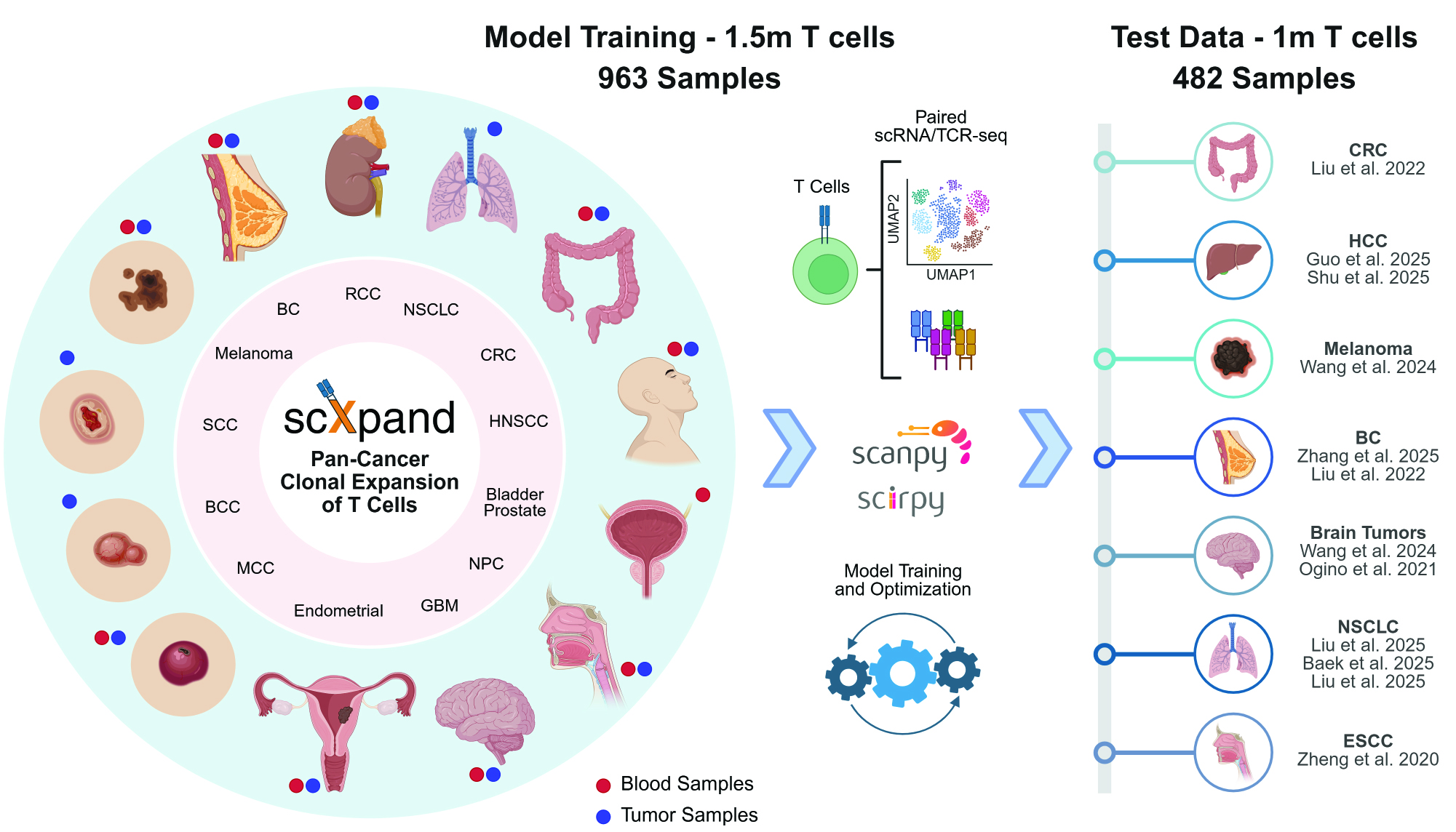
A framework for predicting T-cell clonal expansion from single-cell RNA sequencing data.
Manuscript in preparation - detailed methodology and benchmarks coming soon.
scXpand follows the scverse ecosystem <https://scverse.org/>_ standards for single-cell analysis tools.
View full documentation for comprehensive guides and API reference.
Features
- Multiple Model Architectures:
- Autoencoder-based: Encoder-decoder with reconstruction and classification heads
- MLP: Multi-layer perceptron
- LightGBM: Gradient boosted decision trees
- Linear Models: Logistic regression and support vector machines
- Scalable Processing: Handles millions of cells with memory-efficient data streaming from disk during training
- Automated Hyperparameter Optimization: Built-in Optuna integration for model tuning
Installation
Installing the Published Package: For regular use
scXpand is available in two variants to match your hardware:
NVIDIA GPU with CUDA Support
- Using pip:
pip install --upgrade scxpand-cuda --extra-index-url https://download.pytorch.org/whl/cu128
- Using uv:
uv pip install --upgrade scxpand-cuda --extra-index-url https://download.pytorch.org/whl/cu128 --index-strategy unsafe-best-match
CPU, Apple Silicon, or Non-CUDA GPUs
- Using pip:
pip install --upgrade scxpand
- Using uv:
uv pip install --upgrade scxpand
Local Development Setup: For contributing or working with the source code
If you want to contribute or work with the latest source code, follow these steps:
-
Clone the repository:
git clone https://github.com/yizhak-lab-ccg/scXpand.git
cd scXpand
-
Install uv (if not already installed):
# Follow the installation guide: https://docs.astral.sh/uv/getting-started/installation/
# Verify installation:
uv --version
-
Install in development mode:
uv pip install -e ".[dev]"
-
Install pre-commit hooks:
pre-commit install -
For PyTorch installation (optional):
Using uv with automatic backend selection (Recommended):
uv pip install torch torchvision torchaudio --torch-backend=auto
This automatically detects your system's optimal PyTorch backend (CUDA if available, otherwise CPU/MPS).
See the full installation guide for detailed setup instructions.
Quick Start
import scxpand
# Make sure that "your_data.h5ad" includes only T cells for the results to be meaningful
# Ensure that "your_data.var_names" are provided as Ensembl IDs (as the pre-trained models were trained using this gene representation)
# Please refer to our documentation for more information

# List available pre-trained models
scxpand.list_pretrained_models()

# Run inference with automatic model download
results = scxpand.run_inference(
    model_name="pan_cancer_autoencoder",  # default model
    data_path="your_data.h5ad"
)

# Access predictions
predictions = results.predictions
if results.has_metrics:
    print(f"AUROC: {results.get_auroc():.3f}")
See our Tutorial Notebook for a complete example with data preprocessing, T-cell filtering, gene ID conversion, and model application using a real breast cancer dataset.
Documentation
Setup & Getting Started:
- Installation Guide - Setup for local development of scXpand
- User Guide - Quick start and comprehensive workflow guide
- Data Format - Input data requirements and specifications
Using Pre-trained Models:
- Model Inference - Run predictions on new data with pre-trained models
Training Your Own Models:
- Model Training - Train models with CLI and programmatic API
- Hyperparameter Optimization - Automated model tuning with Optuna
Understanding Results:
- Model Architectures - Detailed architecture descriptions and configurations
- Evaluation Metrics - Performance assessment and interpretation
- Output Format - Understanding model outputs and results
📖 Full Documentation - Complete guides, API reference, and interactive tutorials
License
This project is licensed under the MIT License – see the LICENSE file for details.
Citation
If you use scXpand in your research, please cite:
Shorer, O., Amit, R., and Yizhak, K. (2025). scXpand: Pan-cancer detection of T-cell clonal expansion from single-cell RNA sequencing without paired single-cell TCR sequencing. Preprint at bioRxiv, https://doi.org/10.1101/2025.09.14.676069.
BibTeX
@article{shorer2025scxpand,
  title={scXpand: Pan-cancer detection of T-cell clonal expansion from single-cell RNA sequencing without paired single-cell TCR sequencing},
  author={Shorer, Ofir and Amit, Ron and Yizhak, Keren},
  year={2025},
  journal={bioRxiv},
  doi={https://doi.org/10.1101/2025.09.14.676069}
}
This project was created in favor of the scientific community worldwide, with a special dedication to the cancer research community.
We hope you'll find this repository helpful, and we warmly welcome any requests or suggestions - please don't hesitate to reach out!

Release history Release notifications | RSS feed


Download files
Download the file for your platform. If you're not sure which to choose, learn more about installing packages.
Source Distribution
Built Distribution
Filter files by name, interpreter, ABI, and platform.
If you're not sure about the file name format, learn more about wheel file names.
Copy a direct link to the current filters
File details
Details for the file scxpand-0.3.7.dev2.tar.gz.
File metadata
- Download URL: scxpand-0.3.7.dev2.tar.gz
- Upload date:
- Size: 137.0 kB
- Tags: Source
- Uploaded using Trusted Publishing? No
- Uploaded via: uv/0.8.22
File hashes
| Algorithm | Hash digest | |
|---|---|---|
| SHA256 |
2071a08ed214aa5e86a0ff13070e182b7846b91f4d640be489e1f808c05e26e2
|
|
| MD5 |
2b8c7e63c5383f81c74800748d757c97
|
|
| BLAKE2b-256 |
70ce5c481396768226229a7c500d87e59e943733ccfc2fffed7041c6f360cfb6
|
File details
Details for the file scxpand-0.3.7.dev2-py3-none-any.whl.
File metadata
- Download URL: scxpand-0.3.7.dev2-py3-none-any.whl
- Upload date:
- Size: 142.3 kB
- Tags: Python 3
- Uploaded using Trusted Publishing? No
- Uploaded via: uv/0.8.22
File hashes
| Algorithm | Hash digest | |
|---|---|---|
| SHA256 |
494a526fa37ac268e8bb5b4db62319a6473c1a84fa7a19fd0fd89bf959b7e3d1
|
|
| MD5 |
630abdf72682cc1bfa622f54cfe99d57
|
|
| BLAKE2b-256 |
f61305ef7a7515d8c73d7b2dac461450c207ad379a41255344617aac390bf26d
|