
Single-cell Cytometry Annotation Network

Project description







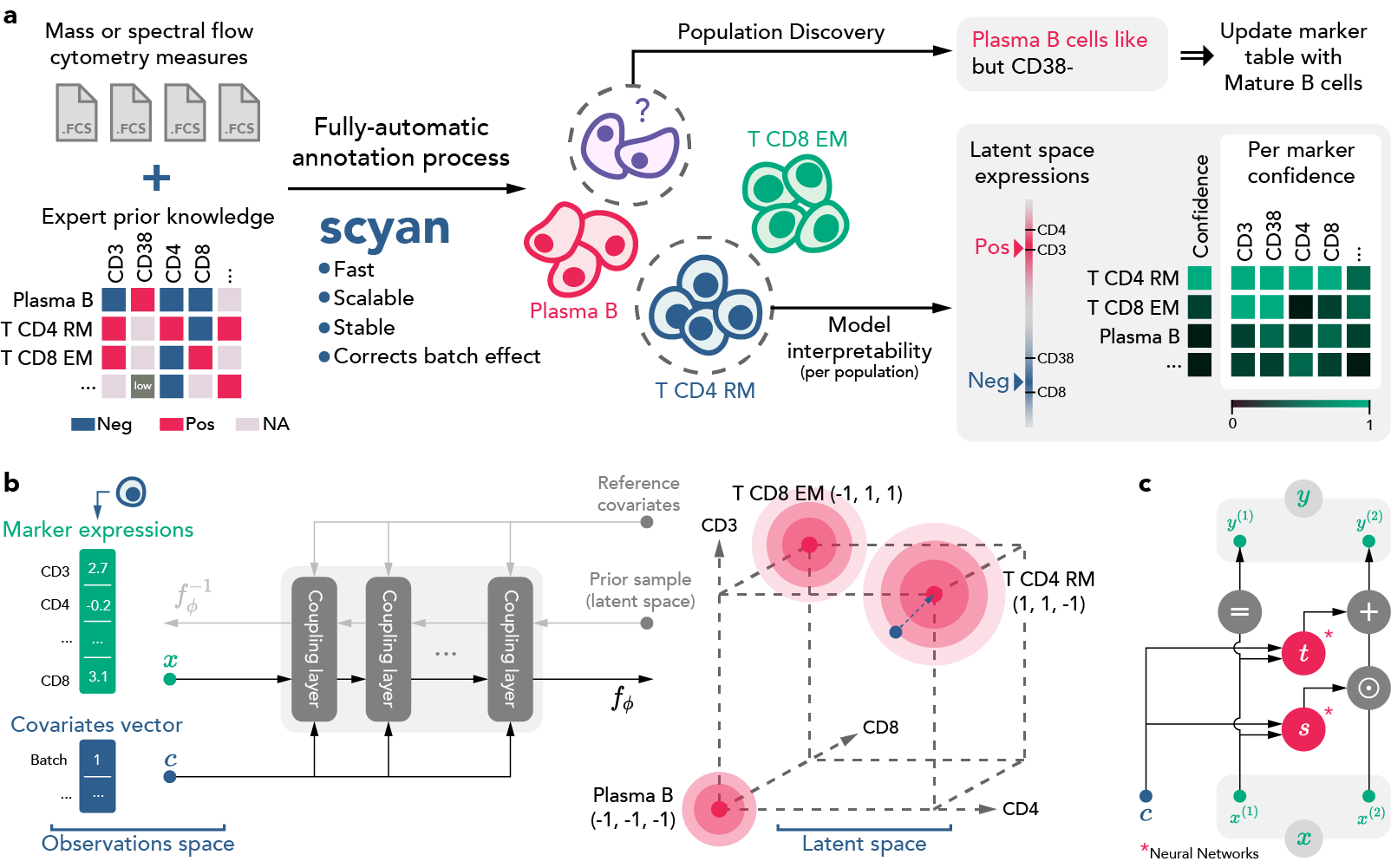
Scyan stands for Single-cell Cytometry Annotation Network. Based on biological knowledge prior, it provides a fast cell population annotation without requiring any training label. Scyan is an interpretable model that also corrects batch-effect and can be used for debarcoding, cell sampling, and population discovery.
Documentation
The complete documentation can be found here. It contains installation guidelines, tutorials, a description of the API, etc.
Overview
Scyan is a Bayesian probabilistic model composed of a deep invertible neural network called a normalizing flow (the function $f_{\phi}$). It maps a latent distribution of cell expressions into the empirical distribution of cell expressions. This cell distribution is a mixture of gaussian-like distributions representing the sum of a cell-specific and a population-specific term. Also, interpretability and batch effect correction are based on the model latent space — more details in the article's Methods section.
Getting started
Scyan can be installed on every OS with pip or poetry.
On macOS / Linux, python>=3.8,<3.11 is required, while python>=3.8,<3.10 is required on Windows. The preferred Python version is 3.9.
Install from PyPI (recommended)
pip install scyan
Install locally (if you want to contribute)
Advice (optional): We advise creating a new environment via a package manager (except if you use Poetry, which will automatically create the environment). For instance, you can create a new
condaenvironment:conda create --name scyan python=3.9 conda activate scyan
Clone the repository and move to its root:
git clone https://github.com/MICS-Lab/scyan.git
cd scyan
Choose one of the following, depending on your needs (it should take at most a few minutes):
pip install .                           # pip minimal installation (library only)
pip install -e '.[dev,docs,discovery]'  # pip installation in editable mode
poetry install -E 'dev docs discovery'  # poetry installation in editable mode
Basic usage / Demo
import scyan

adata, marker_pop_matrix = scyan.data.load("aml")

model = scyan.Scyan(adata, marker_pop_matrix)
model.fit()
model.predict()
This code should run in approximately 40 seconds (once the dataset is loaded). For more usage demo, read the tutorials or the complete documentation.
Technical description
Scyan is a Python library based on:
- Pytorch, a deep learning framework
- AnnData, a data library that works nicely with single-cell data
- Pytorch Lighning, for model training
- Hydra, for project configuration (optional)
- Weight & Biases, for model monitoring (optional)
Project layout
.github/      # Github CI and templates
config/       # Hydra configuration folder (optional use)
data/         # Data folder containing adata files and csv tables
docs/         # The folder used to build the documentation
scripts/      # Scripts to reproduce the results from the article
tests/        # Folder containing tests
scyan/                    # Library source code
    data/                 # Folder with data-related functions and classes
        datasets.py       # Load and save datasets
        tensors.py        # Pytorch data-related classes for training
    module/               # Folder containing neural network modules
        coupling_layer.py # Coupling layer
        distribution.py   # Prior distribution (called U in the article)
        mmd.py            # Maximum Mean Discrepancy implementation
        real_nvp.py       # Normalizing Flow
        scyan_module      # Core module
    plot/                 # Plotting tools
        ...
    tools/
        ...               # Preprocessing tools and more
    model.py              # Scyan model class
    utils.py              # Misc functions
.gitattributes
.gitignore
CONTRIBUTING.md   # To read before contributing
LICENSE
mkdocs.yml        # The docs configuration file
poetry.lock
pyproject.toml    # Dependencies, project metadata, and more
README.md
setup.py          # Setup file, see `pyproject.toml`
Cite us
Our paper is not published yet. Meanwhile, you can read our preprint on arXiv.
Release history Release notifications | RSS feed


Download files
Download the file for your platform. If you're not sure which to choose, learn more about installing packages.
Source Distribution
Built Distribution
Filter files by name, interpreter, ABI, and platform.
If you're not sure about the file name format, learn more about wheel file names.
Copy a direct link to the current filters
File details
Details for the file scyan-1.2.0.tar.gz.
File metadata
- Download URL: scyan-1.2.0.tar.gz
- Upload date:
- Size: 35.9 kB
- Tags: Source
- Uploaded using Trusted Publishing? No
- Uploaded via: poetry/1.1.13 CPython/3.9.13 Darwin/22.1.0
File hashes
| Algorithm | Hash digest | |
|---|---|---|
| SHA256 |
256ee05396a0f07569cfe9e9d80adaf109bf1e6684904a5e8bdce9ff8a2aa6e4
|
|
| MD5 |
f20f5d315e735e8c274ea4fe64aec6df
|
|
| BLAKE2b-256 |
7e9178c4299c5e971bb827417ea05ce66b96d3dd3da526530353dcab50fdb80d
|
File details
Details for the file scyan-1.2.0-py3-none-any.whl.
File metadata
- Download URL: scyan-1.2.0-py3-none-any.whl
- Upload date:
- Size: 42.9 kB
- Tags: Python 3
- Uploaded using Trusted Publishing? No
- Uploaded via: poetry/1.1.13 CPython/3.9.13 Darwin/22.1.0
File hashes
| Algorithm | Hash digest | |
|---|---|---|
| SHA256 |
e06932493dd8e2ffa1ce1fe8fe90d9244e97089efa97a49d9b9ecdde24cab275
|
|
| MD5 |
290e9d119860d0e0bfe4ed8a0c6df39e
|
|
| BLAKE2b-256 |
8a765c912a20988a7324044163a8bd17911c3a1ba999f6ae390ff62a9dbb23bf
|






