
Sound Designer Wireless Demo
This repository contains a Python-based wireless demo app using the Sound Designer SDK on Windows. It uses the amazing Textual framework to provide a console-based GUI.
Installation
The easiest and cleanest way to install this demo is with pipx:
pipx install sd-wireless-demo
You can also install with pip (but it will install a bunch of dependencies directly into your Python environment):
pip install sd-wireless-demo
Either way, you will now have a wireless_demo command on your path, which you can run in a terminal:
$ wireless_demo -h
usage: wireless_demo [-h] [--sdk-root SDK_ROOT] [--noahlink-driver-path NOAHLINK_DRIVER_PATH] [--programmer {RSL10,NOAHLink}] [--com-port COM_PORT] [--debug] [--delete-bonds]

options:
  -h, --help            show this help message and exit
  --sdk-root SDK_ROOT   Path to the Sound Designer SDK root folder (or set "SD_SDK_ROOT" in your environment)
  --noahlink-driver-path NOAHLINK_DRIVER_PATH
                        Path to the NOAHLink Wireless drivers (when using NOAHLink wireless)
  --programmer {RSL10,NOAHLink}
                        The type of wireless programmer to use
  --com-port COM_PORT   The COM port to use when using the RSL10 dongle
  --debug               Log additional debug information to app_debug.log
  --delete-bonds        Delete the bond table in the wireless programmer
Usage
This demo requires the Sound Designer SDK, which you can point to via the --sdk-root command line argument. It also requires a wireless programmer. Currently supported devices are the RSL10 dongle from onsemi, or the NOAHLink Wireless.
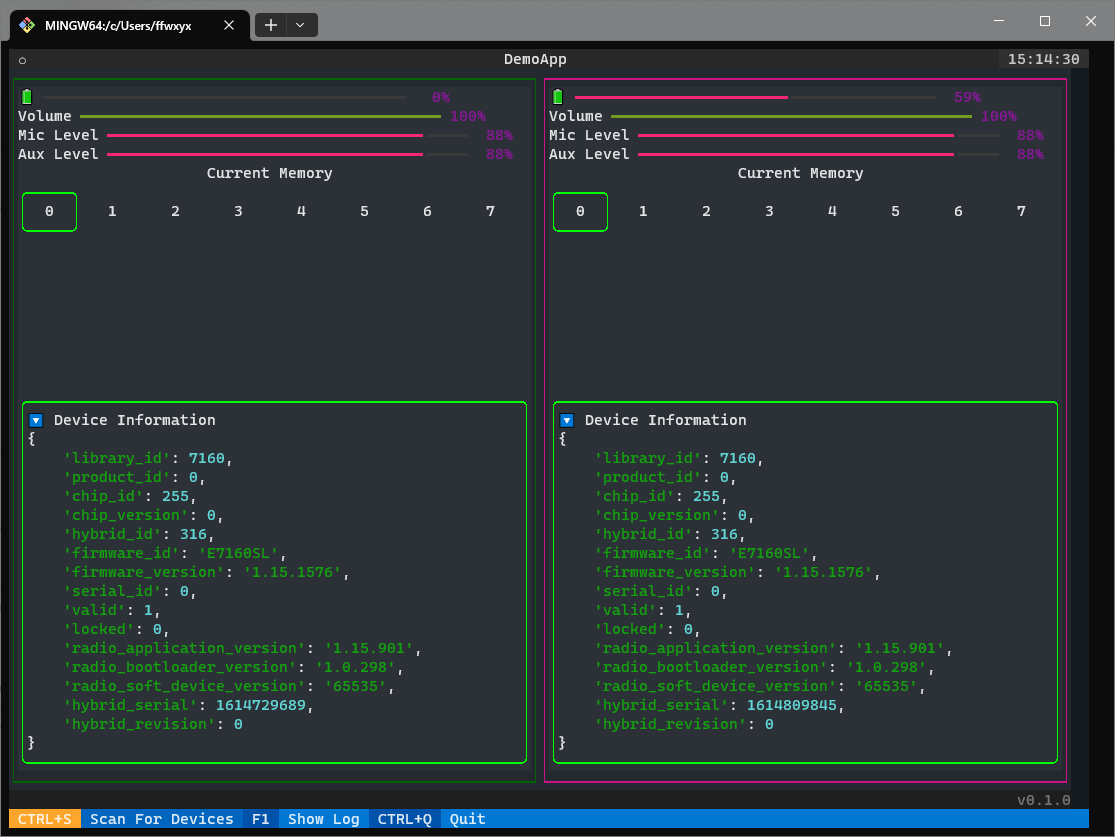
Here is an example of what it looks like when connected to a pair of binaural hearing aids:
1 maintainer

Metadata
1 maintainer
Release files for sd-wireless-demo 0.2.3
For a detailed explanation of source distributions (sdists) and built distributions (wheels), please see the package formats documentation.
Source distribution (sdist)
| File | Size | Uploaded | |
|---|---|---|---|
| sd_wireless_demo-0.2.3.tar.gz | 11.4 kB | Details |
Built distribution (wheel)
| File | Interpreter | ABI | Platform | Reset |
|---|---|---|---|---|
| sd_wireless_demo-0.2.3-py3-none-any.whl | Python 3 | none | any | Details |
Total release size: 24.6 kB
Release files / sd_wireless_demo-0.2.3.tar.gz
| Download URL | sd_wireless_demo-0.2.3.tar.gz |
|---|---|
| Size | 11.4 kB |
| Tags | Source |
|
SHA-256 checksum How to use checksums |
768ab90c1263003c1b7c17cd0754c7bcd17c11eb80179cb17732282914a3a707
|
|
BLAKE2b-256 checksum How to use checksums |
587ebf94738ff10fbde45112e03ae89b6c520ddd3ccac849b6dbd7c6b2326866
|
| Upload date | |
|
Uploaded using Trusted Publishing? What is trusted publishing? |
No |
| Uploaded via |
poetry/1.4.2 CPython/3.10.13 Linux/6.2.0-1015-azure
|
Release files / sd_wireless_demo-0.2.3-py3-none-any.whl
| Download URL | sd_wireless_demo-0.2.3-py3-none-any.whl |
|---|---|
| Size | 13.1 kB |
| Tags | Python 3 |
|
SHA-256 checksum How to use checksums |
0355407437916f10b433be2b11c0d70c6a88f3ae8827fb99b24f2a27160f3f24
|
|
BLAKE2b-256 checksum How to use checksums |
ed58d9172a52108da421534237a101d795f1d2dfa313f98671d8c0e132efd89a
|
| Upload date | |
|
Uploaded using Trusted Publishing? What is trusted publishing? |
No |
| Uploaded via |
poetry/1.4.2 CPython/3.10.13 Linux/6.2.0-1015-azure
|














