


Modern Python library for D-Bus
Features:
- Asyncio and blocking calls.
- Type hints. (
mypy --strictcompatible) - No Python 2 legacy.
- Based on fast sd-bus from systemd. (also supports elogind)
- Unified client/server interface classes. Write interface once!
- D-Bus methods can have keyword and default arguments.
See the documentation for tutorial and API reference.
List of implemented interfaces
- D-Bus (built-in)
- Freedesktop Notifications
- Network Manager
- Freedesktop Secrets
More incoming. (systemd, Bluez, screen saver... )
Community interfaces
- systemd (by @bernhardkaindl)
- modemmanager (by @zhanglongqi)
Stability
Python-sdbus is under development and its API is not stable. Generally anything documented in the official documentation is considered stable but might be deprecated. Using deprecated feature will raise a warning and the feature will be eventually removed.
See the deprecations list.
If there is a feature that is not documented but you would like to use please open a new issue.
Requirements
Binary package from PyPI
- Python 3.9 or higher.
x86_64,aarch64orarmv7larchitecture.- glibc 2.28 or higher. (Debian 10+, Ubuntu 18.10+, CentOS/RHEL 8+)
- pip 20.3 or higher.
libsystemd is statically linked and is not required to be installed
on the system.
Pass --only-binary ':all:' to pip to ensure that it
installs binary package.
i686, ppc64le and s390x can be supported if there is a
demand. Please open an issue if you are interested in those
platforms.
Source package or compiling from source
- Python 3.9 or higher.
- Python headers. (
python3-devpackage on ubuntu) - GCC.
- libsystemd or libelogind
- libsystemd headers. (
libsystemd-devpackage on ubuntu) - Python setuptools.
- pkg-config
Systemd version should be higher than 246.
Optional dependencies
- Jinja2 for code generator.
- Sphinx for autodoc.
Installation
PyPI
URL: https://pypi.org/project/sdbus/
pip install --only-binary ':all:' sdbus
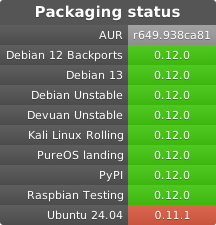
AUR
URL: https://aur.archlinux.org/packages/python-sdbus-git/
Example code
Interface example_interface.py file:
from sdbus import (DbusInterfaceCommonAsync, dbus_method_async,
                   dbus_property_async, dbus_signal_async)

# This is file only contains interface definition for easy import
# in server and client files

class ExampleInterface(
    DbusInterfaceCommonAsync,
    interface_name='org.example.interface'
):
    @dbus_method_async(
        input_signature='s',
        result_signature='s',
    )
    async def upper(self, string: str) -> str:
        return string.upper()

    @dbus_property_async(
        property_signature='s',
    )
    def hello_world(self) -> str:
        return 'Hello, World!'

    @dbus_signal_async(
        signal_signature='i'
    )
    def clock(self) -> int:
        raise NotImplementedError
Server example_server.py file:
from asyncio import new_event_loop, sleep
from random import randint
from time import time

from example_interface import ExampleInterface

from sdbus import request_default_bus_name_async

loop = new_event_loop()

export_object = ExampleInterface()


async def clock() -> None:
    """
    This coroutine will sleep a random time and emit
    a signal with current clock
    """
    while True:
        await sleep(randint(2, 7))  # Sleep a random time
        current_time = int(time())  # The interface we defined uses integers
        export_object.clock.emit(current_time)


async def startup() -> None:
    """Perform async startup actions"""
    # Acquire a known name on the bus
    # Clients will use that name to address this server
    await request_default_bus_name_async('org.example.test')
    # Export the object to D-Bus
    export_object.export_to_dbus('/')


loop.run_until_complete(startup())
task_clock = loop.create_task(clock())
loop.run_forever()
Client example_client.py file:
from asyncio import new_event_loop

from example_interface import ExampleInterface

# Create a new proxied object
example_object = ExampleInterface.new_proxy('org.example.test', '/')


async def print_clock() -> None:
    # Use async for loop to print clock signals we receive
    async for x in example_object.clock:
        print('Got clock: ', x)


async def call_upper() -> None:
    s = 'test string'
    s_after = await example_object.upper(s)

    print('Initial string: ', s)
    print('After call: ', s_after)


async def get_hello_world() -> None:
    print('Remote property: ', await example_object.hello_world)

loop = new_event_loop()

# Always bind your tasks to a variable
task_upper = loop.create_task(call_upper())
task_clock = loop.create_task(print_clock())
task_hello_world = loop.create_task(get_hello_world())

loop.run_forever()
License
Python-sdbus is licensed under LGPL-2.1-or-later.
The LGPL license is an extension of GPL license therefore both licenses' texts are required.
1 maintainer

Metadata
1 maintainer
Release files for sdbus 0.14.3
For a detailed explanation of source distributions (sdists) and built distributions (wheels), please see the package formats documentation.
Source distribution (sdist)
| File | Size | Uploaded | |
|---|---|---|---|
| sdbus-0.14.3.tar.gz | 90.5 kB | Details |
Built distributions (wheels)
| File | Interpreter | ABI | Platform | Reset |
|---|---|---|---|---|
| sdbus-0.14.3-cp39-abi3-manylinux_2_28_x86_64.whl | CPython 3.9 | abi3 | Linux glibc 2.28+ x86-64 | Details |
| sdbus-0.14.3-cp39-abi3-manylinux_2_28_armv7l.whl | CPython 3.9 | abi3 | Linux glibc 2.28+ ARMv7l | Details |
| sdbus-0.14.3-cp39-abi3-manylinux_2_28_aarch64.whl | CPython 3.9 | abi3 | Linux glibc 2.28+ ARM64 | Details |
Total release size: 2.3 MB
Release files / sdbus-0.14.3.tar.gz
| Download URL | sdbus-0.14.3.tar.gz |
|---|---|
| Size | 90.5 kB |
| Tags | Source |
|
SHA-256 checksum How to use checksums |
4ec4fa4108629bae5ab2775e5575b0251fdb555d4a3613c9ddb37fc73f882983
|
|
BLAKE2b-256 checksum How to use checksums |
690e14b0f16087cf7f1e1817da9282dcb590fe27030c6ba136c3e35dff647f3a
|
| Upload date | |
|
Uploaded using Trusted Publishing? What is trusted publishing? |
No |
| Uploaded via |
twine/7.0.0 CPython/3.14.6
|
Release files / sdbus-0.14.3-cp39-abi3-manylinux_2_28_x86_64.whl
| Download URL | sdbus-0.14.3-cp39-abi3-manylinux_2_28_x86_64.whl |
|---|---|
| Size | 742.5 kB |
| Tags | CPython 3.9 Linux glibc 2.28+ x86-64 abi3 |
|
SHA-256 checksum How to use checksums |
37615035d21d29b0fab0dd8c5f86b10f17e84d6126343302f7bf71ef8b0b9c5c
|
|
BLAKE2b-256 checksum How to use checksums |
d57ae0d331eb0894e015930e570e2a381b5afbfd06bff3df586eec89d97f70e1
|
| Upload date | |
|
Uploaded using Trusted Publishing? What is trusted publishing? |
No |
| Uploaded via |
twine/7.0.0 CPython/3.14.6
|
Release files / sdbus-0.14.3-cp39-abi3-manylinux_2_28_armv7l.whl
| Download URL | sdbus-0.14.3-cp39-abi3-manylinux_2_28_armv7l.whl |
|---|---|
| Size | 698.5 kB |
| Tags | CPython 3.9 Linux glibc 2.28+ ARMv7l abi3 |
|
SHA-256 checksum How to use checksums |
2fc4e071098d566b3f2080c9d4bb8be51d6eb213b2d9b445506577f72240787b
|
|
BLAKE2b-256 checksum How to use checksums |
c0d68ab1d779991b103dff8ecdb596ae908bdee50644a21177e3acaf56cd02d9
|
| Upload date | |
|
Uploaded using Trusted Publishing? What is trusted publishing? |
No |
| Uploaded via |
twine/7.0.0 CPython/3.14.6
|
Release files / sdbus-0.14.3-cp39-abi3-manylinux_2_28_aarch64.whl
| Download URL | sdbus-0.14.3-cp39-abi3-manylinux_2_28_aarch64.whl |
|---|---|
| Size | 769.7 kB |
| Tags | CPython 3.9 Linux glibc 2.28+ ARM64 abi3 |
|
SHA-256 checksum How to use checksums |
4bb2f88f63ba16be9660450f054657391474f37cc3c4085daf421d68601f4bd9
|
|
BLAKE2b-256 checksum How to use checksums |
c32fcbe92d8b1f648a0a5a065a4f4732d3a0525db2e0a9e59c11b45029815d65
|
| Upload date | |
|
Uploaded using Trusted Publishing? What is trusted publishing? |
No |
| Uploaded via |
twine/7.0.0 CPython/3.14.6
|














