
Sliced Detection and Clustering Analysis Toolkit - Developed by MBARI

Project description





sdcat
Sliced Detection and Clustering Analysis Toolkit
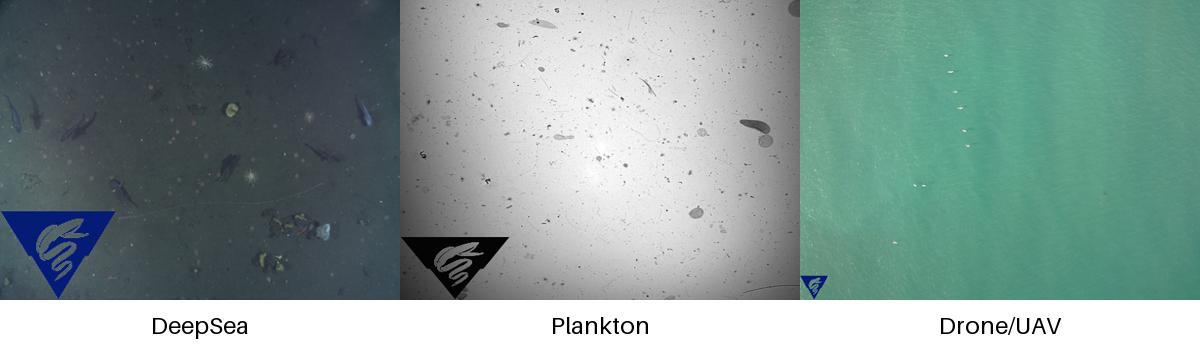
This repository processes images using a sliced detection and clustering workflow. If your images look something like the image below, and you want to detect objects in the images, and optionally cluster the detections, then this repository may be useful to you. The repository is designed to be run from the command line, and can be run in a Docker container, without or with a GPU (recommended).
To use with a multiple gpus, use the --device cuda option
To use with single gpus, use the --device cuda:0,1 option
Detection
Detection can be done with a fine-grained saliency-based detection model, and/or one the following models run with the SAHI algorithm. Both detections algorithms (saliency and object dtection) are run by default and combined to produce the final detections. SAHI is short for Slicing Aided Hyper Inference, and is a method to slice images into smaller windows and run a detection model on the windows.
| Object Detection Model | Description |
|---|---|
| yolov8s | YOLOv8s model from Ultralytics |
| hustvl/yolos-small | YOLOS model a Vision Transformer (ViT) |
| hustvl/yolos-tiny | YOLOS model a Vision Transformer (ViT) |
| MBARI-org/megamidwater (default) | MBARI midwater YOLOv5x for general detection in midwater images |
| MBARI-org/uav-yolov5 | MBARI UAV YOLOv5x for general detection in UAV images |
| MBARI-org/yolov5x6-uavs-oneclass | MBARI UAV YOLOv5x for general detection in UAV images single class |
| FathomNet/MBARI-315k-yolov5 | MBARI YOLOv5x for general detection in benthic images |
To skip saliency detection, use the --skip-saliency option.
sdcat detect --skip-saliency --image-dir <image-dir> --save-dir <save-dir> --model <model> --slice-size-width 900 --slice-size-height 900
To skip using the SAHI algorithm, use --skip-sahi.
sdcat detect --skip-sahi --image-dir <image-dir> --save-dir <save-dir> --model <model> --slice-size-width 900 --slice-size-height 900
ViTS + HDBSCAN Clustering
Once the detections are generated, the detections can be clustered. Alternatively, detections can be clustered from a collection of images, sometimes referred to as region of interests (ROIs) by providing the detections in a folder with the roi option.
sdcat cluster roi --roi <roi> --save-dir <save-dir> --model <model>
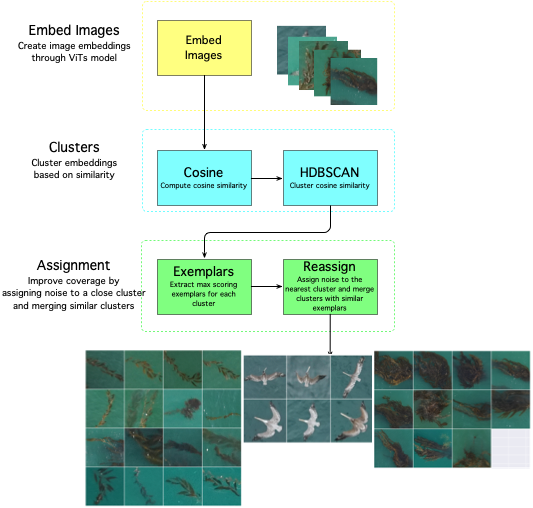
The clustering is done with a Vision Transformer (ViT) model, and a cosine similarity metric with the HDBSCAN algorithm. The ViT model is used to generate embeddings for the detections, and the HDBSCAN algorithm is used to cluster the detections. What is an embedding? An embedding is a vector representation of an object in an image.
The defaults are set to produce fine-grained clusters, but the parameters can be adjusted to produce coarser clusters. The algorithm workflow looks like this:
| Vision Transformer (ViT) Models | Description |
|---|---|
| google/vit-base-patch16-224(default) | 16 block size trained on ImageNet21k with 21k classes |
| facebook/dino-vits8 | trained on ImageNet which contains 1.3 M images with labels from 1000 classes |
| facebook/dino-vits16 | trained on ImageNet which contains 1.3 M images with labels from 1000 classes |
| MBARI-org/mbari-uav-vit-b-16 | MBARI UAV vits16 model trained on 10425 UAV images with labels from 21 classes |
Smaller block_size means more patches and more accurate fine-grained clustering on smaller objects, so ViTS models with 8 block size are recommended for fine-grained clustering on small objects, and 16 is recommended for coarser clustering on larger objects. We recommend running with multiple models to see which model works best for your data, and to experiment with the --min-samples and --min-cluster-size options to get good clustering results.
Installation
Pip install the sdcat package with:
pip install sdcat
Alternatively, Docker can be used to run the code. A pre-built docker image is available at Docker Hub with the latest version of the code.
Detection
docker run -it -v $(pwd):/data mbari/sdcat detect --image-dir /data/images --save-dir /data/detections --model MBARI-org/uav-yolov5
Followed by clustering
docker run -it -v $(pwd):/data mbari/sdcat cluster detections --det-dir /data/detections/ --save-dir /data/detections --model MBARI-org/uav-yolov5
A GPU is recommended for clustering and detection. If you don't have a GPU, you can still run the code, but it will be slower. If running on a CPU, multiple cores are recommended and will speed up processing.
docker run -it --gpus all -v $(pwd):/data mbari/sdcat:cuda124 detect --image-dir /data/images --save-dir /data/detections --model MBARI-org/uav-yolov5
Commands
To get all options available, use the --help option. For example:
sdcat --help
which will print out the following:
Usage: sdcat [OPTIONS] COMMAND [ARGS]...

  Process images from a command line.

Options:
  -V, --version  Show the version and exit.
  -h, --help     Show this message and exit.

Commands:
  cluster  Cluster detections.
  detect   Detect objects in images
To get details on a particular command, use the --help option with the command. For example, with the cluster command:
sdcat cluster --help
which will print out the following:
Usage: sdcat cluster [OPTIONS] COMMAND [ARGS]...

  Commands related to clustering images

Options:
  -h, --help  Show this message and exit.

Commands:
  detections  Cluster detections.
  roi         Cluster roi.
File organization
The sdcat toolkit generates data in the following folders.
For detections, the output is organized in a folder with the following structure:
/data/20230504-MBARI/
└── detections
    └── hustvl
        └── yolos-small                         # The model used to generate the detections
            ├── det_raw                         # The raw detections from the model
            │   └── csv
            │       ├── DSC01833.csv
            │       ├── DSC01859.csv
            │       ├── DSC01861.csv
            │       └── DSC01922.csv
            ├── det_filtered                    # The filtered detections from the model
                ├── crops                       # Crops of the detections
                ├── dino_vits8...date           # The clustering results - one folder per each run of the clustering algorithm
                ├── dino_vits8..detections.csv  # The detections with the cluster id
            ├── stats.txt                       # Statistics of the detections
            └── vizresults                      # Visualizations of the detections (boxes overlaid on images)
                ├── DSC01833.jpg
                ├── DSC01859.jpg
                ├── DSC01861.jpg
                └── DSC01922.jpg
For clustering, the output is organized in a folder with the following structure:
/data/20230504-MBARI/
└── clusters
    └── crops                                   # The detection crops/rois, embeddings and predictions
    └── dino_vit_134412_cluster_detections.parquet  # The detections with the cluster id and predictions in parquet format
    └── dino_vit_134412_cluster_detections.csv  # The detections with the cluster id and predictions
    └── dino_vit_134412_cluster_config.ini      # Copy of the config file used to run the clustering
    └── dino_vit_134412_cluster_summary.json    # Summary of the clustering results
    └── dino_vit_134412_cluster_summary.png     # 2D plot of the clustering results
Process images creating bounding box detections with the YOLOv8s model.
The YOLOv8s model is not as accurate as other models, but is fast and good for detecting larger objects in images, and good for experiments and quick results. Slice size is the size of the detection window. The default is to allow the SAHI algorithm to determine the slice size; a smaller slice size will take longer to process.
sdcat detect --image-dir <image-dir> --save-dir <save-dir> --model yolov8s --slice-size-width 900 --slice-size-height 900
Cluster detections from the YOLOv8s model, but use the classifications from the ViT model.
Cluster the detections from the YOLOv8s model. The detections are clustered using cosine similarity and embedding
features from the default Vision Transformer (ViT) model google/vit-base-patch16-224
sdcat cluster --det-dir <det-dir>/yolov8s/det_filtered --save-dir <save-dir> --use-vits
Related work
- https://github.com/obss/sahi SAHI
- https://arxiv.org/abs/2010.11929 An Image is Worth 16x16 Words: Transformers for Image Recognition at Scale
- https://github.com/facebookresearch/dinov2 DINOv2
- https://arxiv.org/pdf/1911.02282.pdf HDBSCAN
- https://github.com/muratkrty/specularity-removal Specularity Removal
Release history Release notifications | RSS feed


Download files
Download the file for your platform. If you're not sure which to choose, learn more about installing packages.
Source Distribution
Built Distribution
Filter files by name, interpreter, ABI, and platform.
If you're not sure about the file name format, learn more about wheel file names.
Copy a direct link to the current filters
File details
Details for the file sdcat-1.21.3.tar.gz.
File metadata
- Download URL: sdcat-1.21.3.tar.gz
- Upload date:
- Size: 43.3 kB
- Tags: Source
- Uploaded using Trusted Publishing? No
- Uploaded via: poetry/2.1.3 CPython/3.11.12 Linux/6.11.0-1014-azure
File hashes
| Algorithm | Hash digest | |
|---|---|---|
| SHA256 |
b9d80b5d0091c0ed2c519beaebec9de15a3d16d90e0a69e269bec3b8c68f8b00
|
|
| MD5 |
44af8e1bf7177c1b892e61a2a36d0093
|
|
| BLAKE2b-256 |
90528d75d9fd08f1df1508a2c75b834e35c5fff587f61755325526b2f90f8195
|
File details
Details for the file sdcat-1.21.3-py3-none-any.whl.
File metadata
- Download URL: sdcat-1.21.3-py3-none-any.whl
- Upload date:
- Size: 50.4 kB
- Tags: Python 3
- Uploaded using Trusted Publishing? No
- Uploaded via: poetry/2.1.3 CPython/3.11.12 Linux/6.11.0-1014-azure
File hashes
| Algorithm | Hash digest | |
|---|---|---|
| SHA256 |
9b0d57899326fd0e0de2e697347fe69fff86a28da040d3f8180f62f11a0ceb2e
|
|
| MD5 |
807c599af8f15d2ae262d1379ad71cf8
|
|
| BLAKE2b-256 |
3dd6067b12546e10e8ecb61319a0ecb562d18455ed1319ae758567cff0c45aca
|






