







Quick links: Website • GitHub • Docs • API • Paper • Demo (video) • Tutorials • Datasets (HF) • Issues
SDialog is an MIT-licensed open-source toolkit for building, simulating, and evaluating LLM-based conversational agents end-to-end. It aims to bridge agent construction → user simulation → dialog generation → evaluation in a single reproducible workflow, so you can generate reliable, controllable dialog systems or data at scale.
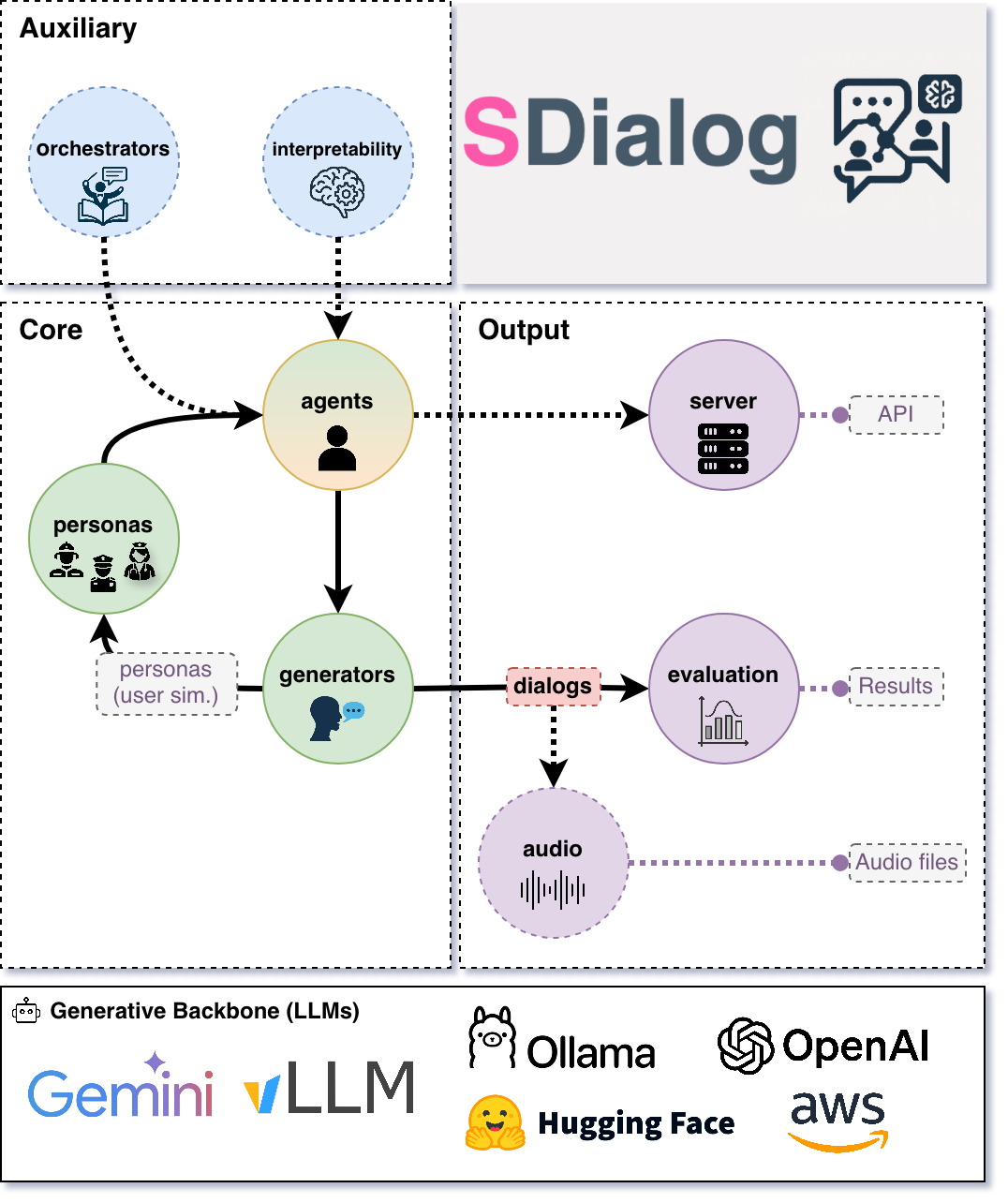
It standardizes a Dialog schema and offers persona‑driven multi‑agent simulation with LLMs, composable orchestration, built‑in metrics, and mechanistic interpretability.
✨ Key features
- Standard dialog schema with JSON import/export (aiming to standardize dialog dataset formats with your help 🙏)
- Persona‑driven multi‑agent simulation with contexts, tools, and thoughts
- Composable orchestration for precise control over behavior and flow
- Built‑in evaluation (metrics + LLM‑as‑judge) for comparison and iteration
- Native mechanistic interpretability (inspect and steer activations)
- Easy creation of user-defined components by inheriting from base classes (personas, metrics, orchestrators, etc.)
- Interoperability across OpenAI, Hugging Face, Ollama, AWS Bedrock, Google GenAI, Anthropic, and more.
If you are building conversational systems, benchmarking dialog models, producing synthetic training corpora, simulating diverse users to test or probe conversational systems, or analyzing internal model behavior, SDialog provides an end‑to‑end workflow.
⚡ Installation
pip install sdialog
Alternatively, a ready-to-use Apptainer image (.sif) with SDialog and all dependencies is available on Hugging Face and can be downloaded here.
apptainer exec --nv sdialog.sif python3 -c "import sdialog; print(sdialog.__version__)"
🏁 Quickstart tour
Here's a short, hands‑on example: a support agent helps a customer disputing a double charge. We add a small refund rule and two simple tools, generate three dialogs for evaluation, then serve the agent on port 1333 for Open WebUI or any OpenAI‑compatible client.
import sdialog
from sdialog import Context
from sdialog.agents import Agent
from sdialog.personas import SupportAgent, Customer
from sdialog.orchestrators import SimpleReflexOrchestrator

# First, let's set our preferred default backend:model and parameters
sdialog.config.llm("openai:gpt-4.1", temperature=1, api_key="YOUR_KEY")  # or export OPENAI_API_KEY=YOUR_KEY
# sdialog.config.llm("ollama:qwen3:14b")  # etc.

# Let's define our personas (use built-ins like in this example, or create your own!)
support_persona = SupportAgent(name="Ava", politeness="high", communication_style="friendly")
customer_persona = Customer(name="Riley", issue="double charge", desired_outcome="refund")

# (Optional) Let's define two mock tools (just plain Python functions) for our support agent
def verify_account(user_id):
    """Verify user account by user id."""
    return {"user_id": user_id, "verified": True}
def refund(amount):
    """Process a refund for the given amount."""
    return {"status": "refunded", "amount": amount}

# (Optional) Let's also include a small rule-based orchestrator for our support agent
react_refund = SimpleReflexOrchestrator(
  condition=lambda utt: "refund" in utt.lower(),
  instruction="Follow refund policy; verify account, apologize, refund.",
)

# Now, let's create the agents!
support_agent = Agent(
  persona=support_persona,
  think=True,  # Let's also enable thinking mode
  tools=[verify_account, refund],
  name="Support"
)
simulated_customer = Agent(
  persona=customer_persona,
  first_utterance="Hi!",
  name="Customer"
)

# Since we have one orchestrator, let's attach it to our target agent
support_agent = support_agent | react_refund

# Let's generate 3 dialogs between them! (we can evaluate them later)
# (Optional) Let's also define a concrete conversational context for the agents in these dialogs
web_chat = Context(location="chat", environment="web", circumstances="billing")
for ix in range(3):
  dialog = simulated_customer.dialog_with(support_agent, context=web_chat)  # Generate the dialog
  dialog.to_file(f"dialog_{ix}.json")  # Save it
  dialog.print(all=True)  # And pretty print it with all its events (thoughts, orchestration, etc.)

# Finally, let's serve our support agent to interact with real users (OpenAI-compatible API)
#    Point Open WebUI or any OpenAI-compatible client to: http://localhost:1333
support_agent.serve(port=1333)
🧪 Testing remote systems with simulated users
Probe OpenAI‑compatible deployed systems with controllable simulated users and capture dialogs for evaluation.
You can also use SDialog as a controllable test harness for any OpenAI‑compatible system such as vLLM-based ones by role‑playing realistic or adversarial users against your deployed system:
- Black‑box functional checks (Does the system follow instructions? Handle edge cases?)
- Persona / use‑case coverage (Different goals, emotions, domains)
- Regression testing (Run the same persona batch each release; diff dialogs)
- Safety / robustness probing (Angry, confused, or noisy users)
- Automated evaluation (Pipe generated dialogs directly into evaluators - See Evaluation section below)
Core idea: wrap your system as an Agent using openai: as the prefix of your model name string, talk to it with simulated user Agents, and capture Dialogs you can save, diff, and score.
Below is a minimal example where our simulated customer interacts once with your hypothetical remote endpoint:
# Our remote system (your conversational backend exposing an OpenAI-compatible API)
system = Agent(
  model="openai:your/model",  # Model name exposed by your server
  openai_api_base="http://your-endpoint.com:8000/v1",  # Base URL of the service
  openai_api_key="EMPTY",  # Or a real key if required
  name="System"
)

# Let's make our simulated customer talk with the system
dialog = simulated_customer.dialog_with(system)
dialog.to_file("dialog_0.json")
💾 Loading and saving dialogs
Import, export, and transform dialogs from JSON, text, CSV, or Hugging Face datasets.
Dialogs are rich objects with helper methods (filter, slice, transform, etc.) that can be easily exported and loaded using different methods:
from sdialog import Dialog

# Load from JSON (generated by SDialog using `to_file()`)
dialog = Dialog.from_file("dialog_0.json")

# Load from HuggingFace Hub datasets
dialogs = Dialog.from_huggingface("sdialog/Primock-57")

# Create from plain text files or strings - perfect for converting existing datasets!
dialog_from_txt = Dialog.from_str("""
Alice: Hello there! How are you today?
Bob: I'm doing great, thanks for asking.
Alice: That's wonderful to hear!
""")
# Or, equivalently if the content is in a txt file
dialog_from_txt = Dialog.from_file("conversation.txt")

# Load from CSV files with custom column names
dialog_from_csv = Dialog.from_file("conversation.csv",
                                   csv_speaker_col="speaker",
                                   csv_text_col="value",)

# All Dialog objects have rich manipulation methods
dialog.filter("Alice").rename_speaker("Alice", "Customer").upper().to_file("processed.json")
avg_words_turn = sum(len(turn) for turn in dialog) / len(dialog)
See Dialog section in the documentation for more information.
📊 Evaluate and compare
Score dialogs with built‑in metrics and LLM judges, and compare datasets with aggregators and plots.
Dialogs can be evaluated using the different components available inside the sdialog.evaluation module.
Use built‑in metrics—conversational features, readability, embedding-based, LLM-as-judge, flow-based, functional correctness (30+ metrics across six categories)—or easily create new ones, then aggregate and compare datasets (sets of dialogs) via Comparator.
from sdialog import Dialog
from sdialog.evaluation import LLMJudgeYesNo, ToolSequenceValidator
from sdialog.evaluation import FrequencyEvaluator, Comparator

# Two quick checks: did the agent ask for verification, and did it call tools in order?
judge_verify = LLMJudgeYesNo(
  "Did the support agent try to verify the customer?",
  reason=True,
)
tool_seq = ToolSequenceValidator(["verify_account", "refund"])

comparator = Comparator([
  FrequencyEvaluator(judge_verify, name="Asked for verification"),
  FrequencyEvaluator(tool_seq, name="Correct tool order"),
])

results = comparator({
  "model-A": Dialog.from_folder("output/model-A"),
  "model-B": Dialog.from_folder("output/model-B"),
})
comparator.plot()
🧠 Mechanistic interpretability
Capture per‑token activations and steer models via Inspectors for analysis and interventions.
Attach Inspectors to capture per‑token activations and optionally steer (add/ablate directions) to analyze or intervene in model behavior.
import sdialog
from sdialog.interpretability import Inspector
from sdialog.agents import Agent

sdialog.config.llm("huggingface:meta-llama/Llama-3.2-3B-Instruct")

agent = Agent(name="Bob")
inspector = Inspector(target="model.layers.15")
agent = agent | inspector

agent("How are you?")
agent("Cool!")

# Let's get the last response's first token activation vector!
act = inspector[-1][0].act # [response index][token index]
Steering intervention (subtracting a direction):
import torch
anger_direction = torch.load("anger_direction.pt")  # A direction vector (e.g., PCA / difference-in-mean vector)
agent_steered = agent | inspector - anger_direction  # Ablate the anger direction from the target activations

agent_steered("You are an extremely upset assistant")  # Agent "can't get angry anymore" :)
🔊 Audio generation
Turn text dialogs into realistic audio, with ground-truth annotations, at different levels of difficulty.
SDialog turns any two-speaker dialog into audio with a single call. Each turn is annotated with its speaker, text, start and end times, and word timestamps, so the audio can be used for ASR, diarization, speech LLMs and other speech tasks:
- Dialogue TTS: Dia2 is the default engine. It generates whole conversations with natural turn-taking. Other engines (Kokoro, Qwen3-TTS, ...) are also supported.
- Voices: matched to the personas (gender, age) from a voice database, designed from the persona description, random, or set by you.
- Realism controls: pauses, overlapping speech, room reverberation, background noise, telephone codecs (G.711, G.729, AMR), and loudness differences between speakers.
- Presets:
clean,conversational,room,call_center,far_fieldandhard, or your own. - Output: mono or stereo (one channel per speaker), any sample rate, saved as WAV plus JSON and RTTM annotations.
Install dependencies (Dia2 needs Python >= 3.10, and a GPU is recommended):
pip install sdialog[audio]
Then, simply:
from sdialog import Dialog

dialog = Dialog.from_file("my_dialog.json")

audio = dialog.to_audio()                                         # clean audio, persona-matched voices
audio = dialog.to_audio(preset="call_center", stereo=True)        # agent / caller on separate channels
audio = dialog.to_audio(voices="random", reverb="large", noise=10, overlap=0.2, seed=0)

audio.save("output/dialog")          # output/dialog.wav, .json (annotations) and .rttm
for seg in audio.segments:
    print(f"{seg.start:6.2f} - {seg.end:6.2f}  {seg.speaker}: {seg.text}")
To convert a whole dataset in parallel, with one model per GPU:
from sdialog.audio import dialogs_to_audio

dialogs_to_audio(dialogs, "audios/", preset="room")
📖 Documentation and tutorials
- EACL 2026 paper (ArXiv version)
- Demo (video)
- Tutorials
- API reference
- Documentation
- Documentation for AI coding assistants like Copilot is also available at
https://sdialog.readthedocs.io/en/latest/llm.txtfollowing the llm.txt specification. In your Copilot chat, simply use:#fetch https://sdialog.readthedocs.io/en/latest/llm.txt Your prompt goes here...(e.g. Write a python script using sdialog to have an agent for criminal investigation, define its persona, tools, orchestration...)
🌍 Project Vision & Community Call
To accelerate open, rigorous, and reproducible conversational AI research, SDialog invites the community to collaborate and help shape the future of open dialog generation.
🤝 How You Can Help
- 🗂️ Dataset Standardization: Help convert existing dialog datasets to SDialog format. Currently, each dataset stores dialogs in different formats, making cross-dataset analysis and model evaluation challenging. Converted datasets are made available as Hugging Face datasets in the SDialog organization for easy access and integration.
- 🔧 Component Development: Create new personas, orchestrators, evaluators, generators, or backend integrations
- 📊 Evaluation & Benchmarks: Design new metrics, evaluation frameworks, or comparative studies
- 🧠 Interpretability Research: Develop new analysis tools, steering methods, or mechanistic insights
- 📖 Documentation & Tutorials: Improve guides, add examples, or create educational content
- 🐛 Issues & Discussions: Report bugs, request features, or share research ideas and use cases
💪 Contributing
See CONTRIBUTING.md. We welcome issues, feature requests, and pull requests. If you want to contribute to the project, please open an issue or submit a PR, and help us make SDialog better 👍. If you find SDialog useful, please consider starring ⭐ the GitHub repository to support the project and increase its visibility 😄.
This project follows the all-contributors specification. All-contributors list:












📚 Citation
If you use SDialog in academic work, please consider citing our paper, published at EACL 2026:
@inproceedings{burdisso-etal-2026-sdialog,
    title = "{SD}ialog: A Python Toolkit for End-to-End Agent Building, User Simulation, Dialog Generation, and Evaluation",
    author = {Burdisso, Sergio and Baroudi, S{\'e}verin and Labrak, Yanis and Gr{\"u}nert, David and Cyrta, Pawel and Chen, Yiyang and Madikeri, Srikanth and Villatoro-tello, Esa{\'u} and Marxer, Ricard and Motlicek, Petr},
    editor = "Croce, Danilo and Leidner, Jochen and Moosavi, Nafise Sadat",
    booktitle = "Proceedings of the 19th Conference of the {E}uropean Chapter of the {A}ssociation for {C}omputational {L}inguistics (Volume 3: System Demonstrations)",
    month = mar,
    year = "2026",
    address = "Rabat, Marocco",
    publisher = "Association for Computational Linguistics",
    url = "https://aclanthology.org/2026.eacl-demo.23/",
    doi = "10.18653/v1/2026.eacl-demo.23",
    pages = "320--340",
    ISBN = "979-8-89176-382-1"
}
🙏 Acknowledgments
This work was mainly supported by the European Union Horizon 2020 project ELOQUENCE and received a significant development boost during the Johns Hopkins University JSALT 2025 workshop, as part of the "Play your Part" research group. We thank all contributors and the open-source community for their valuable feedback and contributions.
📝 License
MIT License
Copyright (c) 2025 Idiap Research Institute
1 maintainer

Metadata
1 maintainer
Release files for sdialog 0.5.4
For a detailed explanation of source distributions (sdists) and built distributions (wheels), please see the package formats documentation.
Source distribution (sdist)
| File | Size | Uploaded | Provenance | |
|---|---|---|---|---|
| sdialog-0.5.4.tar.gz | 1.4 MB | Without provenance | Details |
Built distribution (wheel)
| File | Interpreter | ABI | Platform | Reset |
|---|---|---|---|---|
| sdialog-0.5.4-py3-none-any.whl | Python 3 | none | any | Details |
Total release size: 3.0 MB
Release files / sdialog-0.5.4.tar.gz
| Download URL | sdialog-0.5.4.tar.gz |
|---|---|
| Size | 1.4 MB |
| Tags | Source |
|
SHA-256 checksum How to use checksums |
5af381df48e4bf9b9fe38e30cbf8d1dc1471f3c0fa3b2699a18e893c1c32f975
|
|
BLAKE2b-256 checksum How to use checksums |
ab7915aa807b36171221a9a2578ed00af657abf400eefed3b76be83b12d8df2d
|
| Upload date | |
|
Uploaded using Trusted Publishing? What is trusted publishing? |
No |
| Uploaded via |
twine/6.1.0 CPython/3.9.20
|
Release files / sdialog-0.5.4-py3-none-any.whl
| Download URL | sdialog-0.5.4-py3-none-any.whl |
|---|---|
| Size | 1.5 MB |
| Tags | Python 3 |
|
SHA-256 checksum How to use checksums |
1fdeb5a4ed9d04ab0cfb565a215dc565dd2f8964649b05153aa33a3ab6bf3731
|
|
BLAKE2b-256 checksum How to use checksums |
d78a3ca37e992df5028b12c07865f0bc3c6d5d727eaccad694854d124950aa03
|
| Upload date | |
|
Uploaded using Trusted Publishing? What is trusted publishing? |
No |
| Uploaded via |
twine/6.1.0 CPython/3.9.20
|
Security for sdialog 0.5.4
Provenance
Provenance describes where a file came from. On PyPI, provenance is shared via attestations, which provide a verifiable record of the build or publishing details. View details, limitations and caveats.
No provenance found
None of the files in this release were uploaded with provenance metadata.
A note on package security
PyPI is a repository for distributing packages, not a service for auditing them. While third-party security researchers and our staff do their best to detect and remove malicious packages, PyPI cannot guarantee the quality, security or suitability of any given package.
To learn more about protecting yourself from malicious actors, visit our package security documentation.














