
Copyright © 2016-2018 SoftFIRE and TU Berlin. Licensed under Apache v2 License.
SDN Manager
The SoftFIRE SDN Manager is in charge of managing access to the SDN resources provided by some testbeds in SoftFIRE.
The SDN Manager keeps track of the API endpoints towards the SDN proxy services.
The SDN Manager uses the following experiment Lifecycles:
List
Provision
Release
Upon list resources the SDN manager returns a list of available SDN endpoints to the Experimenter.
To actually use an SDN resource in an experiment an SDNResource has to be included in the experiment descripton that matches a resource ID returned by list resources.
Currently supported SDN Endpoints
Each testbed can provide a different implementation of SDN resources. The current version of the SoftFIRE SDN middleware provides access to two types of SDN controllers:
The Frauhofer FOKUS testbed uses its own implementation of an SDN controller named OpenSDNCore.
The Ericsson testbed provides access to OpenDayLight SDN controllers.
Workflow
The figure below depicts the workflow of the NFV Manager.
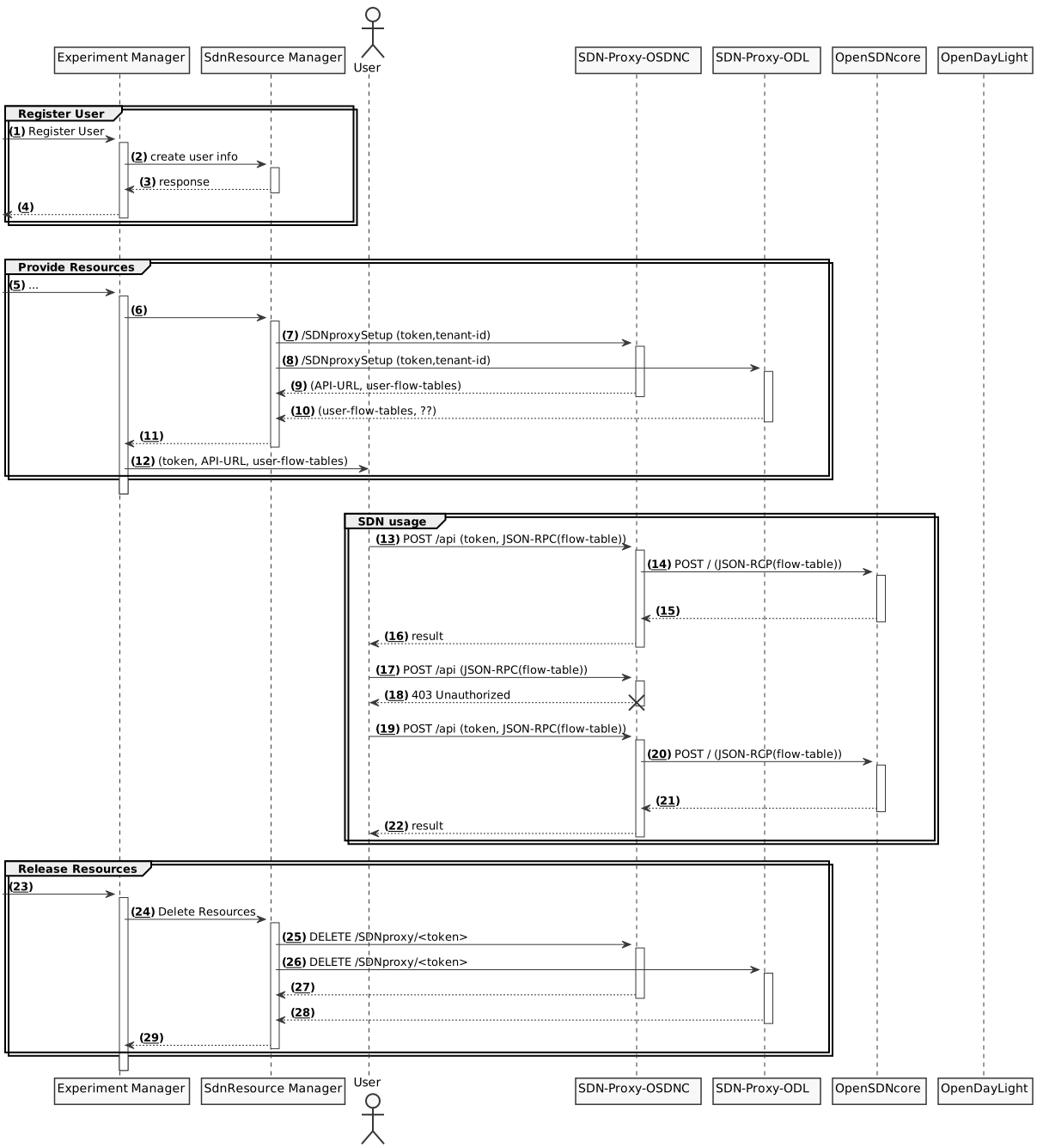
For more information on how to use the SDN resources visit the documentation.
Technical Requirements
The SDN Manager requires Python 3.5 or higher.
Installation and configuration
You can install the SDN Manager using pip:
pip install sdn-manager
and then start it with the sdn-manager command.
Or you can run it from source code by cloning the git repository, installing the dependencies as specified in the setup.py file and executing the sdn-manager script.
The SDN Manager needs a configuration file present at /etc/softfire/sdn-manager.ini. An example of the configuration file can be found here.
Issue tracker
Issues and bug reports should be posted to the GitHub Issue Tracker of this project.
What is SoftFIRE?
SoftFIRE provides a set of technologies for building a federated experimental platform aimed at the construction and experimentation of services and functionalities built on top of NFV and SDN technologies. The platform is a loose federation of already existing testbed owned and operated by distinct organizations for purposes of research and development.
SoftFIRE has three main objectives: supporting interoperability, programming and security of the federated testbed. Supporting the programmability of the platform is then a major goal and it is the focus of the SoftFIRE’s Second Open Call.
Licensing and distribution
Copyright © [2016-2018] Sof
3 maintainers


Metadata
3 maintainers
Release files for sdn-manager 1.0.3
For a detailed explanation of source distributions (sdists) and built distributions (wheels), please see the package formats documentation.
Source distribution (sdist)
| File | Size | Uploaded | Provenance | |
|---|---|---|---|---|
| sdn-manager-1.0.3.tar.gz | 8.0 kB | Without provenance | Details |
Built distribution (wheel)
| File | Interpreter | ABI | Platform | Reset |
|---|---|---|---|---|
| sdn_manager-1.0.3-py3-none-any.whl | Python 3 | none | any | Details |
Total release size: 20.2 kB
Release files / sdn-manager-1.0.3.tar.gz
| Download URL | sdn-manager-1.0.3.tar.gz |
|---|---|
| Size | 8.0 kB |
| Tags | Source |
|
SHA-256 checksum How to use checksums |
bcae145d9298308fa7ad14b287f32b6720ebbd2d3b4f6ef827192495bd01f753
|
|
BLAKE2b-256 checksum How to use checksums |
8c80d89b6ff82dc79d55606edad3e6cf3c2a7833f10511b56d5e8b5756244dd1
|
| Upload date | |
|
Uploaded using Trusted Publishing? What is trusted publishing? |
No |
Release files / sdn_manager-1.0.3-py3-none-any.whl
| Download URL | sdn_manager-1.0.3-py3-none-any.whl |
|---|---|
| Size | 12.2 kB |
| Tags | Python 3 |
|
SHA-256 checksum How to use checksums |
3bb494d72771459856c44f8bd04f9d93f5763c47374c5fcc4fbf71159aea81af
|
|
BLAKE2b-256 checksum How to use checksums |
503be3263fdb148ae3550c4fb5074310648b366a39e0d6525999bdee3f97522e
|
| Upload date | |
|
Uploaded using Trusted Publishing? What is trusted publishing? |
No |
Security for sdn-manager 1.0.3
Provenance
Provenance describes where a file came from. On PyPI, provenance is shared via attestations, which provide a verifiable record of the build or publishing details. View details, limitations and caveats.
No provenance found
None of the files in this release were uploaded with provenance metadata.
A note on package security
PyPI is a repository for distributing packages, not a service for auditing them. While third-party security researchers and our staff do their best to detect and remove malicious packages, PyPI cannot guarantee the quality, security or suitability of any given package.
To learn more about protecting yourself from malicious actors, visit our package security documentation.














