
SDOFMv2: A Multi-Instrument Foundation Model for the Solar Dynamics Observatory with Transferable Downstream Applications






SDOFMv2 is an advanced multi-instrument foundation model for analyzing Solar Dynamics Observatory (SDO) data, designed to drive large-scale, data-driven heliophysics research. Building on the original SDOFM framework, this version improves spatial coherence and global consistency by addressing limitations in temporal coverage and reconstruction artifacts.
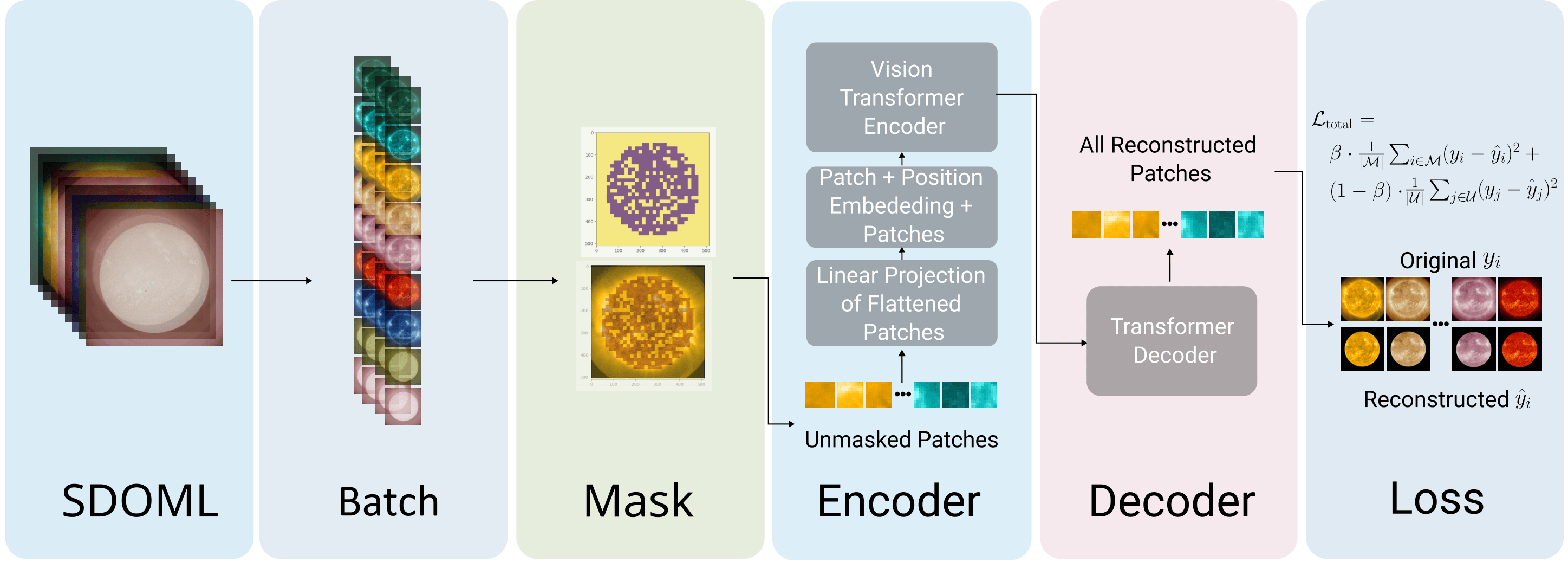
A Masked Autoencoder (MAE) built on a Vision Transformer (ViT) backbone is used for pretraining. During training, a% of image patches are masked; the remaining (100 - a)% are processed by the encoder. The decoder then reconstructs all patches, optimized via a customized loss function.
Table of Contents
- Getting Started
- Repository Structure
- Data Preparation
- Training & Evaluation
- Results & Visualizations
- Citation
- Acknowledgments
Getting Started
For full documentation, please visit sdofmv2.readthedocs.io.
Prerequisites
- Python 3.11+
- NVIDIA GPU + CUDA toolkit (recommended for training)
Installation
We use mamba (or conda) for fast dependency resolution.
Hardware Note:
sdofmv2_environment.ymlis configured for CUDA 12.8 by default. If your system requires a different CUDA version (e.g., 11.8), edit thepipsection insdofmv2_environment.ymlbefore running setup — changecu128to the appropriate tag (e.g.,cu118).
# Clone the repository
git clone https://github.com/Joaggi/sdofmv2.git
cd sdofmv2

# Create and activate the environment
# (installs PyTorch and the local package automatically)
mamba env create -f sdofmv2_environment.yml
mamba activate sdofmv2
Pretrained Weights
Pretrained model checkpoints are available on Hugging Face:
# Using the Hugging Face Hub
mamba install huggingface_hub -c conda-forge
huggingface-cli download joseph-gallego/sdofmv2
Repository Structure
.
├── assets/                     # Output images, model results, and test artifacts
├── configs/                    # YAML configurations for experiments
│   ├── downstream/             # Configs for downstream tasks (F10.7, solar wind)
│   ├── pretrain/               # Configs for MAE pretraining (AIA, HMI)
│   └── test_run/               # Configs for testing and quick validation
├── docs/                       # Sphinx documentation source files
├── notebooks/                  # Jupyter notebooks for analysis and visualization
│   ├── analysis/               # Attention maps, PCA, and masking analysis
│   └── downstream_apps/        # Downstream application demos (F10.7, missing data)
├── scripts/                    # Executable scripts for pipeline tasks
│   ├── analysis/               # Scripts for evaluating and plotting results
│   ├── data/                   # Data acquisition, conversion, and preprocessing
│   ├── evaluation/             # Model evaluation and inference scripts
│   ├── finetuning/             # Scripts for downstream finetuning
│   └── training/               # Pretraining scripts
├── src/
│   └── sdofmv2/
│       ├── core/               # Base model architectures and modules
│       ├── tasks/              # PyTorch Lightning modules for downstream tasks
│       └── utils/              # Helper functions, physical constants, and metrics
├── tests/                      # Unit tests (pytest)
├── pyproject.toml              # Project metadata and build dependencies
└── sdofmv2_environment.yml     # Mamba environment definition
Data Preparation
SDOFMv2 uses the SDOMLv2 dataset — a curated, multi-instrument dataset for the Solar Dynamics Observatory, hosted on NASA's HDRL S3 bucket. Data is streamed via s3fs and stored in the Zarr format.
Dataset Components
| Component | Instrument | Data Type | Approx. Size | Description |
|---|---|---|---|---|
aia |
AIA | EUV Images | ~7.2 TB | 9 extreme ultraviolet channels capturing the solar atmosphere |
hmi |
HMI | Magnetograms | ~713 GB | 3-component vector magnetic field (Bx, By, Bz) for the solar photosphere |
all |
AIA + HMI | EUV Images & Magnetograms | ~7.9 TB | 13 channels combining AIA and HMI modalities |
Storage: Zarr datasets require significant local disk space. Verify your target drive has sufficient capacity before downloading.
Downloading the Data
The download script is resumable — it checks for existing local files and only fetches what's missing.
# Download AIA only
python scripts/data/download_sdomlv2.py --target /path/to/your/storage --component aia

# Download HMI only
python scripts/data/download_sdomlv2.py --target /path/to/your/storage --component hmi

# Download the full dataset
python scripts/data/download_sdomlv2.py --target /path/to/your/storage --component both
Zarr Directory Layout
After download, the data is organized as follows:
data/
├── sdomlv2.zarr/                # AIA multi-channel dataset
│   ├── .zgroup                  # Group hierarchy metadata
│   ├── 2010/
│   │   ├── 131A/                # EUV channel (131 Å)
│   │   ├── 1600A/               # EUV channel (1600 Å)
│   │   └── ...                  # Other AIA channels (193, 211, 304, etc.)
│   └── ...
└── sdomlv2_hmi.zarr/            # HMI magnetic field dataset
    ├── .zgroup
    └── 2010/
        ├── Bx/                  # Magnetic field component
        └── By/                  # Magnetic field component
Unlike monolithic file formats (e.g., .fits), the chunked Zarr layout enables high-speed random access — data loaders can read specific time slices or channels without loading the full multi-terabyte dataset into memory.
Preprocessing
Before training or evaluation, you must compute temporal alignments and dataset statistics (such as normalizations and masks). This step creates an index file that significantly speeds up the data loading process.
# Preprocess data for AIA (default)
python scripts/data/preprocess.py --config-name pretrain_mae_AIA.yaml

# Preprocess data for HMI
python scripts/data/preprocess.py --config-name pretrain_mae_HMI.yaml
Note: The preprocessing script will process the data and output the index files to the directory specified in your configuration file.
Training & Evaluation
Pretraining
python scripts/training/pretrain.py --config-name pretrain_mae_AIA.yaml
Evaluation
python scripts/evaluation/test.py --config-name pretrain_mae_AIA.yaml
Downstream Finetuning
# Example: solar wind forecasting
python scripts/finetuning/run_solarwind.py --config-name solarwind_sdofmv2_ALL.yaml
Configuration files for all tasks are in configs/downstream/. Notebook-based walkthroughs are available in notebooks/downstream_apps/.
Results & Visualizations
Our MAE trained on AIA data successfully reconstructs SDO solar images at high quality.
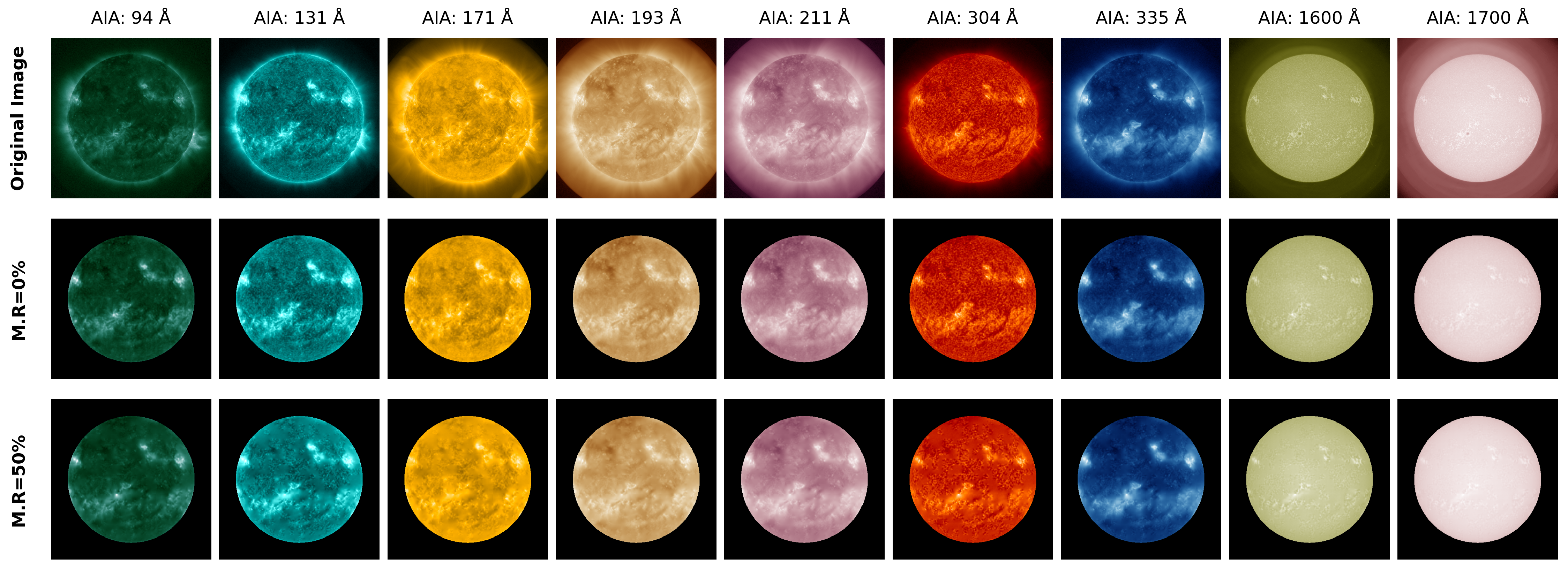
Row 1: Ground-truth images. Row 2: Reconstructions at 0% masking ratio. Row 3: Reconstructions at 50% masking ratio.
Citation
If SDOFMv2 is useful in your research, please cite:
@misc{sdofmv2,
  author    = {Hong, Jinsu and Martin, Daniela and Gallego, Joseph},
  title     = {SDOFMv2: A Multi-Instrument Foundation Model for the Solar Dynamics Observatory with Transferable Downstream Applications},
  year      = {2026},
  publisher = {GitHub},
  journal   = {GitHub repository},
  howpublished = {\url{https://github.com/Joaggi/sdofmv2}},
  note      = {Jinsu Hong, Daniela Martin, and Joseph Gallego contributed equally to this work}
}
Contributing
Contributions, bug reports, and feature requests are welcome! Please check the issues page or open a pull request.
Acknowledgments
This work builds on the SDOFM framework developed by Trillium Technologies Inc. We thank the creators of SDOMLv2 for providing the curated multi-wavelength training data, and the NASA Solar Dynamics Observatory mission for open data access.
1 maintainer

Metadata
1 maintainer
Release files for sdofmv2 0.2.0
For a detailed explanation of source distributions (sdists) and built distributions (wheels), please see the package formats documentation.
Source distribution (sdist)
| File | Size | Uploaded | |
|---|---|---|---|
| sdofmv2-0.2.0.tar.gz | 97.0 kB | Details |
Built distribution (wheel)
| File | Interpreter | ABI | Platform | Reset |
|---|---|---|---|---|
| sdofmv2-0.2.0-py3-none-any.whl | Python 3 | none | any | Details |
Total release size: 208.6 kB
Release files / sdofmv2-0.2.0.tar.gz
| Download URL | sdofmv2-0.2.0.tar.gz |
|---|---|
| Size | 97.0 kB |
| Tags | Source |
|
SHA-256 checksum How to use checksums |
bf5d360bc0274fb8dcc14e7693806a34bb7217900f754c15364353ceeb71d985
|
|
BLAKE2b-256 checksum How to use checksums |
13106cf58e35c77bddab91e9d72cf0aa05fb6a8bdf7833114128b123b9f8949b
|
| Upload date | |
|
Uploaded using Trusted Publishing? What is trusted publishing? |
Yes |
| Uploaded via |
twine/6.1.0 CPython/3.13.12
|
Provenance
Provenance describes where a file came from. On PyPI, provenance is shared via attestations, which provide a verifiable record of the build or publishing details. View details, limitations and caveats.


PyPI Publish Attestation
PyPI verified that this artifact, at this checksum, originated from the publisher listed below.
Signed by GitHub Actions, verified by PyPI on Jun 26, 2026.
Transparency logRelease files / sdofmv2-0.2.0-py3-none-any.whl
| Download URL | sdofmv2-0.2.0-py3-none-any.whl |
|---|---|
| Size | 111.5 kB |
| Tags | Python 3 |
|
SHA-256 checksum How to use checksums |
83a8cc20935d7b223372d4565266530d48670dacbeae3a9d81ed3960287377c7
|
|
BLAKE2b-256 checksum How to use checksums |
2d4cb98f825da308c7d8ee146ec4e91bc74458173eb3b35c359260b05f483eb3
|
| Upload date | |
|
Uploaded using Trusted Publishing? What is trusted publishing? |
Yes |
| Uploaded via |
twine/6.1.0 CPython/3.13.12
|
Provenance
Provenance describes where a file came from. On PyPI, provenance is shared via attestations, which provide a verifiable record of the build or publishing details. View details, limitations and caveats.
PyPI Publish Attestation
PyPI verified that this artifact, at this checksum, originated from the publisher listed below.
Signed by GitHub Actions, verified by PyPI on Jun 26, 2026.
Transparency log













