
Stable Diffusion QR Code
alpha version, expect breaking changes
call diffusers pipeline or Automatic1111 webui api to generate qrcodes.
tldr
import sdqrcode
sd_qr_images, generator = sdqrcode.init_and_generate_sd_qrcode(config="default_diffusers")
| Engine | Colab |
|---|---|
| Diffusers |  |
| Automatic1111 | |
Updates
- June 25: The diffusers version has been added to the package
- June 23: a colab with a pure diffusers version without automatic1111 dependencie is now available. It will be added to the package soon
Motivation
There is multiple methodes availables to generate ai qr code with differents controlnets models and params. Some parameters might works better with some stable diffusion checkpoints and it's a pain to find somethings that works consistanly. This repo aims to easily try and evaluate differents methods, models, params and share them with a simple config file
How it works
The idea is to use controlnet to guide the generation:
- an image is generated based on the prompt for a few steps
- controlnet is activated for some steps to add the qrcode on the generating image
- controlnet is deactivated to blend the qrcode and the image
With this method, small modifications of the weight, start and end parameters can have huge impacts on the generation.
Exemple
click to expand, cherry picked, will add more results later
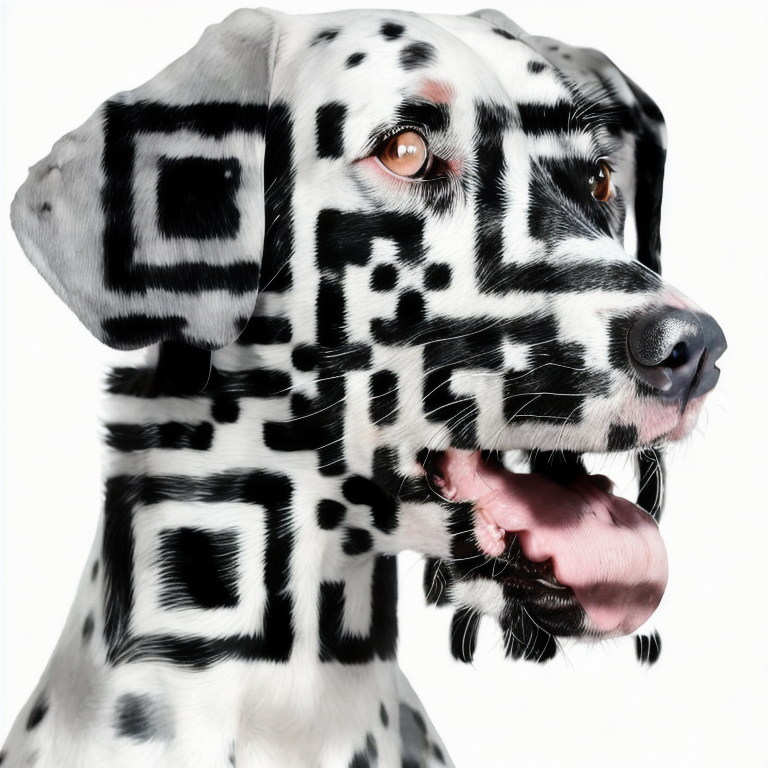 |
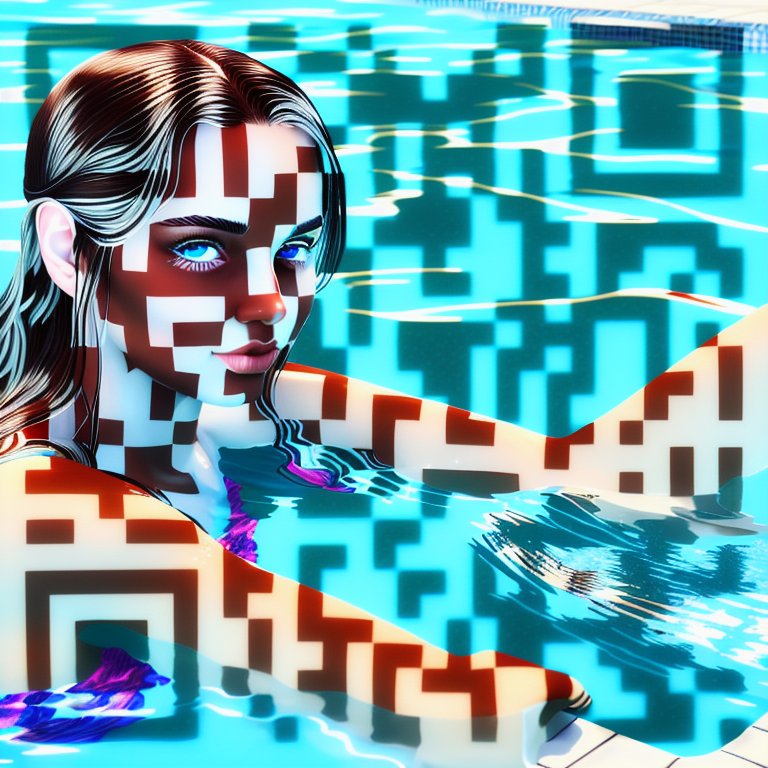 |
|---|
Install
pip install sdqrcode # Automatic1111 engine
#or
pip install sdqrcode[diffusers] # Diffusers engine

pip install git+https://github.com/huggingface/diffusers # require dev version of diffusers
Usage Diffusers
import sdqrcode
# init with a default config
generator = sdqrcode.init(config = "default_diffusers")

# or with a custom config
generator = sdqrcode.init(config = "/path/to/config.yaml")

# or you can also set custom config params (base model, controlnet models, steps, ...)
generator = sdqrcode.init(config = "default_diffusers", model_name_or_path="Lykon/DreamShaper")


# Then you can generate according to the config
images = generator.generate_sd_qrcode()

# or with some custom parameters (you can't set the models at this stage)
images = generator.generate_sd_qrcode(
    prompt = "A beautiful minecraft landscape",
    steps = 30,
    cfg_scale = 7 ,
    width = 768,
    height = 768,
    seed = -1,
    controlnet_weights = [0.35, 0.65], # [weight_cn_1, weight_cn_2, ...]
    controlnet_startstops = [(0,1), (0.35, 0.7)], # [(start_cn_1, end_cn_1), ... ]. (0.35, 0.7) means apply CN after 35% of total steps until 70% of total steps
    qrcode_text = "https://koll.ai" ,
    qrcode_error_correction = "high",
    qrcode_box_size = 10,
    qrcode_border = 4,
    qrcode_fill_color = "black",
    qrcode_back_color = "white",
)
Usage Automatic1111
import sdqrcode

# Use an auto config and define the auto_* params in init to use Automatic1111 backend
generator = sdqrcode.init(
            config_name_or_path = "default_auto",
            auto_api_hostname = "auto_hostname",
            auto_api_port=7860,
            auto_api_https = True,
            auto_api_username = "auto_user",
            auto_api_password = "auto_pass"
        )

# Then you can generate like the diffusers version
images = generator.generate_sd_qrcode()
# get available models
generator.engine.api.util_get_model_names()

# get available controlnet modules
generator.engine.api.controlnet_module_list()

# get available controlnet models
generator.engine.api.controlnet_model_list()
Get default configs
import sdqrcode
sdqrcode.CONFIGS()
Config File
This lib uses a yaml file to describe the qrcode generation process. You can change any parameters to experiment. Exemple:
global:
  mode: txt2img
  prompt: "a beautiful minecraft landscape, lights and shadows"
  negative_prompt: "ugly"
  model_name_or_path: "SG161222/Realistic_Vision_V2.0"
  steps: 20
  scheduler_name: Euler a
  cfg_scale: 7
  width: 768
  height: 768
  seed: -1
  batch_size: 1
  input_image: qrcode # img2img mode only
  denoising_strength: 0.7 # img2img mode only


controlnet_units:
  brightness:
    model: ioclab/control_v1p_sd15_brightness
    cn_input_image: qrcode
    module: none #not implemented yet for diffusers
    weight: 0.35
    start: 0.0
    end: 1.0

  tile:
    model: lllyasviel/control_v11f1e_sd15_tile
    module: none #not implemented yet for diffusers
    cn_input_image: qrcode
    weight: 0.5
    start: 0.35
    end: 0.70

qrcode:
  text: "https://koll.ai"
  error_correction: high # [low, medium, quart, high]
  box_size: 10
  border: 4
  fill_color: black
  back_color: white
-
globalmode: txt2img or img2img (str)prompt: the prompt to use (str)negative_prompt: the negative prompt to use (str)model_name_or_path: stable diffusion checkpoint to use (str)- for diffusers, you can use the model name or local path
- for automatic1111, you should use one of the installed models (see utils methods above to get the list)
steps: the number of steps (int)scheduler_name: the scheduler to use (str)DDIM,Euler,Euler a,LMS,DPM2 Karras,DPM2 a Karras,Heun,DDPM,UniPC,PNDM,DEI,DPM++ SDE,DPM++ 2S a,DPM++ 2M,DPM++ SDE Karras,DPM++ 2S a Karras,DPM++ 2M Karras
cfg_scale: the cfg scale (float)width: the width of the output image (int)height: the height of the output image (int)seed: the seed to use, -1 for random (int)batch_size: the batch size (int)input_image: local path or url of the input image, orqrcodeimg2img only (str)denoising_strength: the denoising strength, img2img only (float)
-
controlnet_units: the controlnet units to use The unit name (tile, brightness, in above exemple) is used for better readability and does not impact the generationmodel: the controlnet model to use (str)- for diffusers, you can use the model name or local path
- for automatic1111, you should choose from the available webui controlnet models
module: the controlnet module to use (str)- for diffusers, not available yet
- for automatic1111, you should choose from the available webui controlnet modules
cn_input_image: (str) can be- path or url of the input image to use for the controlnet
qrcodeto use the qrcode as input image
weight: the weight of the controlnet (float)start: when the controlnet starts applying, in fract of total steps (ex: 0.35 means "start after 35% of total steps are done") (float)end: when the controlnet stops applying, in fract of total steps (ex: 0.7 means "end after 70% of total steps are done") (float)
-
qrcode: the qrcode parameterstext: the text to encode (str)error_correction: the error correction level (str)box_size: the box size (int)border: the border size (int)fill_color: the fill color (str)back_color: the back color (str)
Available configs:
default
This method seem to be the best for me, I use it with the model realistic_visionV2. It uses Controlnet Brightness and Controlnet Tile Here are my firsts thoughts:
- CN brightness should be left as is
- You can play with CN tile parameters to get an image more or less "grid like"
Controlnet models
There are multiple controlnet models that can be used:
- Controlnet Tile: This CN takes an image as input and guide the generation toward this image and to increase the details. We can use a qr code as input.
- Controlnet Brightness:
- Controlnet QR code
Todos
- add img2img for diffusers
- allow to set the sampler (diffusers)
- allow to set the seed (diffusers)
- allow to set the model in the config (auto)
- add more configs
- allow to set the config without having the file in local path
- more tests
- try to install the webui in demo colab
- add diffusers backend
- add docs
- allow to change models
Contrib
Please don't hesitate to submit a PR to improve the code or submit a config
Other projects
You can checkout our website to discover more of our projects such as:
- Seg2Sat: Controlnet model to generate aerial pictures
- PoetGPT: generate beautiful poems and lyrics with AI
- ThisSCPDoesNotExist: generate custom SCP entities
1 maintainer

Metadata
1 maintainer
Release files for sdqrcode 0.3.12
For a detailed explanation of source distributions (sdists) and built distributions (wheels), please see the package formats documentation.
Source distribution (sdist)
| File | Size | Uploaded | |
|---|---|---|---|
| sdqrcode-0.3.12.tar.gz | 14.3 kB | Details |
Built distribution (wheel)
| File | Interpreter | ABI | Platform | Reset |
|---|---|---|---|---|
| sdqrcode-0.3.12-py3-none-any.whl | Python 3 | none | any | Details |
Total release size: 31.0 kB
Release files / sdqrcode-0.3.12.tar.gz
| Download URL | sdqrcode-0.3.12.tar.gz |
|---|---|
| Size | 14.3 kB |
| Tags | Source |
|
SHA-256 checksum How to use checksums |
eb1a95ed283cec461f56e6f0336f9d297c7fb20a95780ad66b274d428d2d53e6
|
|
BLAKE2b-256 checksum How to use checksums |
d0ac2c2a0ea3b6d2967b35271f9664138575e522d303a9102c91c6634bbf1367
|
| Upload date | |
|
Uploaded using Trusted Publishing? What is trusted publishing? |
No |
| Uploaded via |
poetry/1.5.1 CPython/3.11.4 Linux/5.15.0-1040-azure
|
Release files / sdqrcode-0.3.12-py3-none-any.whl
| Download URL | sdqrcode-0.3.12-py3-none-any.whl |
|---|---|
| Size | 16.7 kB |
| Tags | Python 3 |
|
SHA-256 checksum How to use checksums |
88e7817816dbc5e5e30c82308b917c77eb465261e62618a615c2408e7ca99741
|
|
BLAKE2b-256 checksum How to use checksums |
a7313d7117a5299c5cd249cebefeeed796dc0dc0633136ff62195056c3382f0b
|
| Upload date | |
|
Uploaded using Trusted Publishing? What is trusted publishing? |
No |
| Uploaded via |
poetry/1.5.1 CPython/3.11.4 Linux/5.15.0-1040-azure
|














