
Seal5 - Semi-automated LLVM Support for RISC-V Extensions including Autovectorization

Project description
Seal5
[!NOTE] Starting July 11, 2024 we will be offering (monthly) Seal5 Development/User meetings.
Click here for details (slides, next dates,...), if you are interested!
[!NOTE] Seal5 was recently presented at the RISC-V Summit Europe 2024. Click here to access the poster, slides & recording.




Overview
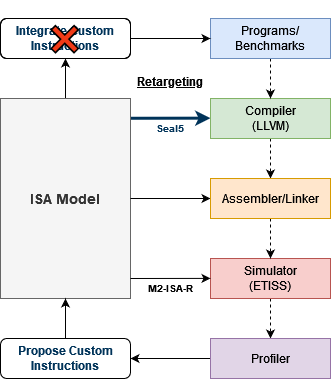
The RISC-V instruction set architecture (ISA) is popular for its extensibility. However, a quick exploration of instruction candidates fails due to the lack of tools to auto-generate embedded software toolchain support. Seal5 work establishes a semi-automated flow to generate LLVM compiler support for custom instructions based on the CoreDSL2 ISA description language. Seal5 is capable of generating support for functionalities ranging from baseline assembler-level support, over builtin functions to compiler code generation patterns for scalar as well as vector instructions, while requiring no deeper compiler know-how.
Eliminating manual efforts for Retargeting is crutial for the automated exploration of custom RISC-V instructions as depicted in the following image. Seal5's code-generation support allows to make use of custom instructions without needing to make changes to the programs/benchmarks source code (i.e. adding inline-assembly calls).
Prerequisites
To be able to run the examples, make sure to clone the Seal5 repo using the --recursive flag. Otherwise run the following command to fetch (and update) the referenced submodules.
git submodule update --init --recursive
Ubuntu Packages
First, a set of APT packages needs to be installed:
sudo apt install python3-pip python3-venv cmake make ninja-build
Python Requirements
First, setup a virtual environment with Python v3.8 or newer.
Install all required python packages using the following command:
pip install -r requirements.txt.
For development (linting, packaging,...) there are a few more dependencies which can be installed via:
pip install -r requirements_dev.txt.
System Requirements
The initial cloning of the llvm-project repo will take a long time, hence a good internet connection is recommended. To run the demo, make sure to have at least 20GB (>40GB for debug builds) of disk space available in the destination (/tmp/seal5_llvm_demo) directory. The target directory can be changed as follows: DEST=$HOME/seal5_demo.
Installation
Warning: It is highly recommended to install seal5 into a new virtual environment. Follow these steps to initialize and enter a venv in your seal5 repo directory:
# alternative: python3 -m venv venv
virtualenv -p python3.8 venv
source venv/bin/activate
From PyPI
pip install seal5
Local Development Version
First prepare your shell by executing export PYTHONPATH=$(pwd):$PYTHONPATH inside the seal5 repository. Then you should be able to use Seal5 without needing to reinstall it.
Alternatively you should be able to use pip install -e ..
Usage
Python API
The flow can be sketched as follows (see Example below for functional code!):
# Create flow
seal5_flow = Seal5Flow(...)
# Initialize LLVM repo and .seal5 directories
seal5_flow.initialize(...)
# Optional: remove artifacts from previous builds
seal5_flow.reset(...)
# Install Seal5 dependencies (CDSL2LLVM/PatternGen)
seal5_flow.setup(...)
# Load CoreDSL2+CFG files (Git config, filters,...)
seal5_flow.load(...)
# Transform Seal5 model (Extract side effects, operands,...)
seal5_flow.transform(...)
# Generate patches based on Seal5 model (ISel patterns, RISC-V features,...)
seal5_flow.generate(...)
# Apply generated (and manual) patches to LLVM codebase
seal5_flow.patch(...)
# Build patches LLVM (This will take a while)
seal5_flow.build(...)
# Run LLVM+Seal5 tests to verify functionality
seal5_flow.test(...)
# Combine patches and install LLVM
seal5_flow.deploy(...)
# Archive final LLVM (optionally inclusing logs, reports,...)
seal5_flow.export(...)
# Optional: Cleanup all artifacts
seal5_flow.cleanup(...)
Command-Line Interface
Command line interface is aligned with the Python API. See examples/demo.sh for an full usage example
export SEAL5_HOME=...
seal5 --dir $SEAL5_HOME reset  --settings
seal5 init [--non-interactive] [-c]
seal5 load --files ...
seal5 setup ...
seal5 transform ...
seal5 generate ...
seal5 patch ...
seal5 build ...
seal5 test ...
seal5 deploy ...
seal5 export ...
seal5 clean [--temp] [--patches] [--models] [--inputs]
Examples
See examples/demo.py for example of end-to-end flow!
Documentation
Checkout Seal5's ReadTheDocs Page!
Limitations
See here.
CI/CD Flow
We added a (manual) CI job to run the examples/demo.py script via GitHub actions.
Contributions
Seal5 issue tracker: https://github.com/tum-ei-eda/seal5/issues
CoreDSL2LLVM/PatternGen issue tracker: https://github.com/mathis-s/CoreDSL2LLVM/issues
References
N/A
-
Seal5: Semi-Automated LLVM Support for RISC-V ISA Extensions Including Autovectorization (https://ieeexplore.ieee.org/abstract/document/10741856)
2024 27th Euromicro Conference on Digital System Design (DSD)
BibTeX
@inproceedings{van2024seal5,
  title={Seal5: Semi-Automated LLVM Support for RISC-V ISA Extensions Including Autovectorization},
  author={Van Kempen, Philipp and Salmen, Mathis and Mueller-Gritschneder, Daniel and Schlichtmann, Ulf},
  booktitle={2024 27th Euromicro Conference on Digital System Design (DSD)},
  pages={335--342},
  year={2024},
  organization={IEEE}
}
Acknowledgment

This research is partially funded by the German Federal Ministry of Education and Research (BMBF) within the projects Scale4Edge (grant number 16ME0465) and MANNHEIM-FlexKI (grant number 01IS22086L).
Release history Release notifications | RSS feed


Download files
Download the file for your platform. If you're not sure which to choose, learn more about installing packages.
Source Distribution
Built Distribution
Filter files by name, interpreter, ABI, and platform.
If you're not sure about the file name format, learn more about wheel file names.
Copy a direct link to the current filters
File details
Details for the file seal5-0.3.0.tar.gz.
File metadata
- Download URL: seal5-0.3.0.tar.gz
- Upload date:
- Size: 116.8 kB
- Tags: Source
- Uploaded using Trusted Publishing? No
- Uploaded via: twine/6.1.0 CPython/3.12.9
File hashes
| Algorithm | Hash digest | |
|---|---|---|
| SHA256 |
7a2ce4b1f7b63099921ad54d8aff546aa873b06b8e2f4581b88634dd1bb6a672
|
|
| MD5 |
12214bd5d8e154df93687b429617aa73
|
|
| BLAKE2b-256 |
1c67ac7c5a312aae734e9be027768a6a9789cb36aee36e757afd4e599c52bb27
|
File details
Details for the file seal5-0.3.0-py3-none-any.whl.
File metadata
- Download URL: seal5-0.3.0-py3-none-any.whl
- Upload date:
- Size: 222.5 kB
- Tags: Python 3
- Uploaded using Trusted Publishing? No
- Uploaded via: twine/6.1.0 CPython/3.12.9
File hashes
| Algorithm | Hash digest | |
|---|---|---|
| SHA256 |
62b706fd21d0411000de79c4b6f964348bf73081dbd446ef6434bb5d2fd41e4b
|
|
| MD5 |
421d1e9f80d095ff10020495c489ad21
|
|
| BLAKE2b-256 |
642be3deec1bcfe91ddf65882dd3a10d13e3b0acff1038116dfa08e2f4551080
|






