
Se Level DBs

Project description
sealev
Allows to access various Sea Level Databases via python.
Installation
To install the package use the command:
pip install sealev
After the installation, it is possible to use the package in python:
python
List of available databases: getDB()
Once you are in python environment you can give the following collamnds
from sealev.sldb import seaLevelDB
sl=seaLevelDB()
#
# get the list of available database sources:
dbs=sl.getDBs()
#
for db in dbs:
   print(db)
You will get a list of all the database that you can query.
LIst the devices of a database: getDevs(<database>)
You can select one specific database, i.e. DART, and requst the list of available devices:
from sealev.sldb import seaLevelDB
sl=seaLevelDB()
darts=sl.getDevs('DART')
#
for dart in darts:
    print(dart['id'],dart['location'],format(dart['lat'])+'/'+format(dart['lon']))
#
The response will be:
21413 Station 21413 - SOUTHEAST TOKYO - 700NM ESE of Tokyo, JP 30.492/152.085
21414 Station 21414 - AMCHITKA - 170 NM South of Amchitka, AK 48.97/178.165
21415 Station 21415 - ATTU - 175 NM South of Attu, AK 50.12/171.867
21416 Station 21416 - KAMCHATKA PENINSULA - 240NM SE of Kamchatka Peninsula, RU 48.12/163.43
21418 Station 21418 - NORTHEAST TOKYO - 450 NM NE of Tokyo, JP 38.73/148.8
...
56003 Station 56003 - Indian Ocean 2     -     630km NNE of Dampier -15.019/118.073
The response if a list of devices; each device is a dictionary composed of:
- id identifier of the device (will be used to retrieve data)
- location place of the device
- country country of the device
- lat/lon coordinates of the device
- [group] if it exists it represents a subclass of the database
the keyword 'id' contains the reference identifier to retrieve the level data.
Retrieve sea level of a device: getLevel(<database>,<device>, [<tmin>],[<tmax>])
Suppose you want to retrieve the level values of one specific device, such as 21414 (Station 21414 - AMCHITKA - 170 NM South of Amchitka), you can give the following command:
from sealev.sldb import seaLevelDB
sl=seaLevelDB()
values=sl.getLevel('DART','21414')
for j in range(len(values['x'])):
    print(values['x'][j],values['y'][j])
The response of the example above is a list of data if the device has recent recorded data:
2024-10-02 00:00:00 5442.868
2024-10-02 00:15:00 5442.874
2024-10-02 00:30:00 5442.882
2024-10-02 00:45:00 5442.891
2024-10-02 01:00:00 5442.897
...
You can retrieve data from the past adding the keyword tmin, tmax in the getLevel call. Example
from sealev.sldb import seaLevelDB
sl=seaLevelDB()
values=sl.getLevel('GLOSS @vliz','mnza','2022-09-19 00:00:00','2022-09-21 00:00:00')
for j in range(len(values['x'])):
    print(values['x'][j],values['y'][j])
The example above retrieves and print the data related to the Tsunami event in Mexico.
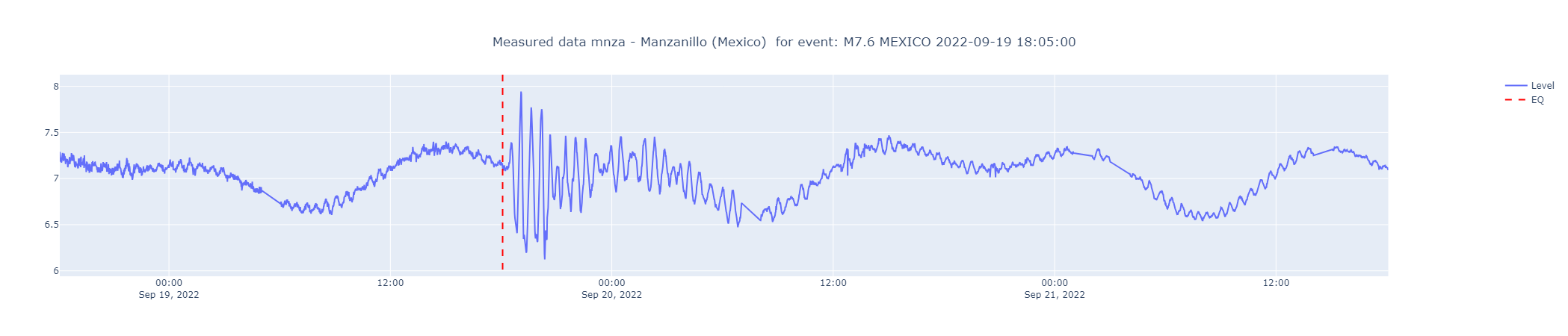
The response is a dctionary containing the following keys:
- x (list) containing a series of datatime values representing the time of the level
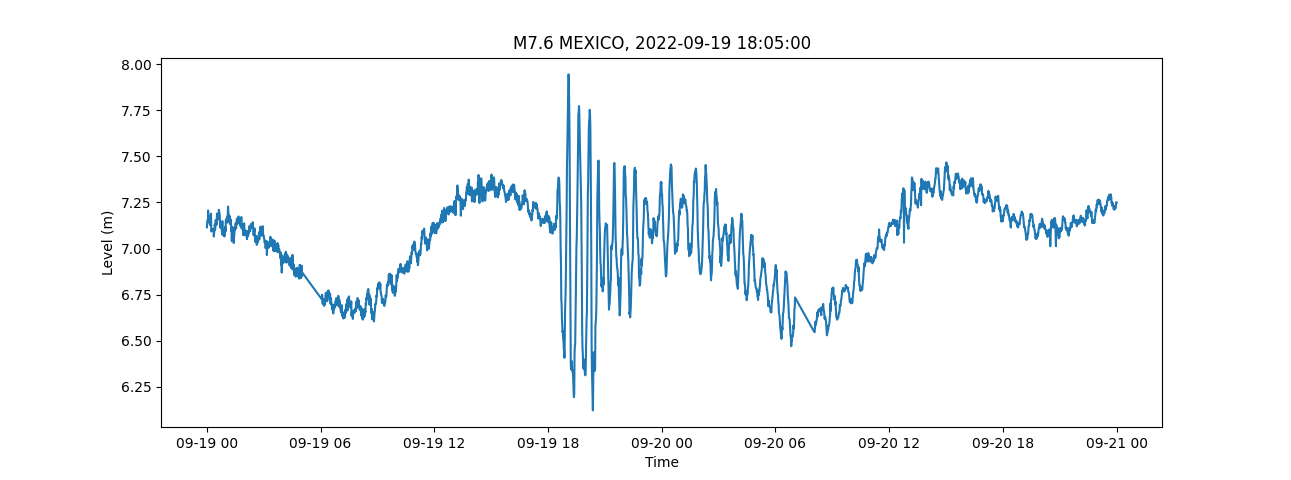
- y (list) containing a series of sea level values of the device (m) each point of the x list will have a corresponding point in y In the example above, if you have setup the matplotlib package (pip install matplotlib), you can plot the quantities with the commands:
import matplotlib.pyplot as plt
plt.plot(values['x'],values['y'])
plt.xlabel('Date/Time')
plt.ylabel('Level (m)')
plt.title('M7.6 MEXICO, 2022-09-19 18:05:00')
plt.show()
The following plot would be generated:
Release history Release notifications | RSS feed


Download files
Download the file for your platform. If you're not sure which to choose, learn more about installing packages.
Source Distribution
Built Distribution
Filter files by name, interpreter, ABI, and platform.
If you're not sure about the file name format, learn more about wheel file names.
Copy a direct link to the current filters
File details
Details for the file sealev-0.0.7.tar.gz.
File metadata
- Download URL: sealev-0.0.7.tar.gz
- Upload date:
- Size: 19.8 kB
- Tags: Source
- Uploaded using Trusted Publishing? No
- Uploaded via: twine/5.1.1 CPython/3.9.0
File hashes
| Algorithm | Hash digest | |
|---|---|---|
| SHA256 |
07d46dcdd917a0149bcc43020d44cddd71227459405cedd088397ccbf4e49c1f
|
|
| MD5 |
eea6f3da41692f8daa9ead55695a0cf1
|
|
| BLAKE2b-256 |
64b98c01055a0411e49ce00cf70a91677b62b01e4fde1592be906f1c321f66a3
|
File details
Details for the file sealev-0.0.7-py3-none-any.whl.
File metadata
- Download URL: sealev-0.0.7-py3-none-any.whl
- Upload date:
- Size: 18.6 kB
- Tags: Python 3
- Uploaded using Trusted Publishing? No
- Uploaded via: twine/5.1.1 CPython/3.9.0
File hashes
| Algorithm | Hash digest | |
|---|---|---|
| SHA256 |
3a5a75f66c946e021b0e5a1f7b782f600160ec97698567f7516a1dedee126388
|
|
| MD5 |
649796e7ff15cf2018a681390159448b
|
|
| BLAKE2b-256 |
c33f047234116b4c21afa4ea7a785a0844f45b2d1775398505f389a9f9c8d50b
|






