
searchselect
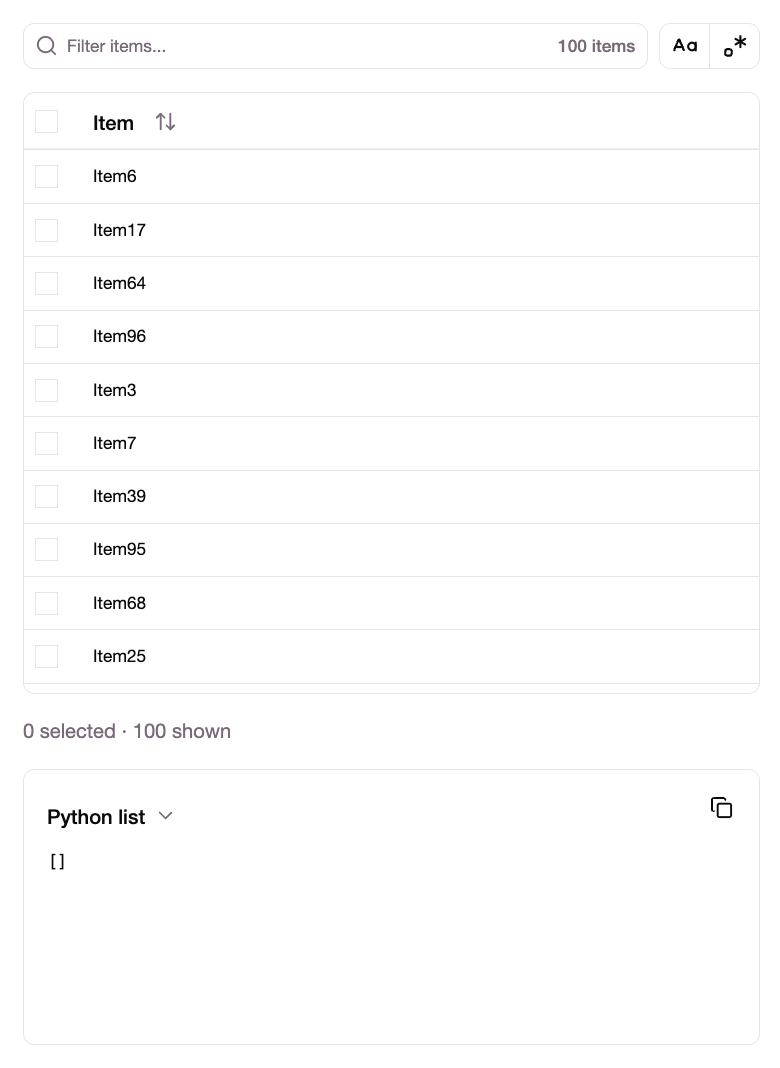
A searchable multi-select anywidget for notebooks. Give it a list of strings; the user searches, filters and ticks; you read the result back in Python.
It is deliberately domain-neutral — it knows nothing but strings. Column names, category values, file paths, feature names, whatever you have a list of.
pip install searchselect
Quickstart
from searchselect import SearchSelect

picker = SearchSelect(items=df.columns)
picker
Then, in a later cell:
df.select(picker.selected)
Works in JupyterLab, Jupyter Notebook, marimo Notebook, VS Code and anywhere else anywidget renders.
API
SearchSelect(items=None, selected=None)
| Trait | Direction | Meaning |
|---|---|---|
items |
read / write | The strings on offer. |
selected |
read / write | The items the user has explicitly ticked. |
query |
read / write | The text in the search box. |
regex |
read / write | Treat query as a regex rather than a substring. |
case_sensitive |
read / write | Whether matching distinguishes case. |
filtered |
read | The items matching the current query. |
query_error |
read | Python's re.error text, or "" if valid. |
theme |
read / write | "auto" (default), "light" or "dark". |
The distinction that matters: selected is an explicit choice, filtered is a query
result. They are independent, and both are useful.
# Tick things by hand, then read them back.
picker.selected            # -> ['age', 'height']

# Or don't tick anything: type a pattern and take everything it matched.
picker.filtered            # -> ['lab_glucose', 'lab_sodium', ...]

# The query is writable too, so you can drive it from Python.
picker.query = "lab_"
The header checkbox selects everything matching the current query, not just
what's on screen — so query plus select-all is the click-free route to the same
set filtered reports.
Rules
- Filtering never unselects. Ticking an item and then typing a search that excludes it
leaves it in
selected. The search box changes what you can see, not what you have chosen. - An empty search box means every item.
filteredis the full list when nothing is typed, not an empty list. - Duplicates are dropped. First occurrence wins; order is otherwise preserved.
- Selection is keyed on the item itself, not its position. Reassigning
itemskeeps ticks on items that still exist and drops the rest. selectedis writable. Set it from Python to preselect or clear; the checkboxes follow. Values not present initemsare ignored.- An unparseable query matches nothing. Which is not the same as an empty query,
which matches everything.
query_errorcarries the reason.
Searching
Two toggles sit next to the search box:
- Case-insensitive matching.
- Regex matching. An invalid pattern is reported inline, with Python's own error message, and matches nothing until it parses.
Matching runs in Python, using re. That means the pattern you type is a Python
regex — (?P<name>...) works, \d and \w are Unicode as they are everywhere else in
your code, and you can paste the pattern straight into the next cell and get identical
results:
picker.regex = True
picker.query = r"^lab_(?P<assay>\w+)"

# the same pattern, same semantics, in your own code
[c for c in df.columns if re.match(picker.query, c)]
The trade-off is that searching needs a responsive kernel. If a long cell is running,
the search box will not update until it finishes. Filtering in the browser would stay
live, but it would mean a JavaScript regex — a different dialect that quietly rejects
(?P<name>...) and treats \d as ASCII-only — and a pattern you can't reuse.
The list
The list is virtualised, so only the visible rows exist in the DOM however long it is.
- The header retracts as you scroll down and returns the moment you scroll back up, so a long list gets the whole box without putting the sort control out of reach.
- Sorting cycles A–Z, Z–A, then back to the original order — which is the order you
passed
itemsin, since that order is preserved. - The header checkbox selects every match, not just what is on screen.
Theme
By default the widget infers light or dark from the host notebook. That is inference, not a lookup — there is no standard way for a host to announce its theme — so pin it when the guess is wrong, when a notebook will be read by someone whose OS setting you don't know, or simply out of preference:
picker.theme = "light" # or "dark", or "auto"
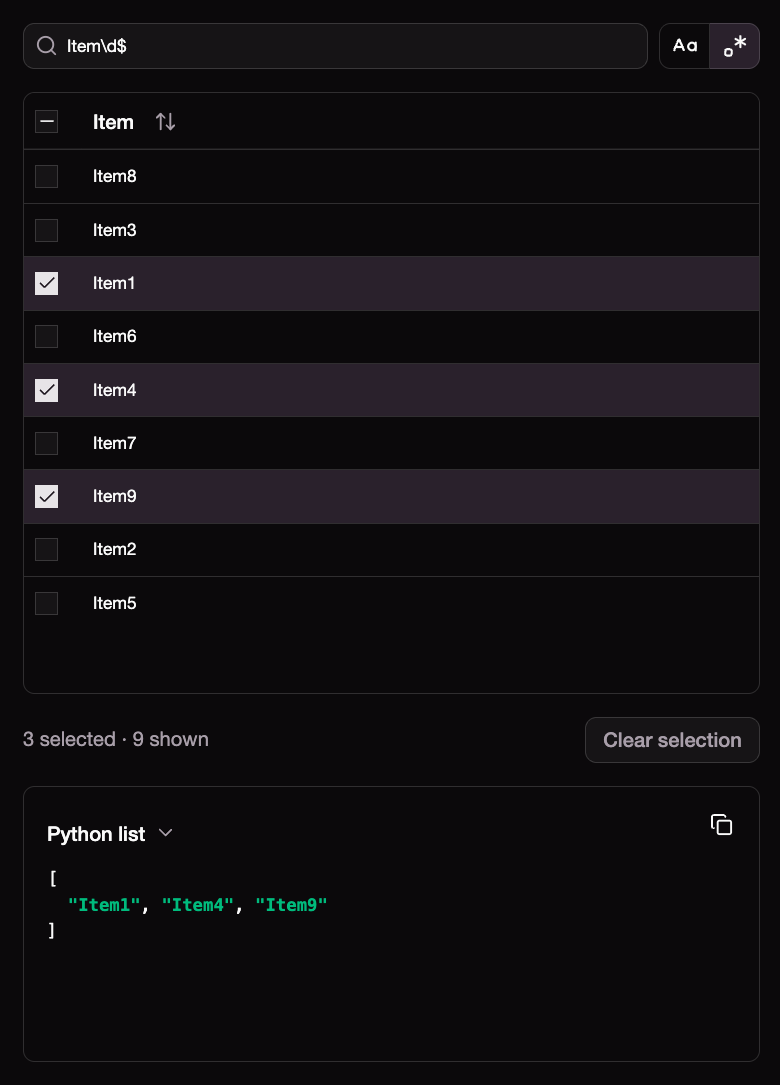
In VS Code, prefer "light". VS Code paints the widget output area white
whatever the editor theme is, and that area is outside the widget, so a dark
widget ends up sitting on a white surround. The widget can only paint up to its
own edge; "light" removes the mismatch.
Copying out
Below the table is a panel rendering the current selection as a Python list or a
Polars expression, with a copy button — for when you would rather paste a literal
into your next cell than reference the widget. This is a convenience; picker.selected
is the real API, and the package has no dataframe dependency of any kind.
Performance
The list is virtualised: only the rows on screen exist in the DOM, about 25 of them, whether you pass two hundred items or a million. Scrolling and rendering are therefore flat in the size of the list.
Two things are not flat, and they set the practical ceiling:
- Transport. Items are sent to the frontend once, as JSON over the Jupyter comm — roughly 22 MB at a million items. Matches travel back only while a query is active; an empty query means "everything", and the frontend already has that list, so the resting state costs nothing.
- Matching. Each query is a scan in Python: about 2 ms at ten thousand items, 60 ms at a hundred thousand, and up to 600 ms at a million for an expensive pattern. Input is debounced, so a keystroke does not become a request, but this is what you feel first on very large lists.
In practice: comfortable into the tens of thousands, usable past that, sluggish around a
million. If you need to go further, open an issue — pushing the search into DuckDB and
serving the visible window with LIMIT/OFFSET would break both ceilings at once,
though it would change the pattern dialect to RE2 and cost you the Python-regex property
above.
Development
Development requires uv and
pnpm.
uv venv
uv pip install -e . --group dev
pnpm dev # start a development server
uv run jupyter lab notebooks/example.ipynb
pnpm dev and pnpm build write to the same directory, and the dev bundle is
unminified with an inline sourcemap — roughly six times the size. pnpm build empties
that directory first and the packaging hook runs it for the sdist, so uv build always
produces a real production bundle regardless of what a dev server left behind.
Releasing:
uv build
uvx twine upload dist/*
License
MIT
1 maintainer

Metadata
1 maintainer
Release files for searchselect 0.1.0
For a detailed explanation of source distributions (sdists) and built distributions (wheels), please see the package formats documentation.
Source distribution (sdist)
| File | Size | Uploaded | |
|---|---|---|---|
| searchselect-0.1.0.tar.gz | 122.3 kB | Details |
Built distribution (wheel)
| File | Interpreter | ABI | Platform | Reset |
|---|---|---|---|---|
| searchselect-0.1.0-py3-none-any.whl | Python 3 | none | any | Details |
Total release size: 245.4 kB
Release files / searchselect-0.1.0.tar.gz
| Download URL | searchselect-0.1.0.tar.gz |
|---|---|
| Size | 122.3 kB |
| Tags | Source |
|
SHA-256 checksum How to use checksums |
6f7b2d608e8735b82eac0aa730f8c981b89eb6d425e101fcca81abf5b98e8992
|
|
BLAKE2b-256 checksum How to use checksums |
123de35506c24f23c2049c6430fe3e936457348e6de7924847b8ff5a33ebfafb
|
| Upload date | |
|
Uploaded using Trusted Publishing? What is trusted publishing? |
Yes |
| Uploaded via |
twine/7.0.0 CPython/3.13.14
|
Provenance
Provenance describes where a file came from. On PyPI, provenance is shared via attestations, which provide a verifiable record of the build or publishing details. View details, limitations and caveats.


PyPI Publish Attestation
PyPI verified that this artifact, at this checksum, originated from the publisher listed below.
Signed by GitHub Actions, verified by PyPI on Aug 30, 2026.
Transparency logRelease files / searchselect-0.1.0-py3-none-any.whl
| Download URL | searchselect-0.1.0-py3-none-any.whl |
|---|---|
| Size | 123.0 kB |
| Tags | Python 3 |
|
SHA-256 checksum How to use checksums |
a73d1a2a1943e90cd8d1870896880f7b833c10ee0b9dec622f111f288d05a791
|
|
BLAKE2b-256 checksum How to use checksums |
b45392b07904b7a14298df296d1e73ab3e2c1ec6c50b1f99f26967c7f877a24e
|
| Upload date | |
|
Uploaded using Trusted Publishing? What is trusted publishing? |
Yes |
| Uploaded via |
twine/7.0.0 CPython/3.13.14
|
Provenance
Provenance describes where a file came from. On PyPI, provenance is shared via attestations, which provide a verifiable record of the build or publishing details. View details, limitations and caveats.
PyPI Publish Attestation
PyPI verified that this artifact, at this checksum, originated from the publisher listed below.
Signed by GitHub Actions, verified by PyPI on Aug 30, 2026.
Transparency log












