
Spotify Search


SearchSpotify is a complete wrapper for the Search API provided by Spotify written in Python.
It has built-in classes that helps you access the data returned by Spotify, alongside with useful methods for exporting data.
Check the documentation for more information on classes and methods.
What you can do
- Get Spotify catalog information about albums, artists or tracks that match a keyword string.
- Easily access the information provided by Spotify using specific class attributes and methods, such as name, id, url and many more.
- Access and export audio and image files, such as album covers for example.
Installation
SearchSpotify depends on requests. You can easily install it by using PIP
python -m pip install requests
Then, you can safely install SearchSpotify using the following command:
python -m pip install searchspotify
Testing your installation
You can test your installation using python interactive shell
>>> import searchspotify
Getting access to the API
To get access to Spotify Search API, you need to have a Spotify account to get an access token, which is required by the API itself.
You can register an account if you don't have one.
Then, you need to login into your account in Spotify for Developers. Once you have successfully logged in, go to your Dashboard, and create a new application.
You should see something like this:
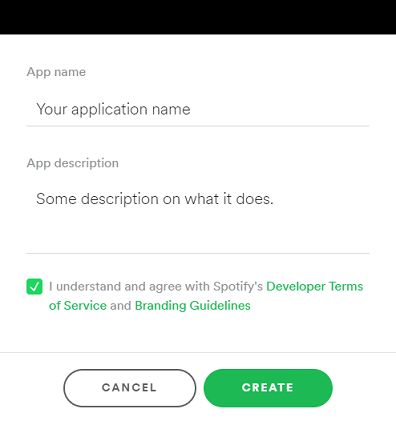
Once you've created your application, you'll receive a client ID and a client secret. These are your credentials, you should store them in a safe environment.
IMPORTANT: You should not store your credentials inside of your code if you're planning to publish it. You should use Environment Variables instead. Check this section to learn how to keep your credentials safe.
Making your first call
So now that you have your credentials, you can start making your calls to the API.
Open your editor and run the following code:
# First, we import our Client class from searchspotify.client
from searchspotify import Client

# Then, we create an instance of that class passing our credentials as arguments.
# IMPORTANT: Don't put your credentials inside your code if your planning to publish it.
myclient = Client("YOUR_CLIENT_ID", "YOUR_CLIENT_SECRET")

# Now we can call the method search() from our client and store the results in a new object.
results = myclient.search("Never gonna give you up")

# Then we call the method get_tracks() from our results object, which returns a list of tracks.
tracks = results.get_tracks()

# Now, let's access the first track in our list by using index 0.
track = tracks[0]

# Finally, we can access some information contained in our track.
print(track.name, "-", track.artists[0].name)
print(track.url)

#Using Album or Playlist links
playlist = myclient.search("https://open.spotify.com/playlist/37i9dQZEVXbmHwm9TPg9pf?si=fUjIaGonRlW3GfkZ9kuxFg")

p(f"Playlist title: {playlist.playlist_name}")
p(f"total tracks: {playlist.total_tracks}")
p(f"description: {playlist.description}")
p(f"total duration: {playlist.total_duration()}")
for track in playlist.tracks:
    print("Track Name:", track.track_name)
    print("Track URL:", track.spotify_url)
    print("Duration:", track.get_string_duration())


album = myclient.search("https://open.spotify.com/album/5nUuEb92id5CtdQCtOs7a1")

print("Album Name:", album.album_name)
print("Album Label:", album.label)
print("Album popularity:", album.popularity)
print("Album Thumb:", album.thumbnail_url)
print("Artists:", album.artists)
print("Release Date:", album.release_date)
print("Total Tracks:", album.total_tracks)
print("Total Duration:", album.total_duration_string())
for track in album.tracks:
    print("Track Name:", track.track_name)
    print("Track Number:", track.track_number)
    print("Track URL:", track.spotify_url)
    print("Duration:", track.get_string_duration())
This should be your result:
Never Gonna Give You Up - Rick Astley
https://open.spotify.com/track/4cOdK2wGLETKBW3PvgPWqT
That seems to be a lot of code, but you can simplify it a lot, like so:
from searchspotify.client import Client

myclient = Client("YOUR_CLIENT_ID", "YOUR_CLIENT_SECRET")
track = myclient.search("Never gonna give you up").get_tracks()[0]

print(track.name, "-", track.artists[0].name)
In a few lines of code, we got access to the API, retrieved some useful information of the first track in our results and displayed it.
There are a lot of class attributes and methods that you can use to retrieve the information you need, you can check them out in the documentation.
Keeping your credentials safe
As mentioned before, you should not store your credentials inside of your code. Specially if you are planning to publish it.
A safer way to store them is by using Environment Variables. Here's a complete tutorial on how to define and access environment variables using Python.
License
This project is under the terms of the MIT license.
1 maintainer

Download files
Download the file for your platform. If you're not sure which to choose, learn more about installing packages.
Source Distribution
Built Distribution
Filter files by name, interpreter, ABI, and platform.
If you're not sure about the file name format, learn more about wheel file names.
Copy a direct link to the current filters
File details
Details for the file searchspotify-0.1.2.tar.gz.
File metadata
- Download URL: searchspotify-0.1.2.tar.gz
- Upload date:
- Size: 22.3 kB
- Tags: Source
- Uploaded using Trusted Publishing? No
- Uploaded via:
twine/7.0.0 CPython/3.13.14
File hashes
| Algorithm | Hash digest | |
|---|---|---|
| SHA256 |
90263b4010616c2f2ad8e0439609458ad0f3240d3a9e5703fd9ae6396f3b9603
|
|
| MD5 |
bd99c143e07b9bd6970db3d21cd97642
|
|
| BLAKE2b-256 |
68af07a4aadf59d9e947455abe8a2467f791d04ab0e123dfeda4aefc011a064e
|
File details
Details for the file searchspotify-0.1.2-py3-none-any.whl.
File metadata
- Download URL: searchspotify-0.1.2-py3-none-any.whl
- Upload date:
- Size: 28.3 kB
- Tags: Python 3
- Uploaded using Trusted Publishing? No
- Uploaded via:
twine/7.0.0 CPython/3.13.14
File hashes
| Algorithm | Hash digest | |
|---|---|---|
| SHA256 |
881c52895e2303141b3eb262b871b989399eca9fa79a4b6e0ae1cbb1595bb5a5
|
|
| MD5 |
1bf84118f40ff640e362f4685687c94e
|
|
| BLAKE2b-256 |
fe187d84a9b7f585a6fb24e57a3487d12f25e8dfb0cc026149cc203e388382de
|







