
Secure Cartography 2
Network Discovery and Topology Mapping


Secure Cartography crawls your network via SNMP and SSH, and maps the topology from CDP/LLDP neighbors — all from a single desktop application with zero server infrastructure. Built by a network engineer, for network engineers.
What It Does
Discover → Visualize → Arrange → Export
- Discover your network from a seed IP using SNMP (v2c/v3) with SSH fallback — CDP and LLDP neighbor crawling across Cisco, Arista, Juniper, and more
- Visualize the topology in an interactive Cytoscape.js viewer with vendor coloring and platform icons
- Arrange nodes interactively and save your layout — positions persist across sessions
- Export to Draw.io (position-matched to your viewer layout), yEd GraphML, PNG, CSV, or JSON
No database. No web server. No Docker. Just pip install seccart2 and go.
Highlights
| Feature | Description |
|---|---|
| Layout persistence | Save/restore node positions in .layout.json sidecar files — arrangements survive across sessions |
| Position-matched Draw.io export | Draw.io output mirrors your interactive viewer layout instead of computing its own |
| Focus maps | Select a node, open a 1-hop neighborhood view for troubleshooting adjacencies |
| NX-OS platform detection | tfsm_fire parses show version into clean platform strings like "Cisco Nexus9000 C9504 9.3(11)" |
| LLDP port resolution | Cascading fallback resolves garbage port IDs from Juniper, Linux, and Arista |
| sysName dedup | Multi-homed devices discovered via different IPs no longer produce duplicate nodes |
| Ghost node filter | NX-OS command artifacts eliminated from topology |
| Hosts file support | --hosts-file enables discovery in environments without DNS |
Features
Discovery Engine
- SNMP-first discovery with automatic SSH fallback
- CDP and LLDP neighbor detection across vendors
- Platform detection via tfsm_fire — structured parsing of
show versionoutput instead of regex on raw text - Two-pass LLDP resolution — correctly handles lldpLocPortNum vs ifIndex
- LLDP remote port resolution — cascading fallback for Juniper/Linux garbage port IDs
- Bidirectional link validation — only confirmed connections appear in topology
- Concurrent crawling — discover 20+ devices simultaneously
- Post-discovery sysName dedup — multi-homed devices produce one node, not duplicates
- Ghost node filtering — NX-OS command artifacts eliminated from topology
- Depth-limited recursion — control how far the crawler goes
- Exclusion patterns — skip devices by hostname, sys_name, or sysDescr
- No-DNS mode — use IPs directly from neighbor tables (home lab friendly)
- Hosts file resolution —
--hosts-filefor environments without DNS
Topology Viewer & Map Management
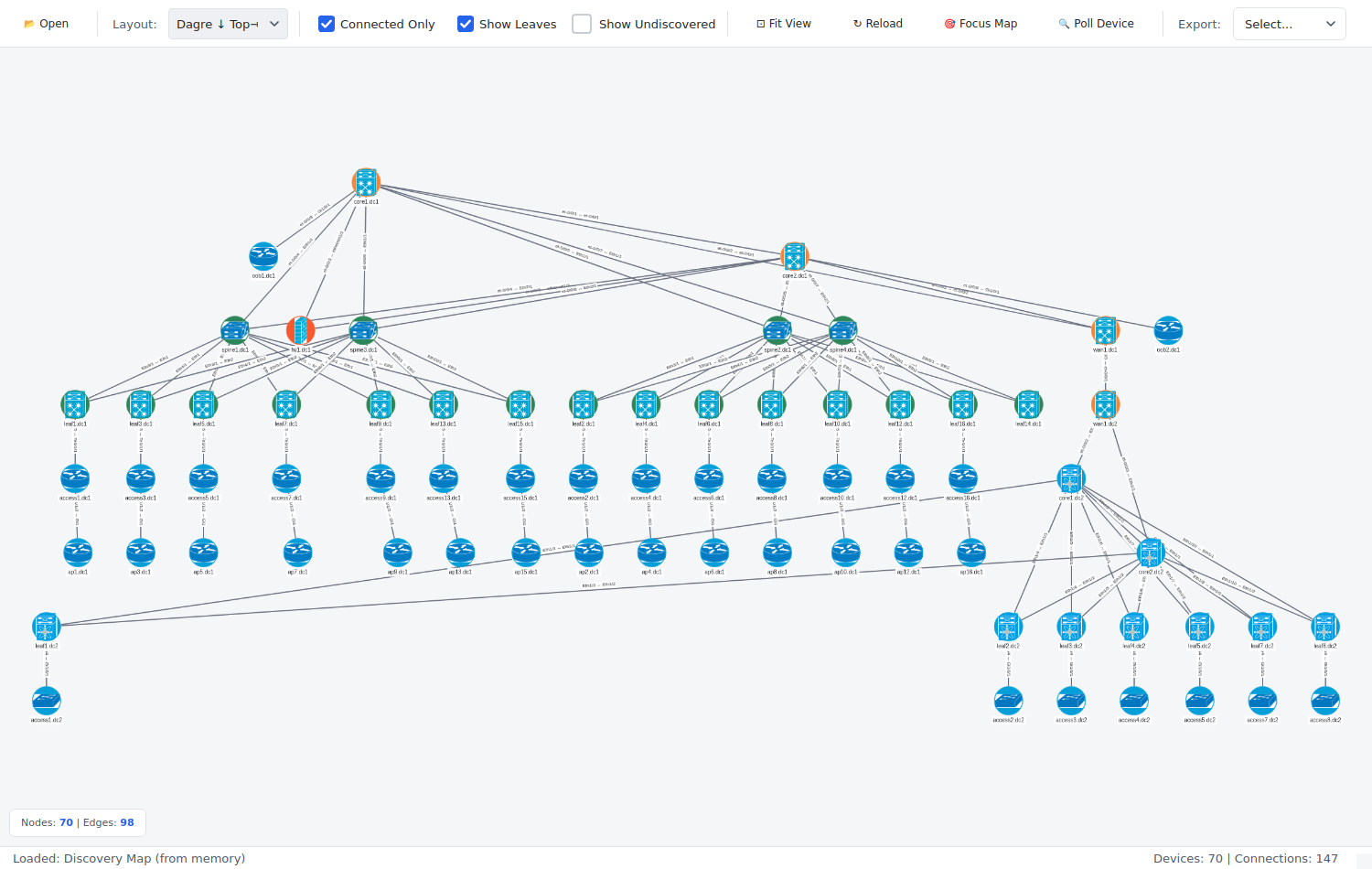
- Embedded Cytoscape.js viewer — interactive network visualization with pan, zoom, drag
- Vendor-specific styling — Cisco (blue), Arista (green), Juniper (orange) with platform icons
- Layout persistence — save node positions to
.layout.jsonsidecar files, auto-restored on reopen - Focus maps — select nodes and open a 1-hop neighborhood viewer for troubleshooting
- Nine layout algorithms — Dagre, fCoSE, Cola, breadthfirst, concentric, and more
- Connected-only filtering — hide orphan and leaf nodes for infrastructure-only views
- Undiscovered peer nodes — referenced but unreachable devices shown with dashed borders
- Theme-aware — visualization follows the Dark/Light theme
- Node editing — double-click to update device details, poll via SNMP
Draw.io Export
One-click export to Draw.io format for professional network documentation:
- Position-matched layout — Draw.io output mirrors your interactive viewer arrangement
- Cisco mxgraph stencils — native Draw.io shapes for switches, routers, firewalls
- Vendor coloring — automatic fill colors (Cisco blue, Juniper orange, Arista green)
- Interface labels — port-to-port connections preserved on edges
- Hierarchical fallback — tree layout when no viewer positions are available
- Universal compatibility — open in Draw.io desktop, web (diagrams.net), or VS Code extension
Additional Export Formats
| Format | Use Case |
|---|---|
| yEd (GraphML) | Professional diagrams with automatic layouts and port labels |
| PNG | Quick image export for reports and presentations |
| CSV | Device inventory for spreadsheets and downstream tooling |
| JSON | Raw topology data for custom processing |
Scale
Secure Cartography handles production-sized networks — the topology viewer, Draw.io, and yEd exports all work at 300+ node scale with hundreds of connections.
Credential Management
- Encrypted SQLite vault — AES-256-GCM encryption at rest
- Multiple credential types — SSH (password + key), SNMPv2c, SNMPv3
- Priority ordering — try credentials in sequence until one works
- Credential discovery — auto-detect which credentials work on which devices
Interactive Device Polling
Poll individual devices directly from the Map Viewer for on-demand identification and inventory — no full discovery required.
- SNMP fingerprinting — identifies vendor, model, OS version via Rapid7 Recog patterns
- Interface inventory — collects ifTable with MAC addresses and OUI vendor lookup
- ARP table collection — neighbor IP/MAC mappings with vendor identification
- Two operating modes:
- Local mode — direct SNMP using pysnmp-lextudio (works on Windows/Linux/Mac)
- Proxy mode — for targets only reachable from a jump host (SNMP Proxy)
- Export to Excel — multi-sheet workbook with Summary, Interfaces, and ARP data
Themed GUI
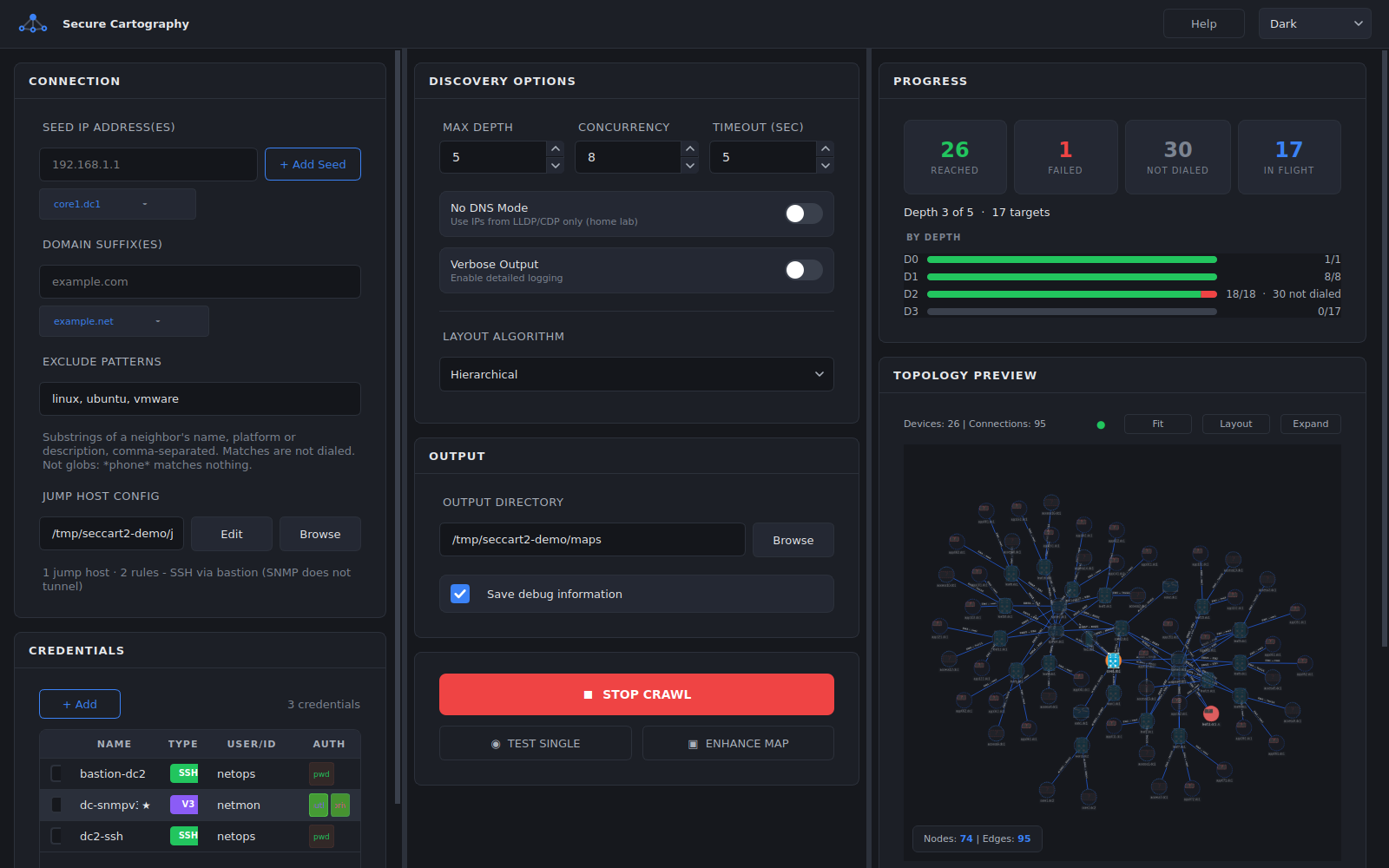
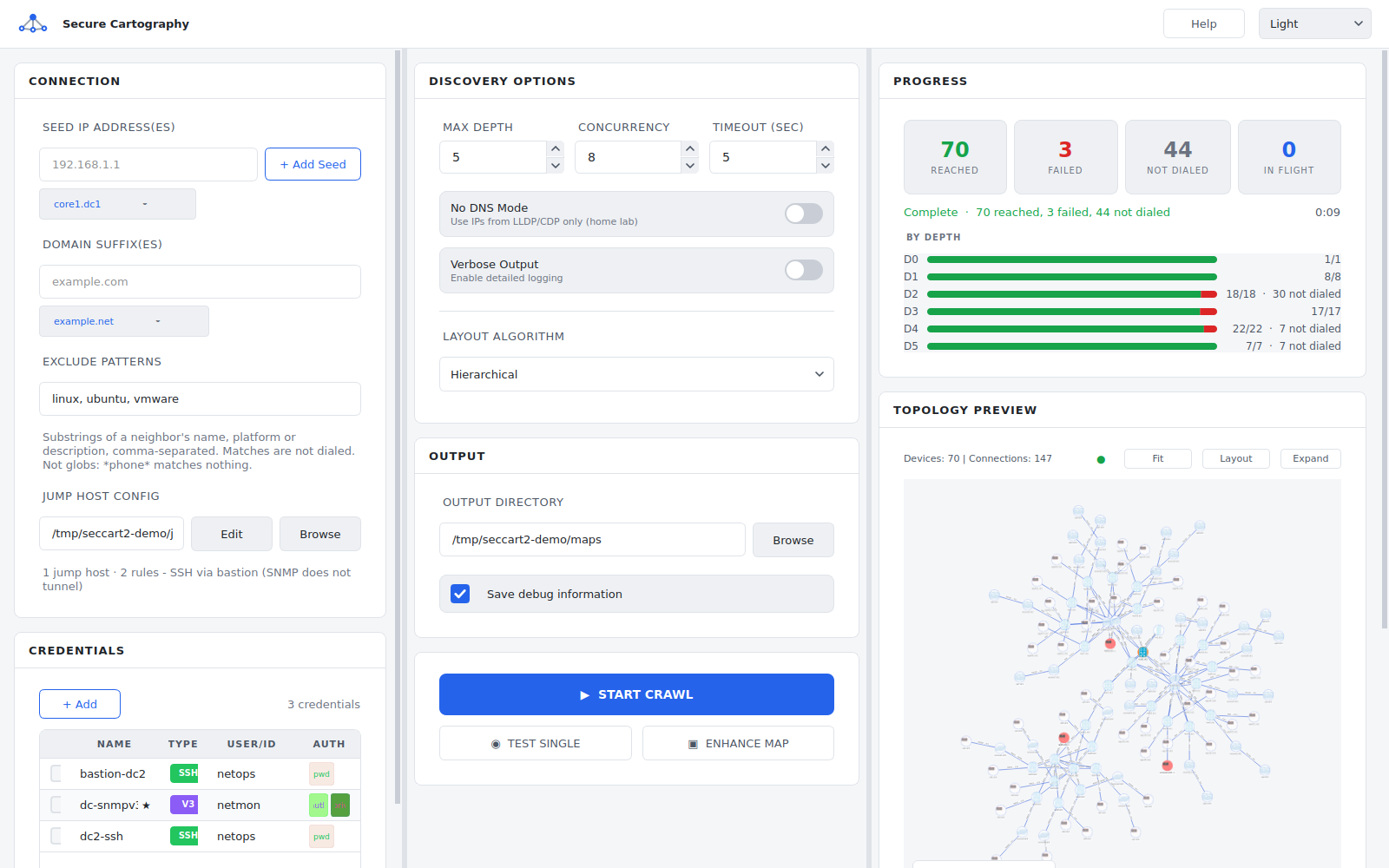
- Two themes — Dark (default) and Light, neutral palettes with a single blue accent
- Real-time progress — live counters, depth tracking, log output
- Responsive design — UI remains interactive during discovery
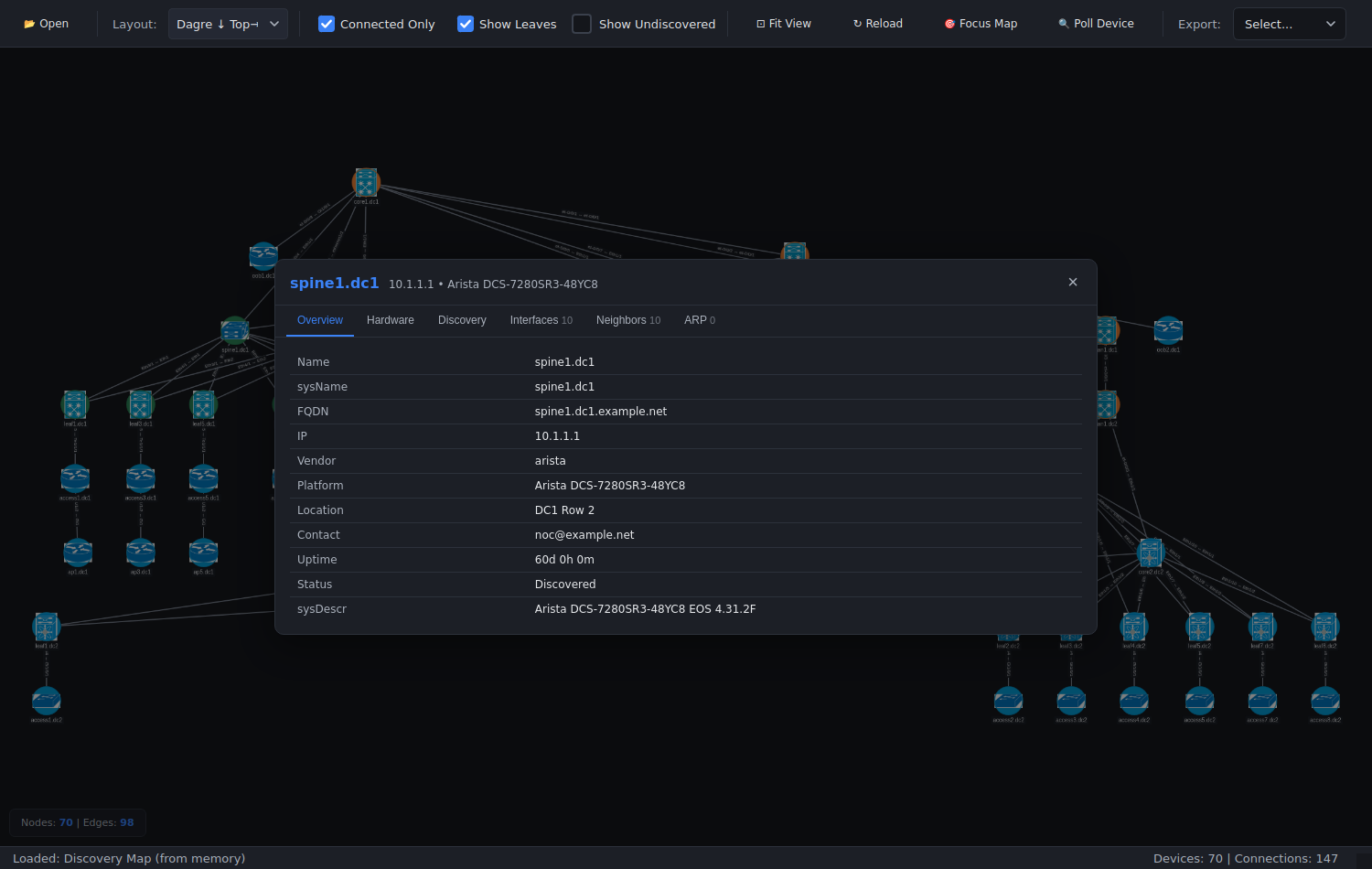
- Click-to-inspect — node details (hostname, IP, platform) on selection
Supported Platforms
| Vendor | SNMP | SSH |
|---|---|---|
| Cisco IOS/IOS-XE | ✓ | ✓ |
| Cisco NX-OS | ✓ | ✓ |
| Arista EOS | ✓ | ✓ |
| Juniper JUNOS | ✓ | ✓ |
Others will appear via SNMP sysDescr fingerprinting; vendor-specific testing has focused on the above.
Screenshots
All screenshots come from a synthetic two-datacenter network, generated by
tools/demo_screenshots.py, so no real network data appears in them. Rerun it
after UI changes: python tools/demo_screenshots.py --out screenshots.
Live crawl - per-depth progress, and the map grows as each depth completes
Complete - 6 levels, 70 devices, failures and not-dialed neighbors accounted for
Map viewer - hierarchical layout, discovered devices only
Device detail - system, hardware, interfaces, neighbors and ARP from the crawl
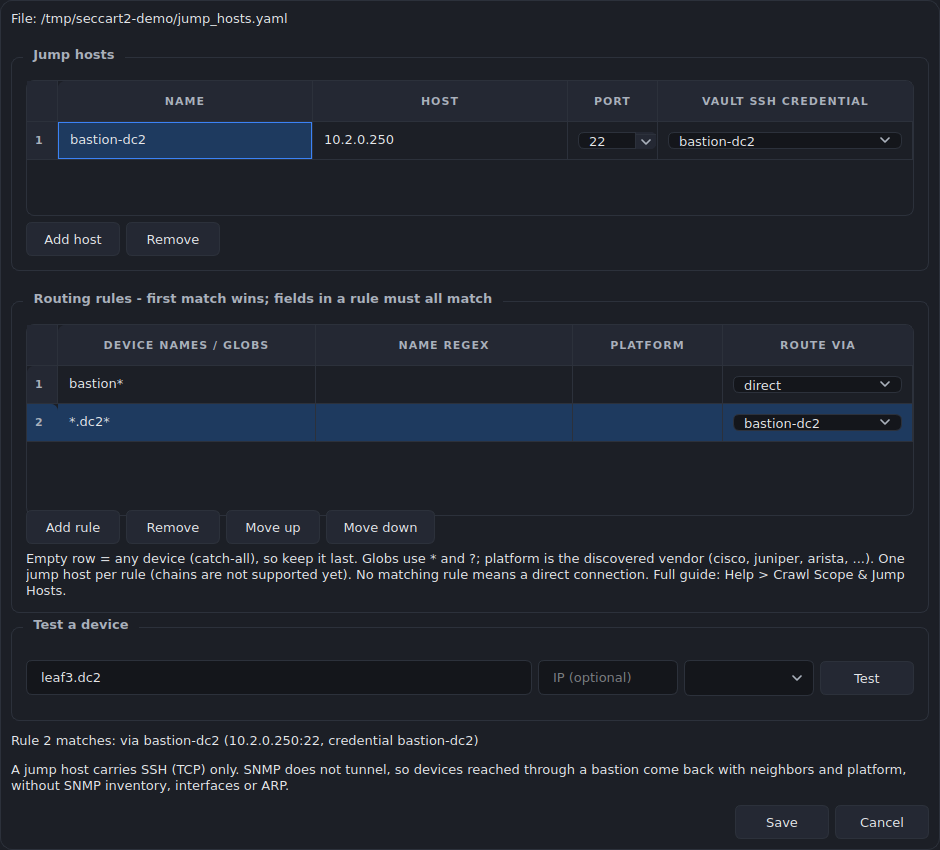
Jump hosts - route SSH through a bastion, with a live rule test
Installation
Prerequisites
- Python 3.10 or higher
- pip
From PyPI
pip install seccart2

# Optional: PDF audit reports
pip install "seccart2[audit]"
From Source
git clone https://github.com/scottpeterman/securecartography2.git
cd securecartography2
pip install -e .
Entry Points
| Command | Equivalent |
|---|---|
seccart2 |
python -m sc2 (or python -m sc2.ui) |
seccart2-creds |
python -m sc2.scng.creds |
seccart2-discover |
python -m sc2.scng.discovery |
seccart2-audit |
python -m sc2.scng.audit |
Quick Start
1. Initialize the Credential Vault
# Create vault and set master password
python -m sc2.scng.creds init

# Add SNMP credential
python -m sc2.scng.creds add snmpv2c snmp-readonly --community public

# Add SSH credential
python -m sc2.scng.creds add ssh network-admin --username admin

# List credentials
python -m sc2.scng.creds list
2. Test Connectivity
# Quick SNMP test (no vault needed)
python -m sc2.scng.discovery test 192.168.1.1 --community public

# Test with vault credentials
python -m sc2.scng.discovery device 192.168.1.1
3. Run Discovery
# Basic crawl
python -m sc2.scng.discovery crawl 192.168.1.1 -d 3

# With options
python -m sc2.scng.discovery crawl 192.168.1.1 10.0.0.1 \
    -d 5 \
    --domain corp.example.com \
    --exclude "phone,wireless,linux" \
    --output ./network_maps
4. Launch GUI
python -m sc2.ui
Jump Host Workflow
When your desktop doesn't have SNMP access:
- SSH to a jump host with network access
- Run discovery via CLI:
python -m sc2.scng.discovery crawl ... - Copy the output directory back to your desktop
- Open
map.jsonin the GUI map viewer
Architecture
sc2/
├── scng/                      # Discovery engine
│   ├── creds/                 # Credential vault
│   │   ├── vault.py           # Encrypted SQLite storage
│   │   ├── models.py          # SSH, SNMPv2c, SNMPv3 dataclasses
│   │   ├── resolver.py        # Credential testing & discovery
│   │   └── cli.py             # Credential management CLI
│   │
│   ├── discovery/             # Discovery engine
│   │   ├── engine.py          # Async orchestration, crawl logic
│   │   ├── models.py          # Device, Neighbor, Interface
│   │   ├── cli.py             # Discovery CLI
│   │   │
│   │   ├── snmp/              # SNMP collection
│   │   │   ├── walker.py      # Async GETBULK table walks
│   │   │   └── collectors/    # system, interfaces, lldp, cdp, arp
│   │   │
│   │   └── ssh/               # SSH fallback
│   │       ├── client.py      # Paramiko wrapper
│   │       ├── collector.py   # Vendor detection, command execution
│   │       └── parsers.py     # TextFSM integration
│   │
│   └── utils/
│       └── tfsm_fire.py       # TextFSM auto-template selection
│
├── export/                    # Export modules
│   ├── graphml_exporter.py    # yEd GraphML export
│   └── drawio_exporter.py     # Draw.io export with vendor styling
│
└── ui/                        # PyQt6 GUI
    ├── themes.py              # Theme system (Dark/Light)
    ├── login.py               # Vault unlock dialog
    ├── main_window.py         # Main application window
    ├── help_dialog.py         # Help system (GUI/CLI docs)
    │
    ├── assets/
    │   └── icons_lib/
    │       └── platform_icon_drawio.json  # Draw.io icon mappings
    │
    └── widgets/               # Custom themed widgets
        ├── panel.py               # Base panel with title bar
        ├── connection_panel.py    # Seeds, domains, excludes
        ├── credentials_panel.py   # Credential management UI
        ├── discovery_options.py   # Depth, concurrency, toggles
        ├── output_panel.py        # Output directory config
        ├── progress_panel.py      # Stats, progress bar
        ├── discovery_log.py       # Styled log output
        ├── discovery_controller.py # Discovery↔UI bridge with throttled events
        ├── topology_preview_panel.py  # Preview container (singleton)
        ├── topology_viewer.py     # QWebEngineView + Cytoscape.js bridge
        ├── topology_viewer.html   # Cytoscape.js visualization
        ├── map_viewer_dialog.py   # Full-screen topology viewer
        ├── tag_input.py           # Tag/chip input widget
        ├── toggle_switch.py       # iOS-style toggle
        └── stat_box.py            # Counter display boxes
Topology Viewer
The Map Viewer is the centerpiece of the documentation workflow. Arrange your topology interactively, save the layout, and export to Draw.io — the output mirrors what you see on screen.
Discovery → map.json → Interactive Viewer → Save Layout → Draw.io Export (position-matched)
                                          → Focus Map (1-hop neighborhood)
                                          → PNG / CSV / GraphML / JSON
See the Features section above for full details.
CLI Reference
Secure Cartography provides two CLI modules that can be used independently of the GUI:
sc2.scng.creds- Credential vault managementsc2.scng.discovery- Network discovery engine
Both CLIs support --help on all commands and subcommands.
Credential Management (sc2.scng.creds)
usage: scng-creds [-h] [--vault-path VAULT_PATH] [--password PASSWORD]
                  {init,unlock,add,list,show,remove,set-default,test,discover,change-password,deps} ...
Global Options
| Option | Description |
|---|---|
-v, --vault-path |
Path to vault database (default: ~/.seccart2/credentials.db) |
-p, --password |
Vault password (or set SCNG_VAULT_PASSWORD env var) |
Commands
init - Initialize a new vault
python -m sc2.scng.creds init
python -m sc2.scng.creds init --vault-path /path/to/custom.db
add - Add credentials
# SSH with password (prompts for password)
python -m sc2.scng.creds add ssh admin-cred --username admin --password

# SSH with key file
python -m sc2.scng.creds add ssh key-cred --username automation --key-file ~/.ssh/id_rsa

# SNMPv2c
python -m sc2.scng.creds add snmpv2c readonly --community public

# SNMPv3 (authPriv)
python -m sc2.scng.creds add snmpv3 snmpv3-cred \
    --username snmpuser \
    --auth-protocol sha256 \
    --auth-password authpass123 \
    --priv-protocol aes128 \
    --priv-password privpass123
list - List all credentials
python -m sc2.scng.creds list
Output shows credential name, type, priority, and default status.
show - Show credential details
python -m sc2.scng.creds show admin-cred
python -m sc2.scng.creds show admin-cred --reveal  # Show passwords/communities
remove - Delete a credential
python -m sc2.scng.creds remove old-credential
set-default - Set credential as default for its type
python -m sc2.scng.creds set-default admin-cred
test - Test credential against a host
python -m sc2.scng.creds test admin-cred 192.168.1.1
python -m sc2.scng.creds test readonly 10.0.0.1
discover - Find which credentials work on a host
python -m sc2.scng.creds discover 192.168.1.1
Tests all credentials and reports which ones succeed.
change-password - Change vault master password
python -m sc2.scng.creds change-password
deps - Check required dependencies
python -m sc2.scng.creds deps
Network Discovery (sc2.scng.discovery)
usage: scng.discovery [-h] {test,device,crawl} ...
Commands
test - Quick SNMP connectivity test (no vault required)
python -m sc2.scng.discovery test 192.168.1.1 --community public
python -m sc2.scng.discovery test 192.168.1.1 --community public --verbose
device - Discover a single device
python -m sc2.scng.discovery device 192.168.1.1
python -m sc2.scng.discovery device core-switch.example.com --output ./results
crawl - Recursive network discovery
usage: scng.discovery crawl [-h] [-d DEPTH] [--domain DOMAINS] [--exclude EXCLUDE_PATTERNS]
                            [-o OUTPUT] [-v] [--no-dns] [-c CONCURRENCY] [-t TIMEOUT]
                            [--no-color] [--timestamps] [--json-events]
                            seeds [seeds ...]
| Option | Description |
|---|---|
seeds |
One or more seed IP addresses or hostnames |
-d, --depth |
Maximum discovery depth (default: 3) |
--domain |
Domain suffix for hostname resolution (repeatable) |
--exclude |
Exclusion patterns for devices to skip (repeatable, comma-separated) |
-o, --output |
Output directory for results |
-v, --verbose |
Enable debug output |
--no-dns |
Disable DNS lookups; use IPs from LLDP/CDP directly |
-c, --concurrency |
Maximum parallel discoveries (default: 20) |
-t, --timeout |
SNMP timeout in seconds (default: 5) |
--no-color |
Disable colored terminal output |
--timestamps |
Show timestamps in log output |
--json-events |
Output events as JSON lines (for GUI/automation integration) |
Crawl Examples
# Basic crawl from single seed
python -m sc2.scng.discovery crawl 192.168.1.1

# Multiple seeds with depth limit
python -m sc2.scng.discovery crawl 10.1.1.1 10.2.1.1 --depth 5

# With domain suffix for DNS resolution
python -m sc2.scng.discovery crawl core-sw01 --domain corp.example.com --domain example.com

# Exclude devices by pattern (matches hostname, sys_name, or sysDescr)
python -m sc2.scng.discovery crawl 192.168.1.1 --exclude "linux,vmware,phone"

# Multiple exclude flags also work
python -m sc2.scng.discovery crawl 192.168.1.1 \
    --exclude "linux" \
    --exclude "phone" \
    --exclude "wireless"

# Home lab mode (no DNS, faster)
python -m sc2.scng.discovery crawl 192.168.1.1 --no-dns

# High concurrency for large networks
python -m sc2.scng.discovery crawl 10.0.0.1 -c 50 -d 10 -o ./enterprise_map

# Full production example
python -m sc2.scng.discovery crawl \
    core-rtr-01.dc1.example.com \
    core-rtr-01.dc2.example.com \
    --depth 8 \
    --domain dc1.example.com \
    --domain dc2.example.com \
    --exclude "linux,esxi,vcenter,phone,wireless,ups" \
    --concurrency 30 \
    --timeout 10 \
    --output ./network_discovery_$(date +%Y%m%d) \
    --verbose
Exclusion Patterns
The --exclude option filters devices from propagating the crawl. Patterns are:
- Case-insensitive substring matches
- Comma-separated for multiple patterns in one flag
- Matched against three fields:
sysDescr,hostname, andsys_name
This means exclusions work for both SNMP-discovered devices (via sysDescr) and SSH-discovered devices (via hostname).
| Pattern | Matches |
|---|---|
linux |
Any device with "linux" in sysDescr, hostname, or sys_name |
rtr-lab,sw-test |
Devices with "rtr-lab" OR "sw-test" in any field |
phone,wireless,ap- |
Common patterns to skip IP phones and APs |
Note: Excluded devices are still discovered (credentials tested, data collected), but their neighbors are not queued for further discovery. This prevents the crawl from expanding through non-network infrastructure.
Output Format
Discovery creates per-device folders with JSON data:
discovery_output/
├── core-switch-01/
│   ├── device.json      # System info, interfaces
│   ├── cdp.json         # CDP neighbors
│   └── lldp.json        # LLDP neighbors
├── dist-switch-01/
│   └── ...
├── devices.csv          # Device inventory
├── discovery_summary.json
├── topology.graphml     # yEd-compatible graph
└── map.json             # Topology with bidirectional validation
map.json (Topology)
{
  "core-switch-01": {
    "node_details": {
      "ip": "10.1.1.1",
      "platform": "Arista vEOS-lab EOS 4.33.1F"
    },
    "peers": {
      "dist-switch-01": {
        "ip": "10.1.1.2",
        "connections": [
          ["Eth1/1", "Gi0/1"],
          ["Eth1/2", "Gi0/2"]
        ]
      }
    }
  }
}
devices.csv
hostname,ip,platform,vendor,model,serial
core-switch-01,10.1.1.1,Cisco IOS IOS 15.2(4.0.55)E,cisco,WS-C3850-24T,FCW2134L0NK
dist-switch-01,10.1.1.2,Arista vEOS-lab EOS 4.33.1F,arista,vEOS,SN-VEOS-01
GUI Theme System
Two built-in themes, both defined as ThemeColors palettes in sc2/ui/themes.py:
| Theme | Window | Panel | Accent |
|---|---|---|---|
| Dark (default) | #16181d |
#1c1f26 |
#3b82f6 |
| Light | #f5f6f8 |
#ffffff |
#2563eb |
A saved theme name the app no longer ships (e.g. from an older ~/.seccart2/settings.json) falls back to Dark.
See README_Style_Guide.md for widget styling details.
Documentation
| Document | Description |
|---|---|
| README_Creds.md | Credential vault API and CLI |
| README_scng.md | Discovery engine architecture |
| README_SNMP_Discovery.md | SNMP collection details |
| README_SSH_Discovery.md | SSH fallback module |
| README_Progress_events.md | GUI progress event reference |
| README_Style_Guide.md | PyQt6 widget theming guide |
| snmp_proxy/README.md | SNMP proxy deployment for remote polling |
Development Status
✅ Implemented
- SNMP discovery (v2c, v3) with SSH fallback
- Async crawl engine with concurrent workers and progress events
- Credential vault with AES-256-GCM encryption
- CDP and LLDP neighbor detection with bidirectional validation
- LLDP remote port resolution (Juniper/Linux/Arista)
- Platform detection via tfsm_fire structured parsing
- Post-discovery sysName dedup for multi-homed devices
- Ghost node filtering for NX-OS artifacts
- CLI for credentials and discovery with hosts file support
- Themed GUI (Dark/Light) with real-time progress
- Interactive Cytoscape.js topology viewer with nine layout algorithms
- Layout persistence with sidecar .layout.json files
- Focus maps with 1-hop neighborhood expansion
- Position-matched Draw.io export with Cisco stencils and vendor coloring
- Export to yEd GraphML, PNG, CSV, JSON
- Interactive SNMP device polling with Rapid7 Recog fingerprinting
- OUI vendor lookup for MAC addresses
📋 Planned
- Credential auto-discovery integration
- Settings persistence
- Topology diff (compare discoveries over time)
Technical Notes
Threading Architecture
The GUI uses a careful threading model to prevent UI lockups:
- Discovery runs in QThread - async engine wrapped in worker thread
- Events throttled at source - high-frequency events (stats, topology) rate-limited before emission
- QueuedConnection for all signals - ensures slots execute on main thread
- WebView isolation - no webview updates during active discovery; topology loads once at completion
Topology Data Transfer
Python→JavaScript communication uses base64 encoding:
# Python side
b64_data = base64.b64encode(json.dumps(topology).encode()).decode()
self._run_js(f"TopologyViewer.loadTopologyB64('{b64_data}')")
// JavaScript side
loadTopologyB64(b64String) {
    const jsonString = atob(b64String);
    this.loadTopology(jsonString);
}
This avoids JSON escaping issues with complex network data containing special characters.
Security Considerations
- Master password is never stored; derived key is held in memory only while vault is unlocked
- Credentials are encrypted with AES-256-GCM before storage
- Salt is randomly generated per installation
- No credentials in logs - discovery output never includes passwords/communities
- Vault auto-locks when application exits
Performance
Typical discovery rates:
- Single device (SNMP): 2-5 seconds
- Single device (SSH fallback): 5-15 seconds
- 100 devices: 3-8 minutes with 20 concurrent workers
- 750+ devices: ~4-5 hours (production tested, 88%+ success rate)
GUI remains responsive during discovery due to throttled event architecture.
License
This project is licensed under the GNU General Public License v3.0 (GPL-3.0-only) - see LICENSE. The GPL is required because Secure Cartography links PyQt6, which Riverbank distributes under GPLv3.
Author
Scott Peterman - Network Engineer
- GitHub: @scottpeterman
- Homepage: scottpeterman
Built by a network engineer who got tired of manually drawing topology diagrams.
Acknowledgments
- Network visualization powered by Cytoscape.js
- SNMP operations via pysnmp-lextudio
- SSH via an in-tree client (from reachssh) on Paramiko
- CLI parsing with TextFSM
- GUI powered by PyQt6
- Encryption via cryptography
- Device fingerprinting via Rapid7 Recog
- OUI database from Wireshark
- Draw.io stencils from mxgraph Cisco library
1 maintainer

Release files for seccart2 1.0.0
For a detailed explanation of source distributions (sdists) and built distributions (wheels), please see the package formats documentation.
Built distribution (wheel)
| File | Interpreter | ABI | Platform | Reset |
|---|---|---|---|---|
| seccart2-1.0.0-py3-none-any.whl | Python 3 | none | any | Details |
Release files / seccart2-1.0.0-py3-none-any.whl
| Download URL | seccart2-1.0.0-py3-none-any.whl |
|---|---|
| Size | 7.1 MB |
| Tags | Python 3 |
|
SHA-256 checksum How to use checksums |
035e774945f491c8f5741147e72305e91c1df9d5f8b7dcf8e60d3a301069db39
|
|
BLAKE2b-256 checksum How to use checksums |
6a96784c69e417ea8496c4f6d0739f1ceacbe0036986dae3f90cda0a45c1aee8
|
| Upload date | |
|
Uploaded using Trusted Publishing? What is trusted publishing? |
No |
| Uploaded via |
twine/7.0.0 CPython/3.10.12
|













