
sec-fincancial-statement-data-set tools (SFSDSTools 2)
Helper tools to analyze the Financial Statement Data Sets from the U.S. securities and exchange commission (sec.gov). The SEC releases quarterly zip files, each containing four CSV files with numerical data from all financial reports filed within that quarter. However, accessing data from the past 12 years can be time-consuming due to the large amount of data - over 120 million data points in over 2GB of zip files by 2023.
This library simplifies the process of working with this data and provides a convenient way to extract information from the primary financial statements - the balance sheet (BS), income statement (IS), and statement of cash flows (CF).
Check out my article at Medium Understanding the the SEC Financial Statement Data Sets to get an introduction to the Financial Statement Data Sets.
The main features include:
- all data is on your local hard drive and can be updated automatically, no need for numerous API calls
- data is loaded as pandas files
- fast and efficient reading of a single report, all reports of one or multiple companies, or even all available reports
- filter framework with predefined filters, easy to extend, supports easy way of saving, loading, and combining filtered data (see 01_quickstart.ipynb and 03_explore_with_interactive_notebook.ipynb)
- standardize the data for balance sheets, income statements, and cash flow statements to make reports easily comparable (see 07_00_standardizer_basics.ipynb, 07_01_BS_standardizer.ipynb, 07_01_BS_standardizer.ipynb, and 07_03_CF_standardizer.ipynb)
- automate processing and standardizing by configuring customized process steps that are executed whenever a new data file is detected on sec.gov (see 08_00_automation_basics.ipynb)
- version 2 supports the new "segments" column that was added in December 2024
- experimental - introduced in version 2.4.0: support for daily updates of the financial reports (see 10_00_daily_financial_report_updates.ipynb)
Have a look at the Release Notes
==========================================================
If you find this tool useful, a sponsorship would be greatly appreciated!
https://github.com/sponsors/HansjoergW
How to get in touch
- Found a bug: https://github.com/HansjoergW/sec-fincancial-statement-data-set/issues
- Have a remark: https://github.com/HansjoergW/sec-fincancial-statement-data-set/discussions/categories/general
- Have an idea: https://github.com/HansjoergW/sec-fincancial-statement-data-set/discussions/categories/ideas
- Have a question: https://github.com/HansjoergW/sec-fincancial-statement-data-set/discussions/categories/q-a
- Have something to show: https://github.com/HansjoergW/sec-fincancial-statement-data-set/discussions/categories/show-and-tell
==========================================================
Principles
The goal is to be able to do bulk processing of the data without the need to do countless API calls to sec.gov. Therefore, the quarterly zip files are downloaded and indexed using a SQLite database table. The index table contains information on all filed reports since about 2010 - over 500,000 in total. The first download will take a couple of minutes but after that, all the data is on your local harddisk.
Using the index in the sqlite db allows for direct extraction of data for a specific report from the appropriate zip file, reducing the need to open and search through each zip file. Moreover, the downloaded zip files are converted to the parquet format which provides faster read access to the data compared to reading the csv files inside the zip files.
The library is designed to have a low memory footprint.
Installation and basic usage
The library has been tested for python version 3.8, 3.9, 3.10 and 3.11. The project is published on pypi.org. Simply use the following command to install the latest version:
pip install secfsdstools
If you want to contribute, just clone the project and use a python 3.8 environment. The dependencies are defined in the requirements.txt file or use the pyproject.toml to install them.
To have a first glance at the library, check out the interactive jupyter notebooks 01_quickstart.ipynb
and 03_explore_with_interactive_notebook.ipynb that are located in notebooks directory in the github repo.
Upon using the library for the first time, it downloads the data files and creates the index by calling the update()
method. You can manually trigger the update using the following code:
from secfsdstools.update import update

if __name__ == '__main__':
    update()
The following tasks will be executed:
- All currently available zip-files are downloaded form sec.gov (these are over 50 files that will need over 2 GB of space on your local drive)
- All the zipfiles are transformed and stored as parquet files. Per default, the zipfile is deleted afterward. If you want to keep the zip files, set the parameter 'KeepZipFiles' in the config file to True.
- An index inside a sqlite db file is created
Moreover, at most once a day, it is checked if there is a new zip file available on sec.gov. If there is, a download will be started automatically. If you don't want 'auto-update', set the 'AutoUpdate' in your config file to False.
Configuration (optional)
If you don't provide a config file, a config file with name secfsdstools.cfg will be created the first time you use the api and placed inside your home directory.
The file only requires the following entries:
[DEFAULT]
downloaddirectory = c:/users/me/secfsdstools/data/dld
parquetdirectory = c:/users/me/secfsdstools/data/parquet
dbdirectory = c:/users/me/secfsdstools/data/db
useragentemail = your.email@goeshere.com
The downloaddirectory is the place where quarterly zip files from the sec.gov are downloaded to.
The parquetdirectory is the folder where the data is stored in parquet format.
The dbdirectory is the directory in which the sqllite db is created.
The useragentemail is used in the requests made to the sec.gov website. Since we only make limited calls to the sec.gov,
you can leave the example "your.email@goeshere.com".
A first simple example
Goal: present the information in the balance sheet of Apple's 2022 10-K report in the same way as it appears in the original report on page 31 ("CONSOLIDATED BALANCE SHEETS"): https://www.sec.gov/ix?doc=/Archives/edgar/data/320193/000032019322000108/aapl-20220924.htm
Note: Version 2 of the framework supports now the segments that was introduced in January 2025. By adjusting the
parameter show_segments you can define whether the segments information are shown or not
from secfsdstools.e_collector.reportcollecting import SingleReportCollector
from secfsdstools.e_filter.rawfiltering import ReportPeriodAndPreviousPeriodRawFilter
from secfsdstools.e_presenter.presenting import StandardStatementPresenter

if __name__ == '__main__':
    # the unique identifier for apple's 10-K report of 2022
    apple_10k_2022_adsh = "0000320193-22-000108"

    # us a Collector to grab the data of the 10-K report. an filter for balancesheet information
    collector: SingleReportCollector = SingleReportCollector.get_report_by_adsh(
          adsh=apple_10k_2022_adsh,
          stmt_filter=["BS"]
    )
    rawdatabag = collector.collect() # load the data from the disk


    bs_df = (rawdatabag
                       # ensure only data from the period (2022) and the previous period (2021) is in the data
                       .filter(ReportPeriodAndPreviousPeriodRawFilter())
                       # join the the content of the pre_txt and num_txt together
                       .join()
                       # format the data in the same way as it appears in the report
                       .present(StandardStatementPresenter(show_segments=False)))
    print(bs_df)
Viewing metadata
The recommend way to view and use the metadata is using secfsdstools library functions as described in notebooks/01_quickstart.ipynb
Of course, the created "index of reports" can be viewed also using a database viewer that supports the SQLite format, such as DB Browser for SQLite.
(The location of the SQLite database file is specified in the dbdirectory field of the config file, which is set to
<home>/secfsdstools/data/db in the default configuration. The name of the database file is secfsdstools.db.)
There are only two relevant tables in the database: index_parquet_reports and index_parquet_processing_state.
The index_parquet_reports table provides an overview of all available reports in the downloaded
data and includes the following relevant columns:
- adsh : The unique id of the report (a string).
- cik : The unique id of the company (an int).
- name : The name of the company in uppercases.
- form : The type of the report (e.g.: annual: 10-K, quarterly: 10-Q).
- filed : The date when the report has been filed in the format YYYYMMDD (stored as a integer number).
- period : The date for which the report was create. this is the date on the balancesheet.(stored as a integer number)
- fullPath : The path to the downloaded zip files that contains the details of that report.
- url : The url which takes you directly to the filing of this report on the sec.gov website.
For instance, if you want to have an overview of all reports that Apple has filed since 2010, just search for "%APPLE INC%" in the name column.
Searching for "%APPLE INC%" will also reveal its cik: 320193
If you accidentally delete data in the database file, don't worry. Just delete the database file
and run update() again (see previous chapter).
Overview
The following diagram gives an overview on SECFSDSTools library.
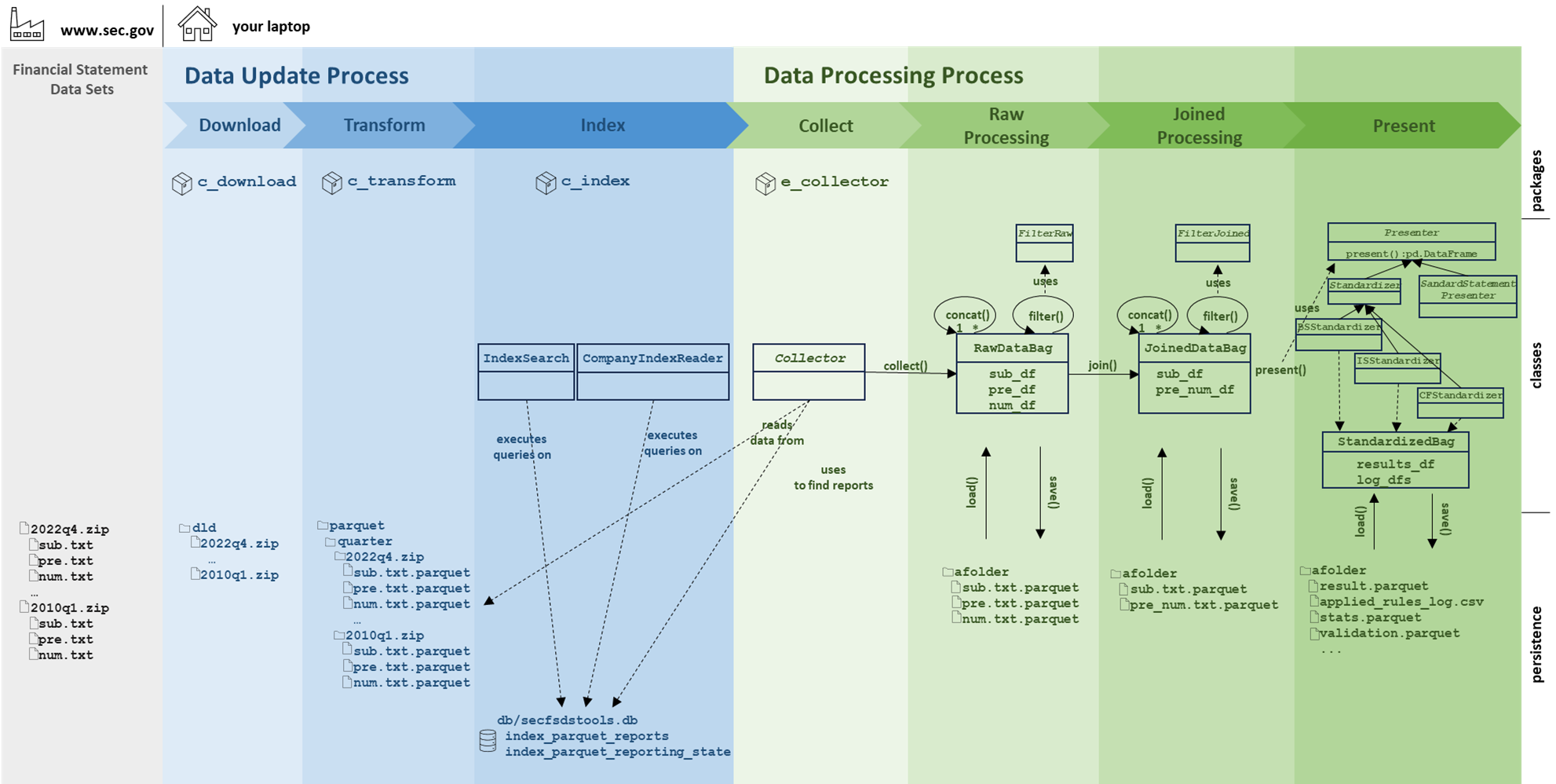
It mainly exists out of two main processes. The first one ist the "Date Update Process" which is responsible for the download of the Financial Statement Data Sets zip files from the sec.gov website, transforming the content into parquet format, and indexing the content of these files in a simple SQLite database. Again, this whole process can be started "manually" by calling the update method, or it is done automatically, as it described above.
The second main process is the "Data Processing Process", which is working with the data that is stored inside the sub.txt, pre.txt, and num.txt files from the zip files. The "Data Processing Process" mainly exists out of four steps:
- Collect
Collect the rawdata from one or more different zip files. For instance, get all the data for a single report, or get the data for all 10-K reports of a single or multiple companies from several zip files. - Raw Processing
Once the data is collected, the collected data for sub.txt, pre.txt, and num.txt is available as a pandas dataframe. Filters can be applied, the content can directly be saved and loaded. - Joined Processing
From the "Raw Data", a "joined" representation can be created. This joins the data from the pre.txt and num.txt content together based on the "adhs", "tag", and "version" attributes. "Joined data" can also be filtered, concatenated, directly saved and loaded. - Present
Produce a single pandas dataframe out of the data and use it for further processing or use the standardizers to create comparable data for the balance sheet, the income statement, and the cash flow statement.
The diagramm also shows the main classes with which a user interacts. The use of them is described in the following chapters.
Feature Overview
This section shows some example code of the different features. Have a look at the notebooks/01_quickstart.ipynb notebook and all other notebooks to get more details on how to use the framework.
Working with the Index
-
Access the index in the slite database to find the CIK (central index key) for a company:
from secfsdstools.c_index.searching import IndexSearch index_search = IndexSearch.get_index_search() results = index_search.find_company_by_name("apple") print(results) -
Get the information on the latest filing of a company:
from secfsdstools.c_index.companyindexreading import CompanyIndexReader apple_cik = 320193 apple_index_reader = CompanyIndexReader.get_company_index_reader(cik=apple_cik) print(apple_index_reader.get_latest_company_filing()) -
Show all annual reports of company by using its CIK number:
from secfsdstools.c_index.companyindexreading import CompanyIndexReader

apple_cik = 320193
apple_index_reader = CompanyIndexReader.get_company_index_reader(cik=apple_cik)

# only show the annual reports of apple
print(apple_index_reader.get_all_company_reports_df(forms=["10-K"]))
Loading Data
The previously introduced IndexSearch and CompanyIndexReader let you know what data is available, but they do not
return the real data of the financial statements. This is what the Collector classes are used for.
All the Collector classes have their own factory method(s) which instantiates the class.
Most of these factory methods
also provide parameters to filter the data directly when being loaded from the parquet files.
These are the forms_filter (which type of reports you want to read, for instance "10-K"), the stmt_filter
(which statements you want to read, for instance the balance sheet), and the tag_filter (which defines the tags
you want to read, for instance "Assets"). Of course, such filters could also be applied afterward, but it is slightly
more efficient to apply them directly when loading.
All Collector classes have a collect method which then loads the data from the parquet files and returns an instance
of RawDataBag. The RawDataBag instance contains then a pandas dataframe for the sub (subscription) data,
pre (presentation) data, and num (the numeric values) data.
-
Load a single report using the
SingleReportCollector:from secfsdstools.e_collector.reportcollecting import SingleReportCollector apple_10k_2022_adsh = "0000320193-22-000108" collector: SingleReportCollector = SingleReportCollector.get_report_by_adsh(adsh=apple_10k_2022_adsh) rawdatabag = collector.collect() # as expected, there is just one entry in the submission dataframe print(rawdatabag.sub_df) # just print the size of the pre and num dataframes print(rawdatabag.pre_df.shape) print(rawdatabag.num_df.shape) -
Load multiple reports with the
MultiReportCollector:from secfsdstools.e_collector.multireportcollecting import MultiReportCollector apple_10k_2022_adsh = "0000320193-22-000108" apple_10k_2012_adsh = "0001193125-12-444068" if __name__ == '__main__': # load only the assets tags that are present in the 10-K report of apple in the years # 2022 and 2012 collector: MultiReportCollector = \ MultiReportCollector.get_reports_by_adshs(adshs=[apple_10k_2022_adsh, apple_10k_2012_adsh], tag_filter=['Assets']) rawdatabag = collector.collect() # as expected, there are just two entries in the submission dataframe print(rawdatabag.sub_df) print(rawdatabag.num_df) -
Load all data for one or multiple quarters using the
ZipCollector:from secfsdstools.e_collector.zipcollecting import ZipCollector # only collect the Balance Sheet of annual reports that # were filed during the first quarter in 2022 if __name__ == '__main__': collector: ZipCollector = ZipCollector.get_zip_by_name(name="2022q1.zip", forms_filter=["10-K"], stmt_filter=["BS"]) rawdatabag = collector.collect() # only show the size of the data frame # .. over 4000 companies filed a 10 K report in q1 2022 print(rawdatabag.sub_df.shape) print(rawdatabag.pre_df.shape) print(rawdatabag.num_df.shape) -
Load all data for a single company or multiple companies
from secfsdstools.e_collector.companycollecting import CompanyReportCollector

if __name__ == '__main__':
    apple_cik = 320193
    collector = CompanyReportCollector.get_company_collector(ciks=[apple_cik],
                                                             forms_filter=["10-K"])

    rawdatabag = collector.collect()

    # all filed 10-K reports for apple since 2010 are in the databag
    print(rawdatabag.sub_df)

    print(rawdatabag.pre_df.shape)
    print(rawdatabag.num_df.shape)
Have a look at the collector_deep_dive notebook.
Working with raw data
When the collect method of a Collector class is called, the data for the sub, pre, and num dataframes are loaded
and being stored in the sub_df, pre_df, and num_df attributes inside an instance of RawDataBag.
-
saveandloadfrom secfsdstools.e_collector.reportcollecting import SingleReportCollector # read data apple_10k_2022_adsh = "0000320193-22-000108" collector: SingleReportCollector = SingleReportCollector.get_report_by_adsh(adsh=apple_10k_2022_adsh) rawdatabag = collector.collect() # save it rawdatabag.save("<path>") # load it back bag = RawDataBag.load("<path") # load it back with Predicate Pushdown (filter while reading) bag = RawDataBag.load("<path", stmt_filter=["BS"]) -
concatmultiple instances ofRawDataBagconcat_bag = RawDataBag.concat(list_of_rawdatabags) -
concat_filebasedconcat multiple RawDataBag folders into a new folder in very memory efficient wayRawDataBag.concat_filebased(list_of_rawdatabag_folders, target_folder) -
joinproduces aJoinedRawDataBagby joining the content of the pre_df and num_df based on the columns adsh, tag, and version. It is an inner join. The joined dataframe appears as pre_num_df in theJoinedRawDataBag.from secfsdstools.e_collector.reportcollecting import SingleReportCollector # read data apple_10k_2022_adsh = "0000320193-22-000108" collector: SingleReportCollector = SingleReportCollector.get_report_by_adsh(adsh=apple_10k_2022_adsh) rawdatabag = collector.collect() joineddatabag = rawdatabag.join() print(joineddatabag.pre_num_df) ``` -
Use filters to
filterthe data. There are many predefined filters, but it is also easy to write your own.# Note, instead of using a_RawDataBag.filter(<myFilter>) you could also use a_RawDataBag[<myFilter>] # Filters the `RawDataBag` instance based on the list of adshs that were provided in the constructor. a_filtered_RawDataBag = a_RawDataBag.filter(AdshRawFilter(adshs=['0001193125-09-214859', '0001193125-10-238044'])) # Filters the `RawDataBag`instance based on the list of statements ('BS', 'CF', 'IS', ...). <br> a_filtered_RawDataBag = a_RawDataBag.filter(StmtRawFilter(stmts=['BS', 'CF'])) # Filters the `RawDataBag`instance based on the list of tags that is provided. <br> a_filtered_RawDataBag = a_RawDataBag.filter(TagRawFilter(tags=['Assets', 'Liabilities'])) # Filters the `RawDataBag` so that data of subsidiaries are removed. a_filtered_RawDataBag = a_RawDataBag.filter(MainCoregRawFilter()) # The data of a report usually also contains data from previous years. # However, often you want just to analyze the data of the current and the previous year. This filter ensures that # only data for the current period and the previous period are contained in the data. a_filtered_RawDataBag = a_RawDataBag.filter(ReportPeriodAndPreviousPeriodRawFilter()) # If you are just interested in the data of a report that is from the current period # of the report then you can use this filter. a_filtered_RawDataBag = a_RawDataBag.filter(ReportPeriodRawFilter()) # Sometimes company provide their own tags, which are not defined by the us-gaap XBRL # definition. In such cases, the version columns contains the value of the adsh instead of something like us-gab/2022. # This filter removes unofficial tags. a_filtered_RawDataBag = a_RawDataBag.filter(OfficialTagsOnlyRawFilter()) # Reports often also contain datapoints or also the same datapint in other currencies than USD. # This filters ensures that only USD datapoints are kept a_filtered_RawDataBag = a_RawDataBag.filter(USDOnlyRawFilter()) # If you dont care about Segments information, you can use this filter. a_filtered_RawDataBag = a_RawDataBag.filter(NoSegmentInfoRawFilter())Have a look at the filter_deep_dive notebook.
Working with joined data
When the join method of a RawDataBag instance is called an instance of JoinedDataBag is returned.
The JoinedDataBag provides save, load, concat, and concat_filebased in the same manner as the
RawDataBagdoes.
More over, also filter is possible and the same filters are available. They just go by the name
...JoinedFilter instead of ...RawFilter.
present The idea of the present method is to make a final presentation of the data as pandas dataframe.
The method has a parameter presenter of type Presenter.
It is simple to write your own presenter classes. So far, the framework provides the following Presenter
implementations (module secfsdstools.e_presenter.presenting):
StandardStatementPresenter
This presenter provides the data in the same form, as you see in the reports itself.apple_10k_2022_adsh = "0000320193-22-000108" collector: SingleReportCollector = SingleReportCollector.get_report_by_adsh( adsh=apple_10k_2022_adsh, stmt_filter=["BS"] ) rawdatabag = collector.collect() bs_df = rawdatabag.filter(ReportPeriodAndPreviousPeriodRawFilter()) .join() .present(StandardStatementPresenter()) print(bs_df)
Standardize financial data
Even if xbrl is a standard on how to tag positions and numbers in financial statements, that doesn't mean that financial
statements can then be compared easily. For instance, there are over 3000 tags which can be used in a balance sheet.
Moreover, some tags can mean similar things or can be grouped behind a "parent" tag, which itself might not be present.
For instance, "AccountsNoncurrent" is often not shown in statements. So you would find the position for "Accounts"
and "AccountsCurrent", but not for "AccountsNoncurrent". Instead, only child tags for "AccountsNoncurrent" might be
present.
The standardizer helps to solve these problems by unifying the information of financial statements.
With the standardized financial statements, you can then actually compare the statements between different
companies or different years, and you can use the dataset for ML.
For details, have a look at the following notebooks:
-
standardize the cash flow statements and make them comparable
-
BalanceSheetStandardizer
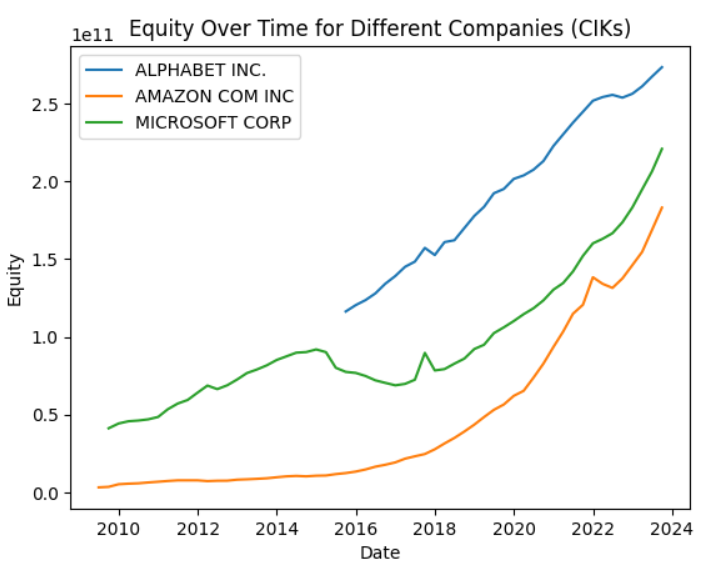
TheBalanceSheetStandardizercollects and/or calculates the following positions of balance sheets:- Assets - AssetsCurrent - Cash - AssetsNoncurrent - Liabilities - LiabilitiesCurrent - LiabilitiesNoncurrent - Equity - HolderEquity (mainly StockholderEquity or PartnerCapital) - RetainedEarnings - AdditionalPaidInCapital - TreasuryStockValue - TemporaryEquity - RedeemableEquity - LiabilitiesAndEquityWith just a few lines of code, you'll get a comparable dataset with the main positions of a balance sheet for Microsoft, Alphabet, and Amazon: (see the stanardize the balance sheets and make them comparable notebook for details)
from secfsdstools.e_collector.companycollecting import CompanyReportCollector
from secfsdstools.e_filter.rawfiltering import ReportPeriodRawFilter, MainCoregRawFilter, OfficialTagsOnlyRawFilter, USDOnlyRawFilter
from secfsdstools.f_standardize.bs_standardize import BalanceSheetStandardizer

bag = CompanyReportCollector.get_company_collector(ciks=[789019, 1652044,1018724]).collect() #Microsoft, Alphabet, Amazon
filtered_bag = bag[ReportPeriodRawFilter()][MainCoregRawFilter()][OfficialTagsOnlyRawFilter()][USDOnlyRawFilter()]
joined_bag = filtered_bag.join()

standardizer = BalanceSheetStandardizer()

standardized_bs_df = joined_bag.present(standardizer)

import matplotlib.pyplot as plt
# Group by 'name' and plot equity for each group
# Note: using the `present` method ensured that the same cik has always the same name even if the company name did change in the past
for name, group in standardized_bs_df.groupby('name'):
  plt.plot(group['date'], group['Equity'], label=name, linestyle='-')

# Add labels and title
plt.xlabel('Date')
plt.ylabel('Equity')
plt.title('Equity Over Time for Different Companies (CIKs)')

# Display legend
plt.legend()
-
IncomeStatementStandardizer
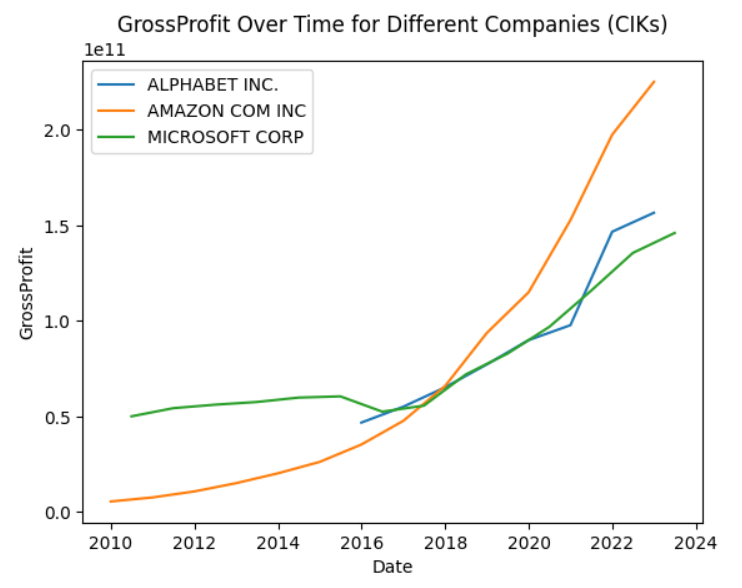
TheIncomeStatementStandardizercollects and/or calculates the following positions of balance sheets:Revenues - CostOfRevenue --------------- = GrossProfit - OperatingExpenses ------------------- = OperatingIncomeLoss IncomeLossFromContinuingOperationsBeforeIncomeTaxExpenseBenefit - AllIncomeTaxExpenseBenefit ---------------------------- = IncomeLossFromContinuingOperations + IncomeLossFromDiscontinuedOperationsNetOfTax ----------------------------------------------- = ProfitLoss - NetIncomeLossAttributableToNoncontrollingInterest --------------------------------------------------- = NetIncomeLoss OustandingShares EarningsPerShareWith just a few lines of code, you'll get a comparable dataset with the main positions of an income statement for Microsoft, Alphabet, and Amazon: (see the standardize the income statement and make them comparable notebook for details)
from secfsdstools.e_collector.companycollecting import CompanyReportCollector
from secfsdstools.e_filter.rawfiltering import ReportPeriodRawFilter, MainCoregRawFilter, OfficialTagsOnlyRawFilter, USDOnlyRawFilter
from secfsdstools.f_standardize.is_standardize import IncomeStatementStandardizer

bag = CompanyReportCollector.get_company_collector(ciks=[789019, 1652044,1018724]).collect() #Microsoft, Alphabet, Amazon
filtered_bag = bag[ReportPeriodRawFilter()][MainCoregRawFilter()][OfficialTagsOnlyRawFilter()][USDOnlyRawFilter()]
joined_bag = filtered_bag.join()

standardizer = IncomeStatementStandardizer()

standardized_is_df = joined_bag.present(standardizer)
# just use the yearly reports with data for the whole year
standardized_is_df = standardized_is_df[(standardized_is_df.fp=="FY") & (standardized_is_df.qtrs==4)].copy()

import matplotlib.pyplot as plt
# Group by 'name' and plot equity for each group
# Note: using the `present` method ensured that the same cik has always the same name even if the company name did change in the past
for name, group in standardized_is_df.groupby('name'):
  plt.plot(group['date'], group['GrossProfit'], label=name, linestyle='-')

# Add labels and title
plt.xlabel('Date')
plt.ylabel('GrossProfit')
plt.title('GrossProfit Over Time for Different Companies (CIKs)')

# Display legend
plt.legend()
-
CashFlowStandardizer
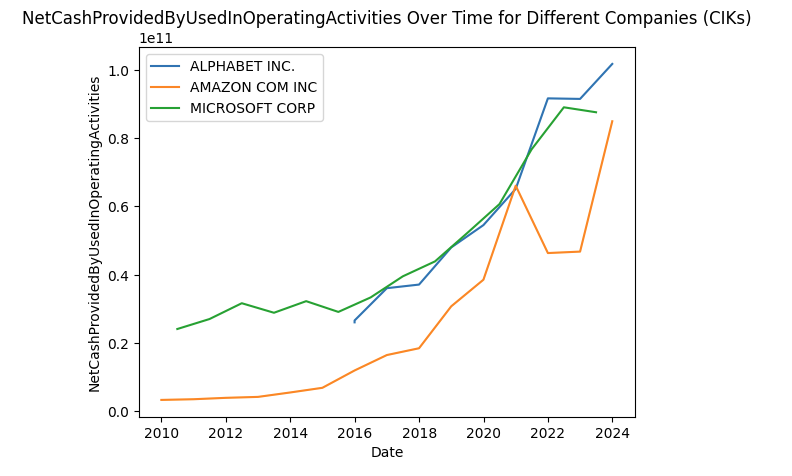
TheCashFlowStandardizercollects and/or calculates the following positions of cash flow statements:NetCashProvidedByUsedInOperatingActivities CashProvidedByUsedInOperatingActivitiesDiscontinuedOperations NetCashProvidedByUsedInOperatingActivitiesContinuingOperations DepreciationDepletionAndAmortization DeferredIncomeTaxExpenseBenefit ShareBasedCompensation IncreaseDecreaseInAccountsPayable IncreaseDecreaseInAccruedLiabilities InterestPaidNet IncomeTaxesPaidNet NetCashProvidedByUsedInInvestingActivities CashProvidedByUsedInInvestingActivitiesDiscontinuedOperations NetCashProvidedByUsedInInvestingActivitiesContinuingOperations PaymentsToAcquirePropertyPlantAndEquipment ProceedsFromSaleOfPropertyPlantAndEquipment PaymentsToAcquireInvestments ProceedsFromSaleOfInvestments PaymentsToAcquireBusinessesNetOfCashAcquired ProceedsFromDivestitureOfBusinessesNetOfCashDivested PaymentsToAcquireIntangibleAssets ProceedsFromSaleOfIntangibleAssets NetCashProvidedByUsedInFinancingActivities CashProvidedByUsedInFinancingActivitiesDiscontinuedOperations NetCashProvidedByUsedInFinancingActivitiesContinuingOperations ProceedsFromIssuanceOfCommonStock ProceedsFromStockOptionsExercised PaymentsForRepurchaseOfCommonStock ProceedsFromIssuanceOfDebt RepaymentsOfDebt PaymentsOfDividends EffectOfExchangeRateFinal CashPeriodIncreaseDecreaseIncludingExRateEffectFinal CashAndCashEquivalentsEndOfPeriodWith just a few lines of code, you'll get a comparable dataset with the main positions of an cash flow statement for Microsoft, Alphabet, and Amazon: (see the standardize the cash flow statements and make them comparable for details)
from secfsdstools.e_collector.companycollecting import CompanyReportCollector
from secfsdstools.e_filter.rawfiltering import ReportPeriodRawFilter, MainCoregRawFilter, OfficialTagsOnlyRawFilter, USDOnlyRawFilter
from secfsdstools.f_standardize.cf_standardize import CashFlowStandardizer

bag = CompanyReportCollector.get_company_collector(ciks=[789019, 1652044,1018724]).collect() #Microsoft, Alphabet, Amazon
filtered_bag = bag[ReportPeriodRawFilter()][MainCoregRawFilter()][OfficialTagsOnlyRawFilter()][USDOnlyRawFilter()]
joined_bag = filtered_bag.join()

standardizer = CashFlowStandardizer()

standardized_cf_df = joined_bag.present(standardizer)
standardized_cf_df = standardized_cf_df[(standardized_cf_df.fp=="FY") & (standardized_cf_df.qtrs==4)].copy()

import matplotlib.pyplot as plt
# Group by 'name' and plot NetCashProvidedByUsedInOperatingActivities for each group
# Note: using the `present` method ensured that the same cik has always the same name even if the company name did change in the past
for name, group in standardized_cf_df.groupby('name'):
    plt.plot(group['date'], group['NetCashProvidedByUsedInOperatingActivities'], label=name, linestyle='-')

# Add labels and title
plt.xlabel('Date')
plt.ylabel('NetCashProvidedByUsedInOperatingActivities')
plt.title('NetCashProvidedByUsedInOperatingActivities Over Time for Different Companies (CIKs)')

# Display legend
plt.legend()
Automate processing
The framework provides two hook methods, that are called whenever the default update process is being executed. This way, you can implement additional processing steps that are executed, after a new data file from the sec.gov was downloaded, transformed to parquet, and index.
Have a look at 08_00_automation_basics
Daily Updates (Experimental)
Introduced with version 2.4.0, secfsdstools now also provides daily updates for filed reports at the SEC.
You have to activate it by adding dailyprocessing = True in the DEFAULT section of the configuration file.
Note, that there are some limitations (see 10_00_daily_financial_report_updates for details).
What basically happens, if dailyprocessing is switched on:
- reports that are not yet part of the quarterly zip files (fincancial statement data set) but are were filed, are downloaded in its raw formate, preprocessed in the same way as the SEC does, transformed to parquet and added to the index table. This means, that you have the latest report locally as soon as they were filed with the SEC.
- As soon as a new quarterly zip file is available, the data of the reports that are now part of the quarterly zip file is cleaned, and the according daily data is being removed, since they are not part of the "official" data set.
- Processing of the daily data is integrated in the example automation pipeline. Have a look at 08_03_automation_supporting_daily_data_example_2.4.2 for details.
Links
- For a detail description of the content and the structure of the dataset
- Release Notes
- Documentation
- QuickStart Jupyter Notebook
- Explore the data with an interactive Notebook
- collector_deep_dive Notebook
- filter_deep_dive Notebook.
- bulk_data_processing_deep_dive Notebook
- bulk_data_processing_memory_efficiency
- standardizer_basics
- standardize the balance sheets and make them comparable
- standardize the income statements and make them comparable
- standardize the cash flow statements and make them comparable
- automate additional processing steps that are executed after new data is discovered
- checkout the
u_usecasespackage - Trouble shooting and known issues
1 maintainer

Metadata
1 maintainer
Release files for secfsdstools 2.4.3
For a detailed explanation of source distributions (sdists) and built distributions (wheels), please see the package formats documentation.
Source distribution (sdist)
| File | Size | Uploaded | Provenance | |
|---|---|---|---|---|
| secfsdstools-2.4.3.tar.gz | 118.8 kB | With provenance | Details |
Built distribution (wheel)
| File | Interpreter | ABI | Platform | Reset |
|---|---|---|---|---|
| secfsdstools-2.4.3-py3-none-any.whl | Python 3 | none | any | Details |
Total release size: 267.2 kB
Release files / secfsdstools-2.4.3.tar.gz
| Download URL | secfsdstools-2.4.3.tar.gz |
|---|---|
| Size | 118.8 kB |
| Tags | Source |
|
SHA-256 checksum How to use checksums |
2f197905427f6d83c0480a1a6348cb682be469165eeb23c06864abf3ddf73fb9
|
|
BLAKE2b-256 checksum How to use checksums |
0a62213c9a253b63a3ebef61bcf30891249a6833d6523810fc56c513312fde87
|
| Upload date | |
|
Uploaded using Trusted Publishing? What is trusted publishing? |
Yes |
| Uploaded via |
twine/6.1.0 CPython/3.13.7
|
Provenance
Provenance describes where a file came from. On PyPI, provenance is shared via attestations, which provide a verifiable record of the build or publishing details. View details, limitations and caveats.


PyPI Publish Attestation
PyPI verified that this artifact, at this checksum, originated from the publisher listed below.
Signed by GitHub Actions, verified by PyPI on Sep 20, 2025.
Transparency logRelease files / secfsdstools-2.4.3-py3-none-any.whl
| Download URL | secfsdstools-2.4.3-py3-none-any.whl |
|---|---|
| Size | 148.4 kB |
| Tags | Python 3 |
|
SHA-256 checksum How to use checksums |
db7dd4a6a1cef8412ca59059b4a3d2660c3416dd29721ab923a0f5372d0520ca
|
|
BLAKE2b-256 checksum How to use checksums |
2f8ed4297ce7ffb8aaff628e1b7a593f1e68858f34f243c2554f89fade97a5af
|
| Upload date | |
|
Uploaded using Trusted Publishing? What is trusted publishing? |
Yes |
| Uploaded via |
twine/6.1.0 CPython/3.13.7
|
Provenance
Provenance describes where a file came from. On PyPI, provenance is shared via attestations, which provide a verifiable record of the build or publishing details. View details, limitations and caveats.
PyPI Publish Attestation
PyPI verified that this artifact, at this checksum, originated from the publisher listed below.
Signed by GitHub Actions, verified by PyPI on Sep 20, 2025.
Transparency logSecurity for secfsdstools 2.4.3
Provenance
Provenance describes where a file came from. On PyPI, provenance is shared via attestations, which provide a verifiable record of the build or publishing details. View details, limitations and caveats.
Full provenance
All 2 files in this release have been uploaded with provenance metadata.
Attestation for secfsdstools-2.4.3.tar.gz
PyPI Publish Attestation
PyPI verified that this artifact, at this checksum, originated from the publisher listed below.
Signed by GitHub Actions, verified by PyPI on Sep 20, 2025.
Transparency logA note on package security
PyPI is a repository for distributing packages, not a service for auditing them. While third-party security researchers and our staff do their best to detect and remove malicious packages, PyPI cannot guarantee the quality, security or suitability of any given package.














