
SecretScraper


Overview
SecretScraper is a highly configurable web scrape tool that crawl links from target websites and scrape sensitive data via regular expression.
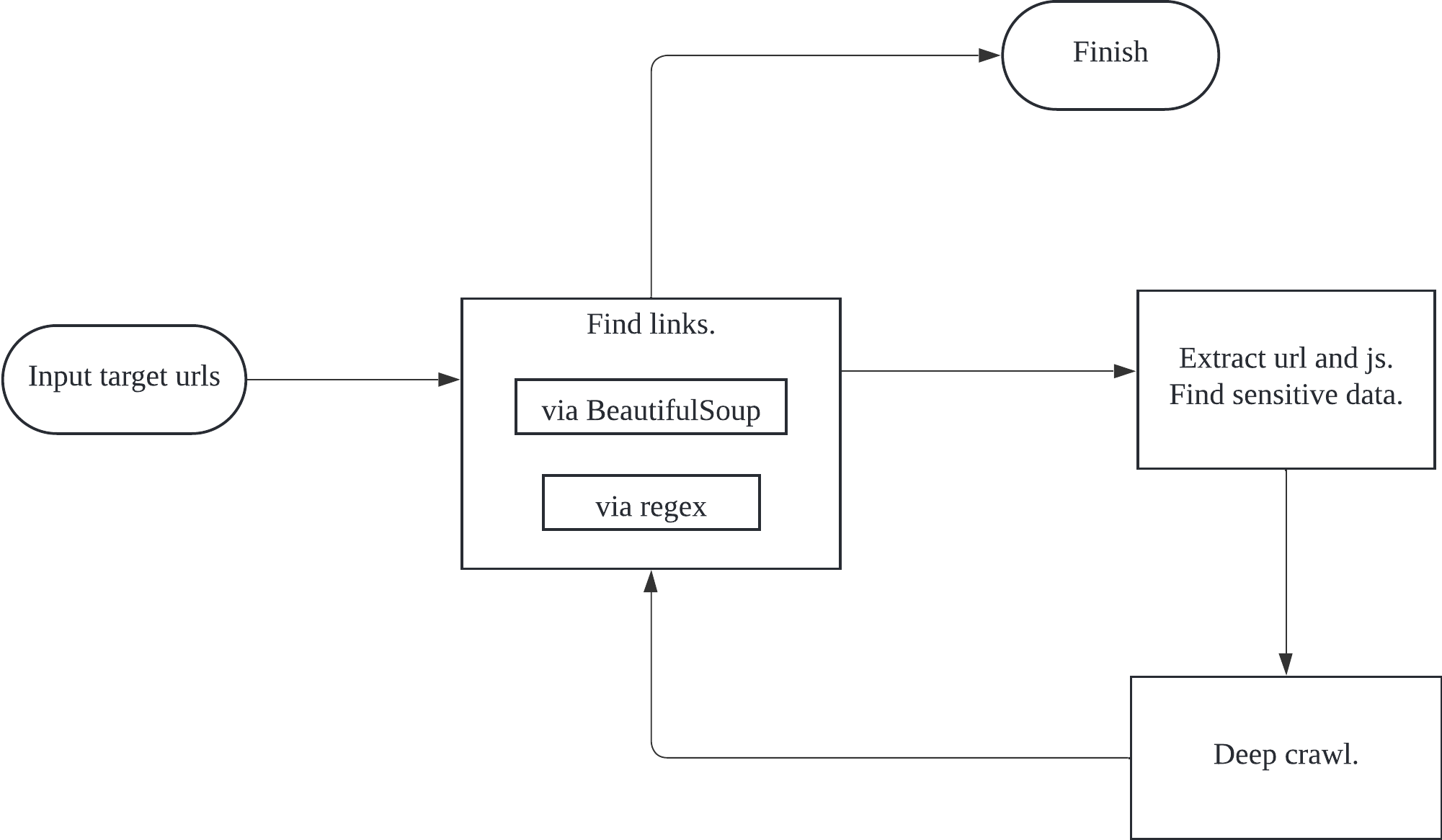
Feature
- Web crawler: extract links via both DOM hierarchy and regex
- Support domain white list and black list
- Support multiple targets, input target URLs from a file
- Support local file scan
- Scalable customization: header, proxy, timeout, cookie, scrape depth, follow redirect, etc.
- Built-in per-domain rate limiting and HTTP connection pool limits
- Built-in regex to search for sensitive information
- Flexible configuration in yaml format
Prerequisite
- Platform: Test on MacOS, Ubuntu and Windows.
- Python Versions: 3.9 - 3.14
Usage
Install
pip install secretscraper
Update
pip install --upgrade secretscraper
Note that, since Secretscraper generates a default configuration under the work directory if settings.yml is absent, so remember to update the settings.yml to the latest version(just copy from Customize Configuration).
Development
uv sync
uv run tox
Basic Usage
Start with single target:
secretscraper -u https://scrapeme.live/shop/
Start with multiple targets:
secretscraper -f urls
# urls
http://scrapeme.live/1
http://scrapeme.live/2
http://scrapeme.live/3
http://scrapeme.live/4
http://scrapeme.live/1
Sample output:


All supported options:
> secretscraper --help
Usage: secretscraper [OPTIONS]

  Main commands

Options:
  -V, --version                Show version and exit.
  --debug                      Enable debug.
  -a, --ua TEXT                Set User-Agent
  -c, --cookie TEXT            Set cookie
  -d, --allow-domains TEXT     Domain white list, wildcard(*) is supported,
                               separated by commas, e.g. *.example.com,
                               example*
  -D, --disallow-domains TEXT  Domain black list, wildcard(*) is supported,
                               separated by commas, e.g. *.example.com,
                               example*
  -f, --url-file FILE          Target urls file, separated by line break
  -i, --config FILE            Set config file, defaults to settings.yml
  -m, --mode [1|2]             Set crawl mode, 1(normal) for max_depth=1,
                               2(thorough) for max_depth=2, default 1
  --max-page INTEGER           Max page number to crawl, default 100000
  --max-depth INTEGER          Max depth to crawl, default 1
  --max-connections INTEGER    Max total HTTP connections
  --max-keepalive-connections INTEGER
                               Max keep-alive HTTP connections
  --max-concurrent-per-domain INTEGER
                               Max simultaneous requests per domain
  --min-request-interval FLOAT
                               Minimum seconds between requests to the same
                               domain
  -o, --outfile FILE           Output result to specified file in csv format
  -s, --status TEXT            Filter response status to display, seperated by
                               commas, e.g. 200,300-400
  -x, --proxy TEXT             Set proxy, e.g. http://127.0.0.1:8080,
                               socks5://127.0.0.1:7890
  -H, --hide-regex             Hide regex search result
  -F, --follow-redirects       Follow redirects
  -u, --url TEXT               Target url
  --detail                     Show detailed result
  --validate                   Validate the status of found urls
  -l, --local PATH             Local file or directory, scan local
                               file/directory recursively
  --help                       Show this message and exit.
Advanced Usage
Validate the Status of Links
Use --validate option to check the status of found links, this helps reduce invalid links in the result.
secretscraper -u https://scrapeme.live/shop/ --validate --max-page=10
Thorough Crawl
The max depth is set to 1, which means only the start urls will be crawled. To change that, you can specify
via --max-depth <number>. Or in a simpler way, use -m 2 to run the crawler in thorough mode which is equivalent
to --max-depth 2. By default the normal mode -m 1 is adopted with max depth set to 1.
secretscraper -u https://scrapeme.live/shop/ -m 2
Write Results to Csv File
secretscraper -u https://scrapeme.live/shop/ -o result.csv
Tune Crawl Rate Limits
Use these options to reduce pressure on a target domain and cap local socket usage:
secretscraper -u https://scrapeme.live/shop/ \
  --max-connections 100 \
  --max-keepalive-connections 50 \
  --max-concurrent-per-domain 5 \
  --min-request-interval 0.2
Domain White/Black List
Support wildcard(*), white list:
secretscraper -u https://scrapeme.live/shop/ -d *scrapeme*
Black list:
secretscraper -u https://scrapeme.live/shop/ -D *.gov
Hide Regex Result
Use -H option to hide regex-matching results. Only found links will be displayed.
secretscraper -u https://scrapeme.live/shop/ -H
Extract secrets from local file
secretscraper -l <dir or file>
Switch to hyperscan
I have implemented the regex matching functionality with both hyperscan and re module, re module is used as default, if you purse higher performance, you can switch to hyperscan by changing the handler_type to hyperscan in settings.yml.
There are some pitfalls of hyperscan which you have to take caution to use it:
- not support regex group: you can not extract content by parentheses.
- different syntax from
re
You'd better write regex separately for the two regex engine.
Customize Configuration
The built-in config is shown as below. You can assign custom configuration via -i settings.yml.
verbose: false
debug: false
loglevel: critical
logpath: log
handler_type: re

proxy: "" # http://127.0.0.1:7890
max_depth: 1 # 0 for no limit
max_page_num: 1000 # 0 for no limit
timeout: 5
follow_redirects: true
workers_num: 1000
max_connections: 100 # total HTTP connection pool size
max_keepalive_connections: 50 # keep-alive connections retained in the pool
max_concurrent_per_domain: 5 # simultaneous requests allowed per domain
min_request_interval: 0.2 # seconds between requests to the same domain
headers:
  Accept: "*/*"
  Cookie: ""
  User-Agent: Mozilla/5.0 (Windows NT 10.0; WOW64) AppleWebKit/537.36 (KHTML, like Gecko) Chrome/80.0.3987.87 Safari/537.36 SE 2.X MetaSr 1.0

urlFind:
  - "[\"'‘“`]\\s{0,6}(https{0,1}:[-a-zA-Z0-9()@:%_\\+.~#?&//={}]{2,250}?)\\s{0,6}[\"'‘“`]"
  - "=\\s{0,6}(https{0,1}:[-a-zA-Z0-9()@:%_\\+.~#?&//={}]{2,250})"
  - "[\"'‘“`]\\s{0,6}([#,.]{0,2}/[-a-zA-Z0-9()@:%_\\+.~#?&//={}]{2,250}?)\\s{0,6}[\"'‘“`]"
  - "\"([-a-zA-Z0-9()@:%_\\+.~#?&//={}]+?[/]{1}[-a-zA-Z0-9()@:%_\\+.~#?&//={}]+?)\""
  - "href\\s{0,6}=\\s{0,6}[\"'‘“`]{0,1}\\s{0,6}([-a-zA-Z0-9()@:%_\\+.~#?&//={}]{2,250})|action\\s{0,6}=\\s{0,6}[\"'‘“`]{0,1}\\s{0,6}([-a-zA-Z0-9()@:%_\\+.~#?&//={}]{2,250})"
jsFind:
  - (https{0,1}:[-a-zA-Z0-9()@:%_\+.~#?&//=]{2,100}?[-a-zA-Z0-9()@:%_\+.~#?&//=]{3}[.]js)
  - '["''‘“`]\s{0,6}(/{0,1}[-a-zA-Z0-9()@:%_\+.~#?&//=]{2,100}?[-a-zA-Z0-9()@:%_\+.~#?&//=]{3}[.]js)'
  - =\s{0,6}[",',’,”]{0,1}\s{0,6}(/{0,1}[-a-zA-Z0-9()@:%_\+.~#?&//=]{2,100}?[-a-zA-Z0-9()@:%_\+.~#?&//=]{3}[.]js)

dangerousPath:
  - logout
  - update
  - remove
  - insert
  - delete

rules:
  - name: Swagger
    regex: \b[\w/]+?((swagger-ui.html)|(\"swagger\":)|(Swagger UI)|(swaggerUi)|(swaggerVersion))\b
    loaded: true
  - name: ID Card
    regex: \b((\d{8}(0\d|10|11|12)([0-2]\d|30|31)\d{3})|(\d{6}(18|19|20)\d{2}(0[1-9]|10|11|12)([0-2]\d|30|31)\d{3}(\d|X|x)))\b
    loaded: true
  - name: Phone
    regex: "['\"](1(3([0-35-9]\\d|4[1-8])|4[14-9]\\d|5([\\d]\\d|7[1-79])|66\\d|7[2-35-8]\\d|8\\d{2}|9[89]\\d)\\d{7})['\"]"
    loaded: true
  - name: JS Map
    regex: \b([\w/]+?\.js\.map)
    loaded: true
  - name: URL as a Value
    regex: (\b\w+?=(https?)(://|%3a%2f%2f))
    loaded: false
  - name: Email
    regex: "['\"]([\\w]+(?:\\.[\\w]+)*@(?:[\\w](?:[\\w-]*[\\w])?\\.)+[\\w](?:[\\w-]*[\\w])?)['\"]"
    loaded: true
  - name: Internal IP
    regex: '[^0-9]((127\.0\.0\.1)|(10\.\d{1,3}\.\d{1,3}\.\d{1,3})|(172\.((1[6-9])|(2\d)|(3[01]))\.\d{1,3}\.\d{1,3})|(192\.168\.\d{1,3}\.\d{1,3}))'
    loaded: true
  - name: Cloud Key
    regex: \b((accesskeyid)|(accesskeysecret)|\b(LTAI[a-z0-9]{12,20}))\b
    loaded: true
  - name: Shiro
    regex: (=deleteMe|rememberMe=)
    loaded: true
  - name: Suspicious API Key
    regex: "[\"'][0-9a-zA-Z]{32}['\"]"
    loaded: true
  - name: Jwt
    regex: "['\"](ey[A-Za-z0-9_-]{10,}\\.[A-Za-z0-9._-]{10,}|ey[A-Za-z0-9_\\/+-]{10,}\\.[A-Za-z0-9._\\/+-]{10,})['\"]"
    loaded: true
TODO
- Support headless browser
- Add regex doc reference
- Fuzz path that are 404
- Separate subdomains in the result
- Optimize url collector [//]: # (- [ ] Employ jsbeautifier)
- Generate configuration file
- Detect dangerous paths and avoid requesting them
- Support url-finder output format, add
--detailoption - Support windows
- Scan local file
- Extract links via regex
Change Log
2024.5.25 Version 1.4
- Support csv output
- Set
remodule as regex engine by default - Support to select regex engine by configuration
handler_type
2024.4.30 Version 1.3.9
- Add
--validateoption: Validate urls after the crawler finish, which helps reduce useless links - Optimize url collector
- Optimize built-in regex
2024.4.29 Version 1.3.8
- Optimize log output
- Optimize the performance of
--debugoption
2024.4.29 Version 1.3.7
- Test on multiple python versions
- Support python 3.9~3.11
2024.4.29 Version 1.3.6
- Repackage
2024.4.28 Version 1.3.5
- New Features
- Support windows
- Optimize crawler
- Prettify output, add
--detailoption - Generate default configuration to settings.yml
- Avoid requesting dangerous paths
2024.4.28 Version 1.3.2
- New Features
- Extract links via regex
2024.4.26 Version 1.3.1
- New Features
- Support scan local files
2024.4.15
- Add status to url result
- All crawler test passed
1 maintainer

Metadata
1 maintainer
Release files for secretscraper 1.4.3
For a detailed explanation of source distributions (sdists) and built distributions (wheels), please see the package formats documentation.
Source distribution (sdist)
| File | Size | Uploaded | Provenance | Actions |
|---|---|---|---|---|
| secretscraper-1.4.3.tar.gz | 519.5 kB | Without provenance | Details for secretscraper-1.4.3.tar.gz |
Built distribution (wheel)
| File | Interpreter | ABI | Platform | Actions Reset |
|---|---|---|---|---|
| secretscraper-1.4.3-py3-none-any.whl | Python 3 | none | any | Details for secretscraper-1.4.3-py3-none-any.whl |
Total release size: 554.3 kB
Release files / secretscraper-1.4.3.tar.gz
| Download URL | secretscraper-1.4.3.tar.gz |
|---|---|
| Size | 519.5 kB |
| Tags | Source |
|
SHA-256 checksum How to use checksums |
2cbcff0dc7ee7871440d2a65ef5fccb421bb0df69638ed59d3712785c31f3859
|
|
BLAKE2b-256 checksum How to use checksums |
151cf536bc3b9b9c5944cb4051a197eb76eec7c633b077b8b8a59be88c9b2196
|
| Upload date | |
|
Uploaded using Trusted Publishing? What is trusted publishing? |
No |
| Uploaded via |
uv/0.11.2 {"installer":{"name":"uv","version":"0.11.2","subcommand":["publish"]},"python":null,"implementation":{"name":null,"version":null},"distro":{"name":"macOS","version":null,"id":null,"libc":null},"system":{"name":null,"release":null},"cpu":null,"openssl_version":null,"setuptools_version":null,"rustc_version":null,"ci":null}
|
Release files / secretscraper-1.4.3-py3-none-any.whl
| Download URL | secretscraper-1.4.3-py3-none-any.whl |
|---|---|
| Size | 34.8 kB |
| Tags | Python 3 |
|
SHA-256 checksum How to use checksums |
cffa4607ed55d54b95ba5c8a4b78d9b638913877cf41c38d969ba3f4cd48b966
|
|
BLAKE2b-256 checksum How to use checksums |
29b090bb4d92772653705634fcb65f74d9d1e0914046eb7ac2ebed01c0bf37f7
|
| Upload date | |
|
Uploaded using Trusted Publishing? What is trusted publishing? |
No |
| Uploaded via |
uv/0.11.2 {"installer":{"name":"uv","version":"0.11.2","subcommand":["publish"]},"python":null,"implementation":{"name":null,"version":null},"distro":{"name":"macOS","version":null,"id":null,"libc":null},"system":{"name":null,"release":null},"cpu":null,"openssl_version":null,"setuptools_version":null,"rustc_version":null,"ci":null}
|
Security for secretscraper 1.4.3
Provenance
Provenance describes where a file came from. On PyPI, provenance is shared via attestations, which provide a verifiable record of the build or publishing details. View details, limitations and caveats.
No provenance found
None of the files in this release were uploaded with provenance metadata.
A note on package security
PyPI is a repository for distributing packages, not a service for auditing them. While third-party security researchers and our staff do their best to detect and remove malicious packages, PyPI cannot guarantee the quality, security or suitability of any given package.
To learn more about protecting yourself from malicious actors, visit our package security documentation.














