
Real-time AI threat monitoring. Protect your apps from prompt injection, leaks, and attacks in just a few lines of code.

Project description
 SecureVector
Security & Observability for AI Agents
Audit every tool. Catch the threats. All locally.
- Secures tool calls and LLM traffic — locally. Allow / deny / ask, enforced at agent runtime via native plugins, framework SDKs, or the multi-provider proxy. Nothing leaves your machine.
- Tamper-evident audit chain — every tool call appended to a SHA-256 hash-chained log, verifiable from the Tool Activity tab.
- 72 detection rules + Guardian ML — OWASP LLM Top 10 + 28 agent-attack chains (prompt injection, jailbreaks, credential exfiltration, PII). An offline ML model catches obfuscated/encoded attacks regex misses — sub-millisecond, fail-open. Details ↓
- Token + cost tracking — per-agent, per-model spend in real time.
- Apache 2.0, no signup —
pip installand you're covered in 60 seconds.
Works with every agent
| Agent / runtime | How to add | Audit runtime_kind |
|---|---|---|
| Claude Code | Native plugin — inline hooks, zero proxy | claude-code |
| OpenAI Codex (CLI 0.133+) | Native plugin | codex |
| GitHub Copilot CLI | Native plugin | copilot-cli |
| Cursor | Native plugin | cursor |
| OpenClaw / ClawdBot | Native plugin | openclaw |
| LangChain | SDK — securevector-sdk-langchain (pip install) |
langchain |
| LangGraph | SDK — securevector-sdk-langgraph (pip install) |
langgraph |
| CrewAI | SDK — securevector-sdk-crewai (pip install) |
crewai |
Native plugins enforce inline (zero proxy); SDKs secure tool calls — all on one enforcement core, so a single tool_id="Bash" rule covers Bash on Claude Code, exec_command on Codex, and shell calls on Cursor & OpenClaw. SDK modes: observe logs (tool runs), enforce blocks. Install from the Integrations tab.
Also supported for LLM traffic (no per-agent runtime_kind attribution): the multi-provider proxy — Ollama · n8n · any OpenAI-compatible app via OPENAI_BASE_URL; the MCP server — Claude Desktop & other MCP clients (pip install securevector-ai-monitor[mcp]); and a raw POST /analyze for any HTTP client. MCP tools invoked from a plugged-in harness are attributed to that harness's runtime_kind.






▶ Watch the Demo
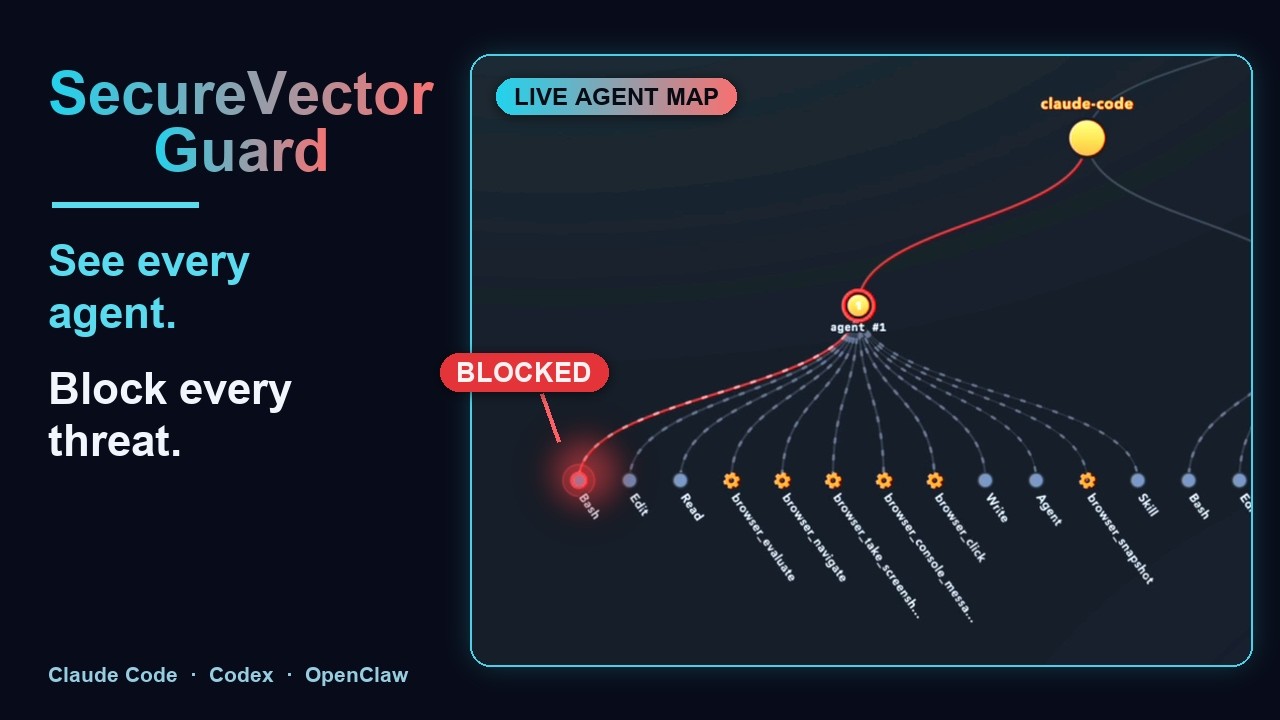
Threat detection, tool permissions, and cost tracking — running locally in real time.
What's new in v4.8.0
- Framework SDKs for LangChain, LangGraph, and CrewAI — pip-installable middleware/tool wrappers that secure tool calls and stream them onto the Agent Map by
runtime_kind(see the "Works with every agent" table above).What's new in v4.7.0
- Fleet management (cloud accounts, optional) — fleet-wide Agent Maps + Agent Runs for devices enrolled via a mint token (SVET); opt-in and metadata-only. Non-enrolled (local-only) installs forward nothing.
- SecureVector Guard for Cursor — native plugin + hooks for the Cursor agent (see the plugins table above).
Full release history in the CHANGELOG.
How It Works

SecureVector protects your AI agents at three layers:
- Pre-install — the Skill Scanner analyzes agent skill packages for shell access, network calls, and hidden risks before you install them
- Runtime — audits every tool call to a SHA-256 hash-chained log, and scans prompts, responses, and natural-language tool inputs (WebFetch / Skill / Task / Agent prompts) for injection attacks, data leaks, and unauthorized access. Shell command bodies and file content are audited but not threat-scanned — that scope mismatch produced false positives, see the v4.2.0 notes above.
- Observe — the SIEM Forwarder ships every threat + tool-call audit to your SOC in OCSF 1.3.0 format (Splunk HEC, Datadog, Microsoft Sentinel, Google Chronicle, IBM QRadar, OTLP, generic webhook, or a local NDJSON file) so AI events correlate with your existing security signals. Metadata-only by default; raw data is opt-in per destination.
For OpenClaw, the native plugin runs inside the agent with zero latency. For other frameworks, the multi-provider proxy intercepts traffic. 100% local — events only leave the machine when you configure a SIEM destination you control.
| The Problem | The Fix |
|---|---|
|
AI agents are powerful — and completely unprotected. Every prompt your AI agent sends, every secret it handles, every piece of user data — goes straight to the LLM provider with nothing in between. No spend limit. No injection protection. No audit trail. You're flying blind. |
SecureVector runs on your machine. For OpenClaw/ClawdBot, the native plugin handles everything — zero latency, no proxy overhead. For LangChain, CrewAI, and other frameworks, the multi-provider proxy routes traffic across OpenAI, Anthropic, Ollama, and more. It blocks threats, enforces tool permissions, and hard-stops agents that blow their budget. 100% local. No accounts. |
Quick Start
Step 1 — Install or download
pip install securevector-ai-monitor[app]
securevector-app --web
Or download the app: Windows · Linux · DEB · RPM · macOS
Step 2 — Open the app
Open http://localhost:8741 in your browser, or double-click the installed binary.
Step 3 — Connect your agent
| OpenClaw / ClawdBot (plugin, zero latency) | LangChain, CrewAI, Ollama, n8n (proxy) |
|---|---|
|
Observability & Monitoring — Go to Integrations → OpenClaw, click Install Plugin, restart OpenClaw. Done. No proxy, no env vars. |
Observability & Monitoring — Go to Integrations, pick your framework, click Start Proxy, and set the env var shown on the page. |
Block Mode (only if you want to enforce blocking) — Toggle Block Mode on the dashboard. The proxy starts automatically and blocks threats before they reach the LLM. Adds ~10–50ms latency per request. Applies to both plugin and proxy integrations.
If the app fails to launch because ports 8741/8742 are already in use, use --port <port> of your choice — the proxy starts automatically on port+1.
See Configuration for proxy or web/api port settings.
Open-source. 100% local by default. No API keys required.
Screenshots
All screenshots are from a local app instance.
🗺️ New in v4.5.0 — Agent Map & Runs
 Agent Map — your whole fleet at a glance: device → harness → agent → tool, across tree / radial / mesh / Sankey views. Blocked calls pop red, secret-touching agents wear a lock. Click any node to drill into its run. |
 Agent Runs — a turn-by-turn trace of every tool call with its allow / block verdict, risk, and reason. Here a prompt-injection and a credential-exfiltration attempt are both caught and blocked. |
 Tool Call History — 305 calls, 158 blocked: bash rm -rf, gmail_send to attacker, use_aws_cli stopped |
 Dashboard — threat counts, cost metrics, and tool permission status |
 LLM Cost Tracker — per-agent spend, budgets, and token breakdown |
 Skill Scanner — static security analysis for AI agent skills |
What You Get
| Tool Audit & Permissions | Threat Detection |
|---|---|
|
Every tool call is recorded into a SHA-256-linked audit log — tamper-evident, verifiable from the Tool Activity tab's Re-verify audit chain button (or via the |
Audits every tool call to the hash chain. Scans every prompt, response, and natural-language tool input (WebFetch / Skill / Task / Agent prompts) for prompt injection (direct and indirect), jailbreaks, PII leaks, credential exfiltration, and tool-result injection. 72 detection rules covering the OWASP LLM Top 10 + 28 agent-attack chains. Shell command bodies and file content are audited but not threat-scanned — the community rule pack was designed for LLM prose and produced false positives on shell syntax. Monitor-by-default; opt-in block mode for hard-stop. |
| Skill Scanner | Cost & Token Tracking |
|
Scan agent skills and tool packages before installing. Static analysis across 10 categories detects shell access, network calls, env var reads, code exec, base64 payloads, symlink escapes, and more. Optional AI review filters false positives automatically. |
Per-agent, per-model token and USD spend in real time. Daily budget limits with auto-stop. Both the Claude Code plugin and the OpenAI Codex plugin read session transcripts locally (CC: |
| SIEM Forwarder | Full Visibility |
|
Forward every threat + tool-call audit to your SOC in OCSF 1.3.0. Supports Splunk HEC, Datadog, Microsoft Sentinel, Google Chronicle, IBM QRadar, OpenTelemetry/OTLP, generic webhook, or a local NDJSON file. Metadata-only by default; raw data is opt-in per destination. |
Live dashboard showing every LLM request, tool call, token count, and threat event. Per-agent Replay timeline merges threat scans + tool audits + cost into one feed. |
| 100% Local by Default | |
|
Runs entirely on your machine. No accounts required. No data leaves your infrastructure unless you configure a SIEM destination. Open source under Apache 2.0. |
|
Performance: Rule-based analysis (default) adds ~10–50ms per request. Optional AI analysis adds 1–3s depending on the model and provider — shown on the dashboard so you can measure it against your actual traffic. Tool-permission decisions (allow / block / log_only): see the Tool Permissions guide.
Works With Everything
Your AI Stack — LangChain · LlamaIndex · CrewAI · AutoGen · LangGraph · n8n · Dify · OpenClaw/ClawdBot — or any framework that makes HTTP calls to an LLM provider.
LLM Providers — OpenAI · Anthropic · Ollama · Groq · and any OpenAI-compatible API.
Run Anywhere — macOS / Linux / Windows · Docker & Kubernetes · AWS / GCP / Azure · VMs · Lambda / Workers / Vercel.
Agent Integrations
| Agent/Framework | Integration |
|---|---|
| LangChain | securevector-sdk-langchain (tool-call SDK, recommended) or LLM Proxy |
| LangGraph | securevector-sdk-langgraph (tool-call SDK, recommended) or LLM Proxy |
| CrewAI | securevector-sdk-crewai (tool-call SDK, recommended) or LLM Proxy |
| Any OpenAI-compatible | LLM Proxy — see Integrations in UI |
| OpenClaw / ClawdBot (LLM gateway agent) | Native plugin (zero latency) — proxy only for block mode |
| n8n | Community Node |
| Claude Desktop | MCP Server Guide |
| Any OpenAI-compatible app | LLM Proxy — set OPENAI_BASE_URL to proxy |
| Any HTTP Client | POST http://localhost:8741/analyze with {"text": "..."} |
OpenClaw / ClawdBot
Native plugin with ZERO latency — runs inside the agent, no proxy needed. Install from the Integrations tab or curl -X POST http://localhost:8741/api/hooks/install. Enable block mode from the dashboard when you want to actively stop threats via proxy.
Claude Code
First-class plugin for Anthropic's Claude Code CLI — PreToolUse enforces tool-permission rules (allow / deny / ask, cloud-syncable), PostToolUse writes a tamper-evident audit row + scans prose tool inputs, UserPromptSubmit catches direct prompt-injection. Optional one-line statusline emitter surfaces live findings next to model / cwd / git state. Loopback-only, fail-open.
Install — two options:
# Option A: via the app UI
# Open http://127.0.0.1:8741 → Integrations → Claude Code → Install Plugin

# Option B: via CLI
securevector-app --install-plugin claude-code
# Uninstall: securevector-app --uninstall-plugin claude-code

# Then, in your Claude Code session:
/reload-plugins
What It Detects
| Input Threats (User to LLM) | Output Threats (LLM to User) |
|---|---|
| Prompt injection | Credential leakage (API keys, tokens) |
| Jailbreak attempts | System prompt exposure |
| Data exfiltration requests | PII disclosure (SSN, credit cards) |
| Social engineering | Jailbreak success indicators |
| SQL injection patterns | Encoded malicious content |
| Tool result injection (MCP) | — |
| Multi-agent authority spoofing | — |
| Permission scope escalation | — |
Full coverage: OWASP LLM Top 10
AI Agent Attack Protection (28 new rules · 72 total)
Built from real attack chains observed against production agent frameworks:
- Tool Result Injection — injected instructions hidden inside MCP tool responses
- Multi-Agent Authority Spoofing — impersonating trusted agents in multi-agent pipelines
- Permission Scope Escalation — agents requesting more permissions than granted
- MCP Tool Call Injection — malicious payloads delivered through MCP tool calls
- Evasion techniques (22 rules) — zero-width characters, encoding tricks, roleplay framing, leetspeak, semantic inversion, emotional manipulation, and more
Optional ML Detection Layer — SecureVector Guardian
Alongside the 72 regex rules, the app ships an optional ML detection layer — SecureVector Guardian, a stdlib-only semantic threat classifier. It runs in parallel with the rule engine and catches obfuscated, paraphrased, buried, or encoded attacks that literal patterns miss, folding its verdict into the same allow / alert / block decision. The model is fully local and runs offline — no cloud round-trip, no prompt text leaves your machine.
Install — comes with the app. Guardian is the securevector-guardian-model package, installed automatically as a dependency: pip install securevector-ai-monitor[app] pulls it in (pure Python, zero ML dependencies). pip install -U securevector-guardian-model + restart updates the model independently of app releases, and the loaded version is shown in Settings → Guardian ML Detection. The model runtime (~1.8 MB) is fetched once on first use and cached locally for offline use thereafter; for air-gapped installs, pre-place it and point SV_GUARDIAN_RUNTIME at the file.
On by default. Toggle it from Settings → Guardian ML Detection (default ON), or force it off globally with the SECUREVECTOR_ML_ENABLED=false environment flag. With Guardian disabled the regex rules keep running unchanged, and the layer is fail-open — any model error silently falls back to rules-only so it never breaks the analyze path.
What to expect when it's on. The model is pure Python (zero dependencies, no GPU, no network), so it runs on any machine. It analyzes in parallel with the regex rules, adding roughly ~0.15 ms per typical analysis (a prompt, tool call, or response — sub-millisecond), a few ms for ~1 KB of text, and up to ~100 ms only for very large documents (bounded, never unbounded). One-time startup is ~200 ms + ~34 MB RAM. Older/slower CPUs scale proportionally, but everyday inputs stay sub-millisecond. Full benchmark: model performance.
Device Identity
Every scan and audit row is stamped with a stable device_id so a customer running SecureVector across several laptops or agents can answer "which agent blocked this, which laptop is tampered, which machine spent what?" — not just "one of my installs did this".
Why we need it. A solo developer runs one install. A SOC team runs five to fifty. When an audit chain breaks, or a spike of blocked gmail-send calls shows up, the useful first question is which machine. Without a per-device tag, the answer is "some install" — which is useless in a fleet. device_id pins every row to a specific machine so dashboards, alerts, and compliance reviews can slice by device.
How it's generated (src/securevector/app/utils/device_id.py):
- Read the OS's existing stable machine identifier:
- macOS →
IOPlatformUUIDviaioreg - Linux →
/etc/machine-id(fallback/var/lib/dbus/machine-id) - Windows →
HKLM\SOFTWARE\Microsoft\Cryptography\MachineGuid
- macOS →
- SHA-256 hash it with a namespace prefix (
securevector-device-v1:<raw>) and truncate to 24 hex chars →sv-a1b2c3d4e5f6... - Cache the result in
~/Library/Application Support/ThreatMonitor/.device_id(0o600) so the OS fetch happens once per install. - If the OS refuses (rare: locked-down container, unusual Linux image), fall back to a random UUID cached to the same file.
Stability across reinstalls. The OS identifier outlives the app install — so uninstalling and reinstalling SecureVector on the same machine gives you the same device_id. Wiping the app data dir AND having no readable OS ID is the only combination that generates a new one. A new physical machine always gets a new ID.
Security / privacy posture — what the customer should know:
| Concern | Reality |
|---|---|
| Is the raw OS machine UUID transmitted? | No. It's read locally, SHA-256 hashed with a namespace, and only the hash is stored. The raw value never reaches a log file or outbound event. |
Can device_id be reversed to the OS UUID? |
SHA-256 is one-way. An attacker who already has the raw OS UUID can compute the device_id — but they already have the machine at that point, so there's no incremental leak. |
| Does it track users? | No. It tracks machines. Multiple users on one laptop share one device_id. It's not tied to email, username, or any identity field. |
| Is it sent to SecureVector Cloud? | Only if Cloud Connect is on AND you trigger an action that reaches the cloud (rule sync, cloud-routed /analyze). device_id goes in metadata alongside scan results. You can opt out by keeping Cloud Connect off — local-only operation never transmits it. |
| Is it in SIEM forwards? | Yes, when the v4.0+ SIEM forwarder is enabled — travels inside each OCSF event's unmapped block so your Splunk/Datadog can group by device. |
| Can the customer reset it? | Yes — delete .device_id in the app data dir. Next write will regenerate from the OS identifier (so same ID reappears) OR a fresh random UUID if the OS ID is unavailable. |
| Does it collide across containers cloned from the same image? | Potentially yes (they share /etc/machine-id). Not relevant for desktop use; mention it if you're deploying in Kubernetes. |
In one sentence: device_id is a machine-identifier-per-install, derived locally, hashed before storage, never transmitted except with explicit user opt-in (Cloud Connect or SIEM Forwarder).
SIEM Forwarder
Stream every threat detection and tool-call audit into your own SIEM — Splunk HEC, Datadog, Microsoft Sentinel, Google Chronicle, IBM QRadar, an OpenTelemetry collector, a local NDJSON file, or any HTTPS endpoint that accepts JSON. Your data, your pipes.
Why this is safe to ship with zero monetization:
| Feature | What leaves your machine |
|---|---|
| Scan verdict | scan_id, verdict, threat_score, risk_level, detected_types[], counts, durations |
| Tool-call audit | seq, action, risk, prev_hash, row_hash (the chain witness — lets your SIEM verify integrity) |
| Never transmitted | Prompt text, LLM output, matched patterns, reviewer reasoning, model reasoning |
The allow-list is enforced at enqueue time by _assert_metadata_only(). Even if the forwarder code were tampered with, it can't add the forbidden fields back.
Supported destinations (one code path, OCSF 1.3.0 payload):
| Kind | Target | Auth header |
|---|---|---|
splunk_hec |
https://<host>/services/collector/event |
Authorization: Splunk <HEC-token> |
datadog |
https://http-intake.logs.<site>/api/v2/logs |
DD-API-KEY: <key> |
otlp_http |
https://<collector>/v1/logs |
optional Authorization: Bearer <token> |
webhook |
anything that accepts JSON POST | optional Authorization: Bearer <token> |
Configure in Connect → SIEM Forwarder. Add SIEM destination → pick type → paste URL + token → Test → Save. Tokens are stored 0o600 in the app data dir, never in SQLite.
📊 Starter dashboards included:
| Platform | Template |
|---|---|
| Microsoft Sentinel | docs/siem/sentinel/securevector-workbook.json |
| Splunk | docs/siem/splunk/securevector-dashboard.xml |
| Datadog | docs/siem/datadog/securevector-dashboard.json |
| Grafana (Loki) | docs/siem/grafana/securevector-dashboard.json |
Each carries severity counters, events-over-time by severity, actor and MITRE-ish breakdowns, and a recent-high-severity log feed. MIT-licensed, AS-IS. Full install steps + field reference in docs/siem/README.md; trademark + upstream licenses in docs/siem/NOTICE.
Starter templates — import-test in your own stack and adjust queries / facets / sourcetypes before relying on them for production detections.
Reliability:
- Per-destination outbox with at-least-once delivery.
- A failing Datadog destination never blocks a healthy Splunk one.
- Per-destination circuit breaker backs off broken endpoints (1 min → 1 hour cap).
- Rows that fail 10 times are dropped (the health view shows the consecutive-failure count).
SIEM-side integrity verification. Every forwarded tool-call audit row carries its prev_hash and row_hash. Run a nightly search in your SIEM that rebuilds the chain — if a historic row has been tampered with on the local host, the forwarded evidence still tells the true story. That's the actual tamper evidence; the local chain alone is only the low bar.
Skill Scanner
Scan AI agent skills and tool packages before you install them. SecureVector performs static analysis across 10 detection categories, assigns a risk score, and optionally runs an AI review to filter false positives.
┌──────────────────────────────────────────────────────────────────────┐
│                        Skill Scanner Flow                           │
│                                                                     │
│   ┌─────────────┐     ┌──────────────────┐     ┌────────────────┐  │
│   │  Skill Dir   │────>│  Static Analysis  │────>│  Risk Scoring  │  │
│   │  or URL      │     │  (10 categories)  │     │  LOW/MED/HIGH  │  │
│   └─────────────┘     └──────────────────┘     └───────┬────────┘  │
│                                                         │           │
│                              ┌───────────────────────── │           │
│                              v                          v           │
│                     ┌─────────────────┐     ┌────────────────────┐  │
│                     │  AI Review      │     │  Policy Engine     │  │
│                     │  (optional LLM) │     │  allow/block rules │  │
│                     │  FP filtering   │     │  trusted publishers│  │
│                     └────────┬────────┘     └─────────┬──────────┘  │
│                              │                        │             │
│                              v                        v             │
│                     ┌──────────────────────────────────────┐        │
│                     │  Verdict: PASS / WARN / BLOCK        │        │
│                     │  + detailed findings per category     │        │
│                     └──────────────────────────────────────┘        │
└──────────────────────────────────────────────────────────────────────┘
Detection Categories
| Category | What It Finds |
|---|---|
shell_exec |
Subprocess calls, system commands |
network_domain |
HTTP requests, socket connections, DNS lookups |
env_var_read |
Access to environment variables (API keys, secrets) |
code_exec |
eval, dynamic code generation |
dynamic_import |
Runtime module loading |
file_write |
Writing to disk outside expected paths |
base64_literal |
Obfuscated payloads in base64 strings |
compiled_code |
.pyc, .so, .dll binaries embedded in the skill |
symlink_escape |
Symlinks pointing outside the skill directory |
missing_manifest |
No permissions.yml declaring required capabilities |
AI-Powered Review
Enable AI analysis (OpenAI, Anthropic, Ollama, Azure, or Bedrock) to automatically review findings and filter false positives. The AI examines each finding in context and adjusts the risk level — reducing noise without hiding real threats.
Open Source
SecureVector is fully open source. No cloud required. No accounts. No tracking. Run it, fork it, contribute to it.
Built for solo developers and small teams who ship AI agents without a security team or a FinOps budget. If you are building with LangChain, CrewAI, OpenClaw, or any agent framework — and you do not have someone watching your agent traffic and API spend — SecureVector is for you.
Install
Option 1: pip
Requires: Python 3.9+ (MCP requires 3.10+)
pip install securevector-ai-monitor[app]
securevector-app --web
Option 2: Binary installers
No Python required. Download and run.
| Platform | Download |
|---|---|
| Windows | SecureVector-v4.8.0-Windows-Setup.exe |
| macOS | SecureVector-4.8.0-macOS.dmg |
| Linux (AppImage) | SecureVector-4.8.0-x86_64.AppImage |
| Linux (DEB) | securevector_4.8.0_amd64.deb |
| Linux (RPM) | securevector-4.8.0-1.x86_64.rpm |
All Releases · SHA256 Checksums
Security: Only download installers from this official GitHub repository. Always verify SHA256 checksums before installation. SecureVector is not responsible for binaries obtained from third-party sources.
macOS binary note: Only download from this official GitHub repository and verify the SHA256 checksum before installing. (Prefer pip?
pip install securevector-ai-monitor[app]always works too.)
Other install options
| Install | Use Case | Size |
|---|---|---|
pip install securevector-ai-monitor |
SDK only — lightweight, for programmatic integration | ~18MB |
pip install securevector-ai-monitor[app] |
Full app — web UI, LLM proxy, cost tracking, tool permissions | 453 KB wheel · ~16 MB total on disk (incl. dependencies) |
pip install securevector-ai-monitor[mcp] |
MCP server — Claude Desktop, Cursor | ~38MB |
Deploy to your own cloud (self-host)
Want it as shared infrastructure instead of one laptop? Run the engine in your own cloud tenant — one terraform apply stands it up with a live HTTPS dashboard, so a whole team's agents point at a single instance. Open-source modules (Apache 2.0), one per provider:
| Cloud | Terraform module |
|---|---|
| AWS | terraform-aws-securevector |
| Azure | terraform-azurerm-securevector |
| Google Cloud | terraform-google-securevector |
| Oracle Cloud | terraform-oci-securevector |
Your data stays in your tenant. Pick a framework SDK or plugin and the module wires your agents to the deployed instance.
Configuration
SecureVector writes svconfig.yml to your app data directory on first run with sensible defaults.
The config path is printed at startup — ~/.local/share/securevector/threat-monitor/svconfig.yml (Linux), ~/Library/Application Support/SecureVector/ThreatMonitor/svconfig.yml (macOS), %LOCALAPPDATA%/SecureVector/ThreatMonitor/svconfig.yml (Windows). Key settings (all editable from the dashboard, which writes back to this file):
server:   { host: 127.0.0.1, port: 8741 }        # change port if 8741 is taken
security: { block_mode: false, output_scan: true } # log/warn by default; flip block_mode to hard-stop
budget:   { daily_limit: 5.00, warn: true, block: true }  # USD/day; daily_limit null to disable
tools:    { enforcement: true }                   # apply allow/block tool rules
proxy:    { integration: openclaw, mode: multi-provider, host: 127.0.0.1, port: 8742 }
          # integration: openclaw | langchain | langgraph | crewai | ollama; port defaults to server.port + 1
MCP Policies — Cloud Sync (optional)
If your org distributes signed MCP tool-policy bundles from SecureVector Cloud, enroll the device once and let the local app long-poll for updates.
1. Admin mints a token in the cloud admin UI (app.securevector.io → Onboarding → Invite users) and shares the install command.
2. User enrolls locally:
securevector-app enroll svet_<token>
The local app POSTs /api/v1/devices/enroll, persists org_id + signing key + auth credentials to ~/Library/Application Support/.credentials (macOS — equivalent path on Linux/Windows), and starts the cloud sync loop on next launch.
3. Set SECUREVECTOR_API_KEY for stable sync auth (recommended).
The local app accepts two auth methods on /policy/sync. The API key path is canonical — it eliminates the short-lived-JWT refresh fragility that can leave a device unable to sync if the refresh token goes stale.
export SECUREVECTOR_API_KEY=sk-<long-lived-key>
| Auth method | Header sent | Source | Lifetime | Sync stability |
|---|---|---|---|---|
| API key ✅ recommended | X-Api-Key: sk-... |
SECUREVECTOR_API_KEY env, then creds.api_key |
Long-lived | Robust — no refresh path needed |
| JWT (fallback) | Authorization: Bearer ... |
Stored from enrollment | ~1h, auto-refresh on 401/403 | Breaks if the refresh token expires; requires re-enrollment to recover |
When both are present, the API key wins. device_id rides as X-SecureVector-Device-Id on every request regardless of auth method; org_id is resolved server-side from the auth principal.
You can mint API keys in the cloud admin UI under Access Management. Set the env var in your shell profile or systemd service unit so it survives restarts.
4. Cloud Sync starts automatically — no further configuration needed. The local app already defaults to the production cloud endpoints (auth.securevector.io and engine.securevector.io). Override env vars exist for self-hosted / on-prem deployments only.
Synced rules are read-only on the device — authoring lives in the cloud admin. The MCP Policies page (sidebar → Configure → MCP Policies) shows verification status, applied policies + rules, and a Sync Now button for manual refresh.
Pointing Your Agent at the Proxy
For LangChain, CrewAI, Ollama, and other non-OpenClaw frameworks, point your application to SecureVector's proxy instead of the provider's API. OpenClaw/ClawdBot users only need this when block mode is enabled.
| 🪟 Windows | 🐧 Linux / macOS |
|---|---|
|
Command Prompt (current session) set OPENAI_BASE_URL=http://localhost:8742/openai/v1 set ANTHROPIC_BASE_URL=http://localhost:8742/anthropic PowerShell (current session) $env:OPENAI_BASE_URL="http://localhost:8742/openai/v1" $env:ANTHROPIC_BASE_URL="http://localhost:8742/anthropic" PowerShell (persistent, per user) [Environment]::SetEnvironmentVariable( "OPENAI_BASE_URL", "http://localhost:8742/openai/v1", "User" ) |
Terminal (current session) export OPENAI_BASE_URL=http://localhost:8742/openai/v1 export ANTHROPIC_BASE_URL=http://localhost:8742/anthropic Persistent (add to echo 'export OPENAI_BASE_URL=http://localhost:8742/openai/v1' >> ~/.bashrc echo 'export ANTHROPIC_BASE_URL=http://localhost:8742/anthropic' >> ~/.bashrc source ~/.bashrc |
Every request is scanned for prompt injection. Every response is scanned for data leaks. Every dollar is tracked — whether via native plugin (OpenClaw) or proxy (all other frameworks).
Supported providers (13): openai anthropic gemini ollama groq deepseek mistral xai together cohere cerebras moonshot minimax
Update
| Method | Command |
|---|---|
| PyPI | pip install --upgrade securevector-ai-monitor[app] |
| Source | git pull && pip install -e ".[app]" |
| Windows | Download latest .exe installer and run it (overwrites previous version) |
| macOS | Download latest .dmg, drag to Applications |
| Linux AppImage | Download latest .AppImage and replace the old file |
| Linux DEB | sudo dpkg -i securevector_<version>_amd64.deb |
| Linux RPM | sudo rpm -U securevector-<version>.x86_64.rpm |
After updating, restart SecureVector.
Documentation
- Installation Guide — Binary installers, pip, service setup
- Use Cases & Examples — LangChain, LangGraph, CrewAI, n8n, FastAPI
- MCP Server Guide — Claude Desktop, Cursor integration
- API Reference — REST API endpoints
- Security Policy — Vulnerability disclosure
Contributing
git clone https://github.com/Secure-Vector/securevector-ai-threat-monitor.git
cd securevector-ai-threat-monitor
pip install -e ".[dev]"
pytest tests/ -v
Contributing Guidelines · Code of Conduct
Cloud (optional, opt-in)
A separate cloud product handles MCP tool-permission policy sync across enrolled devices, per-org audit attribution, and per-device fleet slicing. It also adds AI Agent Governance — your agents' governance posture rolled into a single score across the fleet (app.securevector.io/governance) — plus EU AI Act orientation that maps your action-layer logging and tamper-evident tool-call audit to the relevant obligations (governance/eu-ai-act); orientation only, not legal advice. Sign in for the fleet-wide view — the local install already gives you the single-device snapshot. Strictly additive — the local install above works standalone without it. Details: securevector.io.
License
Apache License 2.0 — see LICENSE.
The starter SIEM dashboard templates under docs/siem/ (Splunk XML, Sentinel workbook, Datadog + Grafana JSON) are MIT-licensed — see docs/siem/LICENSE and docs/siem/NOTICE for trademark disclaimers.
SecureVector is a trademark of SecureVector. See NOTICE.
Release history Release notifications | RSS feed


Download files
Download the file for your platform. If you're not sure which to choose, learn more about installing packages.
Source Distribution
Built Distribution
Filter files by name, interpreter, ABI, and platform.
If you're not sure about the file name format, learn more about wheel file names.
Copy a direct link to the current filters
File details
Details for the file securevector_ai_monitor-4.8.0.tar.gz.
File metadata
- Download URL: securevector_ai_monitor-4.8.0.tar.gz
- Upload date:
- Size: 1.3 MB
- Tags: Source
- Uploaded using Trusted Publishing? No
- Uploaded via: twine/6.1.0 CPython/3.13.12
File hashes
| Algorithm | Hash digest | |
|---|---|---|
| SHA256 |
66c25d577845bfd71bcadeeb1015909078bb47c85d78a330f45f7ac4f9caa485
|
|
| MD5 |
a6f6bbe33b000ba7e319283a1011269c
|
|
| BLAKE2b-256 |
b0dc013917438a7ecae652e1639e094634aa508932265bd20c11b538b2b18e65
|
File details
Details for the file securevector_ai_monitor-4.8.0-py3-none-any.whl.
File metadata
- Download URL: securevector_ai_monitor-4.8.0-py3-none-any.whl
- Upload date:
- Size: 1.4 MB
- Tags: Python 3
- Uploaded using Trusted Publishing? No
- Uploaded via: twine/6.1.0 CPython/3.13.12
File hashes
| Algorithm | Hash digest | |
|---|---|---|
| SHA256 |
19358dd4be1a768fe6d91f0d7d993b039c5618d3bcf609924d36679c3bf7b275
|
|
| MD5 |
293c5d829a8bbcbcd5601d2c52428fcd
|
|
| BLAKE2b-256 |
2574c629f69debe47ecc202c4c18caf788be594b7c0159faa1c9a19b96da3b8c
|






