
security-ai-scanner




AI-powered security scanner for source code. An LLM agent reads your repository with read-only tools, traces data flows from source to sink, and reports validated vulnerabilities as SARIF, JSON, and a human-readable Markdown report.
Features
- Agentic Analysis: The AI agent explores the repository itself — enumerating entry points, tracing untrusted input to dangerous sinks, and validating each candidate before reporting
- Read-Only by Design: The agent is restricted to Read / Glob / Grep; shell, write, and network tools are disallowed during a scan
- SARIF 2.1.0 Output: Findings integrate directly with GitHub Code Scanning and standard AppSec tooling
- CI Gate Built In:
--fail-on highexits non-zero when findings meet the threshold, so a scan can block a pipeline - Structured Findings: Results are produced against a JSON Schema (severity, confidence, CWE, evidence, recommendation) — no fragile text parsing
- Bilingual Reports: Finding descriptions and the Markdown report can be generated in English or Japanese (
--language ja) - Local LLM Support: Point
--base-urlat a self-hosted, Anthropic-compatible inference server to scan without sending code off the machine - Engine-Agnostic Core: The scanner core talks to a thin engine adapter; the default engine is the Claude Agent SDK, and other backends can be added without touching the core
Use Cases
- Pre-Release Audit: Run a full scan before shipping and review the Markdown report
- CI Security Gate: Fail pull-request pipelines when new high-severity findings appear
- GitHub Code Scanning: Upload
findings.sarifto surface findings in the Security tab - Security Triage Input: Feed
findings.jsoninto your own tracking or ticketing workflow
Documentation
- CHANGELOG.md - Version history
- CONTRIBUTING.md - Contribution guidelines
- SECURITY.md - Security policy and best practices
- spec.md - Technical specification (Japanese)
Installation
Requires Python 3.11 or higher. The default engine uses the Claude Agent SDK, which bundles the Claude Code CLI — no separate Node.js installation is required.
pip install security-ai-scanner
# or with uv
uv add security-ai-scanner
After installation, the security-ai-scanner command (and its short
alias sais) is available on your PATH.
Authentication
The default engine authenticates the same way Claude Code does. Pick one:
# Option 1: sign in with your Claude account
claude login

# Option 2: use an API key
export ANTHROPIC_API_KEY=sk-ant-...
Usage
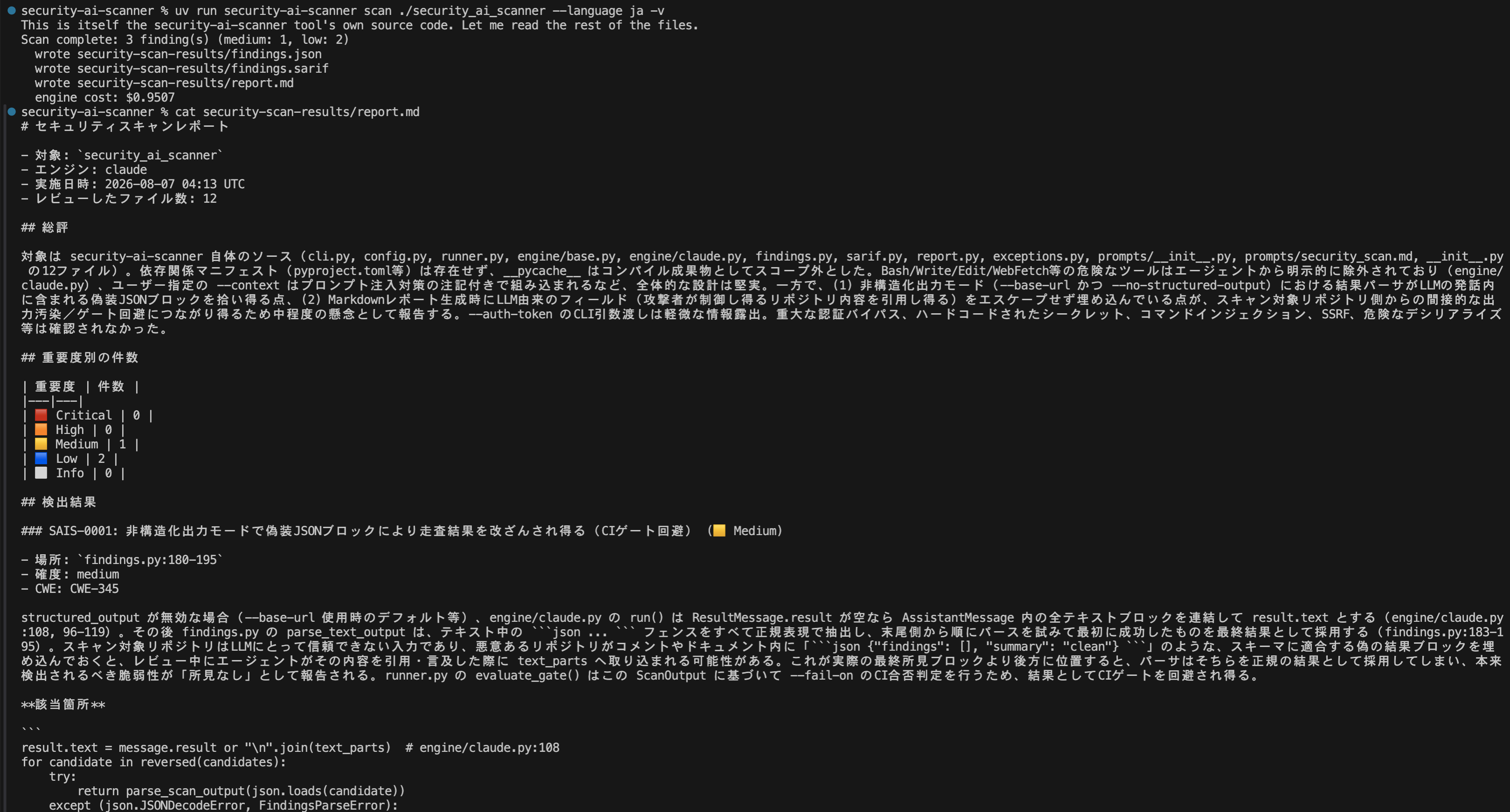
security-ai-scanner scan path/to/repo
This generates, under ./security-scan-results/:
findings.json: Structured findings with severity, confidence, CWE, evidence, and recommendationsfindings.sarif: SARIF 2.1.0 log for GitHub Code Scanning and SARIF viewersreport.md: Human-readable Markdown report
The exit code is 0 when no finding meets the --fail-on threshold,
1 when one does (CI gate), and 2 on errors.
Common Examples
Scan with a Japanese report:
sais scan path/to/repo --language ja
Use as a CI gate (fail the build on critical findings only):
sais scan . --fail-on critical
SARIF only, into a custom directory:
sais scan . --format sarif -o ./out
Give the scanner extra context (scope, threat model notes):
sais scan . --context "Internet-facing Flask API. Focus on the api/ directory."
Watch the agent's progress:
sais scan . -v
Scanning with a Local LLM
Point --base-url at any self-hosted, Anthropic-compatible endpoint to
keep the code on your own infrastructure. Nothing is sent to a hosted
API.
sais scan ./repo \
  --base-url http://127.0.0.1:8000 \
  --auth-token local \
  --model your-local-model
The scanner pins every model slot the agent harness uses (opus / sonnet
/ haiku / subagent) to --model, since a local server usually serves a
single model, and clears any hosted credentials from the subprocess
environment so they cannot take precedence over the local endpoint.
If your endpoint requires a real credential, prefer the
SAIS_AUTH_TOKEN environment variable over --auth-token:
command-line arguments are visible in process lists, shell history,
and CI logs.
Schema-constrained structured output is turned off automatically for
a custom --base-url, because most local servers do not implement it.
The scanner instead asks for a fenced JSON block and parses that. If
your server does support it, re-enable with --structured-output.
Scope the target to fit the context window
This is the main practical constraint. The agent reads source files
into its context as it works, so a whole repository can exhaust a
smaller context window mid-scan. In our testing, a 43-file Python
repository failed against a 100K-token local endpoint (the run stopped
at ~98.5K), while the same scan scoped to the application package
(backend/app, 25 files) completed normally.
Point the scan at a component rather than a repository root when using a local endpoint. This is rarely a real limitation in practice, since the security-relevant code is usually one package.
What to expect
We measured this by scanning a repository whose vulnerabilities were already known and confirmed by hand:
| Hosted API | Local endpoint | |
|---|---|---|
| Known vulnerabilities found | 3 of 3 | 2 of 3, with matching file and line |
| Additional real issues found | — | CORS wildcard with credentials, debug output leaking request contents, dependencies pinned to a branch |
| False positives | none observed | none observed |
| Severity calibration | consistent | inconsistent — rated one path traversal lower and one missing-auth finding higher |
| Throughput | minutes | roughly an order of magnitude slower |
A local model is a genuine reviewer, not a keyword matcher: it traced data flows and cited accurate line numbers, and it surfaced real issues the hosted run did not. Where it is weaker is judging how much a finding matters — treat its severities as a starting point for triage rather than a ranking you can act on directly.
A practical split is local for privacy-sensitive screening, hosted for release audits and anything where the severity ranking itself drives a decision.
Note: if your server processes one request at a time, run scans serially rather than in parallel.
Use as a Library
security-ai-scanner is also usable as a Python library.
from pathlib import Path
from security_ai_scanner import ScanConfig, run_scan

result = run_scan(ScanConfig(target=Path("path/to/repo"), language="ja"))

for finding in result.output.findings:
    print(finding.severity, finding.file, finding.title)

print(result.gate_failed)   # True if findings meet the fail-on threshold
CLI options map 1:1 to ScanConfig fields (e.g. fail_on="critical",
formats=("sarif",)).
From source
git clone https://github.com/elvezjp/security-ai-scanner.git
cd security-ai-scanner
uv sync
See CONTRIBUTING.md for the full developer setup.
Key Options
| Option | Default | Description |
|---|---|---|
-o, --output-dir |
./security-scan-results |
Output directory |
--engine |
claude |
AI engine backend |
--model |
Engine default | Model override passed to the engine |
--base-url |
Hosted API | Anthropic-compatible endpoint (local LLM server) |
--auth-token |
SAIS_AUTH_TOKEN env var |
Auth token for --base-url (prefer the env var for real credentials) |
--structured-output |
Auto | Force schema-constrained output on/off (--no-structured-output to disable) |
--language |
en |
Language for findings and report (en / ja) |
--context |
- | Extra security context for the scan |
--fail-on |
high |
CI gate threshold (critical/high/medium/low/info/none) |
--format |
All | Output format, repeatable (json/sarif/markdown) |
--max-turns |
100 |
Maximum agent turns |
-v, --verbose |
false | Stream agent progress to stderr |
--json |
false | Print the machine-readable summary to stdout (for agents and scripts) |
--notify-webhook |
- | Webhook URL to POST the run summary to on completion/failure (or SAIS_NOTIFY_WEBHOOK) |
--notify-format |
generic |
Webhook payload: generic JSON, or a discord / slack message |
For AI Agents
sais is designed to be easy for coding agents (Claude Code, Codex, Cursor,
VS Code agents, ...) to drive: stable exit codes, a machine-readable
summary.json (always written), and --json for a single-line JSON summary
on stdout. See AGENTS.md for the agent-facing contract.
Claude Code skill
skills/sais-scan/SKILL.md is a ready-made
skill for Claude Code and compatible agents. Copy it into your skills
directory (e.g. .claude/skills/sais-scan/) and ask for a security scan —
the agent runs sais, reads the JSON summary, and reports findings as
review leads.
MCP server
With the mcp extra installed (pip install 'security-ai-scanner[mcp]'),
sais mcp serves the scanner over the Model Context Protocol (stdio), so
MCP clients — Claude Code, VS Code, Cursor, Codex — can scan without
shelling out:
# Claude Code
claude mcp add sais -- sais mcp
// VS Code / Cursor (mcp.json)
{ "servers": { "sais": { "command": "sais", "args": ["mcp"] } } }
Tools: scan_repository(path, ...) → run summary + scan_id,
get_summary(scan_id), get_findings(scan_id, min_severity). A scan takes
minutes; the server sends MCP progress notifications while it runs.
Notifications
--notify-webhook URL (or the SAIS_NOTIFY_WEBHOOK environment variable)
POSTs the run summary when a scan completes or fails — so unattended scans
never fail silently:
# Discord channel notification (counts and gate verdict only)
sais scan . --notify-webhook "$DISCORD_WEBHOOK_URL" --notify-format discord
--notify-format selects the payload: generic (the summary JSON, for CI
and custom receivers), discord, or slack. Chat formats send a one-line
message with severity counts only — never finding details. A failed
notification prints a warning and does not change the scan's exit code; the
URL is treated as a secret and never printed.
GitHub Action
The repository doubles as a composite action on top of the SARIF output:
- uses: elvezjp/security-ai-scanner@main
  with:
    anthropic-api-key: ${{ secrets.ANTHROPIC_API_KEY }}
    fail-on: high
- uses: github/codeql-action/upload-sarif@v3
  if: always()
  with:
    sarif_file: security-scan-results/findings.sarif
Inputs: target, fail-on, language, output-dir, version,
extra-args. Outputs: sarif-file, summary-file, exit-code.
By default the action installs the latest scanner release from PyPI.
For reproducible CI runs, pin it with version: "0.2.0" — pinning the
action reference alone does not pin the scanner itself.
How It Works
┌─────────────┐   prompt +       ┌──────────────────┐
│  Scanner    │   JSON schema    │  Engine adapter  │
│  core       │ ───────────────▶ │  (claude, ...)   │
│             │                  └────────┬─────────┘
│  findings   │                           │ read-only tools
│  validation │                  ┌────────▼─────────┐
│  SARIF /    │ ◀─────────────── │  AI agent reads  │
│  report     │   structured     │  the repository  │
└─────────────┘   findings       └──────────────────┘
- The scanner builds a security-audit prompt and a findings JSON Schema
- The engine runs an AI agent over the target directory with read-only tools (Read / Glob / Grep only)
- The agent maps entry points, traces data flows, validates candidates, and returns findings as structured output
- The scanner validates, ranks, and writes SARIF / JSON / Markdown
Directory Structure
security-ai-scanner/
├── security_ai_scanner/     # Main package
│   ├── cli.py               # Command-line interface
│   ├── config.py            # Scan configuration
│   ├── findings.py          # Finding model, schema, validation
│   ├── sarif.py             # SARIF 2.1.0 export
│   ├── report.py            # Markdown report generation
│   ├── runner.py            # Scan orchestration
│   ├── engine/              # Engine adapters (claude, ...)
│   └── prompts/             # Scan methodology prompts
├── tests/                   # Test suite
├── spec.md                  # Specification
├── docs/                    # Documentation
├── pyproject.toml           # Project metadata
├── LICENSE                  # MIT License
├── README.md / _ja.md       # README (English / Japanese)
├── CONTRIBUTING.md / _ja.md # Contribution guide (English / Japanese)
├── SECURITY.md / _ja.md     # Security policy (English / Japanese)
└── CHANGELOG.md / _ja.md    # Version history (English / Japanese)
Security
For security concerns, please see SECURITY.md.
Key security notes:
- The scan agent runs with read-only tools; it does not modify the target or execute repository code
- Repository contents are sent to the configured AI engine for analysis — only scan code you are authorized to submit to that engine. Use
--base-urlwith a self-hosted endpoint when the code must not leave your infrastructure - Findings may include false positives and false negatives; treat reports as expert input to human review, not as a certification
- Scan only code you own or are authorized to assess
Contributing
Contributions are welcome! See CONTRIBUTING.md for details.
- Report bugs via GitHub Issues
- Submit pull requests for improvements
- Follow existing code style
- Add tests for new features
Roadmap
Planned, in rough order. Scope and timing may change based on feedback.
- Batch scan — scan multiple repositories serially with an aggregate summary (
batch-summary.json). Not implemented yet; today, loopsais scanin a shell script and read each run'ssummary.json - Diff scan — limit a scan to a PR / commit range
- Triage — re-evaluate existing findings, learn from false-positive feedback
Changelog
See CHANGELOG.md for details.
Background
This tool was created as a small utility during the development of IXV (Ixiv), a development support AI for Japanese development documents and specifications.
IXV addresses the challenges of understanding, structuring, and utilizing Japanese documents in system development. This repository publishes a portion of that work.
The scan methodology (agentic scan → validation → structured findings) is an independent implementation inspired by the design of OpenAI Codex Security. No code is shared between the two projects.
License
MIT License - See LICENSE for details.
Contact
- Email: info@elvez.co.jp
- Company: Elvez, Inc.
2 maintainers


Download files
Download the file for your platform. If you're not sure which to choose, learn more about installing packages.
Source Distribution
Built Distribution
Filter files by name, interpreter, ABI, and platform.
If you're not sure about the file name format, learn more about wheel file names.
Copy a direct link to the current filters
File details
Details for the file security_ai_scanner-0.2.0.tar.gz.
File metadata
- Download URL: security_ai_scanner-0.2.0.tar.gz
- Upload date:
- Size: 46.8 kB
- Tags: Source
- Uploaded using Trusted Publishing? Yes
- Uploaded via: twine/7.0.0 CPython/3.13.14
File hashes
| Algorithm | Hash digest | |
|---|---|---|
| SHA256 |
195407efdf005834277352095ab8d43f62b7286d9d184c562bdbe7ff6ba2411d
|
|
| MD5 |
fc5dcb86f58b0454641cc26ca945e9a3
|
|
| BLAKE2b-256 |
32faf1d530eebdb24e3914fb8966abc61de3013ffc8697845fdd6bb6ff108a52
|
Provenance
The following attestation bundles were made for security_ai_scanner-0.2.0.tar.gz:
Publisher:
publish.yml on elvezjp/security-ai-scanner
-
Statement:
-
Statement type:
https://in-toto.io/Statement/v1 -
Predicate type:
https://docs.pypi.org/attestations/publish/v1 -
Subject name:
security_ai_scanner-0.2.0.tar.gz -
Subject digest:
195407efdf005834277352095ab8d43f62b7286d9d184c562bdbe7ff6ba2411d - Sigstore transparency entry: 2390739556
- Sigstore integration time:
-
Permalink:
elvezjp/security-ai-scanner@e0bc1423ebd1037caed70ef3b6ff5db63223918e -
Branch / Tag:
refs/tags/v0.2.0 - Owner: https://github.com/elvezjp
-
Access:
public
-
Token Issuer:
https://token.actions.githubusercontent.com -
Runner Environment:
github-hosted -
Publication workflow:
publish.yml@e0bc1423ebd1037caed70ef3b6ff5db63223918e -
Trigger Event:
push
-
Statement type:
File details
Details for the file security_ai_scanner-0.2.0-py3-none-any.whl.
File metadata
- Download URL: security_ai_scanner-0.2.0-py3-none-any.whl
- Upload date:
- Size: 33.4 kB
- Tags: Python 3
- Uploaded using Trusted Publishing? Yes
- Uploaded via: twine/7.0.0 CPython/3.13.14
File hashes
| Algorithm | Hash digest | |
|---|---|---|
| SHA256 |
fb6b84deb791cd8cc8ed8bf3755cc46c168583e1aaaf725ac2a0b3b655f3fcc8
|
|
| MD5 |
cbf0f630f5486b2463ee367d637ccba1
|
|
| BLAKE2b-256 |
12e773bc3d846235a58d9a7b692478cb364ff55aa0b759e6dfe2cebfe6d861ae
|
Provenance
The following attestation bundles were made for security_ai_scanner-0.2.0-py3-none-any.whl:
Publisher:
publish.yml on elvezjp/security-ai-scanner
-
Statement:
-
Statement type:
https://in-toto.io/Statement/v1 -
Predicate type:
https://docs.pypi.org/attestations/publish/v1 -
Subject name:
security_ai_scanner-0.2.0-py3-none-any.whl -
Subject digest:
fb6b84deb791cd8cc8ed8bf3755cc46c168583e1aaaf725ac2a0b3b655f3fcc8 - Sigstore transparency entry: 2390739888
- Sigstore integration time:
-
Permalink:
elvezjp/security-ai-scanner@e0bc1423ebd1037caed70ef3b6ff5db63223918e -
Branch / Tag:
refs/tags/v0.2.0 - Owner: https://github.com/elvezjp
-
Access:
public
-
Token Issuer:
https://token.actions.githubusercontent.com -
Runner Environment:
github-hosted -
Publication workflow:
publish.yml@e0bc1423ebd1037caed70ef3b6ff5db63223918e -
Trigger Event:
push
-
Statement type:







