
Seeed Jetson Developer Tool — Flash, device management, app market, skills, and remote development

Project description
Seeed Jetson Develop Tool
An all-in-one AI development workbench for Seeed Studio Jetson products — covering everything from firmware flashing to app deployment.



Features
| Module | Status | Description |
|---|---|---|
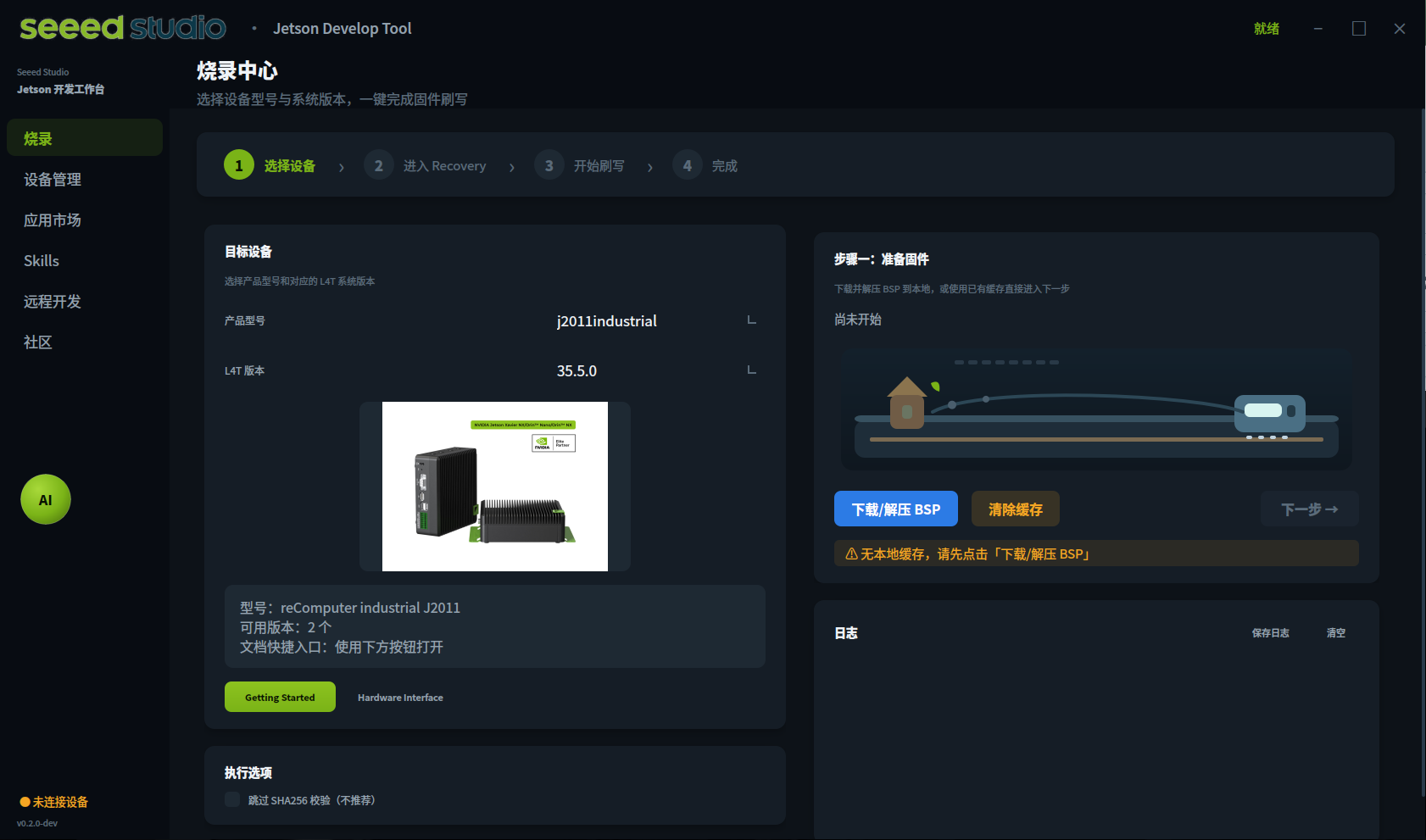
| Flash Center | ✅ | Download, verify (SHA256), and flash firmware for all Jetson series with one click |
| Device Management | ✅ | Quick diagnostics, peripheral detection, real-time device info |
| App Market | ✅ | Browse and install AI apps — YOLOv8, Ollama, DeepSeek, Node-RED, and more |
| Skills | ✅ | 50+ built-in automation skills covering drivers, AI deployment, and system tuning |
| Remote Dev | ✅ | SSH connection, VS Code Server, Jupyter Lab, VNC remote desktop, AI agent install |
| PC Network Sharing | ✅ | Share PC internet to Jetson over Ethernet, with automatic proxy forwarding |
| Jetson Init | ✅ | First-boot serial terminal wizard for username, network, and system setup |
| Community | ✅ | Quick links to Wiki, forum, Discord, and video tutorials |
Requirements
- Host OS: Ubuntu 20.04 / 22.04 / 24.04 (Linux recommended for flashing)
- Python: 3.10+
- Dependencies: PyQt5, paramiko, requests
Installation
pip install seeed-jetson-developer
Launch the GUI:
seeed-jetson-developer
Install from source:
git clone https://github.com/Seeed-Projects/Seeed-Jetson-DevelopTool.git
cd Seeed-Jetson-DevelopTool
pip install .
Or run directly from the repository:
python3 run_v2.py
Supported Devices
reComputer Super (Orin NX / Nano)
| Model | L4T |
|---|---|
| J4012s (16GB) / J4011s (8GB) | 36.4.3 |
| J3011s (8GB) / J3010s (4GB) | 36.4.3 |
reComputer Mini (Orin NX / Nano)
| Model | L4T |
|---|---|
| J4012mini / J4011mini | 36.3.0, 35.5.0 |
| J3011mini / J3010mini | 36.4.3, 36.3.0, 35.5.0 |
reComputer Robotics (GMSL, Orin NX / Nano)
| Model | L4T |
|---|---|
| J4012robotics / J4011robotics | 36.4.3 |
| J3011robotics / J3010robotics | 36.4.3 |
reComputer Classic (Orin NX / Nano)
| Model | L4T |
|---|---|
| J4012classic / J4011classic | 36.4.3, 36.4.0, 36.3.0, 35.5.0 |
| J3011classic / J3010classic | 36.4.3, 36.4.0, 36.3.0, 35.5.0 |
reComputer Industrial (Orin NX / Nano)
| Model | L4T |
|---|---|
| J4012industrial / J4011industrial | 36.4.3, 36.4.4, 36.4.0, 36.3.0, 35.5.0, 35.3.1 |
| J3011industrial / J3010industrial | 36.4.3, 36.4.0, 36.3.0, 35.5.0, 35.3.1 |
| J2012industrial / J2011industrial (Xavier NX) | 35.5.0, 35.3.1 |
reServer Industrial (Orin NX / Nano)
| Model | L4T |
|---|---|
| J4012reserver / J4011reserver | 36.4.3, 36.4.0, 36.3.0 |
| J3011reserver / J3010reserver | 36.4.3, 36.4.0, 36.3.0 |
J501 Carrier Board (AGX Orin)
| Model | L4T |
|---|---|
| 64GB / 32GB (standard + GMSL) | 36.4.3, 36.3.0, 35.5.0 |
Flash Workflow
- Select your device model and L4T version
- Click Download / Extract BSP — firmware is downloaded with SHA256 verification and resume support
- Put the device into Recovery mode (hold Recovery button while powering on)
- Click Detect Device to confirm USB connection
- Click Start Flash — takes 2–10 minutes
Flashing requires a Linux host. Windows users can use WSL2 with USB passthrough.
Remote Development
Connect to Jetson over SSH and access:
- VS Code Server — browser-based IDE running on Jetson
- Jupyter Lab — interactive Python notebooks
- VNC Remote Desktop — full graphical desktop via browser (noVNC) or VNC client
- AI Agent Install — install Claude Code, Codex, or OpenClaw CLI on Jetson
- PC Network Sharing — share PC internet to Jetson, with automatic proxy detection and forwarding
Skills
50+ built-in skills across these categories:
- Drivers & Fixes — USB-WiFi (88x2bu), 5G modules, Bluetooth conflicts, NVMe boot, Docker cleanup
- AI / LLM — PyTorch, Ollama, DeepSeek, Qwen2, LeRobot, vLLM
- Vision / YOLO — YOLOv8, DeepStream, NVBLOX, depth estimation
- Network & Remote — VS Code Server, VNC, SSH keys, proxy setup
- System Tuning — max performance mode, swap config, fan control, cache cleanup
Community skills in OpenClaw format are auto-loaded from the skills/openclaw/ directory.
CLI
# Launch the packaged GUI entry point
python3 -m seeed_jetson_develop.cli
Documentation
- Quick Start — Quick start guide
- Usage — CLI reference
- GUI Guide — GUI user guide
Support
- Wiki: https://wiki.seeedstudio.com/
- Forum: https://forum.seeedstudio.com/
- Discord: https://discord.gg/eWkprNDMU7
License
MIT


Download files
Download the file for your platform. If you're not sure which to choose, learn more about installing packages.
Source Distribution
Built Distribution
Filter files by name, interpreter, ABI, and platform.
If you're not sure about the file name format, learn more about wheel file names.
Copy a direct link to the current filters
File details
Details for the file seeed_jetson_developer-0.1.3.tar.gz.
File metadata
- Download URL: seeed_jetson_developer-0.1.3.tar.gz
- Upload date:
- Size: 45.2 MB
- Tags: Source
- Uploaded using Trusted Publishing? No
- Uploaded via: twine/6.2.0 CPython/3.12.4
File hashes
| Algorithm | Hash digest | |
|---|---|---|
| SHA256 |
e812273f53cab94da73b852ab9d98b04948c7725a454abbbb633a1b540aa487f
|
|
| MD5 |
441ee12f8a3a1c255d2d03bb488669ea
|
|
| BLAKE2b-256 |
a3e016f7be69111adc95900fe3088459f029cc3e61fba95c3d814f5ceb7d1289
|
File details
Details for the file seeed_jetson_developer-0.1.3-py3-none-any.whl.
File metadata
- Download URL: seeed_jetson_developer-0.1.3-py3-none-any.whl
- Upload date:
- Size: 46.7 MB
- Tags: Python 3
- Uploaded using Trusted Publishing? No
- Uploaded via: twine/6.2.0 CPython/3.12.4
File hashes
| Algorithm | Hash digest | |
|---|---|---|
| SHA256 |
77f3944d763b177dabe6846710140a6bc742874db60a2506ccce8e042a096280
|
|
| MD5 |
18ee0b3df409bdcf284842fe97fff679
|
|
| BLAKE2b-256 |
39c2ca24b496a0b6a2d25261b134e85399080d916886a01951dcb984532fe445
|






