
Plot Curve
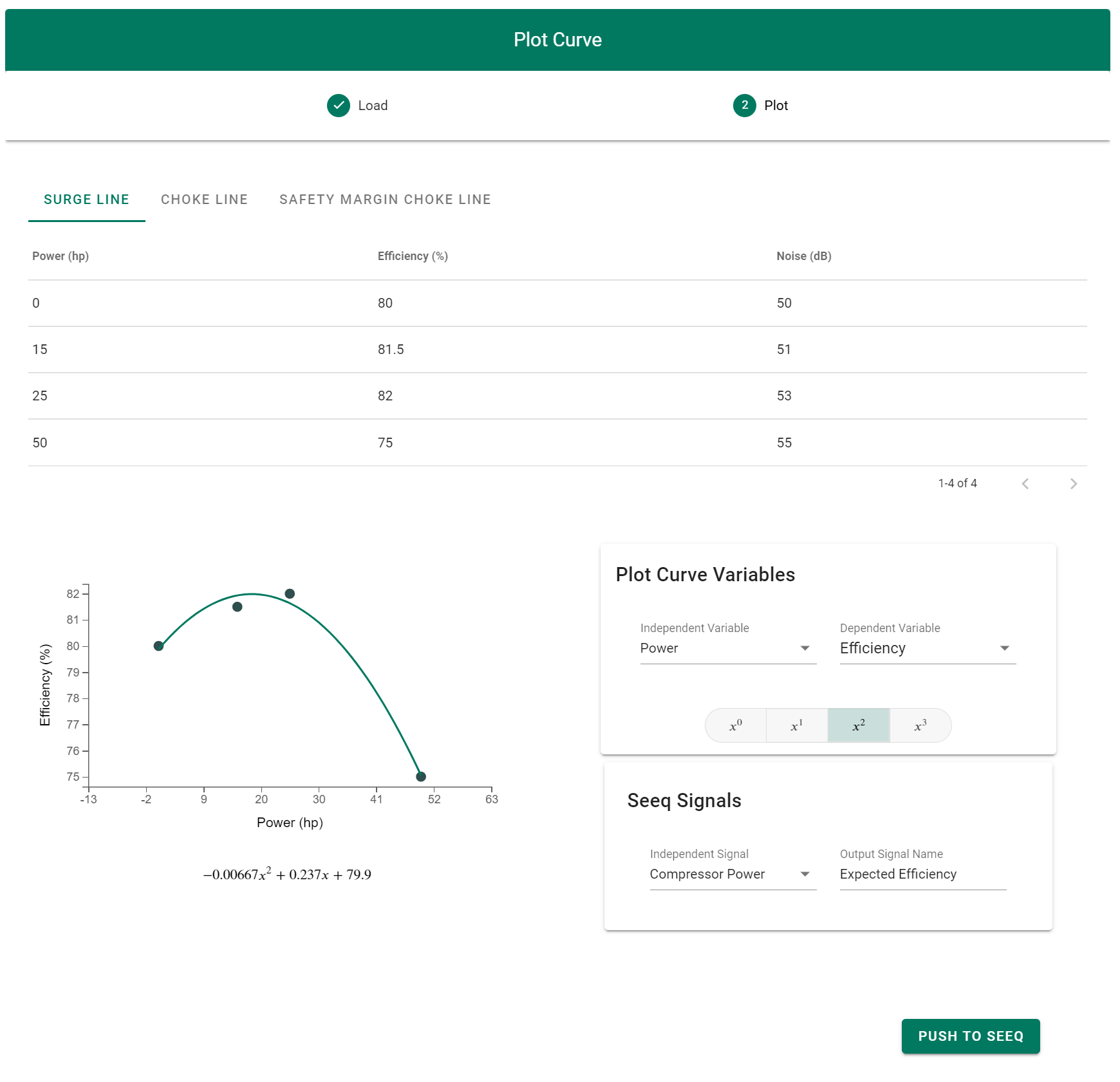
Plot Curve is a Seeq Add-On for fitting curves to tabular data, and pushing the resulting formulas to Seeq Workbench.
Installation
User Installation Requirements (Seeq Data Lab)
If you want to install seeq-plot-curve as a Seeq Add-on Tool, you will need a version of Seeq Data Lab:
- Seeq Data Lab (> R50.5.0, >R51.1.0, or >R52.1.0)
- Seeq module whose version matches the Seeq server version, and the version of SPy >= 182.25
- Seeq server admin access
User Installation (Seeq Data Lab)
- Create a new Seeq Data Lab project, and open the terminal window.
- Run pip install seeq-plot-curve
- Run python -m seeq.addons.plot_curve [--users <users_list> --groups <groups_list>]. During the installation you will be prompted for your username/password (an access key can also be used). It will also prompt for the url of the app notebook which will be available from the deployment folder in Seeq Data Lab.
- Verify that the Plot Curve add-on is present in the AddOn menu in workbench.
Development -- Generating a .addon file for drag and droo use with Add-on Manager
To create a .addon, run python package.py from the top directory after pip installing all the requirements in requirements.txt (pip install -r requirements.txt). It will produce a .addon file in the same directory.
Installation
From the Add-on Manager UI, locate the name of the Add-on and click "Install". As of 10/27/2023, this is only available to users with access to the seeq-add-ons-dev-local Jfrog gallery. If you do not have access, use the deprecated source installation steps below.
DEPRECATED - Source Installation
For development work, it is highly recommended creating a python virtual environment and install the package in that working environment. If you are not familiar with python virtual environments, you can take a look here
Once your virtual environment is activated, you can install seeq-plot-curve from source with:
python setup.py install
DEPRECATED - Development
We welcome new contributors of all experience levels.
- Official Source code repository : https://github.com/seeq12/seeq-plot-curve
- Issue tracker : https://github.com/seeq12/seeq-plot-curve/issues
You can get started by cloning the repository with the command :
$ git clone git@gitub.com:seeq12/seeq-plot-curve.git
There is a template for the developer notebook in /development. To get started, copy it to the root directory, create a new virtual environment and install the requirements.
$ cp ./development/developer_notebook.ipynb developer_notebook.ipynb
$ pip install -r requirements.txt
Next, modify the parameters within the workbook for your local environment (username, password, workbook, worksheet, etc.). Finally, start a jupyter server and navigate to the development notebook in the root directory.
$ jupyter notebook
Documentation can be updated by editing the source files in docs/src/source, and then using the provided bat file to generate the documentation in the docs folder, i.e.:
$ make.bat github
Important links
- Official source code repo: https://github.com/seeq12/seeq-plot-curve
- Official documentation : https://seeq12.github.io/seeq-plot-curve/
- Change Log : https://seeq12.github.io/seeq-plot-curve/changelog.html
- Issue tracker (bugs, feature requests, etc.) : https://github.com/seeq12/seeq-plot-curve/issues
Citation
Please cite this work as:
seeq-plot-curve
Seeq Corporation, 2022
https://github.com/seeq12/seeq-plot-curve
2 maintainers


Metadata
2 maintainers
Release files for seeq-plot-curve 0.1.4
For a detailed explanation of source distributions (sdists) and built distributions (wheels), please see the package formats documentation.
Source distribution (sdist)
| File | Size | Uploaded | |
|---|---|---|---|
| seeq-plot-curve-0.1.4.tar.gz | 35.3 kB | Details |
Built distribution (wheel)
| File | Interpreter | ABI | Platform | Reset |
|---|---|---|---|---|
| seeq_plot_curve-0.1.4-py3-none-any.whl | Python 3 | none | any | Details |
Total release size: 76.0 kB
Release files / seeq-plot-curve-0.1.4.tar.gz
| Download URL | seeq-plot-curve-0.1.4.tar.gz |
|---|---|
| Size | 35.3 kB |
| Tags | Source |
|
SHA-256 checksum How to use checksums |
a0cdf988362158bfab7996c806d22f4ff68862b97f8d073664e46855325f4939
|
|
BLAKE2b-256 checksum How to use checksums |
34ff2b1da26a6be00363e9bb5df4d1ededd88ccc98a8429dd3ea91f9048781bf
|
| Upload date | |
|
Uploaded using Trusted Publishing? What is trusted publishing? |
No |
| Uploaded via |
twine/5.0.0 CPython/3.10.11
|
Release files / seeq_plot_curve-0.1.4-py3-none-any.whl
| Download URL | seeq_plot_curve-0.1.4-py3-none-any.whl |
|---|---|
| Size | 40.8 kB |
| Tags | Python 3 |
|
SHA-256 checksum How to use checksums |
41d3c01e265732c775ad87e0a0a956b32d80147353c248330193b2eb36ac2dd0
|
|
BLAKE2b-256 checksum How to use checksums |
c94e9aed3933af74017624196fe3dcfa73f7528aba2fae3264b55b06d203016e
|
| Upload date | |
|
Uploaded using Trusted Publishing? What is trusted publishing? |
No |
| Uploaded via |
twine/5.0.0 CPython/3.10.11
|














