
User Interface for User-Defined Formula Functions
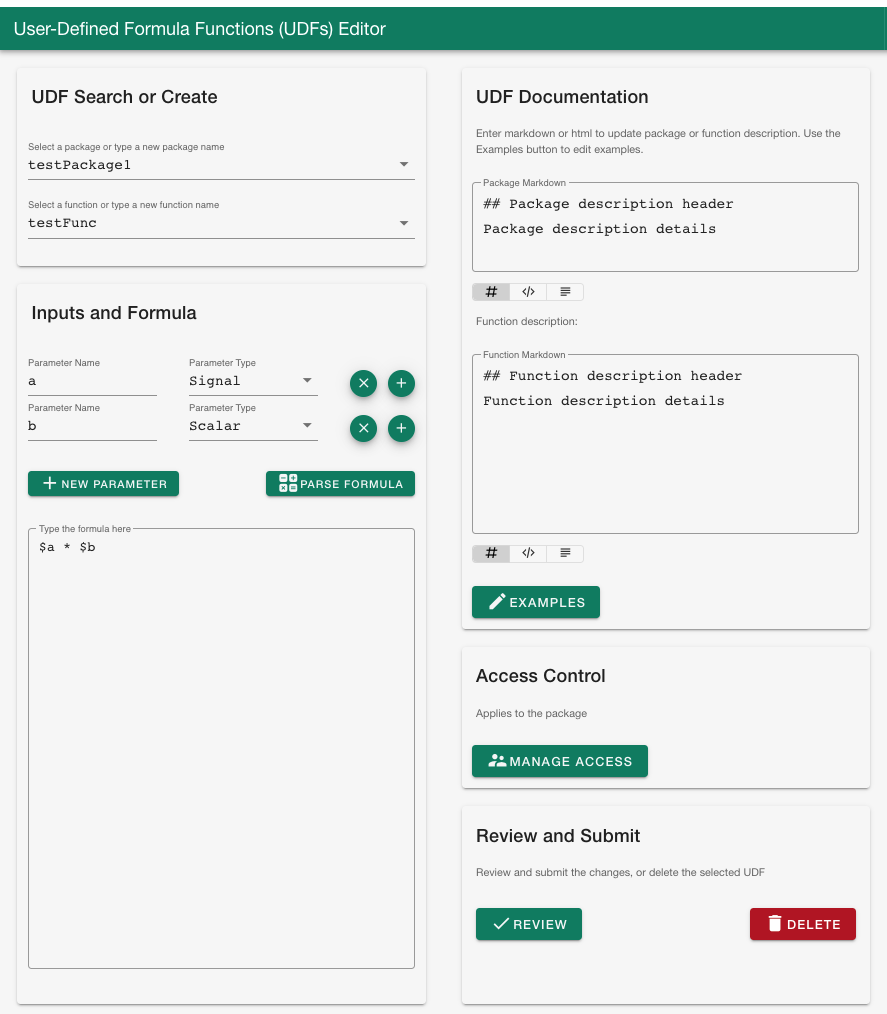
User-Defined Formula Function User Interface (UDF UI) is a Seeq Add-On that allows users to manage UDFs. This includes creating new UDFs, modifying existing ones, modifying access control, or deleting existing user defined functions and packages.
Development -- Generating a .addon file for drag and drop use with Add-on Manager
To create a .addon, run python package.py from the top directory after pip installing all the requirements in requirements.txt (pip install -r requirements.txt). It will produce a .addon file in the same directory.
Installation
From the Add-on Manager UI, locate the name of the Add-on and click "Install". As of 10/27/2023, this is only available to users with access to the seeq-add-ons-dev-local Jfrog gallery. If you do not have access, use the deprecated installation steps below.
DEPRECATED - Installation
User Installation Requirements (Seeq Data Lab)
If you want to install seeq-udf-ui as a Seeq Add-on Tool, you will need a version of Seeq Data Lab:
- Seeq Data Lab (> R50.5.0, >R51.1.0, or >R52.1.0)
- Seeq module whose version matches the Seeq server version, and the version of SPy >= 182.25
- Seeq server admin access
User Installation (Seeq Data Lab)
-
Create a new Seeq Data Lab project, and open the terminal window.
-
Run
pip install seeq-udf-ui -
(if you would like to install a version not on PyPi,
pip installa local.whlfile) -
Run
python -m seeq.addons.udf_ui [--users <users_list> --groups <groups_list>]. During the installation you will be prompted for your username/password (an access key can also be used). It will also prompt for the url of the app notebook which will be available from the deployment folder in Seeq Data Lab. -
Verify that the UDF UI add-on is present in the AddOn menu in workbench.
DEPRECATD - Source Installation
For development work, after checking out the code from repository,
it is highly recommended you create a python virtual environment,
pip install -r requirement.txt, and install the package in that
working environment. If you are not familiar with python virtual environments,
it is recommended you take a look here.
Once your virtual environment is activated, you can install seeq-udf-ui from source with:
python setup.py install
Or build a .whl file using the following command
python setup.py bdist_wheel
and then pip install [FILE NAME].whl
(the wheel file name can change depending on the version).
Development
We welcome new contributors of all experience levels.
-
Official Source code repository : https://github.com/seeq12/seeq-udf-ui
-
Issue tracker : https://github.com/seeq12/seeq-udf-ui/issues
You can get started by cloning the repository with the command :
$ git clone git@gitub.com:seeq12/seeq-udf-ui.git
For development work, after checking out the code from repository,
it is highly recommended you create a python virtual environment,
pip install -r requirements.txt, and install the package in that
working environment.
There is a template for the developer notebook in /development.
Next, modify the parameters within the workbook for your local environment (username, password, workbook, worksheet, etc.).
Finally, start a jupyter server and navigate to the development notebook in the root directory.
$ jupyter notebook
Documentation can be updated by editing the source files in docs/src/source, and then using the provided bat file to generate the documentation in the docs folder, i.e., from the docs/src folder:
$ make github
Generating a .addon file for use with Add-on Manager
To create a .addon, run python package.py from the top directory after pip installing all the requirements in requirements.txt (pip install -r requirements.txt). It will produce a .addon file in the same directory.
Important links
-
Official source code repo: https://github.com/seeq12/seeq-udf-ui
-
Official documentation : https://seeq12.github.io/seeq-udf-ui/
-
Change Log : https://seeq12.github.io/seeq-udf-ui/changelog.html
-
Issue tracker (bugs, feature requests, etc.) : https://github.com/seeq12/seeq-udf-ui/issues
Citation
Please cite this work as:
seeq-udf-ui
Seeq Corporation, 2022
https://github.com/seeq12/seeq-udf-ui
Version compatibility notes
As of Seeq R54, archived formula functions and packages cannot be found in the Workbench Formula editor, whereas prior to R54 they can still be found.
1 maintainer

Metadata
1 maintainer
Release files for seeq-udf-ui 0.2.0
For a detailed explanation of source distributions (sdists) and built distributions (wheels), please see the package formats documentation.
Source distribution (sdist)
| File | Size | Uploaded | |
|---|---|---|---|
| seeq-udf-ui-0.2.0.tar.gz | 28.6 kB | Details |
Built distribution (wheel)
| File | Interpreter | ABI | Platform | Reset |
|---|---|---|---|---|
| seeq_udf_ui-0.2.0-py3-none-any.whl | Python 3 | none | any | Details |
Total release size: 66.2 kB
Release files / seeq-udf-ui-0.2.0.tar.gz
| Download URL | seeq-udf-ui-0.2.0.tar.gz |
|---|---|
| Size | 28.6 kB |
| Tags | Source |
|
SHA-256 checksum How to use checksums |
9a778dacd8e71357ab96ef4fa3bb2f9a3d03b6df7dfaee11a4948fbf34d7e582
|
|
BLAKE2b-256 checksum How to use checksums |
15c38768840198950bb4c89c83f26c2c0eb86582eb7f6452f5b43ff5318b2a51
|
| Upload date | |
|
Uploaded using Trusted Publishing? What is trusted publishing? |
No |
| Uploaded via |
twine/5.1.0 CPython/3.11.5
|
Release files / seeq_udf_ui-0.2.0-py3-none-any.whl
| Download URL | seeq_udf_ui-0.2.0-py3-none-any.whl |
|---|---|
| Size | 37.6 kB |
| Tags | Python 3 |
|
SHA-256 checksum How to use checksums |
d493e50c7728029677013c6ed04e0a08fcfe277931a8b2daffa6d28c26433cec
|
|
BLAKE2b-256 checksum How to use checksums |
6ad513355d5edfa56a246a30278006ce99d684e2e078ae1052d16f5a90a471fd
|
| Upload date | |
|
Uploaded using Trusted Publishing? What is trusted publishing? |
No |
| Uploaded via |
twine/5.1.0 CPython/3.11.5
|














