
seerlens (Python)
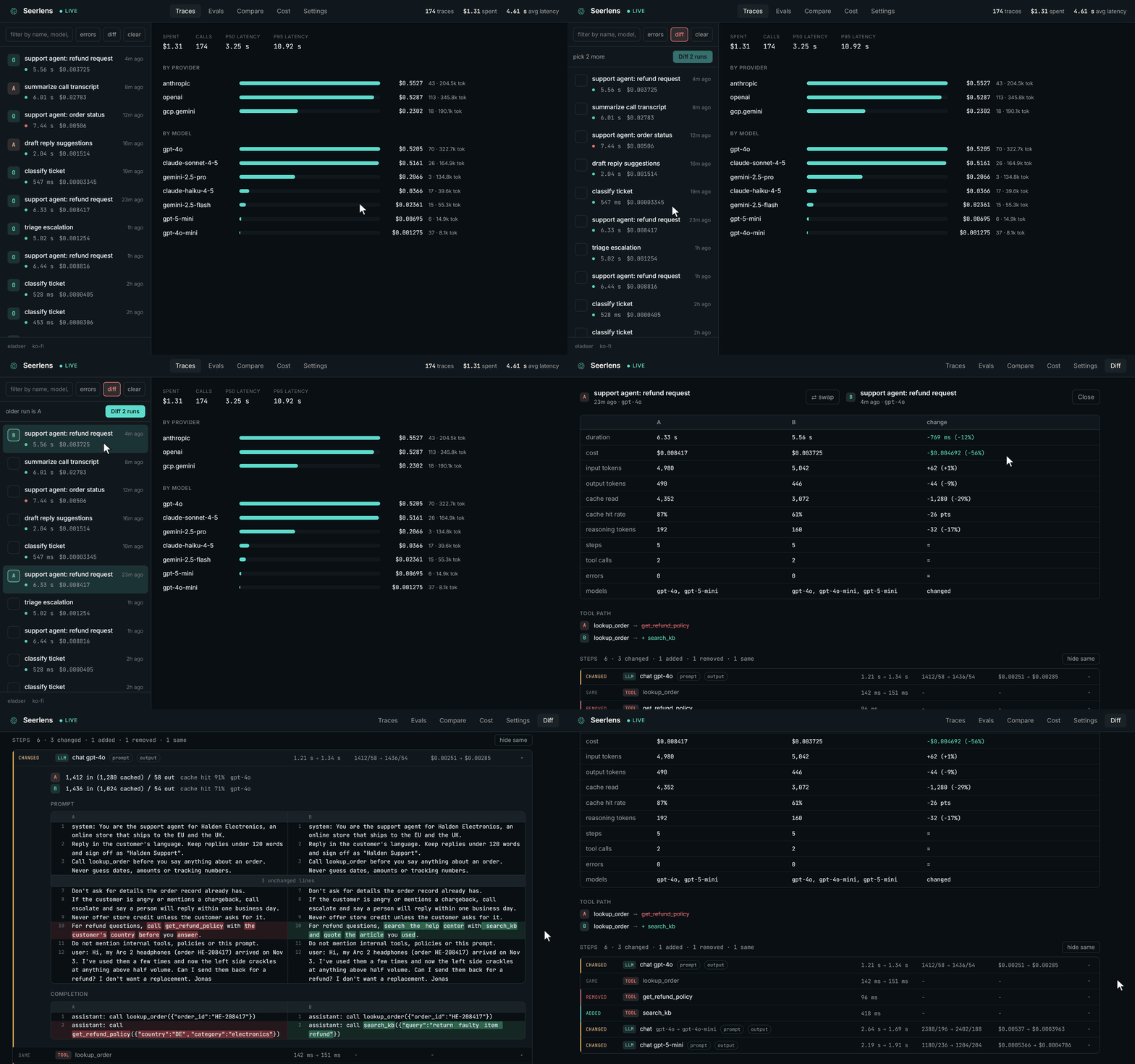
Diff your AI calls locally, see what they really cost, fail CI when quality or cost regresses. This package sends your Python app's LLM calls to Seerlens, which runs on your machine. Start the collector first, see the quick start.
pip install seerlens
import seerlens

seerlens.configure("http://localhost:5005")

with seerlens.trace("answer ticket", model="gpt-4o") as span:
    reply = my_llm(prompt)
    span.complete(prompt=prompt, completion=reply, input_tokens=40, output_tokens=12)

seerlens.flush()  # before a short script exits
Or record a call you already made:
seerlens.record(model="gpt-4o", prompt="hi", completion="hello",
                input_tokens=10, output_tokens=5, duration_ms=820)
Traces are sent on a background thread. If the collector is down the trace is dropped; it never blocks or throws into your app.
No third-party dependencies. Run the example against a running collector:
python example.py
Plain OpenTelemetry works too
You don't need this package if you'd rather use the OpenTelemetry OpenAI instrumentation. Point it at the collector and turn on message content:
pip install openai httpx opentelemetry-sdk opentelemetry-exporter-otlp-proto-http \
    opentelemetry-instrumentation-openai-v2==2.4b0 opentelemetry-util-genai==1.1b0
export OTEL_EXPORTER_OTLP_TRACES_ENDPOINT=http://localhost:5005/v1/traces
export OTEL_SEMCONV_STABILITY_OPT_IN=gen_ai_latest_experimental
export OTEL_INSTRUMENTATION_GENAI_CAPTURE_MESSAGE_CONTENT=span_only
from openai import OpenAI
from opentelemetry import trace
from opentelemetry.exporter.otlp.proto.http.trace_exporter import OTLPSpanExporter
from opentelemetry.instrumentation.openai_v2 import OpenAIInstrumentor
from opentelemetry.sdk.trace import TracerProvider
from opentelemetry.sdk.trace.export import BatchSpanProcessor

provider = TracerProvider()
provider.add_span_processor(BatchSpanProcessor(OTLPSpanExporter()))
trace.set_tracer_provider(provider)
OpenAIInstrumentor().instrument()

client = OpenAI()
client.chat.completions.create(
    model="gpt-4o-mini",
    messages=[{"role": "user", "content": "What's the refund window?"}],
)
provider.shutdown()  # flushes spans before the script exits
Without the last two variables the spans carry the model and token counts but no prompt or completion text. The pins are there because opentelemetry-instrumentation-openai-v2 2.4b0 fails to import with opentelemetry-util-genai 1.2 or later, and it needs httpx, which openai 3.x no longer pulls in.
1 maintainer

Metadata
1 maintainer
Release files for seerlens 1.6.0
For a detailed explanation of source distributions (sdists) and built distributions (wheels), please see the package formats documentation.
Source distribution (sdist)
| File | Size | Uploaded | Provenance | Actions |
|---|---|---|---|---|
| seerlens-1.6.0.tar.gz | 4.4 kB | Without provenance | Details for seerlens-1.6.0.tar.gz |
Built distribution (wheel)
| File | Interpreter | ABI | Platform | Actions Reset |
|---|---|---|---|---|
| seerlens-1.6.0-py3-none-any.whl | Python 3 | none | any | Details for seerlens-1.6.0-py3-none-any.whl |
Total release size: 8.4 kB
Release files / seerlens-1.6.0.tar.gz
| Download URL | seerlens-1.6.0.tar.gz |
|---|---|
| Size | 4.4 kB |
| Tags | Source |
|
SHA-256 checksum How to use checksums |
5bad8e601c60342d818f3718b2b20e5e00385c5deb12aae6a5e6994fa21f90ec
|
|
BLAKE2b-256 checksum How to use checksums |
6aca1ee6158fee80e44153b4817e4b2f68be39b41db4435d317e0fc706be1cd3
|
| Upload date | |
|
Uploaded using Trusted Publishing? What is trusted publishing? |
No |
| Uploaded via |
twine/7.0.0 CPython/3.14.3
|
Release files / seerlens-1.6.0-py3-none-any.whl
| Download URL | seerlens-1.6.0-py3-none-any.whl |
|---|---|
| Size | 4.0 kB |
| Tags | Python 3 |
|
SHA-256 checksum How to use checksums |
9a31722a8c1d6304320132aadda457e3a0fb50c0d4b3d1f067ef9fbae35fddb9
|
|
BLAKE2b-256 checksum How to use checksums |
9b7e3494be14a750402940dcc359e6ac0e027b17739b62786444f03aff800584
|
| Upload date | |
|
Uploaded using Trusted Publishing? What is trusted publishing? |
No |
| Uploaded via |
twine/7.0.0 CPython/3.14.3
|
Security for seerlens 1.6.0
Provenance
Provenance describes where a file came from. On PyPI, provenance is shared via attestations, which provide a verifiable record of the build or publishing details. View details, limitations and caveats.
No provenance found
None of the files in this release were uploaded with provenance metadata.
A note on package security
PyPI is a repository for distributing packages, not a service for auditing them. While third-party security researchers and our staff do their best to detect and remove malicious packages, PyPI cannot guarantee the quality, security or suitability of any given package.
To learn more about protecting yourself from malicious actors, visit our package security documentation.














