
SeetaPsych Gaze Screen
Screen gaze estimation modules for SeetaPsych
Usage
This project is already included in the seetapsych-lib default configuration. Download and use it via seetapsych-manager download.
For usage, refer to SeetaPsych.
The gaze estimation algorithms depend on open-gaze-estimation. Please install it from GitHub separately:
uv pip install git+https://github.com/Elorfiniel/open-gaze-estimation-2025-release.git
You can additionally add this algorithm module using the following methods.
WebUI
Run seetapsych-webui with the --files argument to use it.
seetapsych-webui --files \
  seetapsych_gaze_screen/modules/affnet.yml \
  seetapsych_gaze_screen/modules/tdgazenet.yml
Programmatic Usage
Add the following code in your program to use this algorithm module.
from seetapsych_lib.runtime.factory import Factory
from seetapsych_lib.runtime.pipeline import Pipeline

factory = Factory()
factory.load_file_modules("seetapsych_gaze_screen/modules/affnet.yml")

pipeline = Pipeline(factory, ...)

pipeline.add_attributes("face/gaze_screen")
Module Catalog
| Module YAML | Package Name |
|---|---|
affnet.yml |
GazeScreen-AFFNet(OpenGaze) |
tdgazenet.yml |
GazeScreen-TDGazeNet(OpenGaze) |
GazeScreen-AFFNet(OpenGaze)
Open-source gaze estimation toolkit providing screen gaze coordinates from facial landmarks or mesh.
Module config: affnet.yml
| Package | Provides | Requires |
|---|---|---|
| GazeScreen-AFFNet(OpenGaze) | face/gaze_screen |
face/mesh |
Description
Estimate screen gaze coordinates using the AFFNet1, which predicts a single gaze location shared by both eyes. Suitable for single-user desktop scenarios with moderate accuracy and computational cost.
Parameters
| Name | Type | Default | Description |
|---|---|---|---|
data |
object | (see below) | Camera/screen calibration and image preprocessing settings. See detailed field breakdown in data parameter reference. |
Models
| Model | Version | Recommended |
|---|---|---|
opengaze-affnet-v2.safetensors |
2.0 | ✓ |
opengaze-affnet.safetensors |
1.0 |
Output Attributes
face/gaze_screen— spec.
GazeScreen-TDGazeNet(OpenGaze)
Open-source gaze estimation toolkit providing screen gaze coordinates from facial landmarks or mesh.
Module config: tdgazenet.yml
| Package | Provides | Requires |
|---|---|---|
| GazeScreen-TDGazeNet(OpenGaze) | face/gaze_screen |
face/mesh |
Description
High-accuracy gaze estimation via TdGazeNet with 3D face prior, camera intrinsics and multi-task head; outputs distinct per-eye gaze vectors for left and right eye. Highest accuracy among OpenGaze variants at the cost of heavier compute.
Parameters
| Name | Type | Default | Description |
|---|---|---|---|
optimize |
selection | none |
Post-load structural optimization of the backbone. Set to reparameterize to fold BatchNorm into convolutions for faster inference at load-time cost; use none for training or debug workflows where exact weights must be preserved. Possible values: none, reparameterize. |
data |
object | (see below) | Camera/screen calibration and image preprocessing settings. See detailed field breakdown in data parameter reference. |
Models
| Model | Recommended |
|---|---|
opengeze-tdgazenet.safetensors |
✓ |
Output Attributes
face/gaze_screen— spec.
data parameter reference
All gaze-screen modules share the same top-level structure under the data parameter. Two layouts are used depending on whether the algorithm relies on a 3D face prior. Screen dimensions (w_px, h_px, w_mm, h_mm) are common to both layouts; camera-section fields differ.
Common fields (screen section)
Screen physical dimensions and pixel resolution are used to convert between camera-space millimeters and screen-space pixels. Values must match the actual monitor used for the experiment.
| Field | Type | Example | Description |
|---|---|---|---|
screen.w_px |
int | 1920 |
Screen width in pixels (horizontal resolution). |
screen.h_px |
int | 1080 |
Screen height in pixels (vertical resolution). |
screen.w_mm |
float | 310 |
Screen width in physical millimeters (measured on the active display area). |
screen.h_mm |
float | 174 |
Screen height in physical millimeters. |
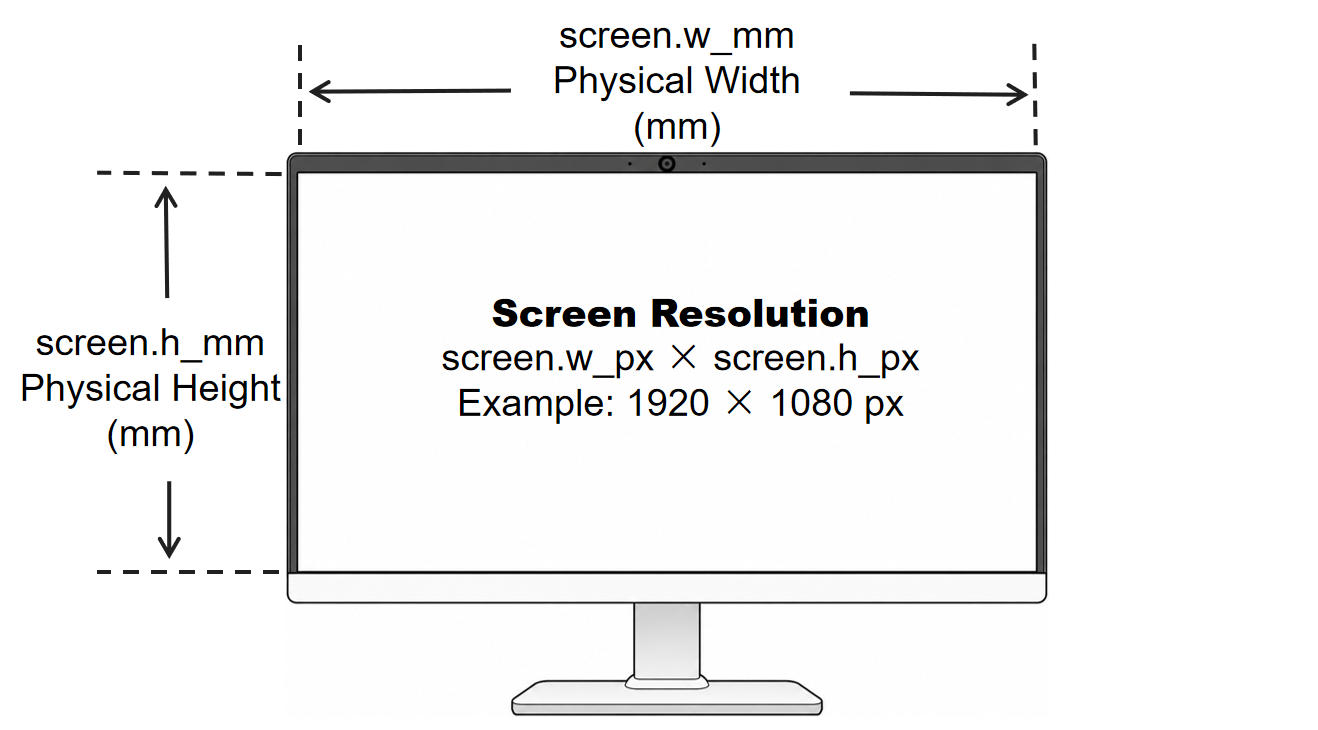
Figure 1. Screen physical dimensions and resolution — common to both Layout A and Layout B. The diagram shows where to measure screen.w_mm (active display width in mm), screen.h_mm (active display height in mm), and how screen.w_px × screen.h_px (e.g. 1920 × 1080 px) maps to the physical area. These four values determine the mm↔pixel conversion factor for projecting gaze points onto screen coordinates; incorrect values will shift the estimated gaze by a proportional scaling error. For TDGazeNet (Layout B), accurate screen dimensions are especially critical because the 3D-face-prior projection relies on the metric screen plane to intersect gaze rays.
Layout A — Simple camera offset (AFFNet)
Used by algorithms that estimate gaze in the camera coordinate frame directly, then project it onto the screen plane from a known relative position. No per-pixel lens distortion is applied; if your camera has strong distortion, undistort frames before feeding them into the pipeline.
{
  "camera": {
    "screen_x_mm": -155,
    "screen_y_mm": -5
  },
  "screen": {
    "h_px": 1080,
    "w_px": 1920,
    "h_mm": 174,
    "w_mm": 310
  }
}
| Field | Type | Default | Description |
|---|---|---|---|
camera.screen_x_mm |
float | -155 |
Horizontal offset from the camera optical center to the screen origin (top-left corner of the active display area), in millimeters along the camera X-axis. Sign convention: right = positive, left = negative. A typical laptop webcam sits above the screen center; the screen therefore lies to the left of the camera, producing a negative value. |
camera.screen_y_mm |
float | -5 |
Vertical offset from the camera optical center to the screen origin, in millimeters along the camera Y-axis. Sign convention: up = positive, down = negative. With the webcam mounted on the top bezel the screen sits slightly below the camera, so this value is usually slightly negative or close to zero. |
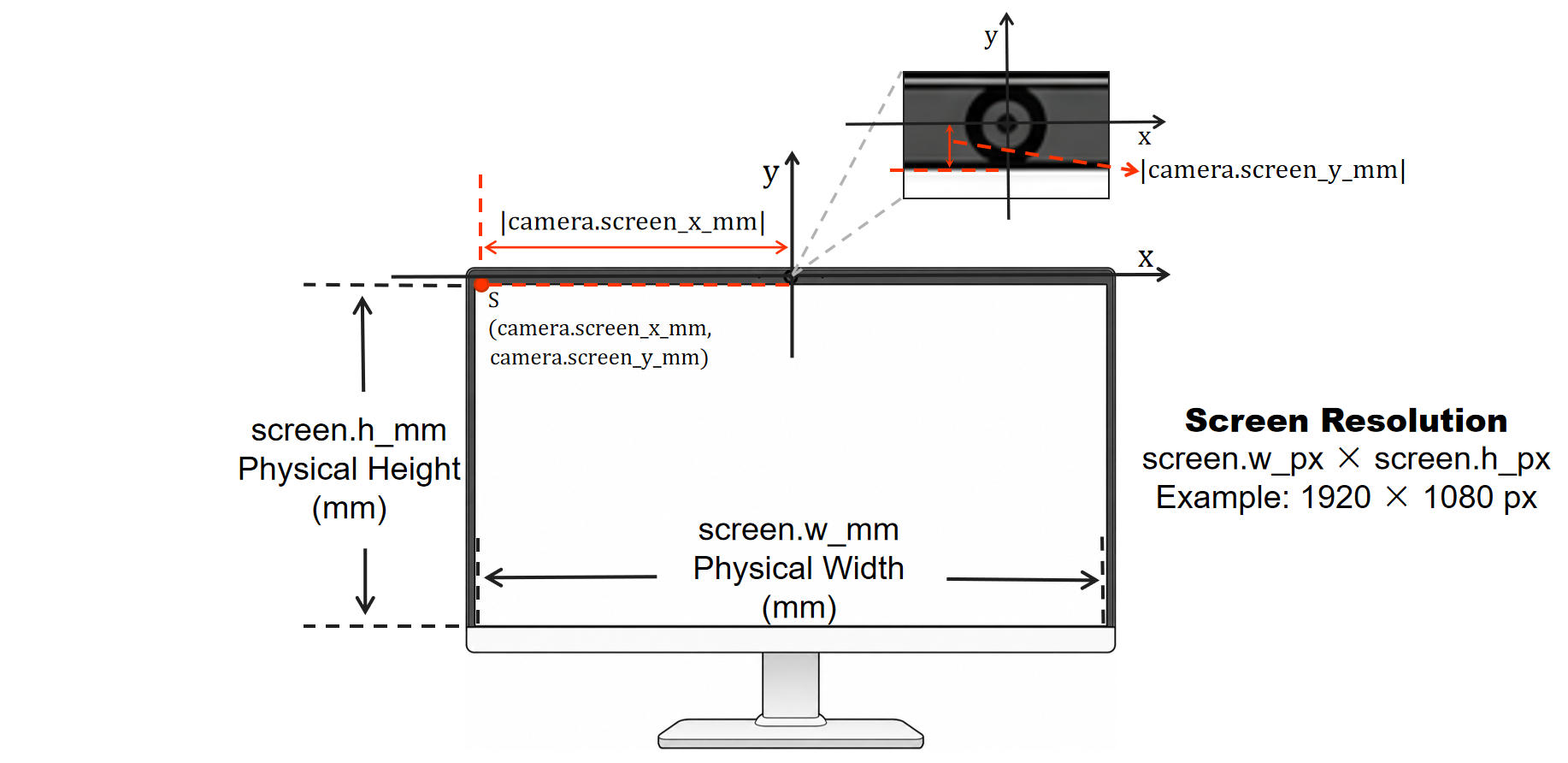
Figure 2. Layout A — camera–screen geometry. The diagram illustrates how camera.screen_x_mm and camera.screen_y_mm measure the signed offset from the camera optical center to the screen origin S (top-left corner of the active display area), together with the screen physical dimensions screen.w_mm/screen.h_mm and pixel resolution used for mm↔px conversion. Use this as a visual reference when taking physical measurements for the AFFNet configuration.
Layout B — Full camera calibration (TDGazeNet)
Used by algorithms that leverage a 3D face prior. Camera intrinsics and OpenCV-format distortion coefficients are used for image/landmark undistortion and geometric normalization, while the screen-to-camera extrinsic transform is used to project the predicted 3D gaze rays onto the screen plane.
Obtain camera.intrinsic and camera.distortion through standard camera calibration, such as OpenCV/Matlab checkerboard calibration. For camera.extrinsic, keep the rotation matrix unchanged and estimate or measure only the translation vector t from the actual camera–screen geometry, as described below.
{
  "camera": {
    "intrinsic": [
      [972.01, 0.0, 652.68],
      [0.0, 972.35, 373.91],
      [0.0, 0.0, 1.0]
    ],
    "extrinsic": [
      [-1.0, 0.0, 0.0, 155.0],
      [0.0, 1.0, 0.0, 5.0],
      [0.0, 0.0, -1.0, 2.5]
    ],
    "distortion": [0.123508, -0.334222, -0.002206, 0.000207, 0.199979]
  },
  "screen": {
    "h_px": 1080,
    "w_px": 1920,
    "h_mm": 174,
    "w_mm": 310
  }
}
| Field | Type | Shape | Description |
|---|---|---|---|
camera.intrinsic |
list[list[float]] |
3 × 3 | Pinhole camera intrinsic matrix [[fx, 0, cx], [0, fy, cy], [0, 0, 1]]. fx, fy are focal lengths in pixels; cx, cy is the principal point in pixels. |
camera.distortion |
list[float] |
5 | OpenCV 5-parameter distortion coefficients [k1, k2, p1, p2, k3] in the usual radial + tangential order. Leave as all zeros for an approximately distortion-free lens (e.g. a factory-calibrated industrial camera). |
camera.extrinsic |
list[list[float]] |
3 × 4 | Screen-to-camera rigid transform [R | t] in row-major form. 3×3 R rotates screen axes into camera axes; 3×1 t is the screen origin (top-left of the active display area) in the camera frame, mm. Default R = diag(-1, 1, -1) matches the standard webcam-in-front-of-screen mounting. Sign conventions and measurement guide: see data.camera.extrinsic below. |
data.camera.extrinsic
The camera extrinsic matrix. For the current implementation, only the translation vector $t = [t_x, t_y, t_z]^T$, i.e. the last column of the matrix, needs to be adjusted for the actual camera–screen setup. Leave the other entries unchanged.
The translation vector $t$ gives the position of the top-left corner of the active display area in the camera coordinate system, in millimeters.
The camera coordinate system is centered at the camera optical center:
- +X points to the right in the camera image (to the user's left when facing the monitor).
- +Y points downward.
- +Z points forward along the camera optical axis, from the camera toward the user.
Measure $t_x$, $t_y$, and $t_z$ as the signed offsets from the camera optical center to the top-left corner of the active display area along these axes.
Example. If the camera optical center is horizontally aligned with the center of a $310,\mathrm{mm}$-wide active display area, the top-left corner is approximately $155,\mathrm{mm}$ along +X, so $t_x \approx 155,\mathrm{mm}$. If the top edge of the active display area is $5,\mathrm{mm}$ below the camera optical center, then $t_y \approx 5,\mathrm{mm}$. If the display plane is $2.5,\mathrm{mm}$ along +Z from the camera optical center, then $t_z \approx 2.5,\mathrm{mm}$.
Thus,
$$ t \approx [155,; 5,; 2.5]^T\ \mathrm{mm}. $$
References
-
Yiwei Bao, Yihua Cheng, Yunfei Liu, and Feng Lu. "Adaptive Feature Fusion Network for Gaze Tracking in Mobile Tablets." In International Conference on Pattern Recognition (ICPR), 2020. ↩
1 maintainer

Download files
Download the file for your platform. If you're not sure which to choose, learn more about installing packages.
Source Distribution
Built Distribution
Filter files by name, interpreter, ABI, and platform.
If you're not sure about the file name format, learn more about wheel file names.
Copy a direct link to the current filters
File details
Details for the file seetapsych_gaze_screen-0.0.3.post1.tar.gz.
File metadata
- Download URL: seetapsych_gaze_screen-0.0.3.post1.tar.gz
- Upload date:
- Size: 413.3 kB
- Tags: Source
- Uploaded using Trusted Publishing? Yes
- Uploaded via:
twine/7.0.0 CPython/3.13.14
File hashes
| Algorithm | Hash digest | |
|---|---|---|
| SHA256 |
0cad27b6cb46e43a9bad5fc96edf3ce96c94a0de94f5f964ee554c22bad6d423
|
|
| MD5 |
e124cb9a2979bbd0b6e231ff33405d0f
|
|
| BLAKE2b-256 |
a66143d8193f7a5375a1acc13f87873bfcbfd9637606c2959f5f6dbe9e265432
|
Provenance
The following attestation bundles were made for seetapsych_gaze_screen-0.0.3.post1.tar.gz:
Publisher:
publish.yml on seetapsych/seetapsych-gaze-screen
-
Statement:
-
Statement type:
https://in-toto.io/Statement/v1 -
Predicate type:
https://docs.pypi.org/attestations/publish/v1 -
Subject name:
seetapsych_gaze_screen-0.0.3.post1.tar.gz -
Subject digest:
0cad27b6cb46e43a9bad5fc96edf3ce96c94a0de94f5f964ee554c22bad6d423 - Sigstore transparency entry: 2698327078
- Sigstore integration time:
-
Permalink:
seetapsych/seetapsych-gaze-screen@e385f2036799a5da3f0ea9a6aa7ab89f94550eb8 -
Branch / Tag:
refs/tags/r0.0.3.post1 - Owner: https://github.com/seetapsych
-
Access:
public
-
Token Issuer:
https://token.actions.githubusercontent.com -
Runner Environment:
github-hosted -
Publication workflow:
publish.yml@e385f2036799a5da3f0ea9a6aa7ab89f94550eb8 -
Trigger Event:
push
-
Statement type:
File details
Details for the file seetapsych_gaze_screen-0.0.3.post1-py3-none-any.whl.
File metadata
- Download URL: seetapsych_gaze_screen-0.0.3.post1-py3-none-any.whl
- Upload date:
- Size: 44.8 kB
- Tags: Python 3
- Uploaded using Trusted Publishing? Yes
- Uploaded via:
twine/7.0.0 CPython/3.13.14
File hashes
| Algorithm | Hash digest | |
|---|---|---|
| SHA256 |
9c984c34481891044c002405ab7f546862bcacb5245ecdecfdfc763526d8b1e0
|
|
| MD5 |
36ab3bc29d08bca162a3cdac6c0a96ab
|
|
| BLAKE2b-256 |
e12de6198490ce71921a906e52d65afa348898298ab13850da4002a2eb281178
|
Provenance
The following attestation bundles were made for seetapsych_gaze_screen-0.0.3.post1-py3-none-any.whl:
Publisher:
publish.yml on seetapsych/seetapsych-gaze-screen
-
Statement:
-
Statement type:
https://in-toto.io/Statement/v1 -
Predicate type:
https://docs.pypi.org/attestations/publish/v1 -
Subject name:
seetapsych_gaze_screen-0.0.3.post1-py3-none-any.whl -
Subject digest:
9c984c34481891044c002405ab7f546862bcacb5245ecdecfdfc763526d8b1e0 - Sigstore transparency entry: 2698327087
- Sigstore integration time:
-
Permalink:
seetapsych/seetapsych-gaze-screen@e385f2036799a5da3f0ea9a6aa7ab89f94550eb8 -
Branch / Tag:
refs/tags/r0.0.3.post1 - Owner: https://github.com/seetapsych
-
Access:
public
-
Token Issuer:
https://token.actions.githubusercontent.com -
Runner Environment:
github-hosted -
Publication workflow:
publish.yml@e385f2036799a5da3f0ea9a6aa7ab89f94550eb8 -
Trigger Event:
push
-
Statement type:














