
SeetaPsych Lib
A Computer Vision Toolkit for Behavior-based Psychological Measurement
简体中文 | English




SeetaPsych Lib is a Python-based open-source computer vision toolkit for behavior-based psychological measurement, serving as the core library of the SeetaPsych project. It provides a modular Pipeline/Runner runtime that supports the composition and execution of custom algorithm modules, and ships with a quick-start WebUI for rapid onboarding and experimentation.
A technical report on SeetaPsych is published on arXiv (PDF).
Overview
As the foundational library of the SeetaPsych ecosystem, its position within the broader open-source project matrix is illustrated in Fig. 1.
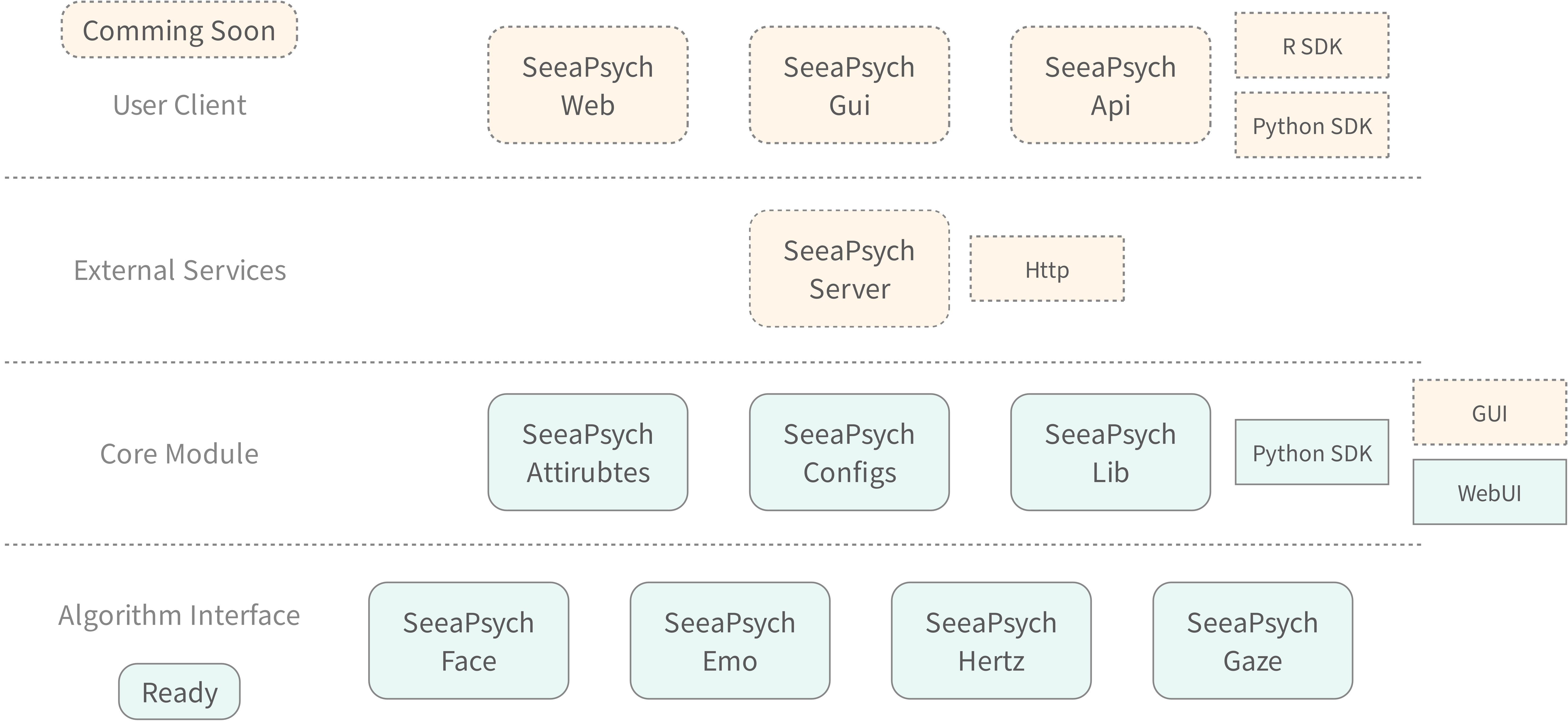
Figure 1. Open source project matrix
The project provides solutions for the following primary application scenarios, as summarized in Fig. 2.
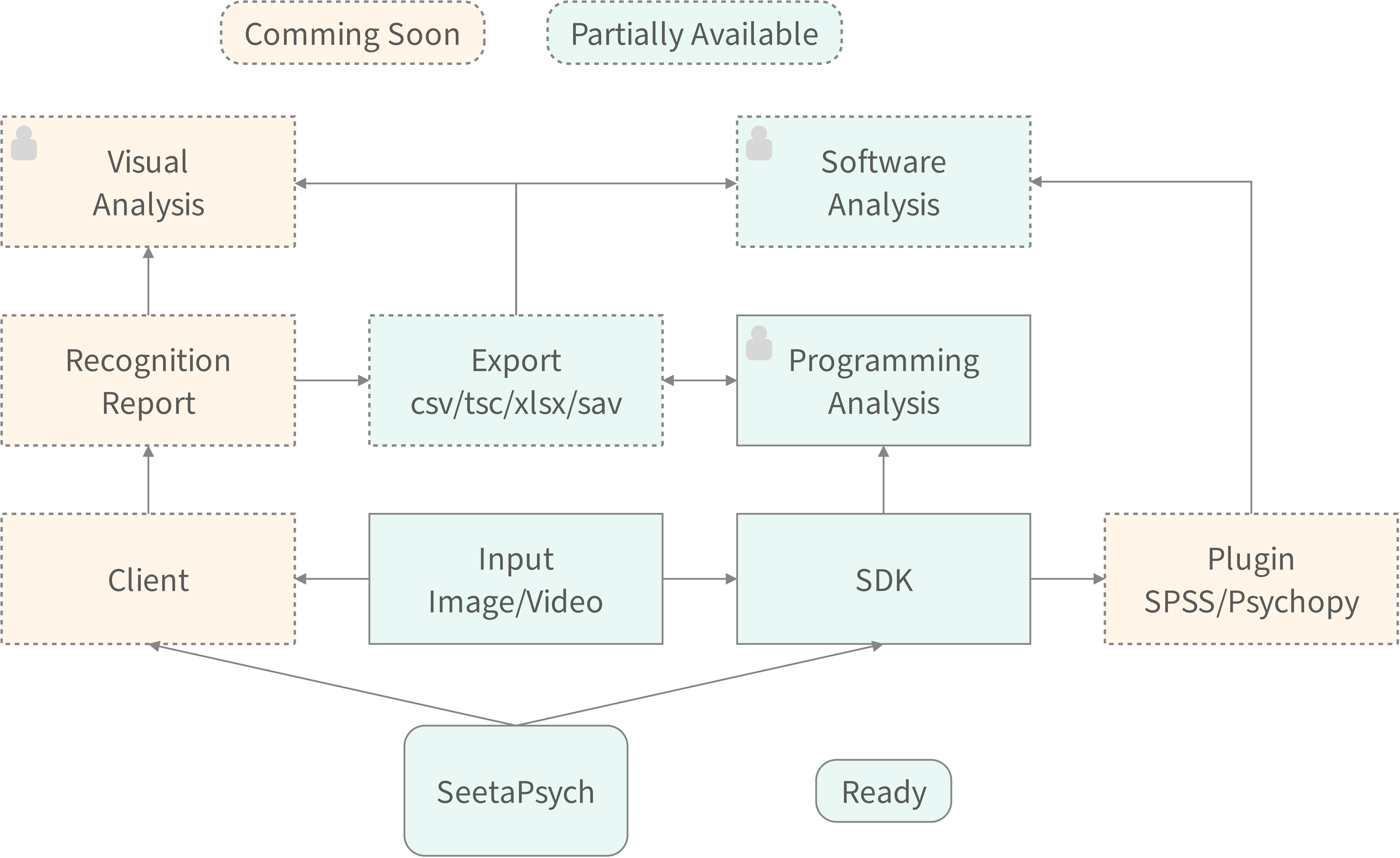
Figure 2. Target Use Cases
The project uses configuration files to describe the available algorithms and the attributes that each algorithm can produce. An attribute represents the output of an algorithm or processing method.
Fig. 3 illustrates how algorithms and attributes are described through configuration files (YML).
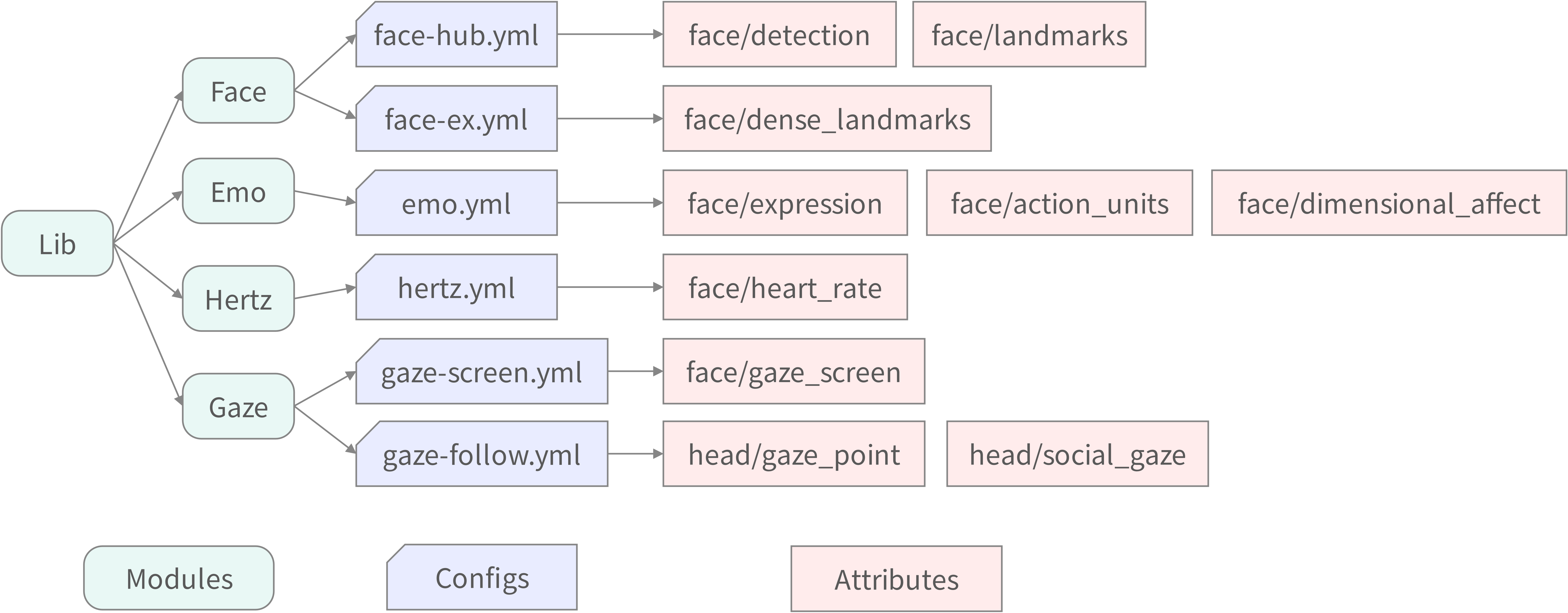
Figure 3. Examples of configuration files (YML) and their corresponding attributes
For example, face-hub.yml (under the Face module) provides two attributes — face/detection and face/landmarks. The face/detection attribute, shown below, contains the detected face bounding box (xyxy) and its confidence score:
{
  "face_detection": [
    {
      "xyxy": [
        128.772,
        158.999,
        286.546,
        369.401
      ],
      "score": 0.802
    }
  ]
}
SeetaPsych attributes are defined and maintained in the seetapsych-attributes repository.
The shared configuration files (configs) live in the seetapsych-configs repository.
These YML configuration files are part of the framework's internal management mechanism and typically do not require manual editing by end users — they are fetched automatically when needed.
Each attribute may depend on one or more algorithm modules for computation.
The key capability of the framework is dependency-driven automation: users only need to specify which attributes they want to obtain. Based on the requested attributes and their declared dependencies, the framework automatically resolves all required algorithm modules and assembles them into an optimized computation graph. A concrete example is shown in Fig. 4.
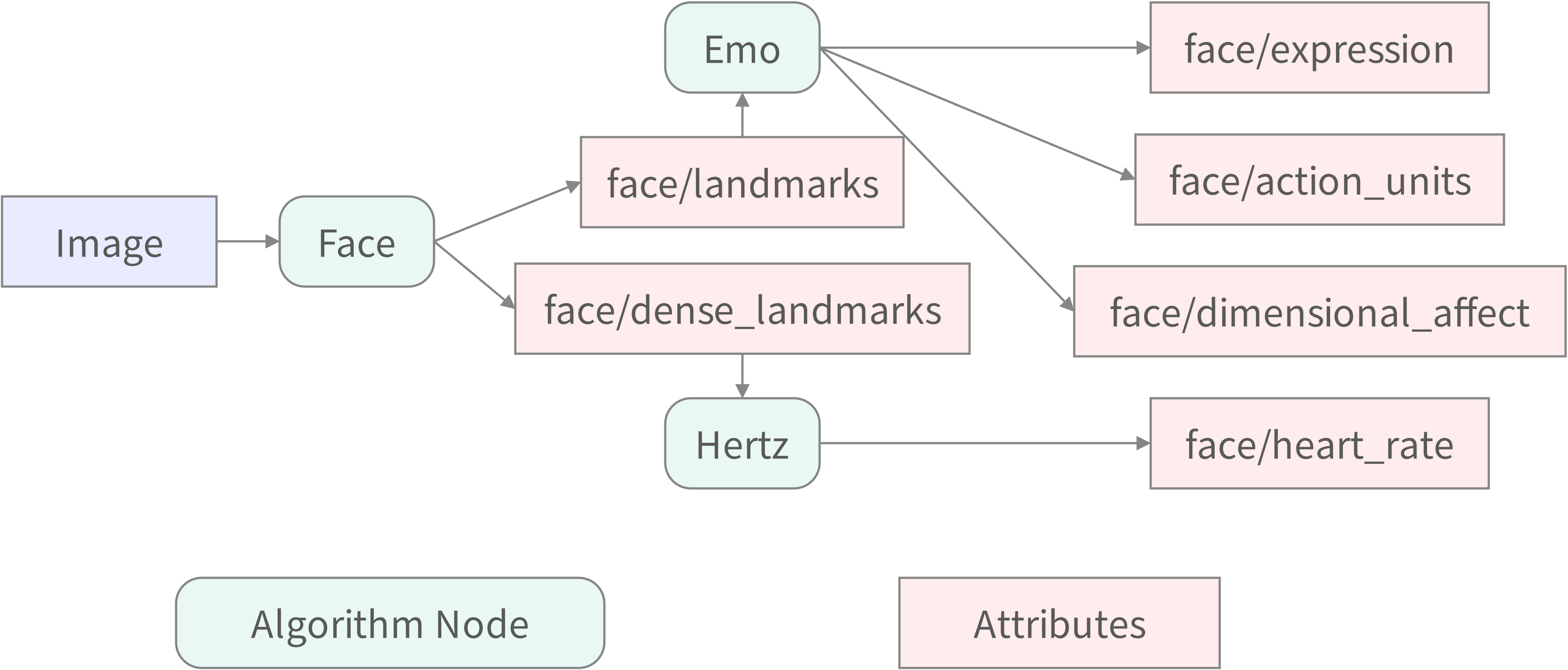
Figure 4. Example of a computation graph constructed from requested attributes
The computation graph is executed by a Runner, which processes images or videos and produces the requested attributes. By default, the Runner automatically detects the available hardware environment and prioritizes GPU acceleration for algorithm inference when a supported GPU is present.
The example in Fig. 4 walks through a concrete dependency chain aligned with the diagram:
- First, the input image is processed by the Face module, which produces
face/landmarksandface/dense_landmarks. face/landmarksis then consumed by the Emo module, which outputsface/expression,face/action_units, andface/dimensional_affect.face/dense_landmarksfeeds into the Hertz module, which estimates theface/heart_rateattribute.
This dependency-based organization enables multiple attributes to share and reuse intermediate results within a single computation graph, avoiding redundant computation.
The built-in algorithm modules are implemented as separate subprojects. Each subproject ships one or more algorithm packages declared via modules/*.yml and registered in the global config registry. The available algorithm subprojects are:
- FaceHub — Face detection (RetinaFace/MediaPipe), 5-point landmarks, 468-point 3D face mesh, and ArcFace 512-dim face feature extraction.
- FaceEx — 280-point dense facial landmark prediction with optional two-pass refinement.
- Emo — Multi-task facial affect estimation: 16 action units, 7 categorical expressions, and valence-arousal dimensional affect.
- GazeScreen — Screen gaze coordinate estimation via AFFNet and TDGazeNet for desktop eye-tracking scenarios.
- GazeFollow — Multi-head detection, per-head scene gaze following, and dyadic social gaze relation classification.
- Hertz — Contactless heart rate estimation via rPPG (TinyHR convolutional waveform predictor and AdaChrom chrominance analysis).
For further details on shared schemas, attribute contracts, and the global module registry, refer to the following repositories:
Requirements
- Python >= 3.10
- (Recommended) uv package manager: https://github.com/astral-sh/uv
Installation
Create Virtual Environment
It is recommended to use an isolated virtual environment before installing dependencies.
Using uv (recommended)
# Create a virtual environment at .venv
uv venv

# Activate (bash/zsh)
source .venv/bin/activate

# Activate (PowerShell)
.venv\Scripts\Activate.ps1

# Activate (Windows CMD)
.venv\Scripts\activate.bat
Using standard venv
python -m venv .venv

# bash/zsh
source .venv/bin/activate

# PowerShell
.venv\Scripts\Activate.ps1

# Windows CMD
.venv\Scripts\activate.bat
Using conda
conda create -n seetapsych python=3.10
conda activate seetapsych
Install Dependencies
Install the required dependencies:
- seetapsych-lib
- seetapsych-attributes
- seetapsych-configs
To run the WebUI, you need to install the seetapsych-lib[webui] package.
Using uv (recommended)
uv pip install 'seetapsych-lib[webui]' seetapsych-attributes seetapsych-configs
Using pip
pip install 'seetapsych-lib[webui]' seetapsych-attributes seetapsych-configs
Install Default Configs
# download default configs
seetapsych-manager download
# install each module requirements
seetapsych-manager setup
# download each model
seetapsych-manager cache
The setup and cache commands can be skipped.
When you use the WebUI or call the library programmatically later, seetapsych-lib can install dependencies and download necessary models on demand.
Public Resources
The default modules installed with seetapsych-lib are published and maintained at https://github.com/seetapsych/seetapsych-configs.
To update the built-in modules to their latest versions, upgrade the configs package and re-download:
# Upgrade the installed seetapsych-configs package to the latest available version
# For plain pip: pip install --upgrade seetapsych-configs
uv pip install --upgrade seetapsych-configs
# Re-download the latest module definitions
seetapsych-manager download -f
Algorithm inputs and execution outputs are defined via Attributes.
The full Attributes specification is available at https://github.com/seetapsych/seetapsych-attributes.
Quick Start
Run WebUI (Streamlit)
seetapsych-webui --log INFO
or
python -m seetapsych_lib.webui --log INFO
A local browser window will open automatically, or you can manually navigate to: http://localhost:8501.
Common arguments:
--dirs <DIR...>: load modules from directories--files <FILE...>: load modules from local config files--urls <URL...>: load modules from remote URLs--disable-builtin: disable builtin modules--disable-default: disable default modules--cache-dir <DIR>: model cache directory--upload-dir <DIR>: upload directory--log <LEVEL>: log level (e.g.,DEBUG,INFO,WARNING, or an integer like10)
Programmatic Usage
# -*- coding: utf-8 -*-

import json
import cv2

from seetapsych_lib.runtime.factory import Factory
from seetapsych_lib.runtime.pipeline import Pipeline
from seetapsych_lib.runtime.runner import Runner
from seetapsych_lib.runtime.parallel_runner import ParallelRunner


def main():
    # All installed algorithm modules are loaded by default during initialization
    # You can use the `load_xxx_module(s)` methods to load specific algorithm modules
    factory = Factory()

    # Quickly build a workflow and declare the attribute to compute as the face feature 'face/detection'
    # You can view all available attributes of installed algorithms using the `seetapsych-manager show` command
    # Result fields for attributes can be found at https://github.com/seetapsych/seetapsych-attributes
    pipeline = Pipeline(factory, attributes=["face/detection"])

    # Check for dependencies or missing issues that need to be resolved with solve()
    print(pipeline.problem())
    # Resolve workflow dependencies, automatically add face detection and corresponding models
    pipeline.solve()

    # Check for runtime environment issues that require installation or download to fix
    print(pipeline.satisfied())
    # Install missing dependencies required for the current pipeline to run
    pipeline.install_requirements()
    # Download missing models required for the pipeline to run
    pipeline.cache_models()

    # Set parameters
    package = pipeline.get_package(provide="face/detection")
    assert package is not None
    pipeline.set_parameters(package.uid, {"input_size": [640, 640]})

    # Create a basic executor
    runner = Runner(pipeline)
    # Or create a parallel executor
    # runner = ParallelRunner(pipeline)

    # Run the algorithm
    report = runner.run(data={"default": cv2.imread("image.jpg")})

    # Print the execution results
    print(json.dumps(report, indent=2, ensure_ascii=False))


if __name__ == "__main__":
    main()
Built-in Modules
This library also ships with built-in algorithm modules. See the full list and documentation in MODULES.md.
Configuration
Environment Variables
The following environment variables are supported:
| Env | Description |
|---|---|
| SEETAPSYCH_LOG_LEVEL | Change default log level. Could be WARNING, INFO, DEBUG, or an integer (e.g., 10). |
| SEETAPSYCH_CACHE_DIR | Base directory for model cache. Models are cached under <CACHE_DIR>/models. |
| SEETAPSYCH_CONFIG_DIR | Base directory for config files. Config files are loaded from <CONFIG_DIR>/configs. |
Development
Docstring Convention
All code docstrings in this project follow the Google Style format (with Args / Returns / Raises sections). Refer to the Google Python Style Guide for the complete specification.
Additional Development Instructions
For local verification steps (lint, type check, tests, build), tag naming conventions, and the release pipeline, see DEVELOPMENT.md.
1 maintainer

Metadata
1 maintainer
Release files for seetapsych-lib 0.0.4.post1
For a detailed explanation of source distributions (sdists) and built distributions (wheels), please see the package formats documentation.
Source distribution (sdist)
| File | Size | Uploaded | |
|---|---|---|---|
| seetapsych_lib-0.0.4.post1.tar.gz | 2.0 MB | Details |
Built distribution (wheel)
| File | Interpreter | ABI | Platform | Reset |
|---|---|---|---|---|
| seetapsych_lib-0.0.4.post1-py3-none-any.whl | Python 3 | none | any | Details |
Total release size: 2.1 MB
Release files / seetapsych_lib-0.0.4.post1.tar.gz
| Download URL | seetapsych_lib-0.0.4.post1.tar.gz |
|---|---|
| Size | 2.0 MB |
| Tags | Source |
|
SHA-256 checksum How to use checksums |
2cb9d785e422d7511e9c6a0fb08f8ad4f394521bdc421353b19f20969f9a51f5
|
|
BLAKE2b-256 checksum How to use checksums |
7e7c6ee9435a4a13e9c6854cea3abf711b3cb14740ba06d3e625aca5177a75a6
|
| Upload date | |
|
Uploaded using Trusted Publishing? What is trusted publishing? |
Yes |
| Uploaded via |
twine/7.0.0 CPython/3.13.14
|
Provenance
Provenance describes where a file came from. On PyPI, provenance is shared via attestations, which provide a verifiable record of the build or publishing details. View details, limitations and caveats.


PyPI Publish Attestation
PyPI verified that this artifact, at this checksum, originated from the publisher listed below.
Signed by GitHub Actions, verified by PyPI on Sep 24, 2026.
Transparency logRelease files / seetapsych_lib-0.0.4.post1-py3-none-any.whl
| Download URL | seetapsych_lib-0.0.4.post1-py3-none-any.whl |
|---|---|
| Size | 113.1 kB |
| Tags | Python 3 |
|
SHA-256 checksum How to use checksums |
11962464dcba4a3e4d29052e308834410e67a509d11807b5f510ad94663f218a
|
|
BLAKE2b-256 checksum How to use checksums |
05ed2d0f18404dadabac3457ccd4eaa9c8350e5f6cc1762d1415878d46d47891
|
| Upload date | |
|
Uploaded using Trusted Publishing? What is trusted publishing? |
Yes |
| Uploaded via |
twine/7.0.0 CPython/3.13.14
|
Provenance
Provenance describes where a file came from. On PyPI, provenance is shared via attestations, which provide a verifiable record of the build or publishing details. View details, limitations and caveats.
PyPI Publish Attestation
PyPI verified that this artifact, at this checksum, originated from the publisher listed below.
Signed by GitHub Actions, verified by PyPI on Sep 24, 2026.
Transparency log













