
Segment Animals
Segment Animals is a Python package for segmenting (extracting) animals from images using deep learning models. It provides a pipeline that combines object detection and segmentation to identify and extract animals from images, making it useful for wildlife research, conservation efforts, and any application where you wish to remove the background from images containing animals.
Segment Animals builds upon the Segment Anything 2 (SAM 2.1) and MegaDetector models.
Installation
Install Segment Animals and its dependencies with pip:
pip install segment-animals
Usage
Here's a quick example of how to use Segment Animals, for a more detailed guide refer to the notebook.
Importing the library and processing an image
from segment_animals import AutoSegmenter
from segment_animals.util import load_image

model = AutoSegmenter()  # Defaults to detection_classes=("animal",)

image = load_image("path/to/your/image.jpg")

detections, masks = model.process_image(image)
print(f"Found {len(detections)} animals.")
Choosing a segmentation model
The default is sam2.1_hiera_large. For a smaller model, pass
segmentation_model_name when creating the pipeline:
model = AutoSegmenter(segmentation_model_name="sam2.1_hiera_tiny")
Available models are sam2.1_hiera_tiny, sam2.1_hiera_small,
sam2.1_hiera_base_plus, and sam2.1_hiera_large. Checkpoints are downloaded
on first use through Hugging Face Transformers and reused from the Hugging Face
cache. Set HF_HOME to choose a different cache location.
The former vit_h, vit_l, and vit_b names are no longer supported.
For development, install dependencies with uv sync.
CPU, CUDA, and MPS devices can be selected with segmentation_device.
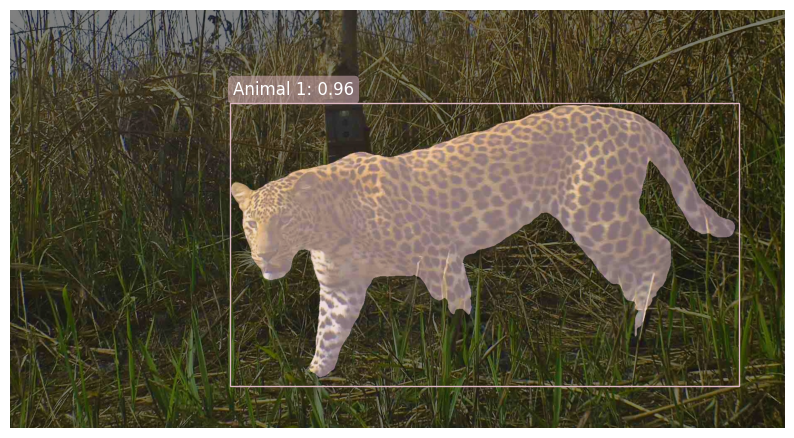
Visualizing detections and masks
from segment_animals.viz import plot_detections_and_masks

plot_detections_and_masks(image, detections, masks)
You should then see a visualisation along the lines of this (original image from Wikipedia)...
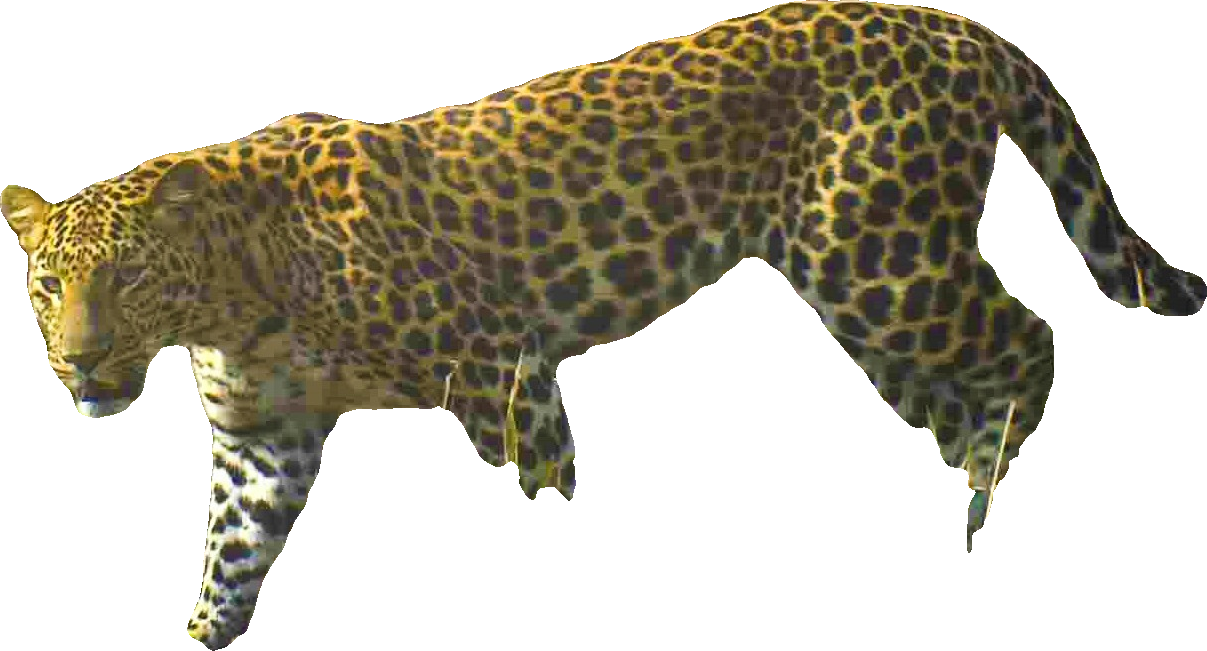
Extracting and saving masks
from segment_animals.viz import extract_masks

# Setting whole_image to False will return individual masks cropped to the extent
# of the predicted masks.
for i, mask_extract in enumerate(extract_masks(image, masks, whole_image=False)):
    # mask_extract is a PIL Image object so you can save it or manipulate it further
    mask_extract.save(f"animal_mask_{i}.png")
Resulting in something like this:
Segmenting Animals, Humans and Vehicles
Segment Animals can also detect and segment the additional classes supported by
MegaDetector: humans and vehicles. Specify detection_classes on
AutoSegmenter to select any combination
of "animal", "human", and "vehicle". The default is ("animal",).
from segment_animals import AutoSegmenter

model = AutoSegmenter(detection_classes=("animal", "human", "vehicle"))
detections, masks = model.process_image(image)

# For humans only:
model = AutoSegmenter(detection_classes=("human",))
The existing visualization and mask extraction functions work with these masks.
Selection happens before segmentation, so only the selected classes get masks.
AutoAnimalSegmenter remains supported but emits a DeprecationWarning.
Replace it with AutoSegmenter() for animals, or
AutoSegmenter(detection_classes=("animal", "human")) when migrating from
AutoAnimalSegmenter(include_humans=True).
Each Detection has a category of "animal", "human", or "vehicle".
The original AnimalDetection name remains an alias for Detection. Filter detections
and masks using the same indices to preserve their alignment:
indices = [i for i, d in enumerate(detections) if d.category == "human"]
human_detections = [detections[i] for i in indices]
human_masks = masks[indices]
Use "animal" instead to select animals.
Human segmentation example
This camera-trap image includes a person partially outside the frame:
Detect and segment the human, then draw the box and mask:
from segment_animals import AutoSegmenter
from segment_animals.util import load_image
from segment_animals.viz import plot_detections_and_masks

image = load_image(
    "https://raw.githubusercontent.com/bencevans/segment-animals/main/example_human.jpg"
)
model = AutoSegmenter(detection_classes=("human",))
detections, masks = model.process_image(image)

for detection in detections:
    print(detection.category, detection.confidence, detection.bbox)

plot_detections_and_masks(image, detections, masks)
The plotted label uses the detection category (Human). Masks cover the visible
part of the person; the model cannot recover parts outside the image.
Running this image through the default MegaDetector redwood and SAM 2.1
sam2.1_hiera_large models detected one human with confidence 0.952:

The extracted human has a transparent background:

Working with Segment Animals?
It'd be great to hear how you're using Segment Animals! Drop me a line at Benjamin.Evans at ioz.ac.uk or open an issue on the GitHub repository.
1 maintainer

Metadata
1 maintainer
Release files for segment-animals 2.1.0
For a detailed explanation of source distributions (sdists) and built distributions (wheels), please see the package formats documentation.
Source distribution (sdist)
| File | Size | Uploaded | |
|---|---|---|---|
| segment_animals-2.1.0.tar.gz | 4.9 MB | Details |
Built distribution (wheel)
| File | Interpreter | ABI | Platform | Reset |
|---|---|---|---|---|
| segment_animals-2.1.0-py3-none-any.whl | Python 3 | none | any | Details |
Total release size: 5.0 MB
Release files / segment_animals-2.1.0.tar.gz
| Download URL | segment_animals-2.1.0.tar.gz |
|---|---|
| Size | 4.9 MB |
| Tags | Source |
|
SHA-256 checksum How to use checksums |
e997090119e78afb045e51ba75d9b418a8c826c9601e70374c7b196c45d00687
|
|
BLAKE2b-256 checksum How to use checksums |
bf2cd7f362410996d218704392c20a792064359852d64f203131274465124bc3
|
| Upload date | |
|
Uploaded using Trusted Publishing? What is trusted publishing? |
No |
| Uploaded via |
uv/0.12.19 {"installer":{"name":"uv","version":"0.12.19","subcommand":["publish"]},"python":null,"implementation":{"name":null,"version":null},"distro":{"name":"macOS","version":null,"id":null,"libc":null},"system":{"name":null,"release":null},"cpu":null,"openssl_version":null,"setuptools_version":null,"rustc_version":null,"ci":null}
|
Release files / segment_animals-2.1.0-py3-none-any.whl
| Download URL | segment_animals-2.1.0-py3-none-any.whl |
|---|---|
| Size | 13.4 kB |
| Tags | Python 3 |
|
SHA-256 checksum How to use checksums |
0b0e77a580bccc1a73f63ba66060bc90630e406d91085f1f05cf613fd15f1f63
|
|
BLAKE2b-256 checksum How to use checksums |
f941d76258d5c94b37dbe11623f4b20d95af782816ed52550761a4a42a60db90
|
| Upload date | |
|
Uploaded using Trusted Publishing? What is trusted publishing? |
No |
| Uploaded via |
uv/0.12.19 {"installer":{"name":"uv","version":"0.12.19","subcommand":["publish"]},"python":null,"implementation":{"name":null,"version":null},"distro":{"name":"macOS","version":null,"id":null,"libc":null},"system":{"name":null,"release":null},"cpu":null,"openssl_version":null,"setuptools_version":null,"rustc_version":null,"ci":null}
|















