
Segment (georeferenced) raster data in an interactive fashion. Retrain models in seconds. Only small amounts of labeled data necessary because of our use of pretrained base models as feature extractors.

Project description




Segment (georeferenced) raster data in an interactive fashion. Retrain models in seconds. Only small amounts of labeled data necessary because of our use of pretrained base models as feature extractors. Segmentmytif can be used as a standalone commandline tool or as the backend for the QGIS plugin called DroneML.
The project setup is documented in project_setup.md.
Typical usage
Let's say you've got the image on the left, along with the labels (superimposed on the image) on the right.
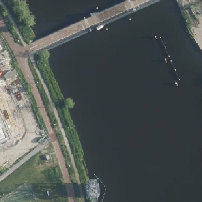
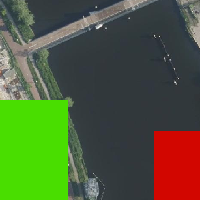
You run the commandline tool as follows, selecting both input image and labels, the path where the output should be, and the type of features to use.
python main.py --input image.tif --labels labels.tif --predictions output.tif
The resulting output looks like:
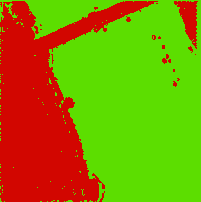
To test this with our testdata, run:
python src/segmentmytif/main.py --input tests/test_data/test_image.tif -l tests/test_data/test_image_labels.tif -p output.tif
Installation
There are 2 ways to install Segmentmytif. Either run:
pip install segmentmytif
Or run:
git clone git@github.com:DroneML/segmentmytif.git
cd segmentmytif
python -m pip install .
Logging
The application writes logs to the 'logs' dir, which will be created if it doesn't exist yet. Messages printed to the screen (stdout) are stored in info.log for later reference. More detailed information, such as input data shapes and value distributions, are written to debug.log.
Train a feature extraction model
To train a feature extraction model run the script "train_model.py" in this repo:
python ./src/segmentmytif/utils/train_model.py -r ../monochrome_flair_1_toy_dataset_flat/ --train_set_limit 10
This assumes a 'flat', grayscale, version of the FLAIR1 dataset is present at the selected root location.
root
- train
    - input
        - IMG_061946_0.tif
        - IMG_061946_1.tif
        - ...
    - labels
        - MSK_061946_0.tif
        - ...
Use the script 'monochromize.py' to create greyscale (single band) tifs for every multiband tif in a source folder:
python ./src/segmentmytif/utils/monochromize.py -i ../flair_1_toy_dataset/ -o ../monochrome_flair_1_toy_dataset/
Credits
This package was created with Copier and the NLeSC/python-template.


Download files
Download the file for your platform. If you're not sure which to choose, learn more about installing packages.
Source Distribution
Built Distribution
Filter files by name, interpreter, ABI, and platform.
If you're not sure about the file name format, learn more about wheel file names.
Copy a direct link to the current filters
File details
Details for the file segmentmytif-0.2.0.tar.gz.
File metadata
- Download URL: segmentmytif-0.2.0.tar.gz
- Upload date:
- Size: 4.6 MB
- Tags: Source
- Uploaded using Trusted Publishing? No
- Uploaded via: twine/6.1.0 CPython/3.12.8
File hashes
| Algorithm | Hash digest | |
|---|---|---|
| SHA256 |
9fe4f54f0fbe114b495b3c3e3c998e03d539c544bdcef34c5033d81b69033e68
|
|
| MD5 |
5c515e8c94e811c1b3d77e8d6bc7962f
|
|
| BLAKE2b-256 |
c26ba098860331846d145e764dc876a4386ba5188373adb057afaa5c8cda05f9
|
File details
Details for the file segmentmytif-0.2.0-py3-none-any.whl.
File metadata
- Download URL: segmentmytif-0.2.0-py3-none-any.whl
- Upload date:
- Size: 26.4 kB
- Tags: Python 3
- Uploaded using Trusted Publishing? No
- Uploaded via: twine/6.1.0 CPython/3.12.8
File hashes
| Algorithm | Hash digest | |
|---|---|---|
| SHA256 |
844f7706008b5d4e5f05b8eaa4d818c2bb6703d375a04d0841e7db56db261c5e
|
|
| MD5 |
1634ff036919338d7cc6bf1fcf590b69
|
|
| BLAKE2b-256 |
fe5e9d8da4acbcbc006ca443a9daceb795f32e7559eef3148c50f9ce03e6a2f3
|






